This is a div block with a Webflow interaction that will be triggered when the heading is in the view.

Modernize your cloud. Maximize business impact.
What’s new in AWS Kinesis?
Amazon Kinesis Data firehose now also supports dynamic partitioning, where it continuously groups in transit data using dynamically or statically defined data keys and delivers the data into the individual amazon S3 prefixes by key. This reduces time to insight by minutes, it also reduces the cost, and overall simplifies the architecture.
Working with Streaming Data
For working with streaming data using Apache Flink, we also have AWS kinesis data analytics service, as with Amazon Kinesis Datastream like Kinesis Data Firehose, this service is also a fully managed, serverless, Apache Flink environment to perform stateful processing with sub-second latency. It integrates with several AWS services, supports custom connectors, and has a notebook interface called KDA Studio (Kinesis Data Analytics Studio), a managed Apache Zeppelin notebook, to allow you to interact with streaming data.
Similar to Kinesis Data Analytics for Apache Flink, Amazon managed stream for Apache Kafka or MSK is a fully managed service for running highly available, event-driven, Apache Kafka applications.
Amazon MSK operates, maintains, and scales Apache Kafka clusters, provides enterprises with security features and supports Kafka connect, and also has multiple built-in AWS integrations.
Architecture for Real-Time Reporting
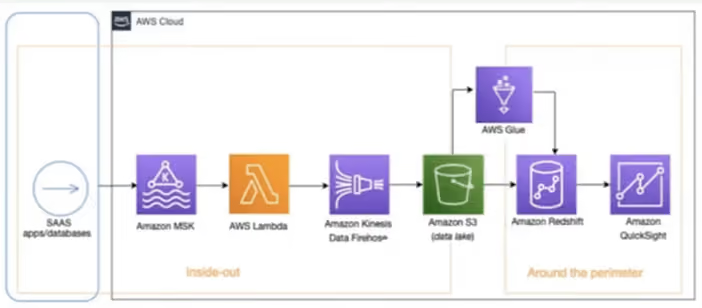
Here we derive insights from input data that are coming from diverse sources or generating near real-time dashboards. With the below architecture what you are seeing is, that you can stream near real-time data from source systems such as social media applications using Amazon MSK, Lambda, and Kinesis Data Firehose into Amazon S3, you can then use AWS glue for Data Processing and Load, Transform data into Amazon redshift using an AWS glue developed endpoint such as an Amazon Sagemaker Notebook. Once data is in Amazon Redshift, you can create a customer-centric business report using Amazon Quick sight.
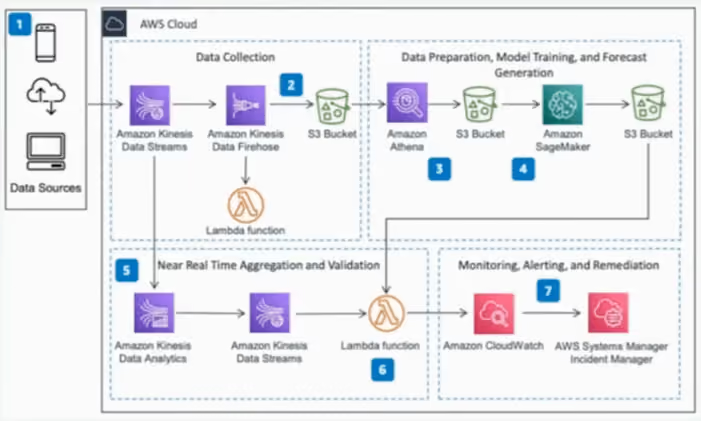
This architecture helps in identifying an act on deviation from the forecasted data in near real-time. In the below architecture, data is collected from multiple sources using Kinesis Data Stream, it is then persisted in Amazon S3 by Kenisis Data firehose, initial data aggregation, and preparation is done using Amazon Athena and then stored in the AWS S3. Amazon Sagemaker is used to train a forecasting model and create behavioral predictions. As new data arrives it is aggregated and prepared in real-time by Kinesis Data Analytics. The results are compared to the previously generated forecast, Amazon Cloud Watch is used to store the forecast and actual value as metrics, and when actual value deviates and cloud watch alarms trigger an incident in AWS Systems Manager, Incident manager.
Real-time reporting
Architecture for Monitoring Streaming Data with Machine Learning
This architecture helps in identifying an act on deviation from the forecasted data in near real-time. In the below architecture, data is collected from multiple sources using Kinesis Data Stream, it is then persisted in Amazon S3 by Kenisis Data firehose, initial data aggregation, and preparation is done using Amazon Athena and then stored in the AWS S3. Amazon Sagemaker is used to train a forecasting model and create behavioral predictions. As new data arrives it is aggregated and prepared in real-time by Kinesis Data Analytics. The results are compared to the previously generated forecast, Amazon Cloud Watch is used to store the forecast and actual value as metrics, and when actual value deviates and cloud watch alarms trigger an incident in AWS Systems Manager, Incident manager.
Monitoring streaming data
Conclusion
The key considerations, when working with AWS Streaming Services and Streaming Applications. When you need to choose a particular service or build a solution
Usage Patterns
Kinesis Data Stream is for collecting and storing data, and Kinesis Data Firehose is primarily for Loading and Transforming Data Streams into AWS Data Stores and Several Saas, endpoints. Kinesis Data Analytics essentially analyzes streaming data.
Throughput
Kinesis streams scale with shards and support up to 1Mb payloads, as mentioned earlier, you have a provisioning mode and an on-demand mode for scaling shard capacity. Kinesis firehose automatically scales to match the throughput of your data. The maximum streaming throughput a single Kinesis Data Analytics for SQL application can process is approximately 100 Mbps.
Latency
Kinesis Streams allows data delivery from producers to consumers in less than 70 milliseconds.
Ease of use and cost
All the streaming services on AWS are managed and serverless, including Amazon MSK serverless, this allows for ease of use by abstracting away the infrastructure management overhead and of course, considering the pricing model of each service for your unique use case.

Building Modern Data Streaming Architecture on AWS
.avif)
Introduction
When a growing business starts looking for an AWS consulting partner, the search gets old fast. Every firm claims expertise. Every website has a wall of logos. The question most SMB founders and CTOs actually want answered is a lot simpler: can this partner actually do what they say?
That's the question AWS built the SMB Competency to answer. It's a credential that requires partners to prove their capabilities through technical review and documented customer outcomes, not a form they filled out. Cloudtech just earned it, and this post walks through what that means for the businesses we work with on AWS for SMBs.
TL;DR
- The AWS SMB Competency is an AWS-issued credential that validates Cloudtech's ability to deliver cloud and AI solutions to small and mid-sized businesses.
- Earning it required technical architecture review, documented customer outcomes, and an assessment of Cloudtech's SMB delivery methodology by AWS itself.
- 87 percent of buyers name AWS Specializations as a top-three factor when choosing an AWS partner, and 60 percent call it their primary deciding factor.
- Competency Partners get stronger AWS co-sell support, which can unlock AWS Partner Funding and lower the out-of-pocket cost of a project.
- Cloudtech's live AWS deployments span healthcare, hospitality, and financial services, each delivered as a fixed-price, defined-scope engagement.
What the AWS SMB Competency actually is
The AWS SMB Competency is a specialization inside the AWS Partner Network built for partners serving small and mid-sized businesses. It's the first AWS go-to-market specialization built around the SMB segment specifically.
To get it, partners go through a validation process that covers:
- Technical architecture review by AWS
- Customer success submissions showing real SMB outcomes
- Assessment of SMB-specific delivery methodology
- Review of compliance and security posture for SMB environments
Earning the competency puts Cloudtech in the AWS Partner Solutions Finder with the SMB Competency badge. That's the directory AWS field teams and SMB buyers use to find partners AWS has actually checked. It's not a paid listing. It's earned.
What this means for growing businesses working with Cloudtech
Here's the short version: you get more confidence, more capability, and a partner AWS itself has reviewed. Here's what that looks like day to day.
1. You're working with a partner AWS has verified, not just listed
87 percent of customers name AWS Specializations as a top-three factor when picking an AWS partner for SMBs, and 60 percent call it their primary deciding factor. Makes sense. There are thousands of AWS partners out there. The competency is what separates the reviewed ones from the ones who just signed up.
When you see the AWS SMB Competency badge on Cloudtech's site, it means AWS looked at our delivery, checked our methodology, and confirmed our customer outcomes hold up for businesses at your size and stage.
2. You get a partner built for your scale, not scaled down from enterprise
Most enterprise cloud consulting firms are set up for large organizations: long timelines, big teams, open-ended contracts. The AWS SMB Competency exists because SMBs need something different. Different budgets. Different timelines. Different expectations.
Cloudtech's whole practice is built around the 50 to 200 employee, $10M to $100M revenue company. Fixed-price engagements. Defined scope. Outcomes you can actually measure. The competency confirms this model has been tested across real SMB deployments on AWS, not just pitched.
3. Your projects get stronger AWS co-sell support
AWS SMB Competency Partners get higher co-sell scoring with AWS field teams. In practice, that means AWS territory managers are more likely to refer SMB clients to Cloudtech, more likely to work jointly on opportunities, and more likely to back engagements with AWS resources
4. You get a partner with outcomes AWS has already checked
The competency required Cloudtech to submit documented customer success examples as part of the review. These aren't case studies we wrote for our own website. AWS reviewed them and accepted them as evidence of real SMB delivery.
A few of Cloudtech's live deployments:
Every one of these ran as a fixed-price engagement with a defined outcome. That's the bar the AWS SMB Competency holds us to.
AWS for SMBs: what growing businesses are actually using it for
The AWS SMB Competency reflects something bigger going on. AWS isn't just an enterprise platform anymore. It's the infrastructure layer that growing businesses in healthcare, financial services, and tech are using to compete with much larger companies, without a much larger cost structure.
Here's what Cloudtech delivers most often for SMBs on AWS:
AWS migration from on-premise or Azure
Companies running on legacy on-premise infrastructure, or on Microsoft Azure, are moving to AWS to cut costs, improve scalability, and simplify compliance. A typical migration for a 100-person company takes six to eight weeks and ends with a documented, auditable AWS environment: right-sized infrastructure, cost controls, and a security baseline in place. For a closer look at how these migrations play out, check this out.
Conversational AI on AWS
Amazon Connect and Amazon Bedrock have made it realistic for SMBs to run production-ready AI voice agents and chat assistants without building custom infrastructure from the ground up. Cloudtech deploys these for SMBs in healthcare, hospitality, and financial services, handling thousands of customer interactions a month, with a smooth handoff to a human agent when the conversation needs one.
Generative AI implementation on AWS
Amazon Bedrock gives SMBs access to foundation models from Anthropic, Meta, and others through a managed AWS service. Cloudtech builds generative AI for document processing, customer service automation, and workflow tasks, all inside the client's own AWS environment so data stays where it should.
AWS cost optimization
Most SMBs that have been on AWS for more than a year are overspending by 20 to 40 percent. Cloudtech's AWS cost reviews find unused resources, right-sizing opportunities, and Reserved Instance strategies that bring the bill down without touching what's actually running.
AWS Partner Funding for SMBs
A lot of SMBs don't realize AWS offers Partner Funding for qualifying engagements through the AWS Partner Competency program. That funding can lower the out-of-pocket cost of a migration, an AI implementation, or an infrastructure review when it's delivered by a validated partner like Cloudtech. Ask us about eligibility when you reach out.
Why AWS for SMBs is a different conversation in 2026
Five years ago, AWS was mostly an enterprise platform. The pricing, the complexity, and the ecosystem were all built around companies with dedicated cloud teams and big budgets. That's changed.
AWS has put real investment into making the platform work for smaller companies: simplified managed services, pre-built AI tools, partner funding, and the SMB Competency itself. The signal from AWS is clear. The SMB segment matters to them now. For further insights look at Key benefits of cloud migration for SMBs.
For growing businesses, that's a real opening. The same infrastructure running the world's largest companies is now within reach, and AWS SMB Competency Partners like Cloudtech are what makes that practical at your scale, your budget, and your timeline.
Talk to an AWS SMB Competency Partner
If you're a growing business evaluating AWS consulting partners, or you're already on AWS and want to get more out of it, Cloudtech is here to help. Every engagement starts with a straightforward conversation about where you are, where you want to be, and what an AWS engagement would realistically look like for your business.
Book a 30-minute AWS consultation. No technical background required, no sales deck. Just a conversation about your business and whether AWS is the right next step.
Key takeaways
- The AWS SMB Competency is earned through AWS technical review, not self-declared, which is why 87 percent of buyers weigh it heavily in partner selection.
- Cloudtech's practice is built specifically for the 50 to 200 employee, $10M to $100M revenue company, with fixed-price, defined-scope engagements.
- Competency status brings stronger AWS co-sell support and access to AWS Partner Funding on qualifying projects.
- Cloudtech's documented AWS deployments cover HIPAA-compliant healthcare voice AI, hospitality conversational AI, and SOC 2 financial services infrastructure.
- The most common AWS for SMBs use cases are migration, conversational AI, generative AI, and cost optimization, and Cloudtech delivers all four.
FAQs
What is the AWS SMB Competency?
It's a credential AWS issues to partners who've shown proven expertise delivering cloud and AI solutions to small and mid-sized businesses. Getting it requires technical validation, customer outcome review, and an assessment of SMB-specific delivery methods by AWS.
What does AWS for SMBs actually include?
It covers the range of AWS services applied to growing businesses: migration off on-premise or competing platforms, Conversational AI through Amazon Connect and Amazon Bedrock, generative AI, cost optimization, and managed infrastructure. An AWS SMB Competency Partner like Cloudtech delivers these as fixed-price, defined-scope engagements.
How is an AWS SMB Competency Partner different from a standard AWS partner?
Any company can join the AWS Partner Network. Getting the SMB Competency requires a separate, tougher validation process built for the SMB segment specifically, including AWS review of customer outcomes and delivery methodology. 87% of SMB buyers rank AWS Specializations as a top-three factor in choosing a partner.
Can AWS funding lower the cost of working with Cloudtech?
Yes. Engagements delivered by AWS SMB Competency Partners can qualify for AWS Partner Funding, which can meaningfully reduce out-of-pocket costs. Cloudtech checks funding eligibility on every engagement and walks clients through the process.
What industries does Cloudtech serve as an AWS SMB Competency Partner?
Mostly healthcare, financial services, legal, and SaaS. Every engagement is delivered on AWS with the compliance posture each industry needs, including HIPAA for healthcare and SOC 2 for financial services.
How long does a typical AWS engagement take?
It depends on scope. A migration for a 100-person company usually runs six to eight weeks. Conversational AI and generative AI implementations vary based on complexity, but Cloudtech scopes every engagement with a fixed price and a defined timeline upfront.
A busy physician on morning rounds, speaking into their phone for just 30-45 seconds about a patient's condition. By the time they move to the next room, a complete progress note is ready for their EMR, detailed and written in their own style. No hours spent on documentation after shift. No administrative burden cutting into patient care time.
This is now a reality.
In August 2025, Pieces Technologies launched "Pieces in your Pocket," an AI-powered assistant that's reducing documentation time for inpatient physicians by 50%. The tool doesn't simply transcribe words, but understands context, learns from prior notes, and adapts to each physician's documentation style to generate clinical-quality records from brief voice interactions.
This innovation represents a broader shift happening across healthcare, driven by Conversational AI. Virtual assistants and voice agents are increasingly taking on essential roles, from clinical documentation and decision support to patient follow-ups and care coordination, fundamentally changing how healthcare is delivered.
This guide explores how Conversational AI is transforming healthcare, the technologies powering this change, and the real-world benefits for patients, providers, and healthcare organizations.
Quick Glance
- Conversational AI in healthcare refers to AI systems that enable human-like interactions between patients and healthcare providers, improving engagement and operational efficiency.
- Key use cases include 24/7 patient support, symptom triage, appointment scheduling, medication management, and remote patient monitoring.
- Challenges in implementing Conversational AI include ensuring data privacy and security, integration with existing systems, and maintaining high response accuracy.
- Cloudtech offers tailored Conversational AI solutions for healthcare, helping providers implement AI-driven tools that streamline operations and improve patient care.
- The future of Conversational AI in healthcare includes proactive health monitoring, personalized medicine, enhanced virtual assistants, and seamless integration with EHRs.
What is Conversational AI in healthcare?
Conversational AI in healthcare refers to the use of AI technologies to facilitate human-like interactions between patients and healthcare systems.
It can understand and respond to both text and voice inputs using tools like Natural Language Processing (NLP), speech recognition, and machine learning. This makes it a crucial technology for automating a wide range of healthcare processes, reducing human workload, and providing patients with personalized, 24/7 assistance.
In essence, Conversational AI helps healthcare providers offer interactive, efficient, and scalable services without human intervention. It enhances the overall patient experience by providing quick, accurate answers to common queries and streamlining a variety of operational tasks. Whether it's helping patients schedule appointments, manage medications, or get immediate health advice, Conversational AI is transforming how healthcare systems interact with both patients and providers.
Now that we have a clear understanding of what Conversational AI entails, let’s check out a few use cases that reveal the massive potential of this technology.
Key use cases of Conversational AI in healthcare
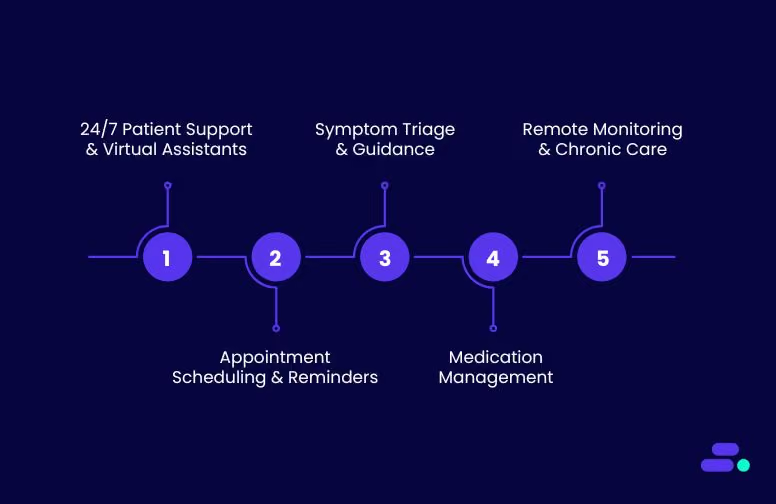
Conversational AI is making a profound impact across the healthcare sector, addressing various challenges by improving patient engagement, streamlining processes, and enhancing decision-making. Below are some key use cases where Conversational AI is being applied effectively:
1. 24/7 patient support and virtual assistants
AI-powered virtual assistants offer patients real-time, on-demand responses to common queries, such as symptoms, medication information, and appointment scheduling. These assistants work around the clock, providing patients with immediate access to vital information, improving overall satisfaction of the patients.
- Benefits:
- Round-the-clock availability.
- Instant access to healthcare information.
- Reduced workload for administrative staff.
2. Appointment scheduling and reminders
Scheduling appointments in a healthcare setting can be cumbersome and time-consuming for both patients and providers. Conversational AI simplifies this process by allowing patients to book, reschedule, and cancel appointments. It is as simple as having a conversation with a personal assistant. Additionally, the AI system can send reminders and follow-up notifications to reduce no-shows and ensure that appointments run on time.
- Benefits:
- Improved appointment booking efficiency.
- Reduced no-show rates.
- Automated reminders and follow-ups.
3. Symptom triage and guidance
Conversational AI can assist with symptom triage, guiding patients through a series of questions to assess their symptoms. It can also determine whether the patients need immediate medical attention or a visit to the doctor. By analyzing the responses, AI-powered systems can provide initial guidance, such as suggesting over-the-counter treatments, booking a doctor’s appointment, or advising the patient to seek urgent care.
- Benefits:
- Faster symptom assessment.
- Reduces unnecessary visits to the hospital or clinic.
- Enhances early detection and intervention.
4. Medication management
AI-powered systems help manage patients' medication schedules by reminding them when to take their medication, offering dosage information, and tracking adherence. These systems can also alert patients about potential side effects and offer guidance on medication management.
- Benefits:
- Improved medication adherence.
- Reduces the risk of medication errors.
- Personalized reminders and alerts.
5. Remote patient monitoring and chronic care management
For patients with chronic conditions, ongoing monitoring is essential. Conversational AI, integrated with remote monitoring tools, can keep track of patients’ health data, such as blood pressure, glucose levels, or heart rate, and send real-time updates to both patients and healthcare providers. This proactive approach to care ensures timely interventions and reduces hospital readmissions.
- Benefits:
- Continuous monitoring of chronic conditions.
- Early detection of potential issues.
- Better management of long-term health conditions.
Want to give your patients interactions that feel human, not robotic, while saving your team hours? Discover Cloudtech’s AI Voice Calling today.
Now, Let’s take a closer look at some real-world examples where Conversational AI has already made a significant impact, and see how it continues to shape the future of healthcare delivery.
Real-world applications of Conversational AI in healthcare
The integration of Conversational AI in healthcare has led to transformative outcomes, as evidenced by various case studies and industry analyses.
For example, when the COVID-19 pandemic accelerated the adoption of digital health solutions, 72.5% of patients utilized front-end conversational AI voice agents or symptom checkers during virtual visits. This led to an increase in AI-driven patient engagement platforms in modern healthcare delivery.
Here is another example:
To enhance patient engagement and streamline administrative tasks, a prominent healthcare provider implemented an AI-driven voice agent system. This system was designed to handle a variety of patient interactions, including appointment scheduling, medication reminders, and general inquiries.
The AI voice agent utilizes advanced Natural Language Processing (NLP) and Machine Learning (ML) algorithms to understand and respond to patient queries in real-time. Integrated with the healthcare provider's Electronic Health Record (EHR) system, the voice agent can access patient information to provide personalized responses and schedule appointments accordingly.
Additionally, the system is capable of sending automated reminders for upcoming appointments and medication refills, thereby improving patient adherence to treatment plans. The voice agent also assists in triaging patient inquiries, directing them to the appropriate department or healthcare professional when necessary.
Results and Benefits
- Improved Patient Access: The AI voice agent operates 24/7, allowing patients to access information and services at their convenience, reducing wait times and enhancing satisfaction.
- Operational Efficiency: By automating routine tasks, the healthcare provider has freed up staff to focus on more complex patient needs, leading to improved workflow efficiency.
- Enhanced Patient Adherence: Automated reminders have contributed to better patient adherence to appointments and medication regimens, potentially leading to improved health outcomes.
- Cost Savings: The implementation of the AI voice agent has resulted in cost savings by reducing the need for additional administrative staff and minimizing scheduling errors.
While the integration of voice AI in healthcare presents numerous advantages, challenges such as ensuring data privacy, maintaining system accuracy, and achieving seamless integration with existing EHR systems remain. Addressing these challenges is crucial for the successful adoption and sustained impact of AI voice agents in healthcare settings.
Challenges and considerations for implementing Conversational AI in healthcare
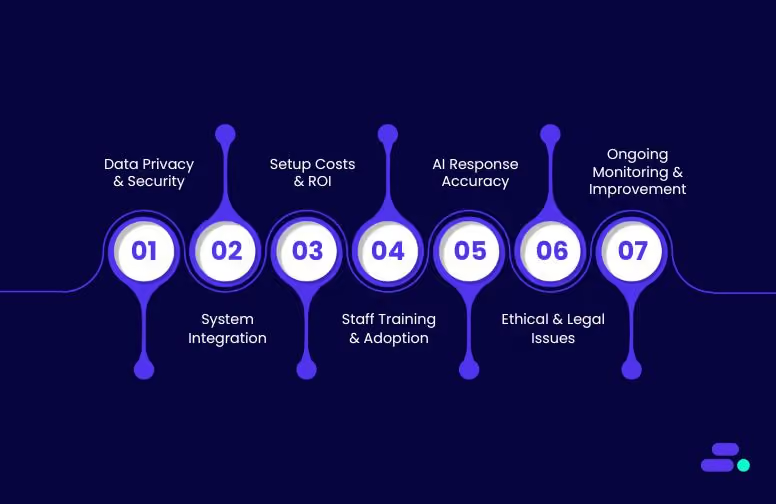
While the advantages of Conversational AI in healthcare are significant, the implementation of such technology comes with its own set of challenges and considerations. Healthcare organizations must carefully assess these challenges to ensure a smooth and successful integration of Conversational AI into their operations. Below are some key challenges and factors that healthcare providers need to keep in mind when adopting Conversational AI solutions:
1. Data privacy and security concerns
The sensitive nature of healthcare data demands data privacy and security when implementing Conversational AI systems. Patient information is protected by strict regulations such as HIPAA (Health Insurance Portability and Accountability Act) in the U.S., and non-compliance can lead to severe consequences.
AI systems must adhere to these regulatory standards to safeguard patient data and maintain confidentiality. Additionally, AI-powered tools that process health data need robust encryption protocols, secure access controls, and frequent audits to prevent unauthorized access.
Considerations:
- Work with trusted vendors that provide compliant AI systems.
- Ensure data encryption, role-based access control, and regular security audits.
- Design AI systems with built-in privacy by design to mitigate risks.
2. Integration with existing healthcare systems
Integrating Conversational AI with existing healthcare IT systems, such as EHRs (Electronic Health Records), EMRs (Electronic Medical Records), practice management systems, and other clinical applications, can be a complex process. A lack of seamless integration could lead to workflow disruptions, inefficiencies, and system conflicts. For instance, a virtual assistant may struggle to pull up patient data from an outdated system or fail to update records in real-time, causing discrepancies in patient information.
Considerations:
- Choose AI solutions that offer robust API integrations with existing systems.
- Ensure smooth data synchronization between Conversational AI and backend systems.
- Collaborate with IT teams to ensure proper configuration and testing before deployment.
3. High Initial Setup Costs and ROI Concerns
The initial investment in Conversational AI technology can be substantial, especially when considering development costs, system integration, and customization for specific healthcare needs. While AI systems can ultimately lead to cost savings through automation and operational efficiency, the return on investment (ROI) may take time to materialize. Healthcare organizations must assess whether they have the budget for such a project and whether the potential benefits justify the upfront costs.
Considerations:
- Perform a cost-benefit analysis to understand potential savings and improvements in patient care.
- Start with pilot projects to test AI capabilities before full-scale deployment.
- Look for AI solutions with scalable pricing models to reduce initial costs.
4. Training and Adoption by Healthcare Staff
For Conversational AI to function optimally, healthcare providers need to ensure their staff are properly trained to work alongside the new system. This includes training on how to interact with AI tools, how to escalate complex cases to human agents, and how to leverage AI to enhance patient care. Resistance from staff or lack of training can lead to underutilization of the technology and hinder its effectiveness.
Considerations:
- Invest in comprehensive training for healthcare professionals and administrative staff.
- Highlight the benefits of AI such as reduced workloads and improved patient outcomes to encourage adoption.
- Implement feedback mechanisms to gather input from staff on AI performance and usability.
5. Ensuring Accuracy and Quality of AI Responses
While Conversational AI can handle many types of queries, it is still an evolving technology, and AI systems are not infallible. The accuracy of responses is critical, especially in healthcare, where providing incorrect information can lead to adverse outcomes.
Considerations:
- Use AI systems that are regularly updated and trained on the latest medical knowledge and terminology.
- Implement human oversight to review AI responses, especially in critical healthcare situations.
- Use machine learning algorithms to refine AI understanding based on real-world data and patient feedback.
6. Ethical and Legal Concerns
The implementation of Conversational AI in healthcare raises several ethical and legal concerns, especially around patient privacy, consent, and accountability. For example, if an AI system provides incorrect advice that leads to harm, who is liable—the healthcare provider, the AI vendor, or the system itself? Addressing these questions is essential to avoid potential legal complications and ensure that AI tools are being used responsibly and ethically.
Considerations:
- Establish clear guidelines around the use of AI in patient care, ensuring that human oversight is maintained in critical cases.
- Connect with legal teams to ensure compliance with healthcare regulations (e.g., HIPAA).
- Adopt transparent AI policies that respect patient privacy and consent.
7. Continuous Monitoring and Improvement
Conversational AI is not a “set it and forget it” solution. It requires continuous monitoring and fine-tuning to ensure it evolves with changing patient needs, healthcare regulations, and medical advances. Regular updates and retraining are essential to ensure that the system remains effective, efficient, and accurate over time.
Considerations:
- Set up a dedicated team to monitor AI performance and handle updates.
- Establish metrics for AI performance to track improvements and address any deficiencies.
- Schedule regular audits of the AI system to ensure compliance with healthcare standards.
Want to overcome the challenges of Conversational AI implementation in healthcare? Connect with Cloudtech today to explore tailored solutions that address these challenges and unlock the potential of AI-powered patient engagement.
As we look ahead, the future of Conversational AI in healthcare holds immense promise.
The future of Conversational AI in healthcare
Conversational AI in healthcare is filled with possibilities that can revolutionize patient care and improve operational efficiency. As AI continues to advance, its role in healthcare will only grow, bringing even more sophisticated solutions to address the evolving needs of patients and providers alike.
Here’s a look at the key trends and emerging examples that will shape the future of Conversational AI in healthcare:
1. Proactive health monitoring and preventive care
One of the most exciting advancements in Conversational AI is the potential for proactive health monitoring. In the future, AI systems will not just respond to patient queries but will take a proactive role in predicting health issues before they arise. By integrating AI with wearable devices, sensors, and health apps, Conversational AI can offer real-time health monitoring, flagging potential issues based on a patient’s vitals or behavior patterns.
Example: AI-powered systems, integrated with wearables like fitness trackers or smartwatches, could monitor vital signs such as heart rate, blood pressure, or blood sugar levels. If the system detects abnormal readings, it could send notifications to the patient or even alert healthcare providers to take preventative action. For instance, an AI assistant could remind a diabetic patient to adjust their insulin levels based on real-time glucose measurements.
Impact: This proactive approach can help in the early detection of chronic conditions, preventing complications and improving patient outcomes.
2. AI-driven personalized medicine
As personalized medicine gains more prominence, Conversational AI will play a significant role in delivering individualized care. By leveraging genetic data, patient history, and real-time health data, AI systems will provide tailored treatment plans that consider each patient's unique health profile.
Example: Imagine an AI assistant integrated into a cancer care center’s workflow. The system could analyze a patient’s genomic data along with previous treatment responses to recommend personalized cancer treatments. It could suggest specific medications or therapy regimens that have shown the highest likelihood of success based on the patient’s unique genetic makeup and past medical history.
Impact: Personalized treatment plans that factor in the specific biology of the patient can increase the effectiveness of treatments and reduce the risk of adverse reactions, offering more precise care for complex health conditions.
3. Enhanced virtual health assistants and voice agents
In the near future, virtual health assistants powered by Conversational AI will be able to conduct more sophisticated medical conversations. These assistants will go beyond basic symptom triage or appointment scheduling and will evolve to provide continuous, holistic health guidance across multiple touchpoints.
Example: AI health assistants could monitor patients' symptoms over time, keeping track of ongoing concerns and making suggestions based on the patient’s evolving condition. For example, an AI-powered assistant for managing mental health might ask about a user’s mood, suggest coping strategies, and recommend professional therapy sessions if necessary.
Impact: Such systems will not only make healthcare more accessible and convenient but also reduce the burden on medical staff by automating routine interactions. This allows providers to focus on more difficult patient care tasks.
4. AI in remote care and telemedicine
As telemedicine becomes more widely adopted, Conversational AI will play a crucial role in facilitating patient interactions and ensuring that consultations are efficient and comprehensive. AI assistants will enable remote consultations, help with administrative tasks, and provide immediate responses to basic health concerns, improving the efficiency of virtual healthcare delivery.
Example: In a telemedicine consultation, an AI assistant could handle pre-consultation processes, such as collecting patient history, validating insurance information, and analyzing symptoms. During the consultation, AI can assist healthcare providers by suggesting potential diagnoses based on the patient’s input and medical records, making the consultation process faster and more accurate.
Impact: Telemedicine platforms that integrate Conversational AI will offer seamless, 24/7 virtual care and improve access to healthcare in underserved areas.
5. Multilingual support for global healthcare access
As healthcare becomes more globalized, multilingual support powered by Conversational AI will be essential to ensuring that patients from different linguistic backgrounds can access healthcare services without barriers.
Example: A global health network could deploy AI-powered systems that can speak multiple languages. For instance, a patient from Spain could interact with an AI assistant in Spanish to book an appointment with an English-speaking doctor. The AI could seamlessly translate between the patient and the healthcare provider, ensuring there are no communication barriers.
Impact: This will greatly improve the accessibility of healthcare services for non-English-speaking populations, ensuring equitable access to care worldwide.
6. Seamless integration with EHRs and other healthcare systems
In the future, Conversational AI will be able to seamlessly integrate with Electronic Health Records (EHRs), practice management systems, and healthcare workflows. This integration will ensure that patient data flows smoothly between the AI system and the healthcare provider’s backend systems, enabling better coordination of care.
Example: A patient reaches out to an AI assistant for a prescription refill. The assistant can pull up the patient’s EHR, confirm the current medication, and even notify the healthcare provider of the refill request. The AI can automatically request approval from the doctor’s office and send the prescription to the pharmacy, all without human intervention.
Impact: This will streamline administrative workflows and ensure data consistency across systems, enabling healthcare providers to offer more coordinated and effective care.
7. AI for healthcare fraud detection and compliance
With growing concerns over fraud and compliance in healthcare, Conversational AI will become an important tool for identifying suspicious activities and ensuring adherence to regulatory standards. AI-powered systems can flag unusual billing patterns, monitor claims for discrepancies, and ensure that providers follow compliance guidelines.
Example: An AI system could monitor insurance claims and detect discrepancies in real-time, alerting healthcare organizations about potential fraud. It can also help with HIPAA compliance by ensuring that patient data is handled securely during AI interactions, preventing unauthorized access or misuse.
Impact: Conversational AI will enhance fraud prevention and streamline compliance processes, helping healthcare organizations reduce risk and protect patient data.
8. AI-Powered medical research assistance
AI-driven systems can assist researchers in data mining, reviewing literature, and identifying potential clinical trials that match patient profiles.
Example: An AI assistant could help oncologists by quickly reviewing the latest cancer research and suggesting new treatment options based on recent breakthroughs. It could also match patients with ongoing clinical trials based on their medical history and eligibility criteria.
Impact: Conversational AI will accelerate research efforts, improve the accuracy of findings, and ensure that the most up-to-date medical knowledge is readily available to healthcare professionals.
Conclusion
The healthcare industry is at the cusp of a major transformation, and Conversational AI is leading the charge. By enabling smarter, more efficient interactions, it not only enhances patient engagement but also streamlines administrative workflows, helping healthcare providers focus more on patient care. Whether it’s assisting patients with appointment scheduling, providing medication reminders, or offering 24/7 support, Conversational AI is proving to be a game-changer.
Cloudtech is committed to helping healthcare providers integrate Conversational AI solutions that enhance patient care, improve operational efficiency, and ensure compliance with industry standards. With deep expertise in AI and healthcare systems, Cloudtech offers tailored solutions that help your organization unlock the full potential of Conversational AI.
Ready to elevate your healthcare experience with Conversational AI?
Connect with Cloudtech and start building the future of customer experience.
Frequently Asked Questions (FAQs)
1. What is Conversational AI in healthcare?
Conversational AI in healthcare refers to the use of AI technologies to facilitate human-like interactions between patients and healthcare systems, enabling tasks such as appointment scheduling, medication reminders, and symptom triage.
2. How can Conversational AI improve patient care?
By providing instant, personalized responses, Conversational AI enhances patient engagement, ensures timely information delivery, and supports better health outcomes.
3. Is Conversational AI secure for handling patient data?
Yes, when implemented with proper security measures and compliance with regulations like HIPAA, Conversational AI can securely handle patient data.
4. Can Conversational AI integrate with existing healthcare systems?
Absolutely. Conversational AI solutions can be integrated with healthcare systems like Electronic Health Records (EHR) to streamline workflows and improve efficiency.
The global datasphere will balloon to 175 zettabytes in 2025, and nearly 80% of that data will go cold within months of creation. That’s not just a technical challenge for businesses. It’s a financial and strategic one.
For small and medium-sized businesses (SMBs), the question is: how to retain vital information like compliance records, backups, and historical logs without bleeding budget on high-cost active storage?
This is where Amazon S3 Glacier comes in. With its ultra-low costs, high durability, and flexible retrieval tiers, the purpose-built archival storage solution lets you take control of long-term data retention without compromising on compliance or accessibility.
This guide breaks down what S3 Glacier is, how it works, when to use it, and how businesses can use it to build scalable, cost-efficient data strategies that won’t buckle under tomorrow’s zettabytes.
Key takeaways:
- Purpose-built for archival storage: Amazon S3 Glacier classes are designed to reduce costs for infrequently accessed data while maintaining durability.
- Three storage class options: Instant retrieval, flexible retrieval, and deep archive support varying recovery speeds and pricing tiers.
- Lifecycle policy automation: Amazon S3 lifecycle rules automate transitions between storage classes, optimizing cost without manual oversight.
- Flexible configuration and integration: Amazon S3 Glacier integrates with existing Amazon S3 buckets, IAM policies, and analytics tools like Amazon Redshift Spectrum and AWS Glue.
- Proven benefits across industries: Use cases from healthcare, media, and research confirm Glacier’s role in long-term data retention strategies.
What is Amazon S3 Glacier storage, and why do SMBs need it?
Amazon Simple Storage Service (Amazon S3) Glacier is an archival storage class offered by AWS, designed for long-term data retention at a low cost. It’s intended for data that isn’t accessed frequently but must be stored securely and durably, such as historical records, backup files, and compliance-related documents.
Unlike Amazon S3 Standard, which is built for real-time data access, Glacier trades off speed for savings. Retrieval times vary depending on the storage class used, allowing businesses to optimize costs based on how soon or how often they need to access that data.
Why it matters for SMBs: For small and mid-sized businesses modernizing with AWS, Amazon S3 Glacier helps manage growing volumes of cold data without escalating costs. Key reasons for implementing the solution include:
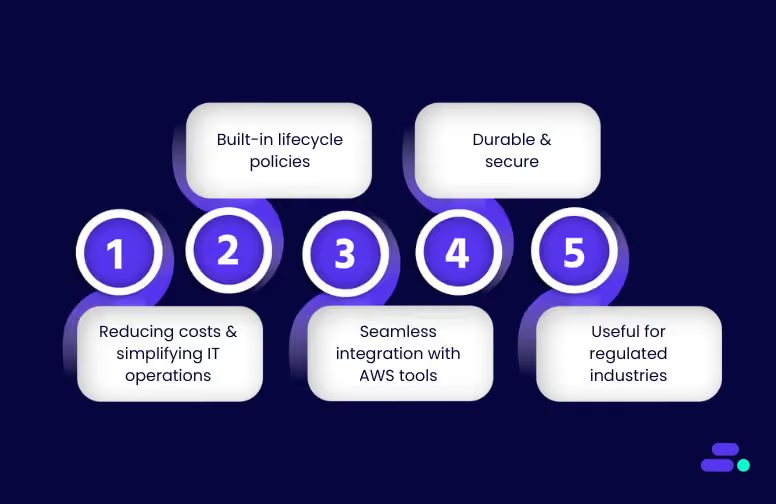
- Cost-effective for inactive data: Pay significantly less per GB compared to other Amazon S3 storage classes, ideal for backup or archive data that is rarely retrieved.
- Built-in lifecycle policies: Automatically move data from Amazon S3 Standard or Amazon S3 Intelligent-Tiering to Amazon Glacier or Glacier Deep Archive based on rules with no manual intervention required.
- Seamless integration with AWS tools: Continue using familiar AWS APIs, Identity and Access Management (IAM), and Amazon S3 bucket configurations with no new learning curve.
- Durable and secure: Data is redundantly stored across multiple AWS Availability Zones, with built-in encryption options and compliance certifications.
- Useful for regulated industries like healthcare: Healthcare SMBs can use Amazon Glacier to store medical imaging files, long-term audit logs, and compliance archives without overcommitting to active storage costs.
Amazon S3 Glacier gives SMBs a scalable way to manage historical data while aligning with cost-control and compliance requirements.
How can SMBs choose the right Amazon S3 Glacier class for their data?
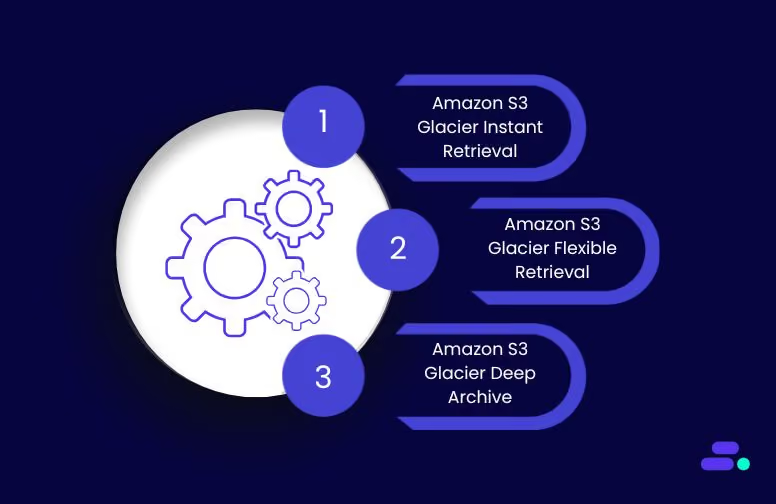
The Amazon S3 Glacier storage classes are purpose-built for long-term data retention, but not all archived data has the same access or cost requirements. AWS offers three Glacier classes, each designed for a different balance of retrieval time and storage pricing.
For SMBs, choosing the right Glacier class depends on how often archived data is accessed, how quickly it needs to be retrieved, and the overall storage budget.
1. Amazon S3 Glacier Instant Retrieval
Amazon S3 Glacier Instant Retrieval is designed for rarely accessed data that still needs to be available within milliseconds. It provides low-cost storage with fast retrieval, making it suitable for SMBs that occasionally need immediate access to archived content.
Specifications:
- Retrieval time: Milliseconds
- Storage cost: ~$0.004/GB/month
- Minimum storage duration: 90 days
- Availability SLA: 99.9%
- Durability: 99.999999999%
- Encryption: Supports SSE-S3 and SSE-KMS
- Retrieval model: Immediate access with no additional tiering
When it’s used: This class suits SMBs managing audit logs, patient records, or legal documents that are accessed infrequently but must be available without delay. Healthcare providers, for instance, use this class to store medical imaging (CT, MRI scans) for emergency retrieval during patient consultations.
2. Amazon S3 Glacier Flexible Retrieval
Amazon S3 Glacier Flexible Retrieval is designed for data that is infrequently accessed and can tolerate retrieval times ranging from minutes to hours. It offers multiple retrieval options to help SMBs manage both performance and cost, including a no-cost bulk retrieval option.
Specifications:
- Storage cost: ~$0.0036/GB/month
- Minimum storage duration: 90 days
- Availability SLA: 99.9%
- Durability: 99.999999999%
- Encryption: Supports SSE-S3 and SSE-KMS
- Retrieval tiers:
- Expedited: 1–5 minutes ($0.03/GB)
- Standard: 3–5 hours ($0.01/GB)
- Bulk: 5–12 hours (free per GB)
- Provisioned capacity (optional): $100 per unit/month
When it’s used: SMBs performing planned data restores, like IT service providers handling monthly backups, or financial teams accessing quarterly records, can benefit from this class. It's also suitable for healthcare organizations restoring archived claims data or historical lab results during audits.
3. Amazon S3 Glacier Deep Archive
Amazon S3 Glacier Deep Archive is AWS’s lowest-cost storage class, optimized for data that is accessed very rarely, typically once or twice per year. It’s designed for long-term archival needs where retrieval times of up to 48 hours are acceptable.
Specifications:
- Storage cost: ~$0.00099/GB/month
- Minimum storage duration: 180 days
- Availability SLA: 99.9%
- Durability: 99.999999999%
- Encryption: Supports SSE-S3 and SSE-KMS
- Retrieval model:
- Standard: ~12 hours ($0.0025/GB)
- Bulk: ~48 hours ($0.0025/GB)
When it’s used: This class is ideal for SMBs with strict compliance or regulatory needs but no urgency in data retrieval. Legal firms archiving case files, research clinics storing historical trial data, or any business maintaining long-term tax records can use Deep Archive to minimize ongoing storage costs.
By selecting the right Glacier storage class, SMBs can control storage spending without sacrificing compliance or operational needs.
How to successfully set up and manage Amazon S3 Glacier storage?
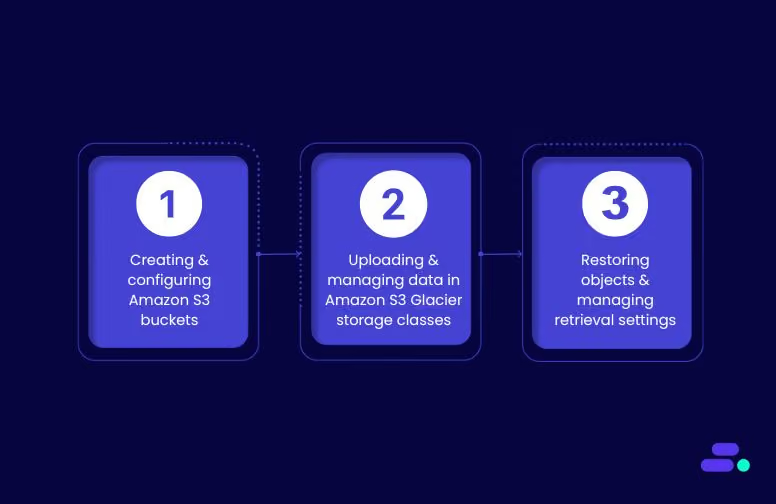
Setting up Amazon S3 Glacier storage classes requires careful planning of bucket configurations, lifecycle policies, and access management strategies. Organizations must consider data classification requirements, access patterns, and compliance obligations when designing Amazon S3 Glacier storage implementations.
The management approach differs significantly from standard Amazon S3 storage due to retrieval requirements and cost optimization considerations. Proper configuration ensures optimal performance while minimizing unexpected costs.
Step 1: Creating and configuring Amazon S3 buckets
S3 bucket configuration for Amazon S3 Glacier storage classes requires careful consideration of regional placement, access controls, and lifecycle policy implementation. Critical configuration parameters include:
- Regional selection: Choose regions based on data sovereignty requirements, disaster recovery strategies, and network latency considerations for retrieval operations
- Access control policies: Implement IAM policies that restrict retrieval operations to authorized users and prevent unauthorized cost generation
- Versioning strategy: Configure versioning policies that align with minimum storage duration requirements (90 days for Instant/Flexible, 180 days for Deep Archive)
- Encryption settings: Enable AES-256 or AWS KMS encryption for compliance with data protection requirements
Bucket policy configuration must account for the restricted access patterns associated with Amazon S3 Glacier storage classes. Standard S3 permissions apply, but organizations should implement additional controls for retrieval operations and related costs.
Step 2: Uploading and managing data in Amazon S3 Glacier storage classes
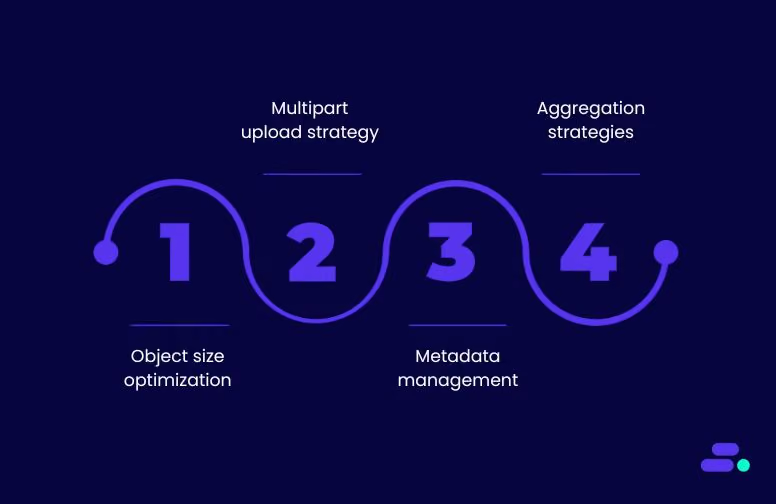
Direct uploads to Amazon S3 Glacier storage classes utilize standard S3 PUT operations with appropriate storage class specifications. Key operational considerations include:
- Object size optimization: AWS applies default behavior, preventing objects smaller than 128 KB from transitioning to avoid cost-ineffective scenarios
- Multipart upload strategy: Large objects benefit from multipart uploads, with each part subject to minimum storage duration requirements
- Metadata management: Implement comprehensive tagging strategies for efficient object identification and retrieval planning
- Aggregation strategies: Consider combining small files to optimize storage costs, where minimum duration charges may exceed data storage costs
Large-scale migrations often benefit from AWS DataSync or AWS Storage Gateway implementations that optimize transfer operations. Organizations should evaluate transfer acceleration options for geographically distributed data sources.
Step 3: Restoring objects and managing retrieval settings
Object restoration from Amazon S3 Glacier storage classes requires explicit restoration requests that specify retrieval tiers and duration parameters. Critical operational parameters include:
- Retrieval tier selection: Choose appropriate tiers based on urgency requirements and cost constraints
- Duration specification: Set restoration duration (1-365 days) to match downstream processing requirements
- Batch coordination: Plan bulk restoration operations to avoid overwhelming downstream systems
- Cost monitoring: Track retrieval costs across different tiers and adjust strategies accordingly
Restored objects remain accessible for the specified duration before returning to the archived state. Organizations should coordinate restoration timing with downstream processing requirements to avoid re-restoration costs.
How to optimize storage with Amazon S3 Glacier lifecycle policies?
Moving beyond basic Amazon S3 Glacier implementation, organizations can achieve significant cost optimization through the strategic configuration of S3 lifecycle policies. These policies automate data transitions across storage classes, eliminating the need for manual intervention while ensuring cost-effective data management throughout object lifecycles.
Lifecycle policies provide teams with precise control over how data is moved across storage classes, helping to reduce costs without sacrificing retention goals. For Amazon S3 Glacier, getting the configuration right is crucial; even minor missteps can result in higher retrieval charges or premature transitions that impact access timelines.
Translating strategy into measurable savings starts with how those lifecycle rules are configured.
1. Lifecycle policy configuration fundamentals
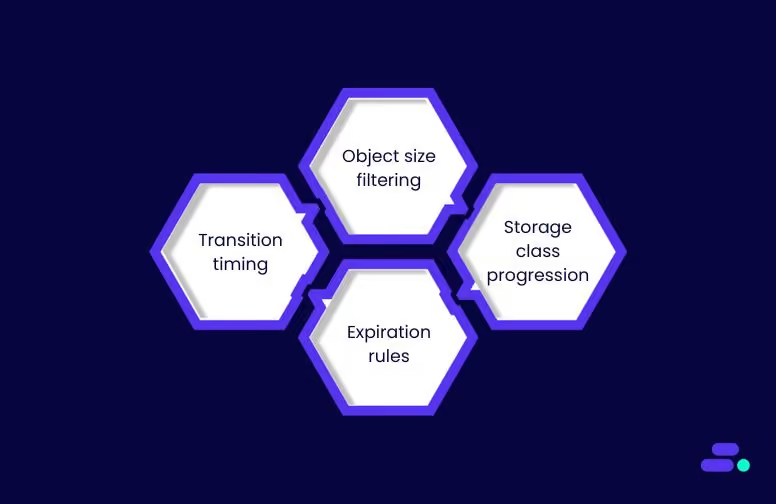
Amazon S3 lifecycle policies automate object transitions through rule-based configurations that specify transition timelines and target storage classes. Organizations can implement multiple rules within a single policy, each targeting specific object prefixes or tags for granular control and management.
Critical configuration parameters include:
- Transition timing: Objects in Standard-IA storage class must remain for a minimum of 30 days before transitioning to Amazon S3 Glacier
- Object size filtering: Amazon S3 applies default behavior, preventing objects smaller than 128 KB from transitioning to avoid cost-ineffective scenarios
- Storage class progression: Design logical progression paths that optimize costs while maintaining operational requirements
- Expiration rules: Configure automatic deletion policies for objects reaching end-of-life criteria
2. Strategic transition timing optimization
Effective lifecycle policies require careful analysis of data access patterns and cost structures across storage classes. Two-step transitioning approaches (Standard → Standard-IA → Amazon S3 Glacier) often provide cost advantages over direct transitions.
Optimal transition strategies typically follow these patterns:
- Day 0-30: Maintain objects in the Standard storage class for frequent access requirements
- Day 30-90: Transition to Standard-IA for reduced storage costs with immediate access capabilities
- Day 90+: Implement Amazon S3 Glacier transitions based on access frequency requirements and cost optimization goals
- Day 365+: Consider Deep Archive transition for long-term archival scenarios
3. Policy monitoring and cost optimization
Billing changes occur immediately when lifecycle configuration rules are satisfied, even before physical transitions complete. Organizations must implement monitoring strategies that track the effectiveness of policies and their associated costs.
Key monitoring metrics include:
- Transition success rates: Monitor successful transitions versus failed attempts
- Cost impact analysis: Track storage cost reductions achieved through lifecycle policies
- Access pattern validation: Verify that transition timing aligns with actual data access requirements
- Policy rule effectiveness: Evaluate individual rule performance and adjust configurations accordingly
What type of businesses benefit the most from Amazon S3 Glacier?
Amazon S3 Glacier storage classes are widely used to support archival workloads where cost efficiency, durability, and compliance are key priorities. Each class caters to distinct access patterns and technical requirements.
The following use cases, drawn from AWS documentation and customer case studies, illustrate practical applications of these classes across different data management scenarios.
1. Media asset archival (Amazon S3 Glacier Instant Retrieval)
Amazon S3 Glacier Instant Retrieval is recommended for archiving image hosting libraries, video content, news footage, and medical imaging datasets that are rarely accessed but must remain available within milliseconds. The class provides the same performance and throughput as Amazon S3 Standard while reducing storage costs.
Snap Inc. serves as a reference example. The company migrated over two exabytes of user photos and videos to Instant Retrieval within a three-month period. Despite the massive scale, the transition had no user-visible impact. In several regions, latency improved by 20-30 percent. This change resulted in annual savings estimated in the tens of millions of dollars, without compromising availability or throughput.
2. Scientific data preservation (Amazon S3 Glacier Deep Archive)
Amazon S3 Glacier Deep Archive is designed for data that must be retained for extended periods but is accessed infrequently, such as research datasets, regulatory archives, and records related to compliance. With storage pricing at $0.00099 per GB per month and durability of eleven nines across multiple Availability Zones, it is the most cost-efficient option among S3 classes. Retrieval options include standard (up to 12 hours) and bulk (up to 48 hours), both priced at approximately $0.0025 per GB.
Pinterest is one example of Deep Archive in practice. The company used Amazon S3 Lifecycle rules and internal analytics pipelines to identify infrequently accessed datasets and transition them to Deep Archive. This transition enabled Pinterest to reduce annual storage costs by several million dollars while meeting long-term retention requirements for internal data governance.
How Cloudtech helps SMBs solve data storage challenges?
SMBs don’t need to figure out Glacier class selection on their own. AWS partners like Cloudtech can help them assess data access patterns, retention requirements, and compliance needs to determine the most cost-effective Glacier class for each workload. From setting up automated Amazon S3 lifecycle rules to integrating archival storage into ongoing cloud modernization efforts, Cloudtech ensures that SMBs get the most value from their AWS investment.
A recent case study around a nonprofit healthcare insurer illustrates this approach. They faced growing limitations with its legacy on-premises data warehouse, built on Oracle Exadata. The setup restricted storage capacity, leading to selective data retention and delays in analytics.
Cloudtech designed and implemented an AWS-native architecture that eliminated these constraints. The new solution centered around a centralized data lake built on Amazon S3, allowing full retention of both raw and processed data in a unified, secure environment.
To support efficient data access and compliance, the architecture included:
- AWS Glue for data cataloging and metadata management
- Amazon Redshift Spectrum for direct querying from Amazon S3 without the need for full data loads
- Automated Redshift backups stored directly in Amazon S3 with custom retention settings
This minimized data movement, enabled near real-time insights, and supported healthcare compliance standards around data availability and continuity.
Outcome: By transitioning to managed AWS services, the client removed storage constraints, improved analytics readiness, and reduced infrastructure overhead. The move also unlocked long-term cost savings by aligning storage with actual access needs through Amazon S3 lifecycle rules and tiered Glacier storage classes.
Similarly, Cloudtech is equipped to support SMBs with varying storage requirements. It can help businesses with:
- Storage assessment: Identifies frequently and infrequently accessed datasets to map optimal Glacier storage classes
- Lifecycle policy design: Automates data transitions from active to archival storage based on access trends
- Retrieval planning: Aligns retrieval time expectations with the appropriate Glacier tier to minimize costs without disrupting operations
- Compliance-focused configurations: Ensures backup retention, encryption, and access controls meet industry-specific standards
- Unified analytics architecture: Combines Amazon S3 with services like AWS Glue and Amazon Redshift Spectrum to improve visibility without increasing storage costs
Whether it’s for healthcare records, financial audits, or customer history logs, Cloudtech helps SMBs build scalable, secure, and cost-aware storage solutions using only AWS services.
Conclusion
Amazon S3 Glacier storage classes, Instant Retrieval, Flexible Retrieval, and Deep Archive, deliver specialized solutions for cost-effective, long-term data retention. Their retrieval frameworks and pricing models support critical compliance, backup, and archival needs across sectors.
Selecting the right class requires alignment with access frequency, retention timelines, and budget constraints. With complex retrieval tiers and storage duration requirements, expert configuration makes a measurable difference. Cloudtech helps organizations architect Amazon S3 Glacier-backed storage strategies that cut costs while maintaining scalability, data security, and regulatory compliance.
Book a call to plan a storage solution that fits your operational and compliance needs, without overspending.
FAQ’s
1. What is the primary benefit of using Amazon S3 Glacier?
Amazon S3 Glacier provides ultra-low-cost storage for infrequently accessed data, offering long-term retention with compliance-grade durability and flexible retrieval options ranging from milliseconds to days.
2. Is the Amazon S3 Glacier free?
No. While Amazon Glacier has the lowest storage costs in AWS, charges apply for storage, early deletion, and data retrieval based on tier and access frequency.
3. How to change Amazon S3 to Amazon Glacier?
Use Amazon S3 lifecycle policies to automatically transition objects from standard classes to Glacier. You can also set the storage class during object upload using the Amazon S3 API or console.
4. Is Amazon S3 no longer global?
Amazon S3 remains a regional service. Data is stored in selected AWS Regions, but can be accessed globally depending on permissions and cross-region replication settings.
5. What is a vault in Amazon S3 Glacier?
Vaults were used in the original Amazon Glacier service. With Amazon S3 Glacier, storage is managed through Amazon S3 buckets and storage classes, rather than separate vault structures.
Get started on your cloud modernization journey today!
Let Cloudtech build a modern AWS infrastructure that’s right for your business.