Blogs


An AWS cybersecurity guide for SMBs in 2025
Cyberattacks are getting more frequent and more expensive. IBM’s most recent cloud security study reports that the average cost of a data breach has reached USD 4.35 million. In response, over half of global organizations are planning to boost investments in threat detection, incident response, and cloud security tools throughout 2025.
For small and mid-sized businesses (SMBs) in sectors like healthcare and fintech, the stakes are even higher. All it takes is one misconfigured access policy or exposed resource to trigger a costly security incident or regulatory fallout.
The good news is that AWS provides a flexible foundation for implementing strong, scalable defenses if the right controls are in place. That’s why more growth-focused SMBs are working with AWS partners like Cloudtech to build secure, compliant environments from the ground up.
This article walks through the most important AWS cloud security practices for 2025, and how to implement them in a way that aligns with the risk profile, industry standards, and long-term goals.
Key takeaways:
- Security is not a one-time setup; it’s a continuous discipline: AWS provides the tools, but SMBs must define clear strategies and enforce controls as environments evolve.
- Misconfigurations are the biggest threat, and the easiest to prevent: With IAM policies, automated monitoring, and least privilege access, most breaches can be avoided before they happen.
- Smart automation is force multiplication for small teams: Tools like AWS Config, Amazon GuardDuty, and AWS Systems Manager help SMBs scale security efforts without scaling headcount.
- Cloud-native security doesn’t mean complexity; it means control: When implemented correctly, AWS makes it easier for SMBs to enforce governance, meet compliance, and respond quickly to threats.
Why do SMBs need a security-first AWS strategy?
AWS operates on a shared responsibility model, meaning Amazon secures the infrastructure, while customers are accountable for securing their data, configurations, and access policies.
Without a clear, well-documented strategy, SMBs often face preventable risks like open Amazon S3 buckets, over-permissive IAM roles, or outdated security groups. These gaps aren’t just technical oversights. They’re business liabilities that can lead to data breaches, compliance violations, and lost customer trust.
For industries like healthcare and fintech, the pressure is even greater. Regulations such as HIPAA and PCI-DSS require strict controls over data access, encryption, and audit trails. Falling short, even unintentionally, can result in heavy fines and reputational damage.
Establishing cloud security best practices from the start helps SMBs:
- Stay compliant with evolving industry regulations
- Reduce the risk of misconfiguration and unauthorized access
- Gain visibility into their cloud environment through monitoring and alerting
- Build a strong foundation that scales with business growth
For SMBs having limited IT teams or expertise, AWS partners like Cloudtech can help them implement the necessary AWS cybersecurity strategies in a way that fits their team size, risk profile, and industry requirements.
How can SMBs implement a security-first AWS strategy?
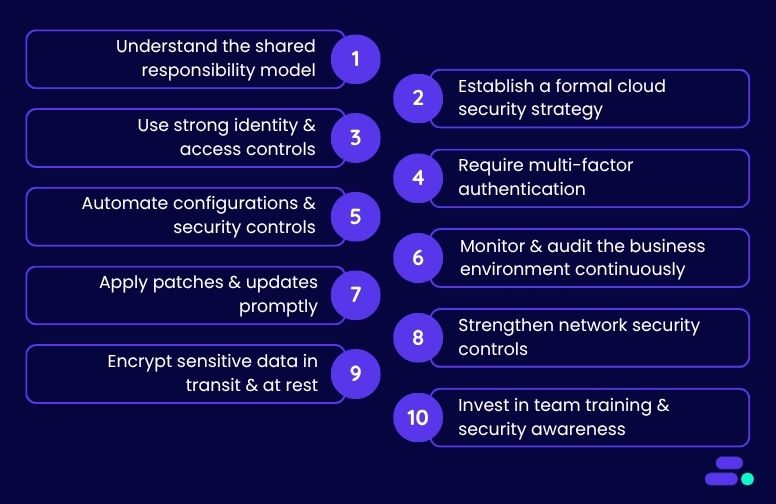
Unlike large enterprises, most SMBs don’t have the luxury of dedicated security teams or redundant systems. They move fast, manage lean teams, and prioritize innovation, especially in sectors like healthcare and fintech where demand is high and competition is fierce. Cloud platforms like AWS help level the playing field, but only if security keeps pace with growth.
In the early stages, it’s natural to focus on performance and delivery. But as environments expand with new workloads, more users, and tighter compliance expectations, security gaps can quietly emerge. Maybe a former contractor still has admin access. Maybe a key data store isn’t encrypted. They’re common side effects of scaling without a structured security plan. And when audits or incidents do arise, they tend to hit smaller businesses harder.
A security-first strategy helps SMBs get ahead of these risks. It brings clarity to what needs protecting, who needs access, and how to automate guardrails that support rather than slow down the business.
The following step-by-step strategy outlines how SMBs can achieve this using AWS-native tools, without overextending their teams or budgets.
1. Understand the shared responsibility model
Security in the cloud is a shared model. AWS secures the infrastructure of the cloud, while businesses are responsible for what they put in it. That includes user access, data classification, encryption settings, compliance configurations, and software-level protections. For SMBs in fintech and healthcare, this model directly impacts how they approach risk management, incident response, and audit readiness.
Real-world scenario: A healthcare startup launches a patient portal on Amazon EC2, assuming AWS manages encryption and access controls by default. However, without explicitly configuring IAM policies, enabling encryption at rest for EBS volumes, or setting up Amazon CloudTrail for audit logs, the environment remains exposed. This violates HIPAA and risks reputational damage in the event of a breach.
To operationalize the shared responsibility model:
- Map responsibilities by service: Use the AWS Shared Responsibility Model and align it with business architecture. For example, AWS manages Amazon RDS’s physical infrastructure. The SMB must enable encryption, rotate keys, and configure IAM policies for database access.
- Assign internal ownership: Create a responsibility matrix that maps each AWS service (e.g., Amazon S3, Amazon EC2, Amazon RDS, AWS Lambda) to a specific team or role, such as DevOps, compliance, or security engineering. This prevents accountability gaps.
- Standardize configuration baselines: Use AWS Config rules and AWS CloudFormation templates to enforce consistent security controls across environments (e.g., block public Amazon S3 buckets, enforce MFA for IAM users).
- Review regularly: As the stack evolves, review ownership and configuration at least quarterly to ensure no drift has occurred, especially after team changes, rapid scaling, or vendor integrations.
Understanding this model ensures that no one assumes AWS “has it covered” when, in reality, critical responsibilities like encryption, access control, and compliance reporting rest squarely on the business side of the fence.
2. Establish a formal cloud security strategy
Once the lines of responsibility are clear, the next priority is developing a formal cloud security strategy. Many SMBs, especially in regulated sectors like healthcare and fintech, spin up AWS environments quickly to meet demand, but without a guiding framework, risk and compliance gaps grow unnoticed.
A security strategy ensures consistency and accountability across teams, especially as infrastructure scales or regulatory pressure increases.
2. Establish a formal cloud security strategy
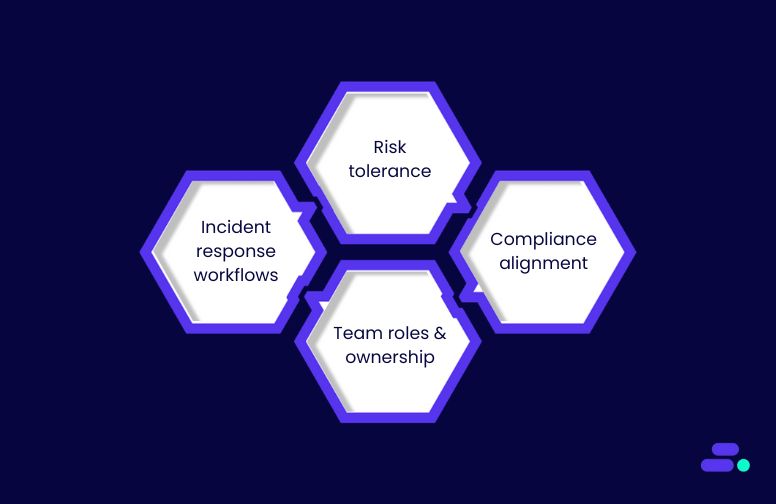
- Risk tolerance: Clarify how much risk the business can accept when choosing between speed, cost, and control. This informs architecture and vendor decisions.
- Compliance alignment: Map applicable standards like HIPAA, PCI-DSS, or SOC 2 to AWS configurations. For example, enable Amazon S3 encryption, enforce logging, and use private subnets for sensitive workloads.
- Team roles and ownership: Assign responsibility for identity, monitoring, key management, and remediation to avoid gaps during day-to-day ops or audits.
- Incident response workflows: Document how the team will detect and respond to threats, using AWS-native tools like Amazon GuardDuty, AWS CloudTrail, and AWS Systems Manager.
This document doesn’t need to be perfect from day one, but it does need to exist and evolve over time. Treat it as the team’s north star for scaling securely and making decisions that stand up to audits, not just deadlines.
3. Use strong identity and access controls
With a strategy in place, the next layer is precise access control. Identity and access missteps, especially overly broad permissions, are among the top causes of cloud breaches in SMB environments.
Using AWS Identity and Access Management (IAM), teams can enforce least-privilege access by:
- Defining role-based policies that grant only what’s needed per function. For example, a billing user shouldn’t have access to EC2 instances, and dev teams shouldn’t see production secrets.
- Disabling root account use for anything beyond initial setup. Instead, use federated identities or IAM roles with MFA.
- Eliminating long-lived credentials by rotating access keys. Use AWS IAM Identity Center (formerly AWS SSO) for session-based logins tied to the identity provider (e.g., Okta, Azure AD).
A healthcare SMB using shared admin credentials across AWS services may be compliant on paper but vulnerable in practice. Granular IAM policies, tied to monitored roles, help contain blast radius and support incident forensics if something goes wrong.
4. Require multi-factor authentication (MFA)
Even with tight IAM controls, stolen or reused credentials remain a top threat, especially in environments where small teams juggle multiple roles. That’s where multi-factor authentication (MFA) becomes critical.
MFA ensures that access requires something more than just a password. It should be non-negotiable for:
- Root users
- Admin and DevOps roles
- Any user interacting with production data or infrastructure
AWS makes implementation straightforward through virtual MFA apps (like Google Authenticator or Authy), hardware tokens, or integration with SSO platforms that support MFA enforcement.
For an SMB handling patient records or financial data, a single compromised credential without MFA could expose the entire AWS account. Enforcing MFA minimizes this risk and adds resilience against phishing, social engineering, or credential stuffing attempts.
5. Automate configurations and security controls
Once identity and access layers are secured, the next priority is eliminating manual configuration drift.
For SMBs, especially those with lean IT teams, automation isn’t just a time-saver. It’s a security multiplier. By using AWS-native tools, teams can standardize deployments, enforce guardrails, and respond to threats without delay.
Key tools and approaches include:
- AWS Config for real-time compliance checks against custom or managed security baselines, flagging issues like open ports or unencrypted volumes as they happen.
- AWS CloudFormation or Terraform to provision infrastructure in a secure, repeatable way, so dev teams don’t accidentally deploy with misconfigured security groups or public access.
- AWS Systems Manager and Lambda to automate patching, log reviews, and even auto-remediation for policy violations or failed audits.
In healthcare, for example, automation can help enforce HIPAA-aligned encryption and retention policies across resources. For fintech, it supports audit-readiness and reduces reliance on ad hoc scripts or manual checklists.
6. Monitor and audit the business environment continuously
Even well-automated environments need constant visibility. Threats evolve, workloads shift, and misconfigurations can creep in. For SMBs in sectors like healthcare and fintech, where downtime or data exposure can have legal and reputational consequences, real-time monitoring and auditing aren’t optional.
Fortunately, AWS offers integrated tools that make continuous oversight both achievable and scalable:
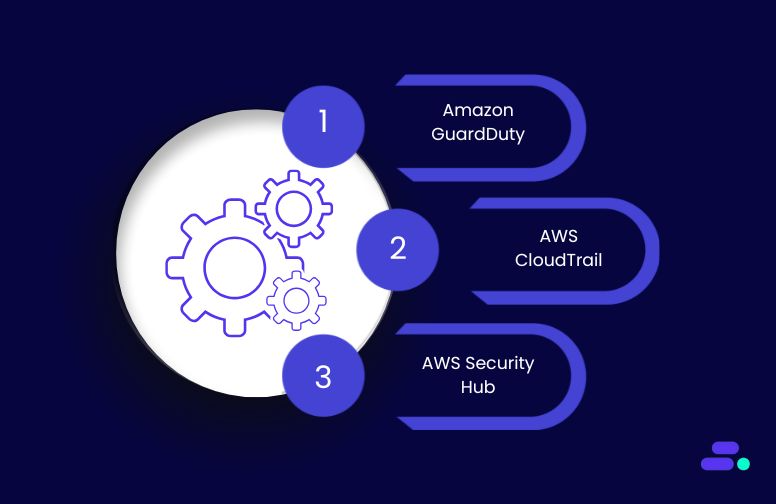
- Amazon GuardDuty delivers intelligent threat detection using machine learning to identify unusual patterns like port scanning, credential compromise, or data exfiltration attempts.
- AWS CloudTrail provides a detailed audit log of every API call, giving the team traceability for changes, critical for root cause analysis or compliance investigations.
- AWS Security Hub aggregates findings across AWS services, offering a unified dashboard to check alignment with frameworks like CIS Benchmarks, HIPAA, or PCI-DSS.
To stay effective, alerts must go beyond dashboards. Set up automated notifications for critical anomalies and establish ownership for reviewing, escalating, and responding to alerts. Small teams can also use third-party SIEM integrations or managed detection and response (MDR) services to extend coverage.
7. Apply patches and updates promptly
Security monitoring is only useful if it’s followed by action, and patching is one of the most critical. Unpatched systems remain one of the top causes of cloud breaches, especially when vulnerabilities are publicly known and easily exploitable.
For SMBs, falling behind on updates is often a bandwidth issue. But AWS provides tools to automate and streamline the process without disrupting operations:
- AWS Systems Manager Patch Manager allows teams to automate patching schedules for Amazon EC2 instances and on-premises hybrid environments.
- Compliance dashboards on AWS Systems Manager help track which systems are up to date and which require immediate attention.
- Maintenance windows on AWS Systems Manager can help apply patches during off-peak hours, minimizing service interruptions.
Make patching a priority for public-facing services, applications handling sensitive data, and any system tied to regulatory compliance. In healthcare and fintech, a missed patch could trigger an audit failure or data breach liability.
8. Strengthen network security controls
Once the workloads are patched and up to date, the next layer of defense is the network itself. Poorly configured network settings, like open ports or flat VPC architectures, can expose sensitive data to the internet or allow lateral movement if compromised.
To reduce the attack surface and enforce segmentation:
- Use Security Groups and Network ACLs to control inbound/outbound traffic at both the instance and subnet levels
- Replace public IPs with VPC endpoints to keep service traffic inside the AWS environment
- Deploy AWS WAF (Web Application Firewall) to block injection attacks, cross-site scripting (XSS), and other Layer 7 exploits
- Avoid open ports like 0.0.0.0/0 for SSH or RDP and use bastion hosts or Session Manager instead
For SMBs in healthcare or fintech, these network controls aren’t just good practice. They’re often required for regulatory compliance. Proactively auditing firewall rules, restricting access by IP or geography, and isolating workloads by function can significantly reduce the blast radius of any incident.
9. Encrypt sensitive data in transit and at rest
Encryption is a baseline requirement, not a bonus, especially for SMBs in healthcare or fintech where data privacy laws like HIPAA, PCI-DSS, or GLBA are non-negotiable. AWS makes encryption accessible, but it’s up to the team to configure and manage it correctly.
For data at rest, enable:
- SSE-S3 for server-side encryption in Amazon S3
- EBS encryption for volumes attached to EC2 instances
- RDS encryption for managed databases, ideally using Customer-Managed Keys (CMKs) via AWS Key Management Service (KMS)
For data in transit, always:
- Use TLS 1.2 or higher
- Manage certificates through AWS Certificate Manager (ACM) for secure HTTPS connections
- Avoid sending sensitive data over unencrypted channels, even between internal systems
Don’t stop at enabling encryption, also:
- Define key rotation schedules
- Enforce least-privilege policies for key access
- Monitor access logs for unusual activity around encryption resources
For SMBs, this ensures that even if other defenses fail, the most sensitive data remains unreadable and auditable, helping businesses stay compliant and protected at scale.

10. Invest in team training and security awareness
Technology alone doesn’t secure the cloud; people do. For SMBs, especially in high-stakes industries like healthcare and fintech, the weakest link is often user behavior, not tooling. A well-configured AWS environment can still be compromised if employees fall for phishing attempts or misconfigure permissions.
To build a security-first culture:
- Train every team member, from IT admins to frontline staff, on AWS security basics, password hygiene, MFA usage, and phishing recognition
- Utilize AWS Skill Builder learning paths or bring in certified AWS training partners like Cloudtech for hands-on workshops
- Run regular tabletop exercises and simulated incidents to test the team’s response readiness
Security awareness should be part of onboarding, reinforced during team meetings, and revisited as the environment evolves. Organizations that embed security into their day-to-day culture are not only better prepared to defend against attacks, but they also recover faster and maintain customer trust when incidents occur.
By following these practices, SMBs can build a compliant and scalable AWS environment.
How does Cloudtech help SMBs secure their cloud?
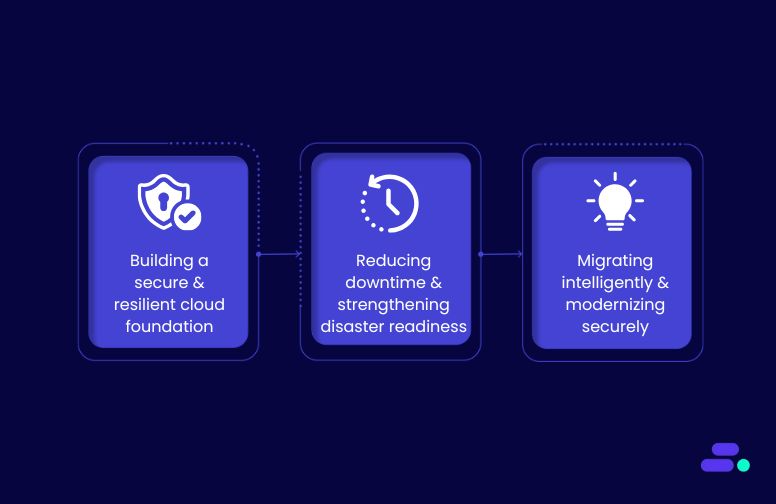
For small and mid-sized businesses, especially those in regulated sectors like healthcare and fintech, moving to AWS is just the first step. Security, uptime, and compliance must be intentionally designed. Cloudtech, an AWS Advanced Tier Services Partner, helps SMBs modernize their AWS environments with resilient, secure architectures that support long-term scalability without adding operational burden.
1. Building a secure and resilient cloud foundation
Cloudtech designs AWS-native environments that are fault-tolerant, cost-optimized, and compliance-ready. From AWS Control Tower governance and multi-AZ architectures to serverless infrastructure and automated monitoring with AWS CloudWatch, every layer is tailored to reduce risk and scale with the business.
2. Reducing downtime and strengthening disaster readiness
Using best practices in backup, disaster recovery, and chaos engineering, Cloudtech enables SMBs to maintain uptime even during outages or attacks. Solutions like active-active replication and automated failover ensure that systems stay online, while workshops and stress testing uncover vulnerabilities before they cause disruption.
3. Migrating intelligently and modernizing securely
Cloudtech handles end-to-end workload migration with minimal disruption, while ensuring each workload is re-architected for security, cost efficiency, and future growth. Post-migration, the environments are optimized for AI-readiness and regulatory compliance, positioning SMBs to use advanced AWS capabilities without added complexity.
Each engagement follows a structured five-phase approach—Engage, Discover, Align, Deliver, and Enable—ensuring every step aligns with the SMB’s goals, compliance needs, and internal capabilities.
Modernize with confidence, backed by AWS expertise
Migrating to AWS gives SMBs the tools to improve resilience, optimize costs, and scale faster. But true cloud success isn’t just about moving workloads. It’s about transforming how teams operate, innovate, and engage customers.
Cloudtech helps SMBs move beyond lift-and-shift with an AWS-native strategy designed around business outcomes. From automating operations and unlocking real-time insights to enabling AI-driven workflows, Cloudtech aligns cloud capabilities with goals, securely and efficiently.
For SMBs ready to break free from legacy limitations, Cloudtech delivers a proven path to modernization with deep AWS expertise, practical strategy, and long-term support.
Connect with Cloudtech to start the conversation.
FAQs
1. How can SMBs determine if their AWS environment is adequately secured?
Security maturity evolves with the business. Cloudtech helps SMBs assess their environment using AWS Security Hub benchmarks and custom KPIs such as identity sprawl, encryption coverage, and patch compliance. This allows organizations to continuously measure posture and prioritize remediation based on actual risk exposure.
2. What are the next steps after implementing MFA and IAM best practices?
Once foundational access controls are in place, the focus should shift to proactive threat detection and automated response. Cloudtech enables SMBs to deploy services like GuardDuty and Systems Manager Automation to detect anomalies and respond in real time, helping teams move from reactive to proactive security operations.
3. How can SMBs prevent security configurations from drifting over time?
Configuration drift often occurs as environments grow and change. Cloudtech mitigates this by implementing AWS Config and conformance packs that enforce predefined policies. Combined with Infrastructure as Code tools like CloudFormation, this ensures environments remain consistent, auditable, and secure at scale.
4. What should an SMB do immediately following a security incident in AWS?
The first priority is containment, isolating affected resources using IAM and VPC controls. Cloudtech helps SMBs build incident response playbooks that include forensic analysis with CloudTrail, root cause tracing, and automated remediation via Lambda. This shortens recovery time and helps teams close security gaps quickly.
5. Is advanced cloud security necessary if an SMB isn’t in a regulated industry?
Absolutely. Even without HIPAA or PCI obligations, SMBs are frequent targets due to limited defenses. Cloudtech aligns security controls to business value, not just compliance. This ensures customer data, core applications, and uptime are protected without overwhelming internal teams or over-investing in tools that don’t fit their scale.
Key benefits of cloud migration for SMBs
According to G2, 60% of organizations say the cloud has directly contributed to more consistent and sustainable revenue growth over the past year. Over 40% have fully realized key benefits like stronger service delivery, greater business agility, and improved continuity.
Before migrating, many SMBs struggled with high infrastructure costs, rigid legacy systems, limited IT bandwidth, and slow, unreliable performance. Scaling was hard. Switching tools or vendors was even harder.
Migrating to the cloud like AWS changed that. Businesses launched faster, scaled on demand, and reduced operational overhead. Services like Amazon EC2, Amazon RDS, AWS Fargate, Amazon CloudWatch, and AWS Backup gave SMBs the tools to build efficiently and stay resilient.
Many of today’s high-growth SMBs are partnering with AWS experts like Cloudtech to move their core systems to the cloud. This blog breaks down the benefits of AWS cloud migration, and how working with AWS partners can maximize each of these benefits.
Key takeaways:
- AWS isn’t just scalable, it enables growth: SMBs gain the flexibility to scale up or down based on demand, without overcommitting on infrastructure.
- Operational overhead shrinks, so teams can focus on building: Automation, monitoring, and managed services free up bandwidth across IT and engineering.
- Modern architecture unlocks innovation: From data lakes to containerized workloads, AWS allows SMBs to tap into AI, machine learning, and serverless without rebuilding from scratch.
- Security and compliance are built in, not bolted on: With AWS’s native services and Cloudtech’s secure-by-design approach, businesses can meet industry standards without slowing innovation.
- Cost control becomes a reality, not a spreadsheet myth: Cloud-native optimization strategies help SMBs pay only for what they use, while Cloudtech ensures every dollar spent drives impact.
Why is cloud migration a smart move for SMBs? Key benefits explained

When small and mid-sized businesses shift from legacy IT systems to a cloud-native setup, they gain measurable reductions in operating costs and increase overall efficiency. Cloud migration eliminates the need for heavy upfront investments in hardware and maintenance, allowing organizations to align expenses with actual usage and direct resources toward growth initiatives.
A modern cloud environment also strengthens security, improves business continuity, and accelerates innovation. With the flexibility to scale on demand and enable real-time collaboration, SMBs are better equipped to adapt to changing market conditions, launch new services quickly, and support long-term business growth.
Here’s how each benefit contributes to helping SMBs operate more efficiently and scale with confidence:
1. Reducing costs and simplifying IT operations
Migrating to the cloud shifts SMBs away from costly, inflexible on-premises systems toward a usage-based operational model that directly aligns expenses with evolving business needs. Rather than investing heavily in hardware that may go underutilized or rapidly depreciate, organizations pay only for the resources they consume, making IT budgets more predictable and freeing up capital for growth initiatives.
How it helps businesses:
- Reduces CapEx and shifts to OpEx: Migrating to AWS allows businesses to replace physical servers and networking equipment with on-demand compute and storage services like Amazon EC2, Amazon S3, and AWS Lambda. This eliminates large upfront purchases and aligns expenses with usage patterns.
- Automates infrastructure management: AWS services like AWS Systems Manager, AWS OpsWorks, and AWS CloudFormation help automate patching, provisioning, configuration, and monitoring. It reduces the need for large IT teams managing infrastructure manually.
- Improves resource efficiency through right-sizing and scheduling: With tools like AWS Cost Explorer, AWS Compute Optimizer, and AWS Trusted Advisor, businesses can right-size Amazon EC2 instances, identify underused resources, and schedule workloads to run during off-peak hours, driving down costs further.
Example: Imagine a regional logistics company migrating its legacy data center to AWS. Instead of purchasing new physical servers before peak season, the company configures Amazon EC2 Auto Scaling. If demand spikes during the holidays, Auto Scaling automatically adds more compute resources, ensuring deliveries run smoothly—without paying for excess capacity during slower months.
By using AWS Cost Explorer, the team identifies underused storage and right-sizes instances, further lowering operational expenses. Automated backups with AWS Backup ensure that if a system issue occurs, critical data is quickly restored, supporting regulatory compliance and business continuity.
Expert insight: AWS partners like Cloudtech help businesses transition their workloads to efficient event-driven, and serverless architectures, improving scalability, minimizing idle compute, and optimizing ROI. It's how SMBs achieve more with less, without compromising on performance.
2. Adaptable and future-ready IT infrastructure
Cloud platforms give SMBs the ability to adapt fast, whether it’s to support sudden growth, test new ideas, or adjust to changing market dynamics. Instead of being locked into fixed infrastructure, businesses can scale services in or out on demand and move with agility in how they build and deploy applications.
How it helps businesses:

- Manages unpredictable demand with elasticity: Services like AWS Auto Scaling, AWS Elastic Load Balancing, and Amazon CloudFront allow businesses to automatically respond to traffic surges or drops, ensuring performance without waste.
- Accelerates delivery cycles: With AWS Lambda, AWS Fargate, and Amazon EKS, businesses can build and release new features faster using microservices and serverless architectures, cutting down deployment times and enabling experimentation.
- Supports business pivots without friction: Whether entering new markets or updating offerings, cloud-native tools adapt easily to evolving goals, enabling rapid changes without lengthy infrastructure projects.
Example: Suppose an e-commerce company faces a surge in online traffic during a major sales event. With AWS Auto Scaling, their application servers automatically spin up new Amazon EC2 instances in response, ensuring website performance remains steady for every customer, even as demand rapidly triples. At the same time, Amazon CloudFront caches product images and pages at edge locations, reducing latency and workload on origin servers for shoppers nationwide. After the sale, the infrastructure scales back down, so costs stay in line with actual usage, all without manual intervention.
Pro tip: Cloudtech’s application modernization service can help SMBs design modular, event-driven applications that scale automatically and deploy fast. With serverless and container-based architectures, businesses can move nimbly, capitalize on new opportunities, and keep infrastructure spending efficient as needs evolve.
3. Built-in security and operational continuity
Downtime, data breaches, and compliance lapses don’t just hurt SMBs, they can derail growth entirely. Cloud-native architectures provide built-in resilience, strong security measures, and recovery mechanisms that keep the business protected and operational, even when things go wrong.
How it helps businesses:
- Minimizes disruptions through redundancy: Multi-AZ (Availability Zone) and cross-region deployments ensure the data and workloads are always accessible, even if one zone experiences failure.
- Enables rapid recovery with automation: Services like AWS Backup, AWS CloudWatch, and AWS CloudTrail offer automated backup, monitoring, and alerting. This allows businesses to detect anomalies in real-time and recover faster from outages or incidents.
- Secures data end-to-end: Native tools like AWS Key Management Service (KMS), AWS Identity and Access Management (IAM), and Amazon GuardDuty help encrypt data, control access, and continuously monitor for threats or unusual behavior, ensuring regulatory compliance and peace of mind.
Example: Consider a healthcare provider moving operations to AWS in order to comply with HIPAA regulations. By activating versioning in Amazon S3 and scheduling automated backups through AWS Backup, the organization secures patient data with less manual oversight. If a local IT issue disrupts onsite files, staff can restore critical records from AWS in minutes, avoiding data loss and maintaining compliance. Continuous monitoring with AWS CloudWatch also helps identify any misconfigured permissions early, allowing the team to resolve vulnerabilities before they become a security threat.
Pro tip: Cloudtech can help SMBs design AWS environments that are not just secure, but audit-ready. From implementing automated backup strategies to setting up proactive monitoring and threat detection, Cloudtech ensures businesses stay resilient without sacrificing speed or scalability.
4. Future-ready technology for growing businesses
One of the most powerful benefits of cloud platforms for SMBs is on-demand access to cutting-edge technology, without the overhead of managing or building it from scratch. From AI and machine learning to real-time analytics and serverless computing, cloud-native services help businesses modernize operations, personalize customer experiences, and innovate faster than ever before.
How it helps businesses:

- Accelerates innovation cycles: Services like AWS Amplify and Amazon Bedrock enable rapid prototyping and deployment using low-code/no-code frameworks, meaning SMBs can build applications quickly with minimal coding by using visual tools and pre-built components, accelerating time to market.
- Enables experimentation without risk: Tools like Amazon SageMaker for ML modeling and Amazon QuickSight for business intelligence let teams test ideas, analyze trends, and build data-driven products, without setting up infrastructure or managing data pipelines.
- Lowers the barrier to entry for emerging tech: Cloud-native services abstract away the complexity of managing compute, storage, and networking, allowing SMBs to use AI, NLP, and automation tools without a dedicated R&D team.
Example: Suppose a digital marketing agency wants to improve how it delivers value to its clients. By using Amazon Comprehend, the agency can instantly analyze thousands of customer reviews and campaign interactions, extracting real-time sentiment insights without building a complex NLP system. These analytics are integrated into campaign strategies, cutting optimization timelines in half and increasing both engagement and client retention, all without hiring in-house data scientists.
Pro tip: Need to streamline forms or invoices? AWS partners like Cloudtech can help SMBs integrate AI-powered OCR and smart extraction with seamless DMS/ERP integration. For insights, Amazon Q delivers conversational dashboards and executive-ready reports. From strategy to data prep, Cloudtech ensures businesses adopt GenAI with speed, clarity, and real outcomes.
5. Anywhere access with smarter teamwork
Today’s teams work across cities, time zones, and devices. Cloud platforms make that possible by centralizing data, standardizing access, and enabling real-time communication. This allows SMBs to stay connected, aligned, and productive, no matter where people log in from. Whether it’s co-editing documents, sharing updates, or accessing systems remotely, the cloud removes friction from everyday teamwork.
How it helps businesses:
- Supports hybrid and remote work environments: With tools like AWS WorkSpaces and Amazon AppStream 2.0, employees can securely access their desktops and applications from any device, keeping operations moving even outside the office.
- Increases transparency and accountability: Built-in sharing controls and audit trails improve visibility into who’s working on what, helping managers coordinate faster and reduce errors from duplicate work.
- Ensures business continuity during disruptions: Natural disasters, hardware failures, or health crises won’t paralyze progress. Cloud-based access ensures teams stay online and productive from anywhere.
Use Case: Consider a boutique consulting firm implementing a hybrid work model. By adopting Amazon WorkDocs and AWS WorkSpaces, consultants and staff can co-edit presentations and reports in real time, whether working remotely or in person. Instead of waiting on email attachments or dealing with version conflicts, teams deliver documents 30% faster, with higher accuracy. Live feedback from colleagues and clients helps boost agility and results, without increasing IT complexity or staffing.
Pro tip: Collaboration works best when data and apps are exactly where teams need them, secure, centralized, and always accessible. AWS partners like Cloudtech can help SMBs build this foundation with cloud-native workspaces, real-time document management, and GenAI-ready data prep services.
6. Sustainable growth and profitability
Cloud platforms are about building leaner, smarter operations. For SMBs, that means using tools like autoscaling, serverless functions, and intelligent storage tiers to eliminate waste, control costs, and act on data in real time. Architecting with efficiency in mind, using containerization, infrastructure as code, and usage-based pricing models. This helps reduce both environmental impact and cloud spend, all without sacrificing speed or flexibility.
How it helps businesses:

- Drives lean, cost-effective operations: Cloud services remove the need for idle hardware and oversized capacity. With pay-as-you-go pricing and auto-scaling, businesses use only what they need, and scale up when growth demands it.
- Enables smarter planning and execution: With advanced analytics tools like Amazon Redshift and AWS Glue, businesses can predict trends, forecast demand, and respond in near real time.
- Promotes greener choices by design: Migrating to energy-efficient infrastructure in the cloud reduces emissions, especially when compared to maintaining traditional on-premises servers.
Example: Imagine a sustainable apparel company seeking to improve margins while reducing waste. By consolidating inventory and customer insights in Amazon Redshift, the company quickly identifies which products sell fastest and which lag behind. If slow-moving items are promptly discontinued, inventory waste drops significantly. Instead of overstocking, the business maintains leaner shelves, resulting in a 25% reduction in waste and an increase in profitability per product line, all while supporting its long-term sustainability goals.
Pro tip: Growth shouldn’t come at the cost of efficiency, or the environment. Cloudtech helps SMBs architect lean, future-ready systems by combining serverless infrastructure, automated analytics, and GenAI-ready data prep. With sustainability baked into the build, businesses can scale profitably and responsibly, on their terms.
How Cloudtech helps SMBs realize the full value of the cloud?

For small and mid-sized businesses, cloud adoption is only the initial phase. The measurable impact emerges when AWS services are architected to align with workload-specific needs. As an AWS Advanced Tier Services Partner, Cloudtech supports SMBs in transitioning from basic cloud setups to fully modernized, AWS-native environments designed for efficiency, performance, and long-term scalability.
Cloudtech helps turn cloud potential into measurable outcomes:
- Build a modern foundation that supports long-term growth: Cloudtech sets up cloud environments with the future in mind, from secure AWS Control Tower governance to serverless compute, auto-scaling storage, and built-in monitoring with AWS CloudWatch. This creates a resilient, right-sized backbone that supports experimentation and growth, without the sprawl or spend of legacy infrastructure.
- Make data useful, accessible, and AI-ready: SMBs often sit on valuable data they can’t use. Cloudtech transforms this into a business asset by modernizing data lakes, setting up ETL pipelines, and ensuring clean, unified access across teams. It also prepares data for advanced tools like Amazon Q and Amazon Bedrock, allowing businesses to build analytics dashboards or AI apps, without starting from scratch.
- Automate smarter with GenAI and intelligent workflows: Cloudtech helps SMBs apply AI where it matters. Whether that’s using Amazon Textract to extract key fields from forms, or applying Amazon Comprehend for document analysis, the result is faster decisions and fewer manual tasks. Through its 4-week GenAI Proof of Concept program, Cloudtech delivers working prototypes fast, minimizing risk and showing clear ROI.
- Improve collaboration and agility across teams: From AWS WorkSpaces to AppStream 2.0 and WorkDocs, Cloudtech equips distributed teams with secure access to systems and documents. That means no more versioning chaos, siloed workflows, or downtime during disruptions. Collaboration happens in real time, no matter where people work.
Cloudtech doesn’t just help SMBs “move to the cloud.” It helps them modernize how they work, with AI-ready data platforms, cloud-native security, and automation tools that support sustainable, profitable growth. From day one, the goal is to reduce complexity and maximize impact, without stretching internal teams or budgets.
Conclusion
Migrating to AWS puts SMBs on a path toward greater resilience, cost efficiency, and scalability. Embracing the cloud is more than just moving workloads. It’s about achieving agility, speed, and new opportunities for innovation and customer engagement.
Cloudtech helps SMBs go beyond basic migration with a strategy-focused approach grounded in AWS-native best practices. By combining deep technical expertise with a practical understanding of business needs, Cloudtech enables companies to automate day-to-day operations, extract actionable insights from their data, and adopt AI-driven solutions. It ensures every step delivers measurable business value.
For organizations ready to move past the constraints of legacy systems, Cloudtech offers a proven path to cloud modernization. It brings deep AWS expertise, practical strategy, and long-term support to help SMBs get more from the cloud, faster. Connect with Cloudtech to start the conversation.
FAQs
1. What types of workloads should SMBs migrate first?
Most SMBs begin with workloads that are expensive to maintain or no longer scale well. Think legacy databases, aging file servers, or ERP systems. Cloudtech helps prioritize these based on business impact, risk, and cost efficiency.
2. How long does an AWS migration project typically take?
Timelines vary, but most small and mid-sized migrations are completed in phases over 6 to 12 weeks. Cloudtech’s phased approach minimizes disruption by aligning the migration with business operations and team readiness.
3. What AWS tools does Cloudtech use during migration?
Cloudtech uses AWS-native tools like Migration Evaluator, AWS Application Migration Service (MGN), Database Migration Service (DMS), and the AWS Well-Architected Framework to ensure secure, seamless transitions with minimal downtime.
4. How does Cloudtech address compliance during and after migration?
Cloudtech designs AWS environments that align with standards such as HIPAA, SOC 2, and PCI-DSS. While not a certified auditor, Cloudtech builds infrastructure and automation that are audit-ready and security-forward.
5. What post-migration support does Cloudtech provide?
Once migration is complete, Cloudtech stays engaged, offering performance tuning, cost optimization, and long-term enablement. This includes DevOps readiness, AI adoption, and expansion into services like serverless and containerized architectures.

Hidden costs of cloud migration and how SMBs can avoid them
Cloud migration offers SMBs a clear path to modernizing outdated infrastructure, improving performance, and scaling with demand. But while the benefits are well understood, the true costs are often underestimated. From unplanned downtime to underused services and post-migration inefficiencies, these hidden costs can erode ROI if not addressed early.
This guide breaks down the key cost drivers SMBs should anticipate during a cloud migration, and how AWS-native tools can help monitor and control spending.
Key takeaways:
- Without upfront planning, SMBs may face unexpected charges from overprovisioned resources, idle services, or unoptimized storage tiers.
- Using tools like AWS Compute Optimizer and TCO Calculator helps align compute and storage to real-world workloads before migration begins.
- Unplanned egress fees, legacy license constraints, and poorly planned cutovers can significantly raise migration expenses.
- Clear tagging, budget alerts, and cost tracking with AWS Budgets and Cost Explorer help prevent cost sprawl and maintain visibility across teams.
- Cloudtech combines technical precision with SMB-focused strategy to help businesses migrate smarter, avoiding common pitfalls and unlocking long-term cloud value.
What’s driving up cloud migration costs? 10 hidden risks and how to fix them

More than just a lift-and-shift operation, cloud migration is a transformation of how data, compute, and applications are managed. For SMBs, overlooking cost drivers like overprovisioned instances, idle storage, or underused managed services can quickly undermine the value of the migration. These accumulate over months in the form of inflated AWS bills, unpredictable budget spikes, and underperforming workloads.
For example, an SMB that migrates its database workloads to Amazon RDS without optimizing instance size or enabling storage auto-scaling may end up paying for capacity it never uses, while also experiencing performance issues under peak load.
SMBs can avoid surprises, preserve ROI, and ensure their cloud environments remain cost-effective and performant by identifying and mitigating such hidden costs early:
1. Overprovisioned compute resources
One of the most overlooked expenses during cloud migration is the cost of oversized compute instances. Many SMBs, aiming to avoid performance issues, default to Amazon EC2 instance types that far exceed their actual needs. They provision m5.2xlarge or c6i.large when a t3.medium or even a AWS Lambda-based architecture might suffice. These decisions are often made without baseline metrics, leading to unused CPU, underutilized memory, and inflated hourly billing.
How to fix it: SMBs should take a measurement-based approach before and after migration:
- Use AWS Application Discovery Service to collect actual utilization data from on-prem workloads over time.
- Use AWS Compute Optimizer to analyze usage patterns and recommend cost-efficient EC2 instance types based on actual CPU, memory, and I/O metrics.
- Configure Auto Scaling Groups with performance-based policies, and replace always-on instances with AWS Lambda or Fargate for intermittent workloads.
- Use the AWS Pricing Calculator and TCO Calculator to compare instance types, Savings Plans, and Reserved Instances.
Pro tip: AWS partners like Cloudtech support SMBs by conducting a detailed workload assessment and sizing exercise before migration. They also configure environment-wide tagging and automation scripts to detect and decommission underused resources post-migration, so excess spend doesn’t go unnoticed over time.
2. Data transfer and egress fees
While data storage in AWS (like S3 or RDS) is relatively predictable, data movement costs are often overlooked, especially when large volumes are transferred between services, across regions, or out of AWS entirely.
Two key cost drivers for SMBs:
- Inter-AZ and inter-region transfers: Moving data between Availability Zones (AZs) or AWS Regions (e.g., from us-east-1 to us-west-2) incurs per-GB charges, even within the same account.
- Data egress to the internet: Transferring data out of AWS (e.g., downloading from an Amazon S3 bucket or exposing APIs to external clients) is billed by GB, with no free tier after the first 100 GB/month.
For example, if a healthcare SMB regularly moves EHR backup files between regions for compliance without using regional services effectively, it may be incurring thousands per year in silent inter-region transfer fees.
How to fix it: SMBs can mitigate these costs with careful architecture and AWS-native controls:
- Wherever possible, keep compute and storage services in the same region and AZ. Use Availability Zone Affinity for EC2 placement to reduce intra-AZ traffic.
- For Amazon S3, DynamoDB, and other services, route traffic through VPC endpoints to avoid NAT gateway or internet transit charges.
- Distribute content using Amazon CloudFront, reducing origin fetches and external bandwidth usage.
- Set up AWS Cost Explorer with usage type filtering (DataTransfer-Out-Bytes) and create AWS Budgets alerts to catch spikes early.
Pro tip: For SMBs with regular cross-region replication or large outbound traffic (e.g., B2B data sharing, backups, public file downloads), Cloudtech can restructure the architecture using services like Amazon S3 Replication with intelligent lifecycle policies, AWS Global Accelerator, and private interconnects.
3. Storage sprawl
As SMBs migrate data to the cloud, storage usage often grows unchecked across services like Amazon S3, EBS, EFS, and RDS snapshots. Files are duplicated for testing, backups are retained longer than necessary, and old volumes are left orphaned.
This uncontrolled growth, known as storage sprawl, leads to ballooning monthly bills, especially when data sits in higher-cost storage tiers like S3 Standard or unused provisioned EBS volumes.
Common scenarios include:
- Development teams taking frequent snapshots of RDS or EBS volumes and forgetting to delete them.
- Large media or log files accumulating in S3 buckets without lifecycle policies.
- Test environments being spun up with duplicated datasets, then left running indefinitely.
Even storing 10 TB of unnecessary Amazon S3 data in Standard storage instead of S3 Glacier or S3 Intelligent-Tiering can add thousands in annual spend, with no business value returned.
How to fix it: Avoiding storage sprawl requires visibility, automation, and lifecycle enforcement:
- Automatically transition infrequently accessed data to more cost-effective storage classes (e.g., S3 Intelligent-Tiering, S3 Glacier, or S3 Glacier Deep Archive) and delete expired objects.
- Use Amazon Data Lifecycle Manager to automate snapshot creation and retention policies for volumes and AMIs.
- Use AWS Trusted Advisor or Compute Optimizer to identify unattached EBS volumes and idle EFS instances.
- Enable AWS Cost Explorer, filtered by usage type (TimedStorage-Snapshot, TimedStorage-ByteHrs) to catch spikes in unused or high-cost storage classes.
4. Idle resources post-migration
After migrating to the cloud, it’s common for SMBs to leave unused or underutilized resources running, especially temporary workloads spun up for testing or transitional services that are no longer needed. These “zombie resources” continue to generate monthly costs without delivering business value.
Examples include:
- EC2 instances left running with no traffic or CPU usage.
- EBS volumes detached from instances but still accruing storage charges.
- RDS instances provisioned for staging environments and forgotten after go-live.
- Load balancers, NAT gateways, or Elastic IPs idle but still metered by the hour.
Even a few idle t3.medium EC2 instances, unmonitored NAT gateways, or unused RDS databases can lead to hundreds or thousands of dollars per month in waste, especially for SMBs operating under tight budgets or cost constraints.
How to fix it: Post-migration optimization is essential to avoid long-term inefficiencies:
- Create alarms for low CPU/network utilization on Amazon EC2, Amazon RDS, or AWS Lambda functions.
- Implement resource tagging (e.g., env:dev, owner:team) and use AWS Resource Groups or AWS Config Rules to detect unused assets.
- Continuously scan for underutilized or idle resources across EC2, EBS, ELB, and RDS.
- Use Instance Scheduler on AWS to stop dev/test workloads outside business hours.
- Use AWS Cost Explorer and Detailed Billing Reports (DBR) to identify persistent charges from low-activity resources.
Pro tip: For SMB clients, Cloudtech deploys automated tagging frameworks and idle resource cleanup scripts using AWS Lambda and EventBridge, along with weekly CloudWatch utilization reports.
5. License-related costs during rehosting
When SMBs migrate existing applications to AWS without rearchitecting (a lift-and-shift or rehosting strategy), they often carry over existing commercial licenses for databases, operating systems, or middleware without considering how cloud billing models differ from on-prem.
Two common issues emerge:
- SMBs using Microsoft SQL Server, Windows Server, or Oracle under on-prem licensing may discover that these licenses don’t fully transfer to AWS EC2 or RDS environments, or require strict license mobility conditions.
- If SMBs spin up EC2 instances with pre-installed licensed AMIs (e.g., Windows + SQL), but also pay for existing licenses separately, they end up paying twice, once to AWS and once to their legacy provider.
For example, rehosting a SQL Server workload to Amazon EC2 without checking the license mobility rights may force SMBs into paying AWS license-included pricing and their existing vendor’s fees, resulting in significant unexpected monthly costs.
How to fix it:
- Use AWS License Manager and AWS Systems Manager Inventory to track all software licenses, editions, and terms prior to rehosting.
- For workloads where BYOL isn’t viable, opt for AWS license-included EC2 AMIs to avoid vendor audits and compliance issues.
- Before rehosting Microsoft or Oracle products, confirm terms with vendors. AWS offers Dedicated Hosts or License Manager options to support compliant BYOL.
- Configure AWS Config rules or License Manager policies to prevent unauthorized deployments of licensed software.
Pro tip: For SMBs running commercial databases or licensed software, Cloudtech maps each workload to the most cost-effective AWS hosting model, whether that’s Amazon RDS with license-included pricing, Amazon EC2 with BYOL, or containerization to eliminate licenses entirely.
6. Downtime during cutover
One of the most underestimated costs of cloud migration is business disruption during the final cutover, the moment when traffic and operations switch from legacy systems to the cloud. Even a few hours of downtime can impact SMBs significantly, leading to:
- Lost revenue from unavailable customer-facing services (e.g., appointment booking platforms, payment systems).
- Operational delays due to inaccessible internal systems like ERPs or CRMs.
- Data inconsistency if records are modified during an uncoordinated switchover window.
For example, a healthcare SMB migrating its EHR system without a robust cutover plan could risk incomplete patient data syncing, impacting care continuity or compliance with HIPAA access controls.
How to fix it: Avoiding downtime during cutover requires incremental, tested transition strategies using AWS-native tools:
- Replicate source servers in near real-time and run cutover rehearsals to validate performance, authentication, and connectivity before flipping the switch.
- Create duplicate environments with Route 53 traffic shifting or Elastic Load Balancer listeners to allow seamless switchover without DNS propagation delays.
- Use AWS Systems Manager Automation to orchestrate cutover workflows, ensuring tasks like final syncs, DNS updates, and user notifications are executed in the right order.
- Run both legacy and cloud systems temporarily with sync tools like AWS DMS (for databases) or AWS DataSync (for file systems) to confirm functional parity before full transition.
7. Underutilized managed services
AWS offers a wide array of managed services like Amazon RDS, Amazon OpenSearch Service, AWS Glue, and Amazon MQ, which promise scalability and reduced operational overhead. However, many SMBs adopt these services without fully using their capabilities, resulting in recurring charges for features or capacity that aren’t aligned with actual usage.
Common examples include:
- Running multi-AZ RDS instances for dev/test databases that don’t require high availability.
- Launching Amazon EMR or Glue jobs on a schedule, even when no data needs processing.
- Using Amazon OpenSearch with high IOPS EBS volumes and multiple nodes for low-volume logs.
- Leaving Elastic Load Balancers (ELBs) active in environments with minimal traffic.
Because these services are billed by provisioned resources (not always by usage), idle or oversized configurations can add thousands annually in waste, especially for SMBs who assume “managed” means “optimized.”
How to fix it: Avoiding this trap requires performance tuning and usage-based configuration, using the following AWS tools and techniques:
- For services like Amazon RDS and AWS DynamoDB, enable Auto Scaling or switch to Amazon Aurora Serverless v2, which adjusts capacity on-demand.
- Use AWS CloudWatch to track query volume, CPU utilization, and memory pressure. Based on thresholds, pause or resize underused services (e.g., using RDS stop/start features).
- Use AWS Compute Optimizer for RDS and Cost Explorer’s utilization reports to identify overprovisioned tiers.
- Instead of running separate managed services per team or app, consolidate into shared resources with access controls (e.g., a central Glue job triggered by EventBridge for multiple apps).
- Use AWS Resource Groups, tagging (env, team, owner), and Config Rules to auto-detect managed services with persistent underutilization.
Pro tip: Cloudtech performs periodic reviews of managed workloads, helping SMBs switch to serverless variants (like Aurora Serverless or Amazon Athena), and deploy usage-based triggers that automatically pause or scale services.
8. Training and ramp-up time for teams
After migration, SMBs often find that internal teams aren’t fully prepared to operate or manage the new cloud environment. Unlike on-prem infrastructure, AWS introduces new concepts like auto-scaling groups, IAM roles, serverless workflows, usage-based billing, and managed services.
Without prior enablement:
- Developers may misconfigure services like Amazon S3 or AWS Lambda, leading to performance bottlenecks or security gaps.
- Ops teams may struggle with log aggregation, monitoring setups (e.g., CloudWatch, CloudTrail), or automated deployments.
- Finance teams may misinterpret usage-based billing reports, resulting in confusion over cost spikes or chargebacks.
This lack of cloud fluency not only slows down adoption but also introduces risks of misconfiguration, non-compliance, and inefficient use of resources.
How to fix it: Cloud training should be role-specific, continuous, and closely tied to the workloads being migrated:
- Enroll teams in curated learning paths such as “Cloud Essentials for SMBs,” “Operations in AWS,” or “Serverless App Development.” Many of these are free and designed for non-enterprise audiences.
- Set up isolated AWS accounts or Control Tower organizational units (OUs) with budget alerts so teams can experiment safely without financial or production risk.
- Create scoped IAM roles (e.g., read-only access, billing viewer, or dev sandbox admin) to let teams explore while maintaining security boundaries.
- Align enablement with current or upcoming cloud features in the roadmap—e.g., train on Step Functions before rolling out a serverless pipeline.
- Help finance and operations teams become fluent in tracking performance and spend from day one.
Pro tip: Cloudtech embeds enablement into every phase of the migration process, not as an afterthought. They deliver tailored onboarding plans that include access to AWS Skill Builder, deploy real-use sandbox environments with scoped permissions, and conduct team-specific sessions on tools like AWS CloudFormation, Amazon CloudWatch, and AWS Cost Explorer.
9. Security misconfigurations post-migration
Post-migration, many SMBs assume that once data and workloads are live in AWS, security is automatically handled. But cloud security operates under a shared responsibility model, and SMBs should not overlook their side of the equation.
Common security misconfigurations include:
- Public Amazon S3 buckets unintentionally exposing sensitive files.
- Overly permissive IAM roles granting broad access across resources.
- Disabled logging on critical services like Amazon RDS, Amazon EC2, or VPC flow logs.
- Unencrypted data at rest or in transit, violating compliance standards like HIPAA or SOC 2.
- Open ports or misconfigured security groups exposing workloads to the public internet.
These missteps can lead to data breaches, failed audits, and reputational damage, especially for SMBs handling regulated data like personal health information (PHI) or payment records.
How to fix it: AWS provides built-in tools and frameworks to enforce security policies proactively:
- Tools like AWS Config and AWS Security Hub continuously evaluate resources against best practices and compliance baselines (e.g., CIS AWS Foundations Benchmark, HIPAA, PCI).
- Ensure activity tracking is active across all regions with AWS CloudTrail and AWS CloudWatch Logs. Use log filtering to detect anomalies in authentication or API access.
- Identify resources (like roles or S3 buckets) shared externally or misconfigured with broad access using IAM Access Analyzer.
- Use AWS KMS for key management and enforce encryption on Amazon S3, EBS, and RDS by default.
- Use VPC security group rules, Network ACLs, and AWS Firewall Manager to control and audit network access.
Pro tip: Cloudtech enforces AWS security best practices during and after migration. It pre-configures guardrails such as encryption policies, IAM role boundaries, and AWS Config compliance packs tailored to SMB environments.
10. Unclear post-migration ownership and billing accountability
After cloud migration, SMBs often face internal confusion over who owns what — both technically and financially. Unlike traditional on-prem systems where infrastructure is centrally managed, cloud workloads can span multiple AWS accounts, projects, or business units. Without defined ownership:
- Teams may unknowingly spin up redundant resources, leading to unexpected charges.
- Cost anomalies go unnoticed because no one is actively monitoring usage.
- Support incidents or access requests are delayed due to unclear administrative responsibility.
- Finance teams struggle to reconcile cloud invoices with internal budgets or departments.
This lack of clarity leads to wasted spend, security risks, and friction between technical and business units.
How to fix it: Fixing this requires a governance model built around clear tagging, budgeting, and ownership practices:
- Create a multi-account structure where each workload or department has a separate account with scoped access and budget enforcement.
- Assign spend limits to teams or workloads using AWS Budgets and Budget Alerts. Send alerts if actuals or forecasts exceed thresholds.
- Use mandatory cost allocation tags (owner, env, cost-center) and enforce them with AWS Tag Policies so every resource is traceable.
- Enable granular cost analysis by project, environment, or team with AWS Cost Explorer. Use Resource Groups to group costs logically.
- Assign ownership of each workload (both technical and financial) and conduct monthly reviews using AWS reports (e.g., CUR - Cost and Usage Reports).
Pro tip: Partnering with an experienced AWS provider early in the migration process helps SMBs avoid missteps that lead to long-term cost creep. From right-sizing compute to enforcing security and billing policies, certified partners like Cloudtech ensure every phase is optimized.
How does Cloudtech help SMBs control migration costs from day one?
Cloudtech helps SMBs reduce the risk of budget overruns by aligning cloud migration strategy with cost control from the very beginning. Instead of reactive cost cleanup, they design migrations around AWS-native tools and financial best practices to keep operations efficient from day one.
Here’s how Cloudtech helps control hidden costs:
- Right-sizing with AWS tools: Uses AWS Compute Optimizer and TCO Calculator to match workloads with optimal EC2 instance types and storage classes, avoiding overprovisioning.
- Pre-migration assessments: Runs deep analysis via AWS Application Discovery Service to identify unused services, underutilized licenses, or overbuilt environments before migration.
- Security and compliance guardrails: Configures IAM roles, KMS encryption, and AWS Config rules early, eliminating costly rework in regulated industries.
- Post-migration cost visibility: Sets up AWS Budgets, Cost Explorer, and tag enforcement to track spend by team, project, or workload.
- Training for self-sufficiency: Enables internal teams with AWS Skill Builder and sandbox accounts, helping prevent misconfigurations that drive up costs post-migration.
By addressing these areas proactively, Cloudtech helps SMBs migrate with confidence, while ensuring that the cloud remains financially sustainable as the business grows.

Wrapping up
Cloud migration offers long-term agility, scalability, and access to modern cloud-native capabilities, but only if done right. For SMBs, unmanaged costs can quietly accumulate through missteps like oversized infrastructure, idle resources, or compliance rework.
Controlling these hidden costs isn’t just about cutting spend. It’s about making migration sustainable, measurable, and aligned with business outcomes. That’s why partnering with an AWS Advanced Tier Partner like Cloudtech matters. With AWS-certified expertise and an SMB-first approach, Cloudtech helps businesses avoid cost traps, set up lasting governance, and build cloud environments that deliver value well beyond day one.
Planning your cloud migration? Make every dollar count—Connect with Cloudtech.
FAQs
1. What’s the most common hidden cost SMBs face during cloud migration?
The most common hidden cost is overprovisioned compute resources, where businesses choose larger Amazon EC2 instances than needed “just in case.” This leads to unnecessary recurring charges. Tools like AWS Compute Optimizer and Cloudtech’s sizing assessments help avoid this by baselining actual usage.
2. How can SMBs prevent cost sprawl after migration is complete?
Post-migration, cost sprawl typically occurs from idle or orphaned resources. SMBs can prevent this by implementing automated cleanup scripts, enforcing tagging policies, and using AWS Budgets and Cost Explorer to track usage by environment or team.
3. Does using managed services like Amazon RDS or Redshift help reduce costs?
Managed services can reduce operational overhead and increase efficiency, but only when used correctly. Underutilized managed services (e.g., provisioned Amazon RDS without autoscaling) can inflate costs. SMBs should monitor usage via CloudWatch and consider serverless or on-demand models where appropriate.
4. Are data transfer fees really a problem for small businesses?
Yes, especially if workloads involve frequent cross-region replication or large data exports outside AWS. These egress fees can add up. Solutions include consolidating workloads into a single region, using Amazon CloudFront for caching, and planning data flows before migration.
5. How does Cloudtech help SMBs manage migration costs specifically?
Cloudtech starts with a business-aligned cost assessment, using AWS TCO tools, Compute Optimizer, and Application Discovery Service to plan cost-efficient architectures. Post-migration, they configure budgets, tagging, and resource monitoring to keep costs transparent and controlled.

Cloud migration tools explained: what to use, when, and why
A fast-growing retail startup tried migrating its legacy order management system to the cloud, but midway through the move, they hit a wall. Key app dependencies weren’t mapped, some data was corrupted in transit, and the team lacked visibility into what had actually made it to the cloud. The result? Weeks of downtime, spiraling costs, and frustrated stakeholders.
Cases like this are common, especially when the right migration tools aren’t used from the start. With dozens of migration tools available, it’s easy to feel overwhelmed or unsure where to begin. The good news? AWS offers a flexible toolkit designed to help businesses when assessing readiness, moving applications, or modernizing after the cutover.
This blog unpacks the key AWS migration tools that SMBs should know, explaining what each tool does, when it’s most useful, and how to combine them for a smooth, cost-effective cloud transition.
Key takeaways:
- Use discovery tools first: Start with AWS Application Discovery Service and Migration Evaluator to map workloads and avoid missteps.
- Pick the right migration tool for the job: From lift-and-shift with AWS MGN to data replication with DMS, each tool fits a specific use case, so choose accordingly.
- Centralize tracking with Migration Hub: Avoid tool sprawl and confusion by monitoring all migration activity in one place.
- Secure and govern from day one: Set up IAM, AWS Config, and Control Tower early to establish compliance and cost boundaries.
- Cloudtech simplifies the journey: SMBs benefit from Cloudtech’s expertise to align tools with outcomes, reduce risk, and accelerate ROI.
Why do SMBs need migration tools during cloud transition?

Unlike enterprises with large IT teams and custom tooling, SMBs often operate with leaner teams and tighter budgets. This means there's less room for trial-and-error or costly delays. That’s why using AWS-native tools is essential. They automate discovery, reduce manual rework, and help SMBs migrate faster, with fewer surprises and lower risk.
Here’s why the right AWS migration tools make a difference:
- They reduce guesswork: Tools like AWS Application Discovery Service uncover what’s running, how it performs, and what’s connected, so things don’t break mid-migration.
- They optimize costs from day one: AWS Migration Evaluator and Compute Optimizer help right-size infrastructure before businesses launch it, preventing overspending.
- They minimize downtime: Tools like AWS MGN replicate servers in real time, allowing seamless cutovers without major disruptions to business operations.
- They reduce manual effort: For lean IT teams, automation matters. These tools eliminate the need for custom scripts or tedious reconfiguration tasks.
- They set a business up for the future: Tools like Control Tower and Migration Hub help implement governance, tagging, and accountability frameworks, making cloud management easier long after migration is done.
In short, AWS migration tools act as a SMB’s co-pilot, giving structure, visibility, and efficiency every step of the way. Without them, migration becomes a high-risk project with too many moving parts and not enough clarity.

Planning before moving: tools for discovery and budgeting

For SMBs, successful cloud migration starts with visibility. Without knowing what systems exist, how they perform, and what they cost to run, it's easy to overprovision or miss critical dependencies.
AWS tools like Application Discovery Service and Migration Evaluator help map infrastructure, analyze usage, and project TCO. Hence, SMBs can build a phased, cost-aware migration plan. It’s the difference between migrating with confidence and dealing with costly surprises later.
1. AWS Application Discovery Service
AWS Application Discovery Service (ADS) is a migration planning tool that automatically collects data from on-premises servers. It helps SMBs understand their current infrastructure before moving to the cloud, no manual spreadsheets required.
What it does: ADS gathers data like CPU, memory, disk, and network usage, and maps application dependencies across the environment. It creates a clear view of how systems interact and which workloads are underutilized or tightly coupled. This reduces the guesswork when right-sizing instances or planning sequencing.
When to use it: Use ADS at the start of the cloud migration journey. It’s a foundational step in the discovery phase, ideally before any infrastructure decisions are made, to avoid surprises and rework later.
Why it matters for SMBs: SMBs often lack the time or staffing to manually audit and map legacy systems. ADS accelerates discovery while reducing risk. It helps prevent common missteps like migrating a front-end app without its backend database or selecting EC2 instances that are far too large.
Example: A healthcare SMB uses ADS before migrating a patient scheduling system. The tool surfaces hidden connections to an old on-prem SQL Server used for reporting. This lets them re-architect the flow using Amazon RDS, avoiding a critical outage during cutover.
2. AWS Migration Evaluator
AWS Migration Evaluator is a free tool that provides data-driven insights and cost projections to help SMBs build a business case for cloud migration.
What it does: It analyzes the on-premises infrastructure (using data from AWS Application Discovery Service or manual input) and delivers a detailed report outlining projected AWS costs, usage patterns, and optimal instance sizing. It includes total cost of ownership (TCO) comparisons and right-sizing recommendations to help plan cloud resources efficiently.
When to use it: Migration Evaluator is best used after initial discovery, once the business has inventoried systems and dependencies. It’s particularly valuable when they need to justify migration to stakeholders or compare on-prem costs with projected AWS pricing.
Why it matters for SMBs: For SMBs with limited budgets and executive scrutiny, making a clear financial case is essential. Migration Evaluator translates technical data into business-friendly forecasts, helping SMBs avoid sticker shock and overprovisioning. It also ensures businesses aren’t moving unnecessary or outdated workloads.
Example: A retail SMB considering migration runs Migration Evaluator and finds that 40% of its workloads can be consolidated or replaced with AWS-managed services, cutting projected costs by nearly half. This enables them to secure leadership buy-in and start migration with clear ROI targets.
Minimizing disruptions during the move: tools for refactoring and rehosting

AWS offers purpose-built tools to help SMBs rehost (“lift and shift”) existing workloads with minimal changes, or refactor applications to take advantage of cloud-native benefits. These tools automate replication, manage cutovers, and ensure that application dependencies remain intact across environments.
Whether a SMB is moving legacy systems as-is or modernizing parts of the stack mid-migration, these services are designed to reduce risk, preserve uptime, and keep the business running smoothly during the transition.
3. AWS Application Migration Service (MGN)
AWS Application Migration Service (MGN) is a fully managed tool that automates the "lift-and-shift" migration of on-premises physical or virtual servers to Amazon EC2.
What it does: MGN continuously replicates source servers in real time to AWS, ensuring minimal data loss. It automates provisioning of Amazon EC2 instances based on the replicated environment and supports non-disruptive cutovers, making it easy to migrate production workloads without rewriting applications.
When to use it: MGN is ideal when rehosting legacy applications that don't require major architectural changes. It’s most useful for SMBs looking to move workloads quickly without the time or resources to refactor code.
Why it matters for SMBs: Many SMBs rely on aging infrastructure but lack the engineering bandwidth for complex replatforming. MGN simplifies migration by reducing manual effort, minimizing downtime, and preserving operational continuity, especially important for customer-facing or revenue-critical systems.
Example: A regional healthcare provider uses MGN to migrate its legacy EHR (Electronic Health Records) application to AWS over a weekend. Continuous replication ensures a seamless cutover, avoiding patient data loss and keeping clinic operations running on Monday morning without disruption.
4. AWS Database Migration Service (DMS)
AWS Database Migration Service (DMS) is a fully managed tool that helps move structured data from on-premises databases, cloud-based platforms, or between AWS services into Amazon RDS, Aurora, DynamoDB, or Redshift.
What it does: DMS supports both homogeneous (e.g., Oracle to Oracle) and heterogeneous (e.g., SQL Server to PostgreSQL) migrations. It enables continuous data replication with minimal downtime by using change data capture (CDC) for near real-time sync between source and target databases.
When to use it: Ideal during database modernization or migration projects, whether moving a legacy on-prem system to Amazon RDS, transitioning from commercial to open-source engines, or syncing databases across environments.
Why it matters for SMBs: For resource-constrained teams, DMS simplifies complex migrations that would otherwise require costly downtime or re-architecture. It’s especially useful when shifting to managed AWS databases that offer better scalability, availability, and cost-efficiency.
Example: A growing healthcare provider uses DMS to migrate from Microsoft SQL Server to Amazon Aurora PostgreSQL. The migration happens with near-zero downtime, allowing clinicians to continue accessing critical patient data throughout the transition without the cost of hiring specialized DBAs.
5. AWS DataSync
AWS DataSync is a fully managed data transfer service that automates and accelerates the movement of large datasets between on-premises storage systems and AWS services like Amazon S3, Amazon EFS, and Amazon FSx.
What it does: DataSync securely moves millions of files or petabytes of data at up to 10x faster than standard open-source tools. It handles encryption, network optimization, and data validation automatically, reducing the need for custom transfer scripts or manual uploads. It also supports recurring or scheduled transfers, ideal for ongoing synchronization.
When to use it: Best suited for SMBs that need to transfer bulk files for backup, disaster recovery, data lake ingestion, or hybrid workloads. Use it when migrating large media archives, shared file systems, or application backups to AWS.
Why it matters for SMBs: Instead of investing time and resources building complex transfer pipelines, SMBs can use DataSync to simplify and secure large-scale file transfers. It minimizes downtime and ensures data integrity during transitions.
Example: A regional media agency uses AWS DataSync to migrate 20 TB of video archives from on-prem NAS to Amazon S3. The automated, encrypted transfer saves weeks of manual effort and enables the agency to start building a searchable content library using S3 and Athena, without needing a dedicated IT team.
Making the cloud work for the business: cost and performance optimization tools

Once migration is complete, the real work begins, ensuring the cloud environment delivers measurable business value. For SMBs, this means keeping cloud costs under control, right-sizing resources, and maintaining high application performance without constant manual tuning.
AWS provides a suite of post-migration tools that help businesses monitor usage, analyze spend, optimize workloads, and track performance in real time. These services are built to surface inefficiencies early, whether it’s an underutilized Amazon EC2 instance or a storage tier mismatch, and guide actionable improvements based on actual data.
6. AWS Migration Hub
AWS Migration Hub is a centralized tracking and management service that provides visibility into the progress of application and infrastructure migrations across multiple AWS tools like AWS Application Migration Service (MGN), AWS Database Migration Service (DMS), and others.
What it does: Migration Hub consolidates migration status and metrics such as server inventory, migration wave planning, and progress tracking into a single dashboard. It helps coordinate multiple teams and tools in one place, reducing confusion and ensuring smoother execution.
When to use it: Use Migration Hub throughout the entire migration lifecycle, from initial discovery and planning to active migration and post-migration validation. It's especially useful when multiple workloads or teams are migrating in parallel.
Why it matters for SMBs: SMBs often run lean operations without full-time program managers. Migration Hub reduces guesswork by giving technical and business stakeholders a shared view of migration progress. It enables better coordination, clearer timelines, and fewer missed steps.
Example: An SMB in the healthcare sector uses Migration Hub to oversee the parallel migration of its EHR system via MGN and its reporting database via DMS. The unified dashboard helps their small IT team stay on top of both efforts without separate tracking tools, keeping the project on schedule and within budget.
7. AWS Control Tower
AWS Control Tower is a governance and automation tool that helps SMBs set up and manage a secure, multi-account AWS environment based on AWS best practices. It establishes a landing zone, or a pre-configured environment with built-in security, compliance, and cost controls.
What it does: Control Tower automates the creation of AWS accounts, applies guardrails (predefined policies), and enforces governance rules across the organization. It integrates services like AWS Organizations, AWS IAM, AWS Config, and CloudTrail to ensure consistent baselines for identity, auditing, and resource usage.
When to use it: Ideal post-migration or during early stages when setting up a long-term AWS foundation. Especially valuable when scaling from a single account to multiple business units or workloads.
Why it matters for SMBs: For growing SMBs, Control Tower eliminates the manual burden of setting up secure account structures and enforcing governance. It ensures that as the cloud footprint grows, SMBs are not left cleaning up compliance issues, cost overages, or inconsistent configurations down the road.
Example: An SMB expanding into new regions uses AWS Control Tower to spin up isolated accounts for each business unit while applying consistent tagging, billing, and security policies. This prevents resource sprawl and simplifies audit readiness from day one.

How does Cloudtech help SMBs make the most of AWS migration tools?
Cloudtech supports small and mid-sized businesses through every phase of migration, not just by executing the move, but by helping them use the right AWS tools at the right time. With a focus on minimizing risk and maximizing ROI, Cloudtech combines deep AWS expertise with an SMB-first mindset.
Here’s what SMBs gain by working with Cloudtech instead of going it alone:
- Clarity from the start: Cloudtech uses AWS tools like Application Discovery Service and Migration Evaluator to map systems, surface risks, and build a business-aligned roadmap, so SMBs don’t guess what to move or when.
- Smarter execution with the right tools: From AWS MGN and DMS to DataSync and Control Tower, Cloudtech matches tools to the workload, saving time, reducing errors, and avoiding over-engineered solutions.
- Cost and compliance baked in: Tagging, IAM, budgets, and guardrails are built into the migration, not added after. This helps SMBs stay secure, auditable, and on budget from day one.
- A foundation that scales: Beyond migration, Cloudtech sets SMBs up for long-term success with automation, analytics, and cloud-native design using services like Lambda, Athena, and Redshift.
With Cloudtech, migration is a strategic transformation grounded in AWS-native tooling and built for long-term success.

Wrapping up
AWS offers one of the most powerful toolkits for cloud migration, but tools alone aren’t enough. For SMBs, real success depends on knowing which ones to use, when to use them, and how to align them with business priorities. Without that clarity, migrations can become costly, complex, and disruptive. Missed dependencies, oversized infrastructure, or fragmented tracking often surface after the move, when fixes are harder and more expensive.
That’s why the smartest SMBs don’t just migrate. They plan with purpose, choose the right AWS-native tools, and execute with governance built in. Cloudtech helps make that possible. As an AWS Advanced Tier Partner focused on SMBs, Cloudtech brings the migration strategy, tool expertise, and built-in guardrails to move fast, without cutting corners. From discovery to cost control to post-migration optimization, Cloudtech helps ensure every step adds business value.
Thinking about migrating to AWS? Make every move count. Connect with Cloudtech.
FAQs
1. Do businesses need to use all AWS migration tools during cloud migration?
No. The right tools depend on specific workloads, goals, and migration strategy. For example, businesses might only need AWS Application Migration Service for lift-and-shift or DMS for database refactoring. A well-scoped assessment helps determine which tools are necessary.
2. Can AWS migration tools help avoid downtime during the move?
Yes. Tools like AWS MGN offer real-time replication for minimal-downtime cutovers, and Route 53 traffic shifting can help test workloads before going live. Planning and rehearsal are key to avoiding production impact.
3. What if businesses have compliance or data residency requirements?
AWS tools like Control Tower, IAM, KMS, and Config help enforce security, compliance, and audit trails. Cloudtech often pre-configures these guardrails for SMBs in healthcare, finance, or other regulated sectors.
4. How do businesses track progress across different migration tools?
AWS Migration Hub acts as a central dashboard to track the status of multiple migrations (e.g., MGN, DMS) and keeps all teams aligned in real time.
5. Is it possible to estimate cloud costs before migrating?
Absolutely. Tools like AWS Migration Evaluator and the AWS Pricing Calculator model TCO and forecast monthly spend, helping SMBs avoid budget surprises. Cloudtech helps interpret these models into real-world planning.

What should every SMB know about cloud data migration?
Cloud data migration is a practical way for businesses to regain control over fragmented or outdated data. Legacy systems often lead to slow reporting, duplicate records, and limited access across teams. By moving data to the cloud, such as centralizing patient files in Amazon S3 or financial records in Amazon Redshift, SMBs can improve accuracy, speed up analytics, and support real-time access.
This guide explores how cloud data migration can help SMBs reach long-term business goals like scalability, compliance, and faster decision-making.
Key takeaways:
- Legacy systems limit growth and visibility: Cloud data migration addresses these issues by centralizing and securing critical data.
- AWS services offer scalable, secure data infrastructure: They provide real-time access, automated backups, and strong security.
- Cloud migration is a business-first decision: It’s about aligning technical execution to business goals.
- Compliance and security can be built in from day one: With AWS, SMBs can meet regulatory standards like HIPAA or SOC 2 without bolt-on tools.
- Cloudtech helps SMBs migrate with clarity and control: It ensures SMBs migrate securely, avoid disruption, and set the foundation for long-term modernization.
Why does cloud data migration matter for SMBs in 2025?

Many SMBs are still managing critical business data in aging, siloed systems. It could be a locally hosted SQL database, spreadsheets stored on shared drives, or industry-specific tools that don’t integrate well with others. These environments create real problems:
- Inconsistent data across departments: These lead to reporting delays, duplicate records, and decision-making based on outdated information.
- Manual backups and recovery processes: These are prone to error, taking valuable time away from internal teams.
- Limited remote access: slows down collaboration, especially for distributed teams or field-based operations.
- Security and compliance gaps: increase the risk of breaches and regulatory violations, especially in healthcare and finance.
Migrating data to AWS helps SMBs replace this fragile setup with scalable, secure, and automated infrastructure:
- Amazon S3: serves as centralized, durable object storage with version control, lifecycle policies, and integrations across AWS.
- Amazon Redshift and Aurora: enable fast, concurrent data access for reporting and application backends, supporting operational needs without constant tuning or performance issues.
- AWS Backup: automates data protection policies across services, eliminating reliance on external drives or tape systems.
- AWS IAM and KMS: allow SMBs to enforce strict role-based access and encrypt sensitive data without building custom tooling.
Example: A healthcare SMB using an on-prem EHR system can migrate its patient records to Amazon S3, then query them using Athena for internal reporting. This can reduce manual report preparation time and ensure encryption at rest with AWS KMS, meeting HIPAA requirements without external compliance tools.
These improvements don’t require a full system rebuild. AWS partners like Cloudtech can help SMBs migrate incrementally, prioritizing critical workloads, validating dependencies, and configuring AWS services to align with the business’s security and performance needs.
With the right data foundations in place, SMBs are positioned not just to solve current challenges, but to build toward AI readiness, automation, and deeper insights.
How can SMBs benefit from adopting cloud data migration?

Data stored on legacy, on-premise systems is typically isolated, harder to scale, and requires manual maintenance. It involves physical hardware, scheduled backups, and limited remote access.
In contrast, cloud-based data is centralized, highly available, and accessible in real time across locations and applications. With AWS services like Amazon S3, Aurora, and Redshift, businesses gain built-in encryption, automated backups, and elastic scalability. These are features that are costly or complex to replicate on-prem.
The result is a shift from static, reactive data management to a dynamic, integrated environment that supports faster decisions, better security, and future-ready infrastructure.
1. Centralized, real-time access to data across departments
In legacy environments, data is stored across multiple locations like local servers, external drives, SaaS platforms, which leads to fragmented access, duplicate records, and inconsistent reports. Migrating data to AWS consolidates these silos into a centralized architecture, allowing teams to access and work with the same datasets in real time.
This not only improves collaboration across finance, operations, and sales, but also lays the groundwork for unified reporting and analytics.
Enabled by:
- Amazon S3: for centralized object storage with versioning and access logging
- Amazon Glue Data Catalog: for metadata management and discoverability
- Amazon Athena or Redshift: for querying data across S3 buckets without ETL delays
Use case: Clinic data is stored across disconnected EHR exports, Excel reports, and local file servers. Each department relies on manual data pulls and faces weekly reporting delays. With cloud data migration, all records are migrated to Amazon S3 with schema discovery via AWS Glue. Clinical and billing teams use AWS Athena for live queries, reducing report prep time from 2 days to under 30 minutes.
2. Flexible performance and cost efficiency at scale
Legacy databases require overprovisioning to handle peak usage, leading to wasted infrastructure spend and poor performance under sudden loads. AWS services like Amazon Aurora Serverless and Redshift Serverless scale automatically based on demand, letting SMBs run high-performance workloads without constant tuning or capacity planning.

This flexibility ensures consistent performance during busy periods while minimizing infrastructure costs during slower cycles.
Enabled by:
- Amazon Aurora Serverless v2: for auto-scaling relational workloads
- Amazon Redshift Serverless: for burstable, analytics-heavy reporting without dedicated clusters
- Amazon S3 Select: to retrieve specific data segments from large files without loading full datasets
Use case: An SMB struggles with on-prem MySQL databases during monthly sales events, which causes slow checkouts and nightly reporting delays. But after migrating to Amazon Aurora Serverless v2 and Amazon Redshift for analytics, checkout data syncs in near real-time, and sales reports are generated live, supporting flash sales without downtime.
3. Embedded security and simplified compliance
SMBs in regulated industries must secure sensitive data without the resources of a dedicated security team. Cloud-native security tooling makes this manageable. AWS provides encryption, access control, logging, and configuration auditing as part of the platform—reducing the need for additional software or manual checks. This ensures compliance with standards like HIPAA, SOC 2, or GDPR with less effort and lower risk.
Enabled by:

- AWS IAM: for identity-based policies and least-privilege access
- AWS KMS: for encryption of data at rest and in transit
- AWS CloudTrail: for tracking all API and data access events
- AWS Config: for compliance drift detection and remediation
Use case: A healthcare SMB faces challenges with sensitive patient data stored on local NAS drives with no encryption, no audit trail, and manual access logs. However, once the data is migrated to Amazon S3 with KMS encryption and IAM role-based access, AWS CloudTrail captures every read/write, and AWS Config monitors for misconfigurations. The SMB ends up meeting HIPAA requirements without external security tools.
4. Automated backup and disaster recovery readiness
Legacy environments often rely on manual backup processes or expensive disaster recovery setups. These approaches are prone to human error and may not support rapid recovery. With AWS, SMBs can automate backup policies across services, store snapshots securely in Amazon S3 or Glacier, and implement multi-AZ or cross-region failover without maintaining duplicate infrastructure.
Enabled by:
- AWS Backup: for centralized backup orchestration across S3, RDS, DynamoDB, and more
- Amazon S3 Glacier Deep Archive: for cost-effective long-term retention
- Multi-AZ deployment: in Amazon Aurora or RDS for automatic failover
- Amazon S3 Replication: for cross-region resilience
Use case: A SMB initially relies on weekly tape backups stored offsite, with no automated restore process and 48+ hour RTO. But after it switches to AWS Backup, it is able to schedule daily snapshots for Amazon Aurora and DynamoDB. With cross-AZ failover, RTO drops to under 15 minutes, and audit logs are retained in Amazon Glacier Deep Archive for 7 years.
5. Readiness for AI, automation, and analytics
Cloud migration doesn’t just solve legacy pain points. It enables future growth. Once data is centralized, clean, and queryable, SMBs can automate processes, apply machine learning, and build predictive dashboards. AWS offers native services to process unstructured data, trigger workflows based on events, and apply generative AI, all without needing to invest in custom infrastructure or data science teams.
Enabled by:
- AWS Glue: for ETL, schema discovery, and data transformation
- Amazon EventBridge: to trigger workflows from data updates or events
- Amazon Q Business: for AI-driven insights and natural language querying
- Amazon Textract and Comprehend: for document parsing and classification
Use case: In a SMB, delivery notes are scanned and stored as PDFs, and manually entered into an Excel-based tracking sheet. Once it undergoes cloud data migration, the scanned documents are uploaded to Amazon S3, parsed by Textract, and routed via EventBridge to update tracking systems. Conversational analytics using Amazon Q allows them to query delivery statuses by route or region, with no manual entry required.
Each of these benefits translates directly into improved business performance, reduced operational risk, and stronger readiness for digital transformation. With Cloudtech guiding the migration process, SMBs don’t just move data, they unlock new possibilities from day one.
How does Cloudtech help SMBs with their cloud data migration?

For SMBs considering cloud data migration, it's important to understand that success depends on more than just moving files. It requires a clear strategy, technical precision, and ongoing alignment with business goals.
Cloudtech helps SMBs manage this process through its data modernization services, which include secure, scalable data migration built entirely on AWS best practices:
- Starts with business-first assessment: Cloudtech evaluates existing data systems, usage, and challenges to prioritize what to move, modernize, or refactor first, not just lift and shift.
- More than just data transfer: Using AWS discovery tools, Cloudtech maps dependencies and data flows to ensure nothing critical is missed during planning.
- Security and compliance from day one: IAM, KMS, and AWS Config are configured upfront to meet strict requirements, especially for HIPAA-ready industries like healthcare.
- Phased, low-risk execution: Migrations happen in stages, validated with CloudWatch and X-Ray to ensure zero disruption and full visibility at each step.
- Built for long-term value: Beyond migration, Cloudtech sets up Amazon S3, Redshift, and AWS Glue to unlock analytics, real-time access, and GenAI tools like Amazon Q Business.
For SMBs, knowing how to migrate data securely and strategically is key to avoiding rework, cost overruns, and compliance risks. Cloudtech brings deep AWS expertise and a clear framework to help businesses make that transition with confidence.

Wrapping up
Cloud data migration is a business decision that shapes how effectively a company can scale, comply with regulations, and make real-time decisions. For SMBs still relying on fragmented, on-premise data systems, moving to the cloud is a chance to consolidate operations, reduce overhead, and unlock modern capabilities like analytics and AI.
But a successful migration doesn’t happen by chance. It requires the right architecture, a clear understanding of business priorities, and a partner who can translate goals into results. Cloudtech brings AWS-certified expertise and a structured, SMB-focused approach to ensure data migration is not only successful but also future-ready.
Ready to migrate your data to the cloud and unlock greater business value? Connect with Cloudtech.
FAQs
1. When should an SMB consider cloud data migration?
If the business is experiencing slow reporting, manual data consolidation, or limited access to data across teams, it’s likely time to consider migration. This is especially relevant if a business is preparing for regulatory audits, adopting AI tools, or scaling operations.
2. What makes cloud-based data infrastructure better than on-prem systems?
Cloud platforms like AWS offer real-time access, auto-scaling, built-in backup, and high availability, all with lower long-term overhead. With services like Amazon S3, Redshift, and Aurora, SMBs can store, process, and secure their data more efficiently than on legacy systems.
3. What are the risks of a poorly planned data migration?
Unmapped dependencies, missing integrations, and compliance oversights can lead to system downtime, data loss, or regulatory issues. That’s why Cloudtech conducts detailed workload assessments using AWS tools like Application Discovery Service and Systems Manager Inventory before any data is moved.
4. How does Cloudtech help SMBs avoid disruption during migration?
Cloudtech uses a phased approach to migration, testing in stages, validating with tools like AWS CloudWatch and X-Ray, and always including rollback plans. This ensures that even complex data migrations are executed with minimal impact to daily operations.
5. Can Cloud data migration support future AI and analytics goals?
Yes. Once data is centralized in services like Amazon S3 or Redshift, Cloudtech configures AWS Glue, Athena, and EventBridge to support advanced use cases. SMBs can then adopt tools like Amazon Q Business or intelligent document processing with confidence that their data is ready.