Introduction
Picture a Tuesday afternoon at your front desk. Two patients are checking in, the phone is ringing, and three voicemails are sitting unheard from this morning. One of those callers already booked with a competitor down the street.
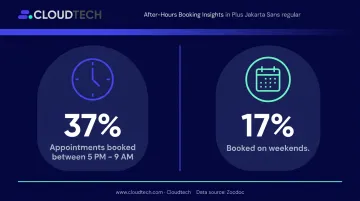
This isn't an edge case — it's the daily reality for thousands of medical practices. According to an MGMA case study of a 200-provider independent group, 13% of queued calls were abandoned before staff could answer. And Zocdoc's booking data shows that 37% of appointments are booked between 5 PM and 9 AM — hours when most practices offer no real-time response at all.
AI appointment request chatbots are built specifically for this gap. They function as a 24/7 virtual front desk: capturing booking requests, answering common questions, and routing patients — without requiring staff involvement for routine interactions.
This guide covers what these tools are, how they work, the compliance requirements practices can't skip, and how to choose and deploy one effectively.
Key Takeaways
- 13% of calls go unanswered at busy practices — AI chatbots capture those requests around the clock
- AI chatbots handle routine scheduling while staff focus on complex, high-value patient interactions
- HIPAA compliance requires every vendor handling patient data to sign a Business Associate Agreement (BAA)
- EHR integration determines whether a chatbot can actually book appointments or just collect contact details
- Deployment timelines for cloud-based solutions can be as short as four weeks
What Is an AI Appointment Request Chatbot for Medical Practices?
An AI appointment request chatbot is conversational software powered by natural language processing (NLP) that sits on your practice website, patient portal, or phone system. It handles booking requests, answers common patient questions, and routes inquiries without pulling a staff member into every interaction.
How It Differs from a Basic Booking Form
A static online form takes a patient's name and preferred time and stops there. An AI chatbot does something different: it understands varied patient phrasing, asks clarifying questions, applies your practice's specific scheduling rules, and confirms bookings in real time.
The difference matters in practice. When a patient types "I need to see someone about my knee this week," a static form has no idea what to do with that. An AI chatbot identifies the appointment category, checks provider availability against your scheduling rules, and moves the patient toward a confirmed slot.
Where These Tools Are Deployed
Medical practices currently use AI chatbots across several channels:
- Website chat widgets — the most common entry point, embedded directly on the practice homepage or booking page
- SMS/text messaging — patients text a number and interact via their messaging app
- Patient portal integration — chatbot functionality embedded within an existing patient portal login
- Voice AI — an AI-powered phone system that handles inbound calls and routes or books without human intervention
A practice handling high phone volume may need voice AI more urgently than a web chat widget — so knowing which channel fits your patient mix is the right starting point for vendor evaluation.
Why Traditional Appointment Scheduling Is Failing Medical Practices
The Phone Tag Trap
A patient calls during a busy period, leaves a voicemail, staff returns the call during the patient's work meeting, the preferred slot fills in the meantime, and the patient — frustrated — finds another provider.
The MGMA case study data puts a real number on how often this happens: 13% of calls in queue were abandoned at one 200-provider group before it centralized scheduling. That's roughly one in eight callers who simply gave up.
Staff Cognitive Load Creates Downstream Errors
When call volume spikes, front desk staff face competing demands: check-ins, insurance verification, phone calls, and patient questions — simultaneously. Under that pressure, errors multiply:
- Double bookings from manual calendar management
- Wrong appointment types scheduled for the visit reason
- Missed insurance verification before the appointment date
- Reminder calls that never happen because no one had time
Each of these errors increases no-show risk. MGMA's 2023 data puts the aggregate outpatient no-show rate at 6.81% — and intake-level scheduling mistakes are a documented driver of that number.
The After-Hours Gap Is a Revenue Problem
Zocdoc's booking data shows that 37% of appointments on their platform were booked between 5 PM and 9 AM, and 17% were booked on weekends. Patients are looking for care outside of 9-to-5 business hours. Practices without real-time scheduling during those windows don't get a second chance — patients move on to whoever responds first.
Key Benefits of AI Appointment Chatbots for Medical Practices
24/7 Patient Engagement and Appointment Capture
An AI chatbot answers at midnight on a Sunday with the same accuracy as at 9 AM Monday. For a patient searching for care after hours, that immediate response is often the difference between booking with your practice and moving on to the next result.
Practices without a real-time response mechanism simply can't capture that after-hours demand — and after-hours booking is a documented pattern, not an edge case.
Significant Reduction in No-Shows
The chatbot's confirmation and reminder workflow starts the moment a booking is confirmed. Automated reminders via text or email reduce the likelihood a patient forgets, deprioritizes, or simply doesn't hear back in time to cancel.
Peer-reviewed research consistently supports the direction of this benefit: a published study on outpatient MRI scheduling found a significant reduction in missed appointments after implementing an automated reminder system. With a baseline no-show rate around 6.81% for U.S. outpatient practices, even a modest reduction in missed appointments translates into meaningful recovered revenue and better patient outcomes.
Staff Workload Relief Without Replacing Human Staff
AI chatbots augment front desk staff — they don't replace them.
The chatbot handles:
- Routine appointment requests matching standard scheduling criteria
- Hours, directions, and parking questions
- Insurance accepted and basic eligibility questions
- Appointment reminders and confirmations
Your staff handles:
- Sensitive or complex patient conversations
- Clinical judgment calls and symptom questions
- New patient clinical intake requiring human judgment
- Escalations from any chatbot interaction that exceeds scope
The front desk team freed from repetitive booking calls can spend more time on the interactions that actually require a human.
Faster Time-to-Appointment and Better Patient Experience
When patients can self-schedule without waiting on hold, access to care improves. That friction reduction directly affects patient satisfaction and loyalty. Practices that make scheduling difficult risk losing patients who have no shortage of alternatives — particularly in competitive urban markets.
Operational Data and Scheduling Optimization
Most practices evaluate AI chatbots for their patient-facing benefits and miss a less obvious one: scheduling data. Chatbot platforms capture booking patterns that practices rarely have visibility into otherwise.
That data typically includes:
- Peak request times by day and hour
- Most-requested appointment types
- Drop-off points in the booking conversation
After six months of deployment, this operational intelligence is often among the first things practices point to when asked what surprised them about the tool.
How AI Appointment Chatbots Work: From Patient Request to Confirmed Visit
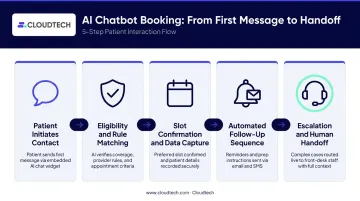
Step 1 — Patient Initiates Contact
A patient visits your website, clicks the chat widget (or calls a voice AI line), and sends a natural-language request: "I need to see someone about my knee this week." The NLP engine parses the intent, identifies the appointment category, and begins the conversation workflow.
Step 2 — Eligibility and Rule Matching
The system checks the request against your practice's scheduling logic:
- Provider specialty and availability
- Appointment duration requirements for the visit type
- Insurance eligibility
- Real-time calendar data pulled from the EHR or practice management system
Direct EHR integration is what makes this step accurate. Without a live connection to your scheduling system, the chatbot is working off a static copy of availability, which means double bookings and outdated slot information become real risks.
Step 3 — Slot Confirmation and Patient Data Capture
The chatbot presents available slots, collects necessary details (name, date of birth, insurance, reason for visit), and confirms the appointment. That data flows directly into the EHR without manual re-entry, which eliminates transcription errors from a staff member copying information from one system to another.
Step 4 — Automated Follow-Up Sequence
Upon confirmation, the chatbot triggers a preset reminder sequence via the patient's preferred channel (text or email). This replaces the manual reminder burden on staff and improves show rates without adding to the front desk workload.
Step 5 — Escalation Protocols for Human Handoff
Automation handles the routine work, but well-designed AI chatbots know where that work ends. When a request exceeds the chatbot's scope — symptoms suggesting urgency, billing disputes, or questions requiring clinical judgment — the system routes the interaction immediately to a human staff member.
The handoff should be seamless: the staff member receives full context from the conversation so the patient never has to repeat themselves. In practice, this means warm transfers that pass the complete conversation history to the live agent before they say hello. When patient data is involved, that context handoff isn't optional.
HIPAA Compliance and Data Security: What Medical Practices Must Know
HIPAA compliance is not optional for any AI tool that touches patient data. A chatbot that collects a patient's name, appointment reason, insurance details, or contact information in the context of scheduling care is handling Protected Health Information (PHI) — and your practice is liable if your vendor does not meet HIPAA standards.
The PHI Question in Chatbot Interactions
Under HHS guidance, the following chatbot-collected fields are PHI when linked to a scheduling interaction:
| Chatbot Field | PHI Status |
|---|---|
| Patient name + appointment reason | PHI — links identity to care |
| Insurance details | PHI — payment for care |
| Appointment date, provider, specialty | PHI — reveals receipt of care |
| Date of birth combined with contact info | PHI — identifiable health context |
The Minimum Due Diligence Checklist
Before deploying any chatbot that touches patient data, ask every vendor these questions:
- Does your platform sign a Business Associate Agreement (BAA)?
- How is PHI encrypted in transit and at rest?
- Where is patient data stored, and who has access to it?
- Are you built on HIPAA-eligible cloud infrastructure?
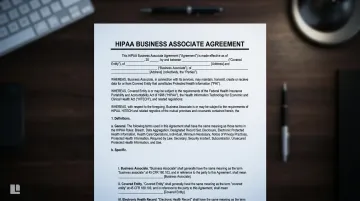
The BAA requirement is firm: under HHS rules, any vendor that creates, receives, maintains, or transmits PHI on behalf of your practice is a business associate, and a BAA must be executed before any PHI flows through their system.
Why AWS-Based Architectures Simplify Compliance
Cloud-native platforms built on AWS can be used to process and store PHI under an AWS BAA, because the following services carry HIPAA Eligible designation:
- Amazon Bedrock, Lex, and Connect — conversational AI and voice automation
- Amazon Transcribe — real-time and async speech-to-text
- Amazon S3 and KMS — encrypted object storage with key management
- AWS CloudTrail and IAM — immutable audit logging and granular access controls
These security controls are built into the infrastructure layer, not bolted on later. For medical practices, this means the compliance foundation arrives pre-built. Cloudtech deploys this stack for healthcare clients with CloudTrail audit logs retained for seven years, MFA enforcement, and Service Control Policies that restrict PHI storage to approved U.S. regions — giving practices documented, auditable evidence of compliance rather than a vendor's assurance.
How to Choose and Implement an AI Appointment Chatbot for Your Practice
Start With Your Practice's Specific Needs
Before evaluating vendors, assess what your practice actually requires:
- Solo, group, and multi-specialty practices each carry different scheduling rule complexity — size shapes everything from provider availability logic to location routing
- Phone-heavy practices may need voice AI; web-first practices should prioritize a chat widget with strong mobile support
- EHR integration depth varies significantly by vendor — confirm real-time sync before shortlisting
- Patient volume determines the load the system must handle reliably at peak hours
- Identify your highest-friction appointment types: where do patients give up or call back multiple times?
Matching tool capabilities to these specifics produces better outcomes than running through a generic feature checklist.
Key Selection Criteria
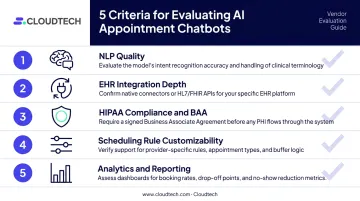
Evaluate vendors against these five factors:
- NLP quality — Can it understand natural patient phrasing, or does it require scripted inputs?
- EHR integration depth — Does it connect directly to your scheduling system in real time?
- HIPAA compliance and BAA availability — Non-negotiable; confirm before any demo
- Customizability to your scheduling rules — Provider-specific availability, appointment durations, location logic
- Analytics and reporting — Can you see booking patterns, drop-off points, and conversion data post-launch?
One factor that's easy to underestimate: the underlying cloud infrastructure. HIPAA-compliant deployments require secure, auditable environments — practices that already run on a properly configured AWS architecture have a measurably shorter path from vendor selection to go-live.
Define Escalation and Human Handoff Rules Before Go-Live
Document which conversation paths require immediate human routing before the system goes live:
- Any symptom description suggesting urgency
- Insurance discrepancies the AI cannot resolve in real time
- New patient clinical questions requiring human judgment
- Billing disputes or complaints
- Patients who are confused, distressed, or explicitly request a human
These rules should be mapped into the system before the first patient interaction, not discovered during one.
Plan Staff Communication and Training
Adoption depends on your team understanding what the chatbot does — and doesn't do. Brief your front desk staff on:
- Which interaction types the chatbot handles without escalation
- How to monitor the chat dashboard and escalation queue
- What a warm handoff looks like from their end
- How to flag conversation flows that need tuning post-launch
Once your team is trained and the system is live, the work shifts to measurement. Establish a 30/60/90-day review rhythm and track results against a clear baseline.
Measure Performance With the Right KPIs
Establish a 30/60/90-day review rhythm after deployment. Track:
- Appointment conversion rate from chat sessions
- No-show rate before and after deployment
- After-hours bookings captured
- Staff time saved on routine scheduling calls
- Patient satisfaction scores
Real interaction data from the first 90 days is what allows you to optimize conversation flows and refine escalation thresholds.
Frequently Asked Questions
Is there a ChatGPT for medical practices?
Yes. Several AI tools function similarly to general-purpose AI but are purpose-built for medical settings. They understand healthcare-specific scheduling rules, integrate directly with EHR systems, and are designed with HIPAA compliance in mind. General-purpose tools like ChatGPT are not appropriate for patient-facing scheduling workflows due to data security and compliance requirements.
Are AI appointment chatbots HIPAA compliant?
HIPAA compliance depends on the specific vendor, not the technology category. Before deploying any chatbot that collects patient information, confirm the vendor signs a Business Associate Agreement (BAA) and that PHI is encrypted in transit and at rest. Demonstrating compliance is the vendor's obligation — verify it before deployment, not after.
Will an AI chatbot replace my front desk staff?
No. AI chatbots handle repetitive, rule-based tasks like routine booking and FAQ responses — not the human judgment your team provides. Staff freed from high-volume routine calls can focus on complex patient interactions, clinical coordination, and in-person care.
How quickly can a medical practice implement an AI appointment chatbot?
Timelines vary by vendor, but cloud-based solutions with direct API connections to practice management systems typically go live in approximately four weeks. That window covers architecture setup, API integration, stress testing, and a HIPAA compliance audit.
Can AI chatbots handle scheduling for multiple providers and locations?
Yes. Modern AI appointment chatbots manage scheduling rules across multiple providers, specialties, and locations simultaneously. How well the system handles complexity depends on thorough configuration before launch — mapping each provider's availability, appointment durations, and constraints into the system.
What's the difference between a basic chatbot and an AI appointment scheduling assistant?
A basic chatbot follows rigid decision trees and can only respond to exact keyword matches. An AI appointment scheduling assistant uses NLP to understand natural patient language, applies your scheduling logic in real time, and integrates directly with the EHR to confirm bookings without human intervention. The practical difference: one handles "book appointment" as a keyword; the other handles "I need to see someone about my knee this week."