Introduction
According to Zendesk's CX Trends 2026 report, 88% of consumers now expect faster response times than they did just a year ago — and 74% expect 24/7 availability because of AI.
Traditional support models — fixed staffing, business-hour coverage, queue-based routing — simply cannot meet those expectations without adding headcount indefinitely.
Generative AI changes the equation. Unlike older rules-based chatbots that matched keywords to scripted answers, generative AI understands context, generates original natural language responses, and handles the kind of follow-up questions that break legacy systems entirely.
This guide covers exactly what you need to know:
- What generative AI for customer support actually is
- The measurable benefits for your team and customers
- The top use cases driving real adoption
- A practical five-step implementation roadmap
- The risks worth taking seriously before you build
Key Takeaways
- Gen AI understands user intent, generates human-like responses, and resolves issues end-to-end inside business systems — not just scripts and menus
- Core benefits include 24/7 availability, reduced agent workload, faster resolution, personalized interactions at scale, and measurable cost efficiency
- Top use cases: AI chatbots, real-time agent assist, automated ticket routing, sentiment detection, and self-service knowledge tools
- Successful implementation follows a phased approach: define use cases, prepare your data, integrate systems, and monitor continuously
- Human oversight remains essential; gen AI augments agents, it does not replace them
What Is Generative AI for Customer Support?
Generative AI refers to large language models (LLMs) trained on large text datasets that generate original, context-aware responses — rather than retrieving pre-written ones. NIST describes it as AI that produces new content by learning patterns from its training data, including text and other digital outputs.
In a customer support context, that means a system that reads a customer's message, understands what they actually need, and generates a specific, relevant reply — rather than selecting the closest match from a decision tree.
Generative AI vs. Traditional AI in Customer Service
Legacy chatbots operate on rules and keyword matching. Ask them something slightly unexpected and they either fail entirely or loop back to a generic menu. They break on phrasing variations, can't handle follow-up questions, and feel robotic because they are.
Generative AI handles all of this differently:
- Understands natural language — "Can you tell me why my bill is higher this month?" works just as well as "billing issue"
- Manages multi-turn conversations — it retains context across follow-up questions within the same interaction
- Adapts tone — formal with an enterprise client, casual with a consumer, empathetic when frustration is detected
- Handles edge cases — unexpected queries — ones no product team could anticipate — don't break the system
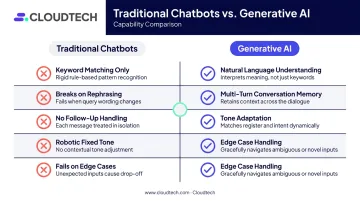
Those capabilities don't appear by magic. They come from three technical components working together.
How It Works in a Customer Support Context
- LLMs generate language understanding and response output — they're the reasoning engine behind every reply
- Retrieval-Augmented Generation (RAG) grounds those responses in your company's actual knowledge base, not the model's general training data. AWS defines RAG as optimizing LLM output by referencing an authoritative external knowledge base before generating a response
- API integrations connect the AI to CRMs, ticketing systems, and order management tools — so it can take action on requests, not just answer questions
The same model and knowledge base can run across chat, email, voice, and social messaging at once. For SMBs managing lean support teams, that kind of unified coverage used to require significant headcount. Now it doesn't.
Key Benefits of Generative AI for Customer Support
24/7 Availability Without Staffing Pressure
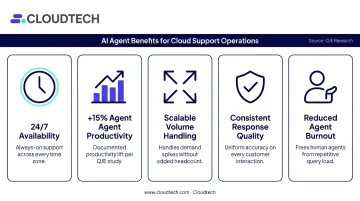
AI handles queries at 2 a.m. on a holiday with the same response quality as 10 a.m. on a Tuesday. There's no queue, no hold music, no wait. For support teams that currently experience volume spikes outside business hours, this alone changes the operational math significantly.
Agent Productivity That's Measurable
The productivity gains from gen AI aren't theoretical. A peer-reviewed field study covering 5,172 customer-support agents, published in the Quarterly Journal of Economics, found that access to a generative AI assistant increased issues resolved per hour by 15% on average. The gains were largest among newer and lower-skilled agents — meaning gen AI effectively accelerates the ramp time for less experienced staff.
The same study also found improvements in customer sentiment, fewer requests for managerial escalation, and better employee retention.
Scalability Without Linear Headcount Growth
Gen AI can absorb significant increases in support volume without a proportional increase in staff. A 3x volume spike doesn't require 3x the headcount. With the right architecture, better routing and smarter deflection let AI carry the tier-one load while your team stays focused on complex cases.
Additional benefits:
- Consistent quality: no bad days, no rushed responses during high-volume periods
- Faster first response: AI responds in seconds, not minutes or hours
- Reduced agent burnout: repetitive queries shift to AI so agents handle work that actually requires human judgment
Top Use Cases of Generative AI in Customer Support
AI-Powered Conversational Chatbots
Gen AI chatbots understand questions as they're actually phrased. A customer asking "Where's my order?" gets the same quality response as one asking "Why was I charged twice?" or "Can I swap my delivery address?" — no predefined scripts needed, and no reformatting required from the customer.
Unlike FAQ bots, they manage follow-up questions naturally. When a customer says "actually, I meant the second order," the AI understands the context and adjusts. Escalation to a human agent happens smoothly when the situation warrants it, with the full conversation history transferred.
Real-Time Agent Assist
Rather than replacing agents, gen AI works alongside them. During a live chat or call, the system:
- Surfaces relevant knowledge base articles in real time
- Drafts suggested responses the agent can send or edit
- Summarizes the customer's ticket history before the agent reads a word
- Recommends next steps based on similar resolved cases
The result: agents spend less time searching for answers and more time actually resolving issues. NewDay's Bedrock-based agent assist implementation, for example, achieved more than 90% answer accuracy — a real-world outcome from a production deployment, not a benchmark.
Automated Ticket Routing and Triage
Every support team has a version of the same problem: tickets land in a general inbox and someone has to manually sort them. Gen AI reads incoming tickets, classifies them by intent, urgency, topic, and language, then routes them to the right team or agent automatically.
The practical impact:
- First-response time drops because tickets reach the right person immediately
- Priority tickets (frustrated customers, payment issues, account compromises) get flagged before they escalate
- Agents start each ticket with context, not a blank screen
Sentiment Detection and Proactive Escalation
Gen AI detects frustration signals, urgency, and satisfaction patterns within customer messages in real time. A customer using increasingly sharp language or mentioning cancellation triggers an automatic escalation alert before the conversation goes off the rails.
This lets support systems prioritize at-risk customers automatically, without requiring a manager to manually review every conversation to catch the ones that need immediate attention.
Self-Service Knowledge and Personalized Recommendations
Beyond reactive support, gen AI helps customers find answers on their own. Smart self-service tools do this by:
- Surfacing the most relevant help articles based on specific phrasing, not just keyword matches
- Generating custom summaries rather than returning a list of links
- Incorporating prior interaction history to personalize suggestions
- Proactively suggesting solutions based on what similar customers asked
When the self-service layer is strong, ticket volume drops — and the tickets that do come in tend to be the complex ones genuinely worth a human's time.
How to Implement Generative AI for Customer Support
Step 1 — Define Use Cases and Success Metrics
Start with the highest-volume, most repetitive query types: order status, password resets, billing questions, return requests. These are the lowest-risk starting points with the clearest ROI.
Define KPIs before anything is built:
- CSAT — are customers more satisfied?
- Average handle time — are issues resolved faster?
- Deflection rate — how many tickets does AI resolve without human involvement?
- First-contact resolution — is the issue fixed in one interaction?
Without baseline measurements, you can't evaluate what the AI is actually doing.
Step 2 — Audit and Prepare Your Knowledge Base
Gen AI is only as accurate as the knowledge it draws from. Before connecting any data source to a model, audit everything:
- Are FAQs current and accurate?
- Does product documentation reflect the current product?
- Are there gaps in coverage for common query types?
- Is historical ticket data clean enough to be useful?
RAG-based systems retrieve chunks of your existing documentation and pass them to the model as context. Bad source material produces bad answers — no matter how capable the underlying model is.
Step 3 — Choose the Right Infrastructure
AWS offers a strong native stack for building gen AI customer support solutions:
- Amazon Bedrock — provides access to foundation models and powers RAG through Bedrock Knowledge Bases, connecting your company data to the model and returning responses with source citations
- Amazon Lex — handles the conversational interface layer for chat and voice, with native gen AI capabilities for building natural-language interactions
- Amazon Connect — provides the contact center infrastructure, integrating Lex and Bedrock-based agents for voice and chat channels, with Amazon Q in Connect supplying agents with generated responses and knowledge in real time
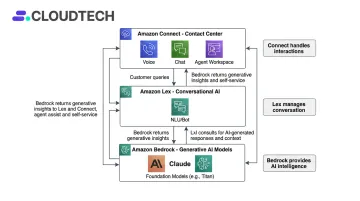
Cloudtech, as an AWS Advanced Tier Partner, helps SMBs deploy these services without the overhead that typically comes with enterprise contact center platforms. For teams without dedicated AWS architects on staff, hands-on Bedrock and Connect experience shortens the path from pilot to production significantly.
Step 4 — Deploy in Phases With Human Oversight
Don't launch across every channel simultaneously. Start with:
- One channel — web chat is the lowest-friction starting point
- One use case — pick the highest-volume query type from Step 1
- Human review enabled — agents should be able to see AI outputs, override them, and handle escalations throughout the pilot
As accuracy improves and the team builds confidence, expand to additional channels and use cases. Trying to do everything at once is the most common reason pilots fail.
Step 5 — Monitor, Measure, and Iterate
Gen AI systems degrade if left unattended. Knowledge bases go stale, new product changes create gaps, and edge cases accumulate. Post-launch operations should include:
- Review KPIs weekly against the baselines established in Step 1
- Audit every escalation and resolution failure, not just a sample
- Update the knowledge base on a regular cadence — this is ongoing maintenance, not a one-time project
- Collect feedback from agents and customers directly; they surface problems before dashboards do
Challenges and Risks to Consider
Hallucination and Accuracy
Gen AI can generate confident-sounding answers that are simply wrong. NIST's AI Risk Management Framework flags this as "confabulation" — plausible but false content that misleads users. In a customer support context, this might mean a customer receives incorrect return policy information or wrong account details.
RAG mitigates this by grounding responses in verified company documents rather than the model's general training. But RAG reduces hallucination risk — it doesn't eliminate it. Regular knowledge base audits and output monitoring remain necessary even after RAG is in place.
Data Privacy and Compliance
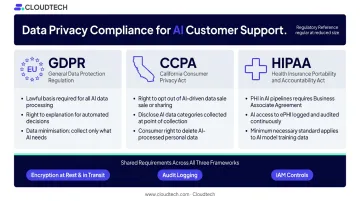
Customer interactions contain personal data. Depending on your industry and customer location, that means navigating GDPR, CCPA, or HIPAA requirements:
- GDPR requires lawful basis for processing, transparency about AI use, and individual rights management
- CCPA grants California residents rights to know, delete, and opt out of data sharing
- HIPAA applies whenever customer data includes protected health information — and any cloud provider processing that data requires a business associate agreement
For regulated industries, compliance controls — IAM policies, encryption, audit logging, and threat detection — need to be part of the initial architecture, not added after deployment. Retrofitting security into a live AI system is significantly harder and more expensive than building it in from the start.
Change Management and Team Adoption
Agents who feel threatened by AI tools tend not to use them effectively. Gartner found that 64% of customers would prefer companies not use AI in customer service — and when agents can't speak clearly about how AI is being used, that skepticism deepens.
Address adoption directly:
- Train agents on when to trust AI suggestions and when to override them
- Clarify that AI handles the repetitive work so agents can focus on interactions that actually require skill
- Give agents visibility into how the AI is performing so distrust doesn't fill the information gap
Frequently Asked Questions
How do businesses use AI for customer support?
Most teams start with chatbots for self-service, agent assist tools for live interaction guidance, and automated routing to direct tickets to the right team. The entry point is always high-volume, repetitive queries — order status, password resets, billing — with expansion into other use cases as accuracy is validated.
Which AI model is best for customer support?
The right model depends on your use case, data privacy requirements, and existing infrastructure. Common options include GPT-4 (OpenAI), Claude (Anthropic), and models available through Amazon Bedrock. Evaluate each on accuracy, response latency, cost per query, and integration fit with your existing tools and data sources.
What's the difference between generative AI and traditional chatbots?
Traditional chatbots match keywords to fixed responses — they break when customers phrase things unexpectedly. Generative AI understands natural language, generates original answers, handles follow-up questions, and can take actions inside business systems like CRMs and ticketing tools.
Can generative AI replace human customer service agents?
No — and framing it that way sets implementation up to fail. Gen AI handles repetitive, high-volume queries effectively. Human agents remain essential for complex issues, emotionally sensitive situations, and cases where empathy and judgment determine the outcome.
How long does implementation take?
A focused pilot — a chatbot handling FAQs on one channel — can go live in a matter of weeks with the right infrastructure and a clean knowledge base. Full contact center transformation across multiple channels and use cases typically unfolds over several months in deliberate phases.
What data is needed to get started?
The core inputs are historical customer queries and their resolutions, product documentation, FAQs, knowledge base articles, and relevant CRM data. Quality matters more than volume — clean, comprehensive source data produces reliable AI responses. Gaps in source documentation produce gaps in AI knowledge.