Introduction
Generic generative AI tools work fine for drafting marketing emails or summarizing public documents. The problem starts when companies try to apply those same tools to proprietary contracts, regulated patient records, or domain-specific workflows — and discover that accuracy, compliance, and business impact fall apart.
Research from Project NANDA's 2025 State of AI in Business report found that 95% of organizations receive zero measurable return from GenAI pilots, while only 5% of integrated initiatives reach production and generate meaningful P&L impact. Most projects stall not because the technology fails, but because of gaps in data readiness, architecture decisions, and governance before a single model is trained.
This guide walks through when custom GenAI development makes sense, what preparation actually looks like, the build steps that matter, and the mistakes that consistently derail projects before they reach production.
Key Takeaways
- Custom GenAI models outperform generic tools when use cases involve proprietary data or domain-specific regulated workflows
- Most teams should start with RAG plus light fine-tuning — not training from scratch
- Data preparation and governance is the biggest cost driver and the strongest predictor of project success
- Without defined success metrics and a post-launch monitoring plan, well-built models stall in pilot
- Production-grade GenAI is achievable for SMBs — managed AWS infrastructure removes the need for a large in-house ML team
When Should You Develop Custom Generative AI Models?
Custom development isn't always the right answer. For low-stakes tasks — drafting social copy, generating one-off summaries, answering generic questions — off-the-shelf tools like ChatGPT or Copilot are perfectly adequate and far faster to deploy.
The calculus changes when the cost of a wrong answer is high.
Signals That Justify Custom Development
Custom GenAI development is warranted when:
- Your data is sensitive or proprietary — contracts, patient records, pricing intelligence, IP, or confidential internal documents that cannot be sent to third-party APIs
- You operate in a regulated industry — healthcare (HIPAA), financial services, legal, or life sciences (21 CFR Part 11) where compliance constraints govern what models can process and retain
- The model needs to live inside your core product — not as an external chat tool, but embedded in a workflow where accuracy directly drives decisions
- Generic models fail on your vocabulary — specialized terminology, internal naming conventions, and domain-specific reasoning that foundation models consistently mishandle
Custom vs. Generic: Key Trade-Offs
| Factor | Custom Model | Generic Tool |
|---|---|---|
| Data control | Full ownership | Shared API processing |
| Compliance fit | Configurable | Limited |
| Domain accuracy | High (with good data) | Variable |
| Time to first result | Weeks to months | Hours |
| Competitive advantage | Durable | None — competitors access the same features |
| Ongoing maintenance | Required | Managed by vendor |
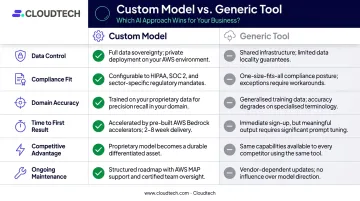
If the table tilts toward custom, the next question is how to build it — and that's where the path forward gets specific to your data, infrastructure, and compliance requirements.
What You Need Before Developing Custom Generative AI Models
Skipping readiness checks is one of the most reliable ways to blow a GenAI budget. Teams that map infrastructure, data, and compliance requirements upfront typically spend far less time — and money — unwinding decisions made on assumptions.
Infrastructure and Cloud Requirements
Minimum infrastructure for most custom GenAI projects:
- GPU-capable compute — cloud-based options via AWS SageMaker or Amazon Bedrock are preferred over on-premises for most SMBs; they reduce upfront capital cost and simplify scaling
- Vector database or search layer — required for RAG-based architectures; Amazon OpenSearch Serverless, pgvector on RDS, and Pinecone are common choices
- API gateway infrastructure — connects the model to existing CRM, ERP, or product backends; this layer needs to be designed before training begins, not retrofitted afterward
As an AWS Advanced Tier Partner, Cloudtech helps SMBs configure the right SageMaker or Bedrock environment before any model code is written — covering vector store setup and API connectivity, two components that frequently get deprioritized until they cause delays.
Data Readiness
Data readiness consistently derails projects that look viable on paper. Before training begins, organizations need to:
- Inventory all data sources — support tickets, CRM notes, contracts, knowledge bases, internal docs
- Assess quality — identify duplicates, missing fields, outdated content, inconsistent formats
- Classify sensitivity levels — determine what's PII, what's proprietary, what's public
- Establish governance rules — consent, retention policies, access controls, and deletion rights
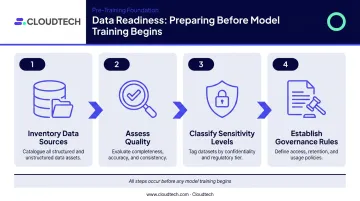
Gartner's 2024 survey of over 1,200 data management leaders found that 63% of organizations either lacked or were unsure they had the right data management practices for AI, and forecast that organizations would abandon 60% of AI projects unsupported by AI-ready data through 2026.
Team and Compliance Readiness
That data risk doesn't disappear on its own — it requires the right people to manage it. At minimum, a custom GenAI project requires:
- Data engineer — handles ingestion, preprocessing, and pipeline construction
- ML engineer or GenAI developer — manages model selection, training, and evaluation
- Product or business owner — defines success metrics, represents end users, and maintains the model post-launch
Compliance requirements must be mapped before architecture decisions are finalized. GDPR, CCPA, and HIPAA all impose specific constraints on how training data can be collected, stored, and processed — and those constraints directly affect architecture choices.
How to Develop Custom Generative AI Models: Step-by-Step
Step 1: Define Outcomes and Use Cases First
Anchor the project to one to three specific business outcomes before any model work begins. Examples that work well:
- Reduce first response time in customer support from 4 hours to 30 minutes
- Cut proposal generation from 3 hours to 20 minutes
- Auto-draft internal regulatory reports from structured data inputs
For each use case, define:
- Who will use the model
- In which tool or interface
- At what step in their existing workflow
- What "good" looks like — measurable success metrics: time saved per task, error reduction rate, or revenue impact
Without defined metrics, teams cannot distinguish a genuinely useful model from an impressive demo that never reaches production.
Step 2: Audit and Prepare Your Data
Walk through each potential data source systematically:
- List all sources — support tickets, CRM records, contracts, knowledge bases, code repositories, product specs
- Flag quality and sensitivity issues — PII, outdated content, duplicates, and format inconsistencies
- Assign a data owner accountable for quality and access decisions
- Define preprocessing steps — PII removal, deduplication, tagging, and format standardization
Data preparation typically consumes the largest share of time and budget in any custom GenAI project. Teams that allocate most of their budget to model training and assume data is "ready enough" hit expensive delays mid-build.
Step 3: Choose the Right Model Pattern
Once your data is ready, the next decision is how the model will actually work. Four patterns cover the vast majority of business use cases:
| Pattern | How It Works | Best For | Cost |
|---|---|---|---|
| Prompt Engineering | Instructions guide a foundation model's outputs | Quick experiments, simple tasks | Lowest |
| RAG | Retrieves relevant documents at inference time; no parameter updates | Knowledge retrieval, frequently-updated content, privacy-sensitive use cases | Low–Moderate |
| Fine-Tuning | Updates model parameters using a labeled domain dataset | Tone, style, domain reasoning that must be embedded, not retrieved | Moderate–High |
| Training from Scratch | Builds a model with no prior knowledge on a massive corpus | Frontier research applications | Very High |
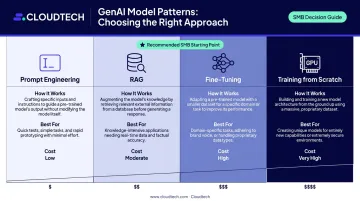
Recommended starting point for most SMBs: RAG plus light fine-tuning. This balances cost, speed, and control without requiring specialized ML research expertise. An AWS workload comparison illustrates the cost differential clearly — RAG ran at approximately $548/month versus $5,107/month for fine-tuning alone on equivalent workloads, though hybrid approaches often deliver the best accuracy-cost balance.
A Microsoft Research agriculture study found fine-tuning added more than 6 accuracy percentage points, with RAG adding another 5 — but these gains depend heavily on data quality and domain specificity.
Step 4: Build the System Architecture and Integration Layer
System design goes far beyond the model itself. Before training begins, plan:
- Hosting environment — cloud (Bedrock, SageMaker), on-premises, or hybrid
- API and gateway layer connecting the model to CRM, ERP, or product backends
- Vector search structure — embedding models, indexing strategy, and retrieval configuration
- Fallback mechanisms for low-confidence outputs or failures — feature flags and human-in-the-loop routing should be designed in from the start, not retrofitted later
Retrofitting a well-trained model into a poorly designed architecture is one of the most expensive mistakes in custom GenAI projects. Integration planning must happen before training, not after.
Step 5: Train, Evaluate, Deploy, and Monitor Iteratively
The build cycle works in stages:
- Prepare datasets — training, validation, and test sets built from real-world examples, not just clean samples
- Run experiments tracking prompt variations, hyperparameter changes, and evaluation metrics across iterations
- Have domain experts evaluate outputs for accuracy, tone, and compliance risk before wider rollout
- Add guardrails to block unsafe outputs — PII leaks, off-topic responses, and hallucinations
- Deploy to a pilot group first to validate real-world performance before full launch
- Monitor in production — track cost per request, latency (P50, P95, P99), error rates, and output quality on an ongoing basis
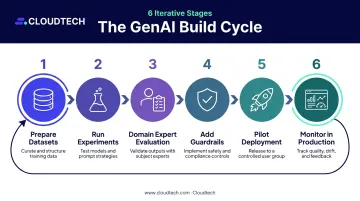
Production monitoring is not optional. Model drift is inevitable as real-world data evolves — without a scheduled retraining cadence and ongoing governance review, even well-built models degrade in quality within months of deployment.
Key Model Parameters That Shape Results
Even with good data and the right architecture, outcomes vary based on a handful of controllable variables that teams often overlook until problems appear.
Data Quality and Diversity
The single biggest predictor of model output quality is the diversity and cleanliness of training data. A model trained on narrow or biased data reflects those limitations in every response.
- Homogeneous or error-filled data produces outputs that fail on edge cases — the ones most likely to surface in production
- Poor data quality causes hallucinations, incorrect domain-specific answers, and faster model drift; improving data diversity often has a larger impact than switching to a more powerful model
- Biased training data in HR screening or lending applications creates regulatory and reputational exposure — an ACL 2024 study found LLMs showed measurable racial bias in hiring prompt experiments
Model Pattern Fit
Choosing the wrong pattern for the task wastes compute budget and increases maintenance burden — without improving accuracy. Getting this right before you build saves significant rework later.
- RAG is more cost-effective for knowledge-retrieval tasks and easier to update as internal documents change
- Fine-tuning is better when tone, style, or domain reasoning must be embedded — not just retrieved
- Mismatched pattern choices produce models that are expensive to retrain and hard to keep current, raising long-term costs and maintenance burden
Framework and Infrastructure Selection
The choice of development framework (PyTorch, Hugging Face Transformers, LangChain, LlamaIndex for RAG pipelines) and cloud infrastructure (AWS Bedrock, SageMaker, or open-source on managed compute) affects training speed, scalability, deployment flexibility, and long-term maintenance costs.
- Framework lock-in or undersized infrastructure creates bottlenecks when scaling
- CPU-only compute for large model training causes significant latency and training time overruns — always validate instance type against workload requirements before committing
- Select tools that match both current needs and projected usage growth, not just what's familiar to the team
Common Mistakes When Developing Custom Generative AI Models
Mistake 1: Starting Without a Defined Use Case and Owner
Jumping into model selection or framework debates without a specific, measurable business outcome and an assigned product owner leads directly to the pattern where projects produce impressive demos but never reach production. Project NANDA's report found only 5% of enterprise GenAI pilots reach production — lack of business ownership and unclear outcomes are consistently cited barriers.
Mistake 2: Underestimating Data Work and Skipping Governance
Teams routinely allocate most of their budget to model training while assuming data is "ready enough." In practice, data cleaning, classification, access control, and PII handling consistently consume more time and cost than projected.
Skipping governance creates real compliance exposure under GDPR, CCPA, and HIPAA. EDPB Opinion 28/2024 specifically notes that unlawfully processed personal training data can affect later deployment lawfulness — a risk that can halt production rollout entirely.
Mistake 3: Overengineering the First Version
Attempting to train from scratch, build complex agentic pipelines, or add too many features in the first iteration is a reliable way to miss timelines and exhaust budget before a single user validates the output. A leaner starting point works better:
- Start with RAG plus light fine-tuning
- Deploy to a small pilot group first
- Measure results, then expand based on evidence
Mistake 4: No Monitoring or Retraining Plan Post-Launch
Model drift is inevitable. Without continuous monitoring and scheduled retraining, even well-built custom models degrade in quality within months. A governance team reviewing outputs for accuracy and bias isn't optional — it's what keeps the model trustworthy over time. NIST's AI Risk Management Framework specifies ongoing input/output monitoring, incident tracking, and human-feedback processes as core requirements for responsible production AI — not optional enhancements.
Conclusion
Custom generative AI models deliver measurable business value when they are anchored to specific use cases, built on well-governed data, matched to the right model pattern, and integrated into real workflows. Most failures trace back to weak preparation, no clear business owner, or treating deployment as the finish line rather than the starting point.
Start small: pick one high-value, well-scoped use case, audit your data, sketch a pilot architecture, and iterate. For SMBs that want to move from concept to production without building an in-house ML team, Cloudtech's AWS-certified architects bring hands-on GenAI implementation experience to accelerate that path. Engagements typically run 2–8 weeks, delivering validated, scalable deployments on Bedrock or SageMaker. The fastest way to start is to identify one well-defined problem and get the right architecture in place around it.
Frequently Asked Questions
How long does it take to develop a custom generative AI model?
Timeline depends heavily on approach. RAG-based solutions reach a working pilot faster than fine-tuned models, which require dataset preparation, training runs, and evaluation cycles. McKinsey found most GenAI deployments take 1–4 months, with highly customized builds 1.5 times more likely to exceed five months — and top-performing mid-market companies averaged 90 days from pilot to full implementation.
What is the difference between fine-tuning and training a generative AI model from scratch?
Fine-tuning adapts an existing pre-trained model to a specific domain or task using a smaller, targeted dataset — it's faster, cheaper, and sufficient for most business applications. Training from scratch builds a model with no prior knowledge using massive datasets; Stanford's 2024 AI Index estimated GPT-4's training compute cost alone at over $78 million, excluding personnel, data, and failed runs.
How much does it cost to develop a custom generative AI model?
Costs vary significantly based on data complexity, model pattern, infrastructure, and team composition. Operating costs differ substantially by approach — AWS data shows RAG running at roughly $548/month versus $5,107/month for a continuously-hosted fine-tuned model on equivalent workloads. Data preparation and team labor typically account for the largest share of total project spend, not cloud compute alone.
What data do I need to develop a custom generative AI model?
Data should be domain-relevant, high-quality, and sufficiently diverse — common sources include internal documents, support tickets, CRM records, product specs, and knowledge bases. Before training begins, remove PII, classify sensitivity levels, and apply access controls; HIPAA, GDPR, and CCPA each impose specific requirements on how training data is handled.
Can a small or mid-sized business realistically build a custom generative AI model?
Yes — the key is starting with a RAG-based approach on managed cloud infrastructure like AWS Bedrock or SageMaker rather than training large models from scratch. Managed services handle the heavy infrastructure lifting, keeping costs and complexity within range without requiring a large in-house data science team.
What is RAG and when should I use it instead of fine-tuning?
Retrieval-Augmented Generation grounds model responses in documents retrieved from a vector database at inference time, rather than baking knowledge into model weights. Use RAG when your knowledge base changes frequently, when data privacy requires keeping content outside the model, or when you need to start quickly without a large labeled training dataset. Fine-tuning is better when consistent tone, style, or specialized domain reasoning needs to be embedded into the model itself.