Introduction
ChatGPT and similar off-the-shelf tools are genuinely capable — but they were trained on public data, not your clinical notes, financial records, or proprietary product specs. For businesses where data sensitivity, regulatory compliance, or competitive differentiation matters, that distinction has real consequences.
McKinsey's 2024 State of AI survey found that 65% of organizations regularly use generative AI — but roughly half of those deployments rely on public models with minimal customization. That gap between adoption and meaningful customization is where the competitive opportunity sits, particularly in healthcare, financial services, manufacturing, and SaaS.
If your business sits in one of those sectors, the question isn't whether to customize — it's how to do it without over-engineering the solution. This article gives you a clear-eyed view of what custom generative AI models are, when they make business sense, how to build and deploy them on AWS, and what to expect on cost and ROI. It's a practical framework for SMBs evaluating whether to move beyond off-the-shelf tools.
Key Takeaways
- Custom generative AI makes sense when data sensitivity, regulatory requirements, cost at scale, or competitive differentiation demands it
- For most SMBs, RAG or fine-tuning delivers faster results than training a model from scratch
- Data preparation is consistently the most underestimated phase of any custom AI project
- AWS services like Amazon Bedrock and SageMaker eliminate the need to manage GPU infrastructure
- Gartner reports 30% of generative AI projects are abandoned post-POC — most often due to poor data quality or unclear business value
What Is a Custom Generative AI Model — and When Should You Build One?
A custom generative AI model is an AI system shaped around your data, your rules, and your specific use cases. Unlike a generic hosted API — where you query a public model trained on general internet data — a custom model incorporates your proprietary data into how it behaves, responds, or retrieves information.
The distinction matters more than it sounds. A public API doesn't know your billing process, your clinical terminology, or your product catalog. A custom model does.
When a Custom Model Makes Business Sense
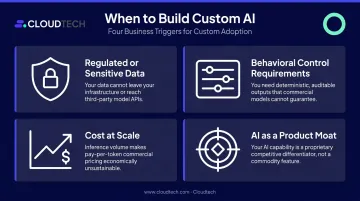
Four triggers consistently indicate a business is ready to move beyond off-the-shelf tools:
- Regulated or sensitive data — Clinical notes, financial records, and legal documents cannot be transmitted to third-party APIs without creating compliance exposure under HIPAA, SOC 2, or FINRA requirements
- Behavioral control requirements — Regulated industries need predictable, auditable AI outputs, not variable, hard-to-audit outputs from a general-purpose model
- Cost at scale — Per-token API fees become prohibitive at high call volumes; self-hosted or fine-tuned models can cut per-query costs once volume justifies the infrastructure
- AI as a product moat — When the AI capability is central to your product's value proposition, relying on a public model your competitors can also access isn't a differentiator
Once you've identified which trigger applies, the next decision is model type — open source or proprietary API.
Custom vs. Generic: Open Source vs. Proprietary Models
| Factor | Open Source (LLaMA, Mistral) | Proprietary API (OpenAI, Anthropic) |
|---|---|---|
| Customization | High — fine-tune, modify, self-host | Limited — prompt and RAG only |
| Data privacy | Full control over where data goes | Data leaves your environment |
| Licensing | Varies — check thresholds carefully (Meta's Llama 3.x requires separate licensing above 700M monthly active users) | Usage-based, managed by provider |
| Technical burden | High — you manage infrastructure and updates | Low — provider manages uptime and security |
| Vendor risk | None | Lock-in risk if provider changes terms |
The right choice depends on where you sit on two axes: how sensitive your data is and how much internal technical capacity you have. If you're processing regulated data, open-source self-hosted models on AWS offer the cleanest compliance path. If you're prototyping and sensitivity is low, a hosted API gets you running in hours with no infrastructure overhead.
How to Build a Custom Generative AI Model: Step-by-Step
Most SMBs don't need to train a model from scratch. The goal is picking the right depth of customization for the actual use case — and building toward production systematically rather than chasing the most technically impressive option.
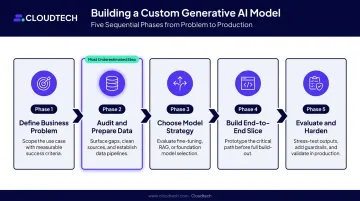
Phase 1 — Define a Specific Business Problem
The most reliable way to waste a generative AI budget is to start with the technology and work backward to a use case. Start instead with one measurable problem:
- "Reduce average handle time for billing support tickets from 12 minutes to under 5"
- "Automate first-pass triage of clinical intake documents before provider review"
- "Generate draft RFQ responses from product spec sheets without manual writing"
Each of these has a specific workflow, a user group, and a metric. Vague mandates — "we need AI" — produce vague outcomes.
Phase 2 — Audit and Prepare Your Data
Data quality is the actual differentiator between a generic model and a genuinely useful custom one. This phase is consistently underestimated. Data professionals report spending roughly 37.75% of their time on preparation and cleansing — and for good reason.
Before any model work begins, you need to:
- Identify internal data sources — tickets, CRM records, EHR documents, product logs, contracts
- Check access rights and compliance — verify HIPAA BAAs are in place, confirm data can be used for training under existing agreements
- Clean and deduplicate — remove noise, resolve inconsistencies, eliminate duplicate records
- Anonymize sensitive fields — de-identify PHI, mask PII, ensure training data doesn't expose regulated information
- Document ownership — who owns each dataset, what the update cadence is, and who authorizes changes
In Cloudtech's engagements, data preparation routinely consumes more time than model configuration — it's where most projects are won or lost.
That tracks with the broader picture: Gartner found that 63% of data management leaders lacked or were unsure they had appropriate AI data management practices — a gap that directly causes projects to stall or fail post-proof-of-concept.
Phase 3 — Choose Your Model Strategy
Three tiers, meaningfully different in cost and complexity:
| Tier | What it involves | Best for |
|---|---|---|
| Prompt engineering + RAG | Smart system prompts, retrieval-augmented generation from your document corpus | Fast pilots, knowledge retrieval, document Q&A |
| Fine-tuning a foundation model | Adapt a base model (LLaMA, Mistral, or a Bedrock-supported model) on domain-specific examples | Specialized behavior, format, style, task performance |
| Training from scratch | Build a model starting from random weights | Rare — requires massive datasets, compute budgets, and ML research depth most businesses don't need |
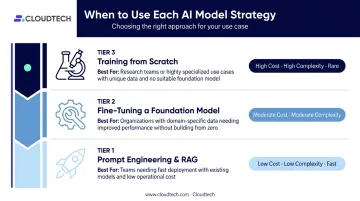
Most SMBs should start at Tier 1 or 2. Hugging Face notes that fine-tuning requires "far less compute, data, and time" than pretraining — it's the practical path to meaningful behavioral customization without a research team.
Phase 4 — Build a Thin End-to-End Slice First
Before scaling, build a minimal working prototype on a single user journey. This reduces wasted spend and proves the concept in the real environment — not a sanitized demo.
For document-based use cases, this typically involves:
- Amazon S3 as the document corpus
- Amazon Bedrock Knowledge Bases as the managed retrieval layer
- Amazon OpenSearch Serverless for vector indexing and semantic search
- Amazon Textract for extracting structured content from PDFs and scanned documents
- AWS Lambda and Step Functions for orchestrating multi-step query workflows
Frameworks like LangChain and LlamaIndex can accelerate pipeline assembly — treat them as building blocks, not requirements.
Cloudtech's healthcare SaaS implementation followed this pattern: Bedrock Agents connected to indexed S3 content and Redshift datasets, with OpenSearch handling near-real-time indexing. The result was a GenAI assistant that reduced support tickets by 45% within two months while maintaining full HIPAA compliance.
Phase 5 — Evaluate, Harden, and Plan for Rollout
Getting to a working demo is progress — getting to a production system requires a different checklist:
Evaluation checklist:
- Test against real edge cases, not curated examples
- Track hallucination rates — RAG-grounded responses are inherently more reliable than pure generation
- Benchmark latency under realistic load
- Run side-by-side comparison against the existing process
Rollout planning questions:
- Which team or workflow goes first?
- How do users escalate when the model produces a wrong or uncertain answer?
- What KPIs will you track in the first 30 and 90 days?
- Who owns ongoing monitoring?
Most of what separates a demo from a trusted production system is operational discipline, not engineering complexity.
Deploying Your Custom Generative AI Model on AWS
For most SMBs, cloud deployment eliminates the need to manage GPU infrastructure while providing enterprise-grade security, scalability, and monitoring. AWS is the leading platform for this work, with three services doing most of the heavy lifting:
- Amazon Bedrock — managed foundation model access, customization, and inference, including fine-tuning support for selected models and on-demand or provisioned throughput
- Amazon SageMaker — broader model building and deployment control, with JumpStart providing foundation models integrated with training pipelines
- AWS Lambda — business logic layer for Bedrock agent action groups and API integration
Key Deployment Decisions
- Dedicated endpoints vs. serverless — dedicated inference endpoints offer lower latency for high-traffic use cases; serverless is cost-efficient for variable or low-volume workloads
- Model versioning and rollback — always maintain the ability to revert to a previous version if a model update degrades performance
- System integration — connecting the deployed model to CRM, EHR, or ticketing platforms via well-designed APIs is often harder than building the model itself
These deployment decisions feed directly into your security configuration — and for regulated industries, the two can't be treated separately.
Security and Compliance on AWS
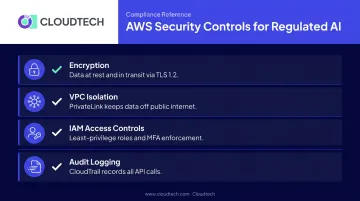
For healthcare and financial services clients, the configuration matters as much as the platform. Key controls:
- Encryption — Bedrock encrypts data at rest and in transit; TLS 1.2 is enforced across inter-network traffic
- VPC isolation — AWS PrivateLink connects a VPC privately to Bedrock without an internet gateway, keeping data off the public internet
- IAM access controls — role-based access with least-privilege principles, MFA enforcement, and regular access reviews
- Audit logging — SageMaker integrates with CloudTrail, which records all API calls for compliance evidence
Important: AWS Bedrock and SageMaker AI are HIPAA-eligible services — but eligibility is not automatic compliance. Organizations handling PHI must execute an AWS Business Associate Addendum and configure the deployment correctly. The shared responsibility model means your compliance status depends on how you build it.
Cloudtech's team — AWS-certified architects, 70% of whom are former AWS employees — configures and deploys these environments with HIPAA, SOC 2, and FINRA requirements addressed from the start of every engagement.
Understanding the Cost and ROI of Custom Generative AI
Cost Drivers to Plan For
Beyond initial development, the main ongoing costs are:
- Compute — GPU hours for training and inference
- API fees — per-token costs if using hosted models at scale
- Data preparation and labeling — consistently the most underestimated line item
- Maintenance and retraining — models drift; business requirements change
IDC reported $82 billion in AI compute and storage hardware spending in Q2 2025, up 166% year-over-year. That growth reflects cloud provider investment, which translates to increasingly capable managed services — but compute costs remain a real budget variable worth planning for.
A Simple ROI Framework
(Total annual benefits − Total annual costs) ÷ Total annual costs
Break benefits into three buckets:
| Benefit Bucket | Examples |
|---|---|
| Productivity gains | Hours saved per team member on manual tasks |
| Revenue uplift | New features enabled, faster conversion, higher retention |
| Cost avoidance | Fewer errors, reduced third-party licensing, lower headcount for repetitive tasks |
Set realistic payback expectations based on investment scope:
- Pilot-level investments: Target 6–12 month payback
- Platform-level investments: Target 24–36 months
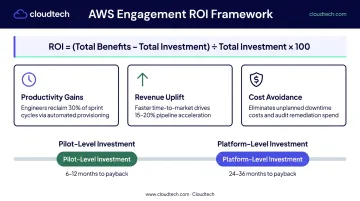
If a use case can't plausibly hit those ranges, deprioritize it.
Worth keeping in mind: Deloitte found that only 15% of generative AI users reported significant, measurable ROI in 2025, with 38% reporting modest ROI. Use that data to sharpen your scope — start with use cases where the benefit is concrete, measure outcomes from day one, and build confidence before scaling.
Key Challenges — and How to Overcome Them
Data Quality and Governance
Poor data quality is the most common reason custom AI projects underperform or get abandoned. Good data governance before model work means:
- Clear data ownership — someone accountable for each dataset
- Documented cleaning processes — reproducible, not ad hoc
- Privacy compliance review — completed before training begins, not after
- Ongoing refresh cadence — stale training data produces stale outputs
This investment pays off in model accuracy and regulatory defensibility. Gartner predicts that through 2026, organizations will abandon 60% of AI projects unsupported by AI-ready data.
Integration Complexity
Connecting a custom model to ERP, CRM, or EHR systems is frequently harder than building the model itself. The technical side is challenging enough — but the organizational side is often underestimated. Common integration hurdles include:
- API design mismatches between the model and existing systems
- Data flow architecture gaps across ERP, CRM, or EHR platforms
- Schema conflicts that require manual mapping or transformation layers
- User adoption gaps — teams need to trust the output and know how to escalate edge cases
Build the integration and the change management plan simultaneously, not sequentially.
Talent and Ongoing Maintenance
There's a meaningful gap between building a proof of concept and maintaining a production AI system. Models drift as data patterns shift, and business requirements rarely stay static. Deloitte identifies insufficient worker skills as the largest barrier to integrating AI into existing workflows.
The make-vs-buy question for ongoing maintenance depends on whether AI capability is a strategic core competency or an operational tool. For most SMBs, partnering with a specialized team for maintenance — while building internal literacy — is more cost-effective than hiring a full ML engineering function. Cloudtech structures this handoff deliberately: internal teams get documentation, training, and architecture walkthroughs so they can operate their AI systems independently — without staying locked into outside support.
Frequently Asked Questions
How much does it cost to build a custom generative AI model?
Costs depend on scope. A focused pilot using RAG or fine-tuning typically costs far less than a full platform with deep system integration, multiple custom models, and high traffic volumes. Compute, data preparation, and ongoing maintenance are the key cost drivers beyond initial development — plan for all three, not just the build.
Is ChatGPT an LLM or a generative AI model?
It's both. ChatGPT is a large language model (LLM) — and LLMs are a subset of generative AI specifically trained on text data to generate language. Generative AI is the broader category that also includes image, audio, and code generation.
What is the difference between fine-tuning a model and training one from scratch?
Fine-tuning starts with an existing foundation model and adapts it to your domain using your own data — it's faster and far less expensive than training from scratch. Training from scratch builds a model with no pre-existing weights, requiring massive datasets, compute budgets, and ML research depth that most businesses don't need and can't justify.
How long does it take to build and deploy a custom generative AI model?
A focused pilot using RAG or fine-tuning can reach production in roughly 6–12 weeks, depending on data readiness and deployment complexity. AWS reports that some Generative AI Innovation Center projects moved from concept to production in 45 days. Full custom platforms with deep integration typically take 3–9 months.
Can small and mid-sized businesses realistically benefit from custom generative AI?
Yes — particularly through targeted use cases like automating customer support, internal knowledge retrieval, or document processing. Cloud-based deployment on AWS eliminates hardware overhead, and fine-tuning a foundation model is far more accessible than it was two years ago. Start with a specific, measurable problem — not a general mandate to "add AI."