What Is an AI Service Desk?
IT support teams are under real pressure. Ticket volumes keep climbing, staff handle the same password reset requests dozens of times a day, and employees wait hours — sometimes longer — for resolution on issues that should take minutes.
Not all service desk tools work the same way. Here's how they differ:
- Traditional help desk: Human agents manually triage every incoming request
- AI help desk: Automation answers common questions and guides basic troubleshooting
- AI service desk: Uses natural language processing (NLP), machine learning, and generative AI to receive, classify, route, and fully resolve requests — often with no human involvement at all
Where a help desk reacts, an AI service desk manages broader operational workflows: incident management, self-service fulfillment, access provisioning, onboarding sequences, and cross-system automation. Rather than a chatbot with a ticketing system bolted on, it's a service-management layer that learns and improves with every interaction.
Key Takeaways
- AI service desks automate request intake, classification, routing, and resolution end-to-end
- Cost-per-ticket drops significantly as AI handles high-volume, low-complexity requests without added headcount
- Round-the-clock support becomes possible without scaling your team
- Native integrations connect AI service desks to your existing ITSM tools, chat platforms, and cloud infrastructure
- The right platform depends on your use case (customer-facing vs. internal IT), team size, and compliance needs
How Does an AI Service Desk Work?
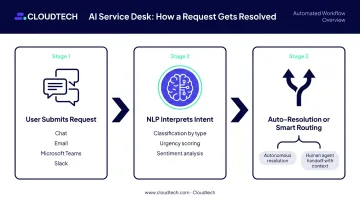
Here's how a typical request moves through the system:
- User submits a request via chat, email, a self-service portal, or a tool like Microsoft Teams or Slack
- NLP interprets intent — the system reads the message, identifies what the user needs, and classifies the request by type, urgency, and sentiment
- Automatic resolution or intelligent routing — if the system can handle it (password reset, software access request, FAQ), it resolves autonomously; if not, it routes to the right human agent with full context already attached
The Learning Layer
Machine learning keeps the system improving. Every resolved ticket becomes training data — the system gets better at recognizing recurring issues, refining classification accuracy, and identifying the fastest resolution path for similar future requests. A 2026 peer-reviewed ITSM study found that AI-based classification reached 95.6% accuracy in real-world deployments — a benchmark that would be difficult to match with manual triage at scale.
Beyond Routing: Workflow Execution
That accuracy matters most when it feeds into execution. Routing is just the starting point — when a request arrives for new software access, an AI service desk can trigger a multi-step workflow automatically:
- Verify the user's identity
- Check approval rules against policy
- Provision the license in the relevant system
- Notify the user of completion
The same logic applies to onboarding sequences, record updates, and password resets — each resolved without a human queue or manual handoff.
Key Features of an AI Service Desk in 2026
Intelligent Triage and Smart Routing
Incoming requests carry more signal than most teams extract from them. An AI service desk reads intent, sentiment, and urgency in parallel — then routes the request to the right team or self-service flow without anyone sorting tickets manually. This alone eliminates a significant source of delay and misrouting.
AI-Powered Self-Service and Virtual Agents
Virtual agents handle common requests around the clock: password resets, software access, FAQ responses, account lookups. They're accessible through chat interfaces, web portals, Microsoft Teams, and Slack. Users get immediate answers at 2 a.m. on a Sunday without waiting for business hours.
Automated End-to-End Resolution Workflows
System integrations let the desk complete multi-step requests on its own. Onboarding a new employee? The AI service desk can create accounts, assign software licenses, configure permissions, and send welcome instructions — triggered by a single HR system event.
AI Knowledge Base and Real-Time Guidance
The platform connects to internal knowledge repositories and retrieves relevant articles, troubleshooting steps, and suggested responses — both to end-users during self-service and to live agents mid-conversation. Less time searching for agents means faster answers for users.
Built-In Analytics and Predictive Insights
Real-time dashboards track:
- Ticket volume and trends
- Resolution rates and SLA adherence
- Automation success rates
- Recurring issue patterns
Predictive AI goes a step further — spotting clusters of related incidents before they escalate into a major outage.
AI Quality Assurance and Sentiment Analysis
AI evaluates conversation quality at scale, flags compliance risks, detects negative sentiment before a situation deteriorates, and surfaces coaching opportunities for agents — without requiring a manager to manually review every ticket.
Benefits of an AI Service Desk
Faster Resolution and 24/7 Availability
AI handles repetitive requests instantly, at any hour, without adding headcount. The impact on resolution times can be dramatic. Qualfon, an IT services organization, cut average resolution time from 16 hours to 4 hours across more than 10,000 monthly tickets after deploying AI-powered service management — a 75% efficiency increase by their own measurement.
Significant Cost Reduction
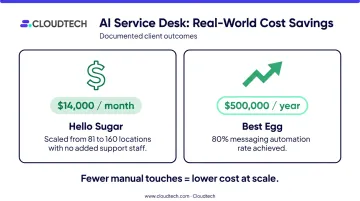
Automating high-volume, low-complexity tickets reduces cost-per-ticket and overall support operating costs. Three vendor-reported examples show the range of impact:
- Hello Sugar (Zendesk): $14,000 in monthly savings, scaling from 81 to 160 locations without adding reception staff
- Best Egg (financial services): $500,000 in annual savings through 80% messaging automation
- The pattern: fewer manual touches per ticket means lower operating costs at scale
Improved Agent Productivity and Job Satisfaction
When AI absorbs password resets and routine access requests, human agents handle fewer interruptions from low-value work. They focus on complex, sensitive issues that actually require judgment and empathy — the work most agents find meaningful. The result is measurably better output and lower turnover, not just a better experience.
Scalability Without Operational Strain
Request volume doesn't scale linearly with headcount when AI handles the bulk of routine work. This makes AI service desks especially valuable for SMBs experiencing rapid growth or seasonal demand spikes — teams that can't afford to hire their way through every volume increase.
Consistent Service Delivery, Built on Real Data
Without AI, similar tickets get handled differently depending on which agent picks them up. AI standardizes workflows across channels, and built-in analytics create a continuous feedback loop — so the system improves based on what's actually happening, not guesswork.
Common AI Service Desk Use Cases
IT Support and Incident Management
When multiple users report login failures within minutes of each other, an AI service desk can detect the pattern, group the tickets, flag a potential outage, and route to the right team — before the issue becomes a full-scale incident. Ticket deduplication alone cuts noise in high-volume environments.
Employee Onboarding, Offboarding, and Access Management
Multi-step workflows that previously required coordination between IT and HR can run automatically, including:
- Creating accounts and assigning software licenses on day one
- Revoking access and reclaiming assets during offboarding
- Routing approval requests without manual follow-up
ServiceNow documents employee-service workflows and AI-supported request fulfillment as core capabilities. Both IT and HR teams spend less time on coordination and more time on higher-value work.
Customer Support Automation
Customer-facing teams in retail, SaaS, e-commerce, and financial services use AI service desks to resolve order inquiries, account questions, and common issues through conversational AI. Lightspeed Commerce reported that Intercom's Fin AI agent resolves 45%–65% of support volume while being involved in 99% of conversations — freeing agents to focus on complex, relationship-sensitive issues.
Top AI Service Desk Tools of 2026
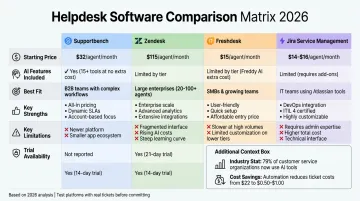
The right tool depends on your use case (customer-facing vs. internal IT), team size, integration requirements, and AI maturity. Here's a quick comparison based on current vendor pricing:
| Tool | Best For | Starting Price | Free Trial |
|---|---|---|---|
| Zendesk | Omnichannel CX + employee service | $19/agent/month | 14 days |
| Freshdesk | Ticket-based multichannel support | $0 (Free tier) | 14 days |
| ServiceNow | Enterprise ITSM | Custom quote | Demo only |
| Intercom | Messaging-first SaaS support | $0.99/outcome (Fin) | 14 days |
| SysAid | IT-focused internal service desks | $89/agent/month | Available |
Zendesk
Zendesk covers both customer-facing and employee service channels in a single platform. Native AI agents handle messaging, email, and voice; AI Copilot assists live agents in real time; and intelligent triage, knowledge management, and QA are built directly into the agent workspace.
Best for organizations needing omnichannel AI service at scale. Note that AI Copilot runs an additional $50/agent/month on top of base plans.
Freshdesk
Freshdesk works well for ticket-based customer support across multiple channels. Freddy AI handles automated resolution and agent productivity tasks like summaries and response suggestions.
The AI features skew assistive rather than fully autonomous. It's a practical fit for teams building toward automation, not those who need full self-resolution today.
ServiceNow
ServiceNow is built for enterprise ITSM with extensive workflow automation, asset management, and IT governance. Virtual Agent, Now Assist, Predictive Intelligence classification, and AI search are all documented capabilities.
Best for larger organizations with complex, process-heavy environments. No public pricing and no free trial reflect the enterprise sales motion.
Intercom
Intercom's Fin AI agent answers email, chat, and phone, takes actions in connected systems, and hands off unresolved work to humans. It's purpose-built for messaging-first and SaaS customer support.
Usage-based pricing ($0.99 per outcome) can escalate quickly at high volume. Intercom also lacks the ITSM depth you'd find in ServiceNow or SysAid.
SysAid
Best for IT-focused internal service desks. Ticket management, asset tracking, workflow automation, and SLA tools are core strengths. SysAid Copilot summarizes tickets, suggests replies, and provides contextual assistance within service desk workflows. Not designed for customer-facing CX use cases or unified customer/employee service management.
How to Choose the Right AI Service Desk for Your Business
Evaluation Criteria That Actually Matter
- Ease of use and time to value — SMBs need fast setup. A platform that takes months to configure before delivering value isn't a good fit for lean teams.
- Feature alignment with your use case — Customer support and internal IT require different capabilities. Prioritize platforms built for your primary scenario, not ones that claim to do everything equally well.
- Security and compliance requirements — Healthcare, financial services, and manufacturing organizations face HIPAA, SOC2, and related requirements. The platform needs documented compliance capabilities, not just a checkbox on a features page.
- Total cost of ownership — Seat fees are just the starting point. AI usage charges, add-on modules, and integration costs often exceed base subscription costs at scale.
The Integration Question
An AI service desk that can't connect to your existing environment creates more problems than it solves. At minimum, it should integrate with your ITSM platform, HRIS, CRM, and communication tools like Teams or Slack. For organizations already running workloads on AWS, the underlying infrastructure often determines how well service desk AI performs. Services like Amazon Lex (conversational interfaces), Amazon Connect (omnichannel contact center), Amazon Bedrock (generative AI foundation models), and Amazon Q (enterprise knowledge assistance) can power or substantially enhance service desk AI capabilities — giving you more control over how the AI is grounded and governed.
Working with an AWS Consulting Partner
For SMBs implementing an AI service desk on AWS — particularly in healthcare, financial services, or manufacturing — compliance requirements add real complexity to the build. Working with an AWS consulting partner can accelerate deployment and reduce setup risk significantly.
Cloudtech, an AWS Advanced Tier Partner based in New York, brings relevant experience to this work:
- Team comprised primarily of former AWS employees with hands-on AWS architecture expertise
- Completed HIPAA-compliant AI and automation implementations for healthcare and life sciences clients
- Experience with clinical document AI, data modernization, and generative AI on Amazon Bedrock
- Focused exclusively on SMBs, so engagements are scoped and priced accordingly
That background translates directly to AI service desk builds where compliance, security, and cloud architecture aren't optional. Reach out to Cloudtech to discuss your specific requirements.
Frequently Asked Questions
What is the difference between an AI service desk and a traditional help desk?
A traditional help desk relies on human agents to manually triage, prioritize, and respond to every request. An AI service desk uses NLP, machine learning, and automation to classify, route, and resolve requests autonomously — handling far greater volume with significantly faster resolution times.
How does an AI service desk reduce IT support costs?
AI handles high-volume repetitive tasks — password resets, ticket routing, access provisioning — without human involvement. That reduces the number of agents needed, lowers cost-per-ticket, and frees existing staff for complex work that requires their expertise.
What AI features should I prioritize when evaluating service desk tools?
Five capabilities drive the majority of measurable efficiency gains:
- Intelligent triage and routing
- Self-service virtual agents
- Automated end-to-end resolution workflows
- Knowledge base integration
- Built-in analytics with continuous learning
Can small businesses benefit from an AI service desk?
Yes — SMBs often benefit most. AI service desks let small teams scale support operations without proportionally increasing headcount, and many platforms (Freshdesk, Zendesk, Intercom) offer affordable, fast-to-deploy options suited to lean teams with limited IT resources.
Will AI replace human agents in the service desk?
Gartner forecasts that agentic AI will autonomously resolve 80% of common customer-service issues by 2029. Human agents remain essential for complex, sensitive, or emotionally nuanced issues — the best platforms are built to augment them, not replace them.
How long does it take to implement an AI service desk?
Simple SaaS deployments can be live in days. Enterprise integrations with existing ITSM tools, knowledge bases, and cloud infrastructure typically take several weeks or longer. Working with specialists who know both the platform and your environment can cut that timeline considerably.