The problem is that adding a chatbot and having it actually work are two different things. Pasting a code snippet takes minutes. Getting the bot to answer accurately, represent your brand, and not frustrate visitors takes real planning.
This guide covers the exact steps to integrate a chatbot into a small business website — what to prepare beforehand, how to choose the right tool, and what separates chatbots that deliver results from ones that get turned off after a month.
Key Takeaways
- Chatbot success starts with one clearly defined use case — broad scope is the fastest path to failure
- Match the chatbot type to the task: rule-based for FAQs, conversational AI for intake, agentic for multi-step workflows
- Training data quality determines answer quality more than platform choice
- Always build a human escalation path before launch — 53–77% of users report frustration when a chatbot offers no way out
- Post-launch monitoring is not optional — a static chatbot becomes less useful every month
How to Integrate a Chatbot into Your Small Business Website
Step 1: Define Your Goals and Intended Use Case
Before evaluating a single platform, write down the specific problem your chatbot will solve. Vague objectives — "improve customer experience" or "be more responsive" — produce chatbots trained too broadly to do anything well.
Common starting points that work:
- FAQ deflection — handling repeated questions about hours, pricing, return policies
- Lead qualification — capturing contact details and intent signals from site visitors
- Appointment booking — connecting visitors to a scheduling tool in real time
- After-hours support — answering predictable questions when staff are unavailable
Once you have the use case, define what success looks like in measurable terms. Useful KPIs include:
- Deflection rate — percentage of inquiries resolved without staff involvement
- Lead capture volume — number of qualified contacts collected per week
- Response time reduction — time-to-first-response before and after deployment
This step determines which chatbot type fits — and getting it wrong means rebuilding from scratch.
Step 2: Choose the Right Chatbot Type and Platform
There are three categories small businesses encounter:
| Type | How It Works | Best For | Main Risk |
|---|---|---|---|
| Rule-based | Fixed menus, decision trees | Narrow FAQs, routing, form-style lead capture | Fails outside anticipated paths |
| Conversational AI | NLP interprets natural language and context | Broader FAQ search, flexible intake | Inaccurate answers if training data is weak |
| AI agent | Autonomously completes multi-step tasks with tools | Booking, account actions, complex resolution | Higher cost, permissions, control risk |
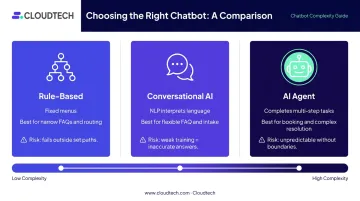
Buy the least autonomous system that safely meets your goal. A rule-based bot handles a narrow FAQ list reliably and cheaply. An AI agent deployed without clear boundaries will behave unpredictably.
When evaluating platforms, focus on:
- Ease of setup — no-code options (Tidio, Freshchat, Intercom) versus developer-required builds
- Tool integrations — CRM, email, scheduling software compatibility
- Pricing structure — costs are charged per seat, per conversation, or per outcome; model against your expected volume before committing
- Data handling — confirm whether the vendor trains on your conversation data and what compliance certifications apply
Most small businesses use a third-party platform rather than building custom. The tradeoff is speed and cost versus flexibility. Use free trials to test two or three options before committing.
Step 3: Design the Conversation Flow and Train the Bot
Conversation flow design is where most small business chatbot deployments succeed or fail. Three specific failure patterns appear repeatedly:
- Flows too linear — cannot handle varied phrasing of the same question
- Flows too broad — the bot tries to handle everything and handles nothing well
- Flows with no escalation path — users hit a dead end and leave
Design the human handoff before anything else. Define what triggers escalation (unrecognized intent, sensitive topics, purchase decisions), what information passes to the human agent, and how quickly the handoff happens.
For training, use content you already have:
- FAQ pages
- Product and service descriptions
- Support ticket history
- Booking or intake forms
IBM identifies completeness, accuracy, and timeliness as the critical data quality dimensions for AI systems — which means outdated pricing pages or vague service descriptions produce vague, inaccurate answers. Audit your content before training begins, not after.
Step 4: Embed the Chatbot on Your Website
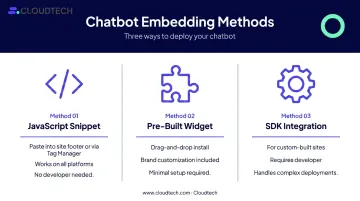
Three primary embedding methods cover most scenarios:
- JavaScript snippet — paste into the site footer or via Google Tag Manager; works on virtually every platform with no developer needed
- Pre-built widget — drag-and-drop installation with brand customization; minimal setup
- SDK integration — for custom-built sites or more complex deployments requiring developer involvement
Platform-specific compatibility is well established. Tidio, for example, supports WordPress (via plugin or manual JS), Squarespace (JS snippet), Wix (JS), and Shopify (official app or manual JS). Most platforms provide step-by-step instructions for each environment.
Placement matters. Bottom-right corner is the standard position — users expect it there. Beyond default placement, consider:
- Triggering on the pricing page after 30 seconds of scroll
- Appearing at checkout to reduce cart abandonment
- Activating on contact pages as an alternative to form submission
Step 5: Test, Monitor, and Continuously Optimize
Before going live, run structured tests:
- Submit the most common user queries and verify accuracy
- Simulate edge cases and unexpected phrasing
- Test the full escalation path — does it actually reach a human?
- Check behavior on both desktop and mobile
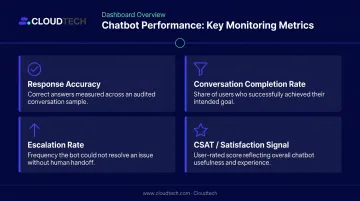
Once the bot is live, shift to ongoing monitoring. Track four metrics that reveal where it needs refinement:
| Metric | What It Tells You |
|---|---|
| Response accuracy | Whether answers are correct on audited sample |
| Conversation completion rate | Whether users achieve their intended goal |
| Escalation rate | How often the bot cannot resolve without human help |
| CSAT / satisfaction signal | Whether users found the experience useful |
A chatbot left static degrades. Schedule quarterly reviews at minimum to keep it accurate and useful:
- Update training data as products, pricing, or policies change
- Revise flows based on real conversation logs
- Add new capabilities only after the core use case performs consistently
When Should Small Businesses Add a Chatbot to Their Website?
A chatbot makes sense when your business handles a consistent volume of repetitive, predictable inquiries — hours, pricing, return policies, appointment availability — that pull staff away from higher-value work. It's also worth adding one when visitors regularly need support outside business hours and no one is available to respond.
Signs a chatbot will add value:
- Staff answer the same 10–15 questions repeatedly every week
- Website traffic peaks at times when no one is available to respond
- Lead forms go unfollowed for hours or overnight
- Appointment scheduling requires back-and-forth that a booking tool could handle
Signs a chatbot isn't the right fit yet:
- Every inquiry is highly customized or relationship-dependent
- Your audience is not comfortable interacting with automated tools
- Mishandled responses carry regulatory risk — healthcare and legal contexts often require human judgment, HIPAA compliance, and documented oversight that no chatbot should bypass
These two lists point to the same underlying rule: business size matters less than inquiry volume and repetition. A solo operator with high site traffic and predictable questions may benefit more than a 20-person team handling only bespoke, high-touch work.
Key Factors That Determine Chatbot Performance After Integration
Setup gets the chatbot live. These factors determine whether it stays useful.
Training Data Quality
Training data is the single biggest performance variable. A chatbot trained on vague, incomplete, or outdated content will give inaccurate answers regardless of which platform it runs on.
Before training begins:
- Audit FAQ content for accuracy and completeness
- Update product descriptions, pricing, and policies
- Remove contradictory or outdated information
- Organize content by topic so the bot can map intent to answers
Conversation Flow Design
Poorly designed flows create dead ends, confusion, and drop-offs. The most effective flows are scoped tightly to what the bot does well, not stretched to cover every possible question. Each flow should have a clear escalation point before the user runs out of options.
Integration with Business Tools
A chatbot connected to your CRM logs leads automatically. One linked to a scheduling tool books appointments in real time. One synced with a product database gives accurate availability answers. Without these integrations, the bot can only serve static information, which limits what the bot can actually do.
Cloud Infrastructure and Hosting Environment
For small businesses deploying conversational AI or AI agents, the backend infrastructure shapes reliability, response speed, and data security. Concurrent session handling, latency under load, and compliance with data regulations (HIPAA, GDPR, PCI DSS) are not automatic. Each requires deliberate setup.
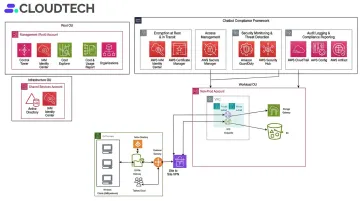
AWS provides the architecture for scalable, compliant AI workloads, but as AWS documentation makes clear, customers remain responsible for configuring services correctly and executing required agreements. For SMBs scaling cloud infrastructure, an AWS-certified partner like Cloudtech can assess the existing environment, identify gaps, and implement the right backend configuration. That typically covers:
- Encryption at rest and in transit via AWS KMS
- Access controls through IAM policies
- Compliance monitoring via AWS Security Hub
- Audit logging through CloudTrail
Common Mistakes Small Businesses Make When Integrating Chatbots
Most chatbot failures trace back to a handful of avoidable decisions. Watch for these three:
Launching without a defined scope. An undefined use case produces a bot trained too broadly, with inconsistent answers that frustrate visitors. Start with one focused problem, prove value, then expand.
Choosing the wrong chatbot type. A rule-based bot fails when users ask open-ended questions. An AI agent without workflow boundaries behaves unpredictably. Matching capability to actual need — covered in Step 2 — is the most consequential decision in the process.
Treating deployment as a one-time task. User behavior shifts, product details change, and questions evolve. A bot that isn't revisited regularly becomes less accurate month over month. Schedule a review cadence — monthly at minimum — before you launch.
Conclusion
Integrating a chatbot into a small business website works when it starts with a clearly defined use case, uses a platform matched to that use case, and is supported by well-designed conversation flows and accurate training data. Underperforming chatbots almost always trace back to gaps in one of those three areas.
The businesses that see lasting results treat chatbot integration as an ongoing process — monitoring performance, refining flows based on real user behavior, and expanding scope incrementally as results justify it. Start narrow, measure what matters, and let actual user behavior guide where you expand next.
Frequently Asked Questions
Can you integrate a chatbot into your website?
Yes. Most modern websites support chatbot integration through a JavaScript snippet or pre-built widget provided by the chatbot platform. This approach works with WordPress, Wix, Squarespace, and Shopify with no advanced coding required.
What data privacy rules apply to chatbots on small business websites?
Your chatbot will handle customer conversations that may include names, emails, and purchase details — all regulated under privacy laws like CCPA. Confirm that your chosen platform encrypts conversation data, stores it within compliant infrastructure, and does not train on it without explicit consent.
How much does it cost to add a chatbot to a small business website?
Costs range from $0 (Freshchat's free plan, up to 10 agents) to $24–$55+ per month for platforms like Tidio, Freshchat Growth, and Zendesk Suite. AI agent platforms such as Intercom Fin charge from $0.99 per resolved outcome. Total cost also depends on conversation volume, integrations, and whether developer work is needed.
What is the best chatbot platform for a small business website?
The right platform depends on your use case, technical comfort level, and budget. Evaluate options on ease of setup, tool integrations, pricing structure, and data handling — the criteria covered in Step 2 of this guide — rather than feature lists alone.
How long does chatbot integration typically take?
A basic no-code setup can take a few hours to a couple of days. More capable AI agent deployments with custom integrations typically take one to two weeks. Training data preparation — auditing, organizing, and uploading your content — is usually the most time-consuming part of the process.
Do I need technical skills to integrate a chatbot into my small business website?
Most small business-focused platforms are designed for non-technical users, with no-code builders, pre-built templates, and simple embed options. More customized deployments — involving CRM integrations, custom conversation logic, or compliance-sensitive hosting — may benefit from developer involvement or an experienced technical partner.