Introduction
According to a 2024 Gartner survey, 85% of customer service leaders plan to explore or pilot conversational GenAI in 2025. The market reflects this urgency — IDC reports the worldwide conversational AI software services market grew 30.2% to over $7.1 billion in 2024.
The gap between a basic chatbot and one that actually works in production comes down to architecture. Building a chatbot is easy. Building one that answers accurately from your own proprietary data — without hallucinating, returning outdated answers, or losing context mid-conversation — requires the right setup.
Retrieval-Augmented Generation (RAG) is the architecture that closes that gap. This guide covers:
- When RAG is the right fit for your use case
- What you need in place before you start building
- How to build it step by step
- Which parameters determine output quality
- The mistakes that most commonly derail implementations
Key Takeaways
- RAG retrieves relevant documents before generating a response, grounding answers in your actual data
- The build process has four stages: data ingestion, embedding and vector DB setup, RAG chain construction, and adding multi-turn chat history
- Chunk size, embedding model, top-k value, and prompt design determine real-world quality — not just the LLM
- RAG is the wrong choice when your knowledge base is small, static, or when latency is a hard constraint
- Fix poor data prep and conversational context handling first — those cause most RAG failures, not the LLM
How to Build Conversational AI with RAG
Step 1: Prepare and Ingest Your Source Documents
Start with your source documents — PDFs, text files, FAQs, internal knowledge base articles. Use a document loader to pull these from a directory or data store.
Once loaded, split them into smaller, overlapping chunks using a text splitter. Two settings matter most here:
- Chunk size (e.g., 1,000 characters) — controls how much context each embedding carries
- Chunk overlap (e.g., 100 characters) — prevents important content from being cut off at boundaries
Finally, assign each chunk a unique ID based on source file name, page number, and chunk index. This enables accurate tracking, deduplication, and incremental updates when your knowledge base changes.
Step 2: Generate Embeddings and Store in a Vector Database
Convert each chunk into a numerical vector using an embedding model. Options include:
- OpenAI text-embedding-3-large — strong general-purpose performance
- Amazon Titan Text Embeddings V2 — optimized for RAG, pre-trained on 100+ languages, handles up to 8,192 tokens
- Cohere Embed v3 — evaluated across 56 datasets, competitive on MTEB/BEIR benchmarks
Store these embeddings in a vector database:
| Vector DB | Best For |
|---|---|
| ChromaDB | Prototyping, open-source, lightweight |
| Pinecone | Managed cloud, production scale |
| Amazon OpenSearch Serverless | AWS-native teams needing a managed retrieval layer |
| Amazon Kendra | Semantic search with enterprise document support |
After ingestion, run a sample similarity search to verify relevant documents are returning for test queries.
Step 3: Build the Basic RAG Chain
Initialize a retriever from your vector database configured for similarity search. Set the top-k parameter (e.g., k=3 to k=5) to control how many chunks are retrieved per query.
Select your LLM: GPT-4o-mini, Claude via Amazon Bedrock, or another foundation model. Then define a prompt template with explicit grounding instructions — something like: "Answer only using the provided context. If you don't know, say so."
Connect the components into a sequential chain:
- Retriever — fetches relevant chunks from the vector DB
- Format documents — structures retrieved chunks for the prompt
- Prompt template — combines context with the user query
- LLM — generates the grounded response
- Output parser — formats the final answer
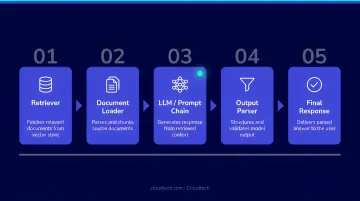
Test with real queries to confirm retrieved chunks are relevant and responses stay within the provided context.
Step 4: Add Chat History for Multi-Turn Conversational Context
A basic RAG chain breaks down the moment a user asks a follow-up question. "What are the different types?" means nothing without knowing what was discussed in the prior turn.
Fix this by implementing a history-aware retriever that reformulates the user's latest question as a standalone query using prior conversation turns as context.
Build the full conversational QA chain by:
- Combining the history-aware retriever with a system prompt that includes a chat history placeholder
- Connecting it through a retrieval chain that passes both retrieved context and prior messages to the LLM
Test with at least three sequential questions, including a follow-up that references a prior answer. Watch for two things: does the retriever reformulate the follow-up correctly, and does the LLM's response stay grounded in retrieved context rather than hallucinating from memory?
When Should You Build Conversational AI with RAG?
RAG adds retrieval infrastructure and latency. It should be chosen deliberately, not by default.
RAG is the right fit when:
- The AI needs to answer from proprietary internal documents — HR policies, product manuals, compliance records
- Your knowledge base changes frequently and retraining a model would be impractical or expensive
- Accuracy and source traceability matter — healthcare, finance, legal contexts where hallucinations carry real consequences
RAG is the wrong choice when:
- The knowledge base is small and static — fine-tuning may produce better results
- Response latency is a hard constraint and retrieval overhead is unacceptable
- Queries are open-ended or creative and don't rely on factual document retrieval
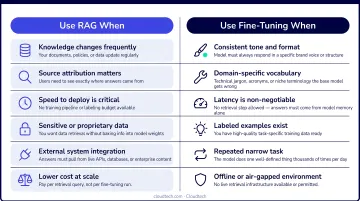
When those conditions apply, a standalone LLM or fine-tuned model is simpler, faster, and easier to maintain. AWS guidance on RAG vs. fine-tuning specifically recommends fine-tuning when the goal is to change model behavior — output style, tone, vocabulary — rather than ground it in external documents.
What You Need Before You Start
Preparation quality directly determines system performance. A well-structured knowledge base and the right tooling will save significant debugging time later.
Technical and Infrastructure Requirements
Minimum requirements:
- Python 3.8+ environment
- API access to an LLM provider
- An embedding model (local or API-based)
- A vector database client
For teams on AWS, the native stack covers all of these:
- Amazon Bedrock — managed access to foundation models including Claude and Titan Embeddings
- Amazon Kendra or OpenSearch Serverless — managed retrieval layer
- Amazon S3 — scalable document storage
Cloudtech's AWS-certified architects help SMBs stand up this stack — including HIPAA-compliant configurations for healthcare and regulated industries.
Data and Document Readiness
Source documents must be in compatible formats (PDF, TXT, HTML), well-structured, and free of duplicate content. Poor input data quality is one of the leading causes of low retrieval accuracy and hallucinated responses.
Establish a document governance process before ingestion — not after. Before loading anything, clean up your source files:
- Strip headers, footers, and boilerplate text
- Remove duplicate documents or redundant content
- Verify format compatibility (PDF, TXT, HTML)
- Confirm logical structure within each document
What goes in shapes everything that comes out.
Key Parameters That Affect RAG Performance
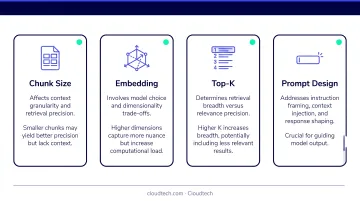
Two RAG systems built on the same LLM can produce dramatically different results depending on how four variables are configured.
Chunk Size and Overlap
Chunk size determines how much context is embedded in each vector. The tradeoffs are direct:
- Too large — chunks contain irrelevant noise, retrieval precision drops
- Too small — chunks lack enough context to answer meaningfully
Common fixed chunk sizes include 128, 256, 512, or 1,024 tokens. The right setting varies significantly by document type. Research testing chunk sizes from 64 to 1,024 tokens found no universal optimum — SQuAD recall peaked at 64-token chunks, while TechQA accuracy jumped from 16.5% at 128 tokens to 71.5% at 1,024 tokens. Start in the 256–512 token range for most use cases, then test and iterate from there.
Embedding Model Selection
The embedding model must semantically align with your documents' domain. A general-purpose model underperforms on highly technical, medical, or legal content.
Evaluate models on the MTEB leaderboard using retrieval-specific scores, not just overall averages. For domain-specific applications, compare candidates on datasets relevant to your industry before committing.
Retrieval Top-K Value
Top-k controls how many chunks are passed to the LLM per query:
- Too few — the model may lack sufficient context
- Too many — the prompt becomes bloated, increasing cost and potentially degrading response quality through "lost in the middle" effects
k=3 to k=5 is a standard starting point that balances context richness with prompt efficiency. Pinecone's RAG documentation uses k=5 as a default in their chatbot examples. If you add a reranking step, you can safely retrieve a larger candidate pool (10–50) and let the reranker select the most relevant chunks before generation.
Prompt Engineering and System Prompt Design
The system prompt defines how the LLM uses retrieved context. A weak prompt causes the model to ignore documents and generate answers from pre-trained knowledge — which is exactly what RAG is trying to prevent.
The CO-STAR framework (Context, Objective, Style, Tone, Audience, Response), developed by GovTech Singapore's Data Science and AI Division, provides a structured approach to building effective prompts. Anchor it with an explicit grounding constraint:
"Only answer using the provided context. If the information isn't available, say so."
Anthropic's contextual retrieval research found that prepending chunk-specific context before embedding reduced retrieval failure rates by 49% in evaluations — a substantial gain from prompt-level changes alone.
Common Mistakes When Building RAG Conversational AI
Most RAG failures trace back to a handful of recurring mistakes. Catching them early saves significant debugging time later.
- Raw, unprocessed documents produce noisy embeddings that degrade retrieval quality. Strip headers, footers, boilerplate, and duplicates before ingestion — clean input is non-negotiable.
- Default chunk sizes are rarely right for your content. Test multiple configurations against real queries from your use case; this single adjustment often has the biggest impact on answer quality.
- No history-aware retriever breaks multi-turn conversations immediately. If your application supports dialogue, implementing conversational memory is not optional.
- General-purpose embedding models lose accuracy on specialized content. For medical, legal, or financial applications, evaluate domain-specific or fine-tuned alternatives.
- Slow response times usually point to unoptimized vector database indexing or a top-k value that's too high. Tighten indexing settings, reduce k, and add response streaming to improve how fast the app feels to users.
- Persistent hallucinations despite retrieval mean the system prompt isn't enforcing grounding. Add explicit constraints and confirm that retrieved chunks are actually reaching the model — not just being fetched and dropped.
Frequently Asked Questions
What is the RAG approach in AI?
RAG (Retrieval-Augmented Generation) is a technique that combines a retrieval step — fetching relevant documents from an external knowledge base — with a generative LLM that uses those documents to produce accurate, grounded responses. Instead of relying solely on pre-trained knowledge, the model answers from what it retrieves.
What is the difference between RAG and conversational AI?
Conversational AI refers to the broader capability of machines to simulate human-like dialogue using NLP and ML. RAG is a specific architectural technique used to enhance conversational AI by grounding its responses in retrieved, up-to-date external documents.
What tools do I need to build a RAG-based conversational AI?
Core components include a document loader, text splitter, embedding model, vector database (ChromaDB, Pinecone, or AWS Kendra), an LLM (GPT-4, Claude, or Amazon Bedrock models), and an orchestration framework like LangChain to connect the pipeline.
How do I maintain chat history in a RAG conversational AI?
Implement a history-aware retriever that reformulates each new user query using prior conversation turns as context. This ensures follow-up questions are understood in the context of what was previously discussed.
What are the most common mistakes when implementing RAG?
The top mistakes are poor data preprocessing, incorrect chunk sizing, using mismatched embedding models for the domain, and failing to implement a history-aware retriever for multi-turn conversations.
Can RAG-based conversational AI be deployed on AWS?
Yes. AWS offers a native RAG stack: Amazon Bedrock for foundation model access, Amazon Kendra or OpenSearch Serverless for retrieval, and S3 for document storage. Cloudtech helps SMBs deploy RAG pipelines on this infrastructure, including HIPAA-compliant configurations for regulated industries.