Introduction
Healthcare organizations are drowning in data they can't use. Clinical notes live in one system, lab results in another, insurance claims in a third — and none of these systems talk to each other cleanly. The result is fragmented patient records, delayed decisions, and significant compliance risk.
Making sense of this at scale isn't just a storage problem. It requires HIPAA-compliant infrastructure, FHIR interoperability standards, NLP pipelines for unstructured text, and ML capabilities for analytics. Most healthcare IT teams can't assemble that stack from scratch — not without months of specialized work.
This guide is written for IT leaders, developers, and decision-makers at healthcare organizations and SMBs exploring AWS HealthLake. Here's what you'll find inside:
- How HealthLake works and what it actually does
- A practical walkthrough of building a healthcare data lake on AWS
- Real use cases with concrete applications
- Honest guidance on the implementation challenges to expect
Key Takeaways
- AWS HealthLake is a fully managed, HIPAA-eligible service that stores health data in FHIR R4 format at petabyte scale
- Built-in NLP automatically extracts diagnoses, medications, and PHI from unstructured clinical text
- FHIR format conversion is a prerequisite — HL7 v2, CCD, and X12 data must be converted before import
- Downstream analytics connect via QuickSight for dashboards, SageMaker for ML models, and Athena for SQL queries
- A focused proof-of-concept on one data type reduces implementation risk considerably
What Is AWS HealthLake?
AWS HealthLake reached general availability in July 2021. It's a fully managed, HIPAA-eligible cloud service that enables healthcare providers, payers, and life sciences companies to store, transform, query, and analyze health data at petabyte scale.
In practice, HealthLake removes the engineering overhead of organizing and structuring patient data. Ingestion, normalization, indexing, and secure storage are handled automatically by AWS — no custom ETL pipelines required.
The Role of FHIR R4
HealthLake uses FHIR R4 (Fast Healthcare Interoperability Resources, version 4) as its native data model. FHIR matters for two concrete reasons:
- It enables consistent data exchange across different EHR systems, payers, and platforms
- It satisfies regulatory interoperability mandates — including ONC's Cures Act Final Rule and CMS-0057-F — with payer compliance deadlines in 2027
Hospital adoption reflects this momentum: FHIR-based apps enabling patient access were available at 69% of US hospitals in inpatient settings in 2024, up from 56% in 2021.
All data entering HealthLake must be in FHIR R4 format — this is non-negotiable.
HealthLake vs. DIY Healthcare Data Lakes
A traditional AWS healthcare data lake (S3 + Glue + Athena + custom ETL) can work, but it demands deep domain expertise in healthcare data standards, manual governance configuration, and custom ML pipelines. HealthLake packages these into a managed service.
For healthcare organizations without large in-house data engineering teams — which describes most SMBs — this difference is substantial. HealthLake can compress a months-long build into weeks. The prerequisite: data must be in FHIR R4 format before import begins.
How AWS HealthLake Works
HealthLake processes health data through four stages: Import → Store → Transform → Query/Analyze. AWS manages the infrastructure, but each stage requires deliberate configuration.
Import: Ingesting Health Data
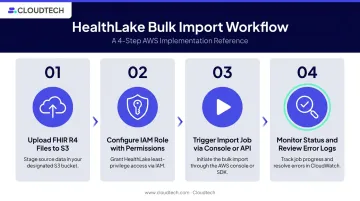
The bulk import process works as follows:
- Upload FHIR R4 files (EHR exports, lab reports, clinical notes, claims) to an Amazon S3 bucket
- Configure an IAM role with the required S3 read/write permissions
- Trigger an import job via the HealthLake console, CLI, or
StartFHIRImportJobAPI call - Monitor job status until completion; review error logs for failed records
Critical prerequisite: HealthLake natively supports only FHIR R4. Organizations using HL7 v2, CCD, X12, or proprietary EHR formats must convert their data first. AWS Marketplace offers third-party tools (such as HiPaaS) that handle HL7 v2, X12, and C-CDA conversion to FHIR before ingestion.
Store: The FHIR Data Store
Once imported, data lives in the HealthLake Data Store, which:
- Creates a chronological, complete view of each patient's medical history
- Continuously indexes all records for fast querying
- Enforces end-to-end encryption (in transit and at rest)
- Maintains access controls that satisfy HIPAA technical safeguard requirements
The Data Store is the single source of truth. All subsequent transformation and query operations run against it.
Transform: Integrated NLP and ML
With data centralized in the store, HealthLake applies pre-trained medical NLP models from Amazon Comprehend Medical to clinical text within DocumentReference resources. Three operations run automatically:
- DetectEntities-V2 — identifies medical entities (diagnoses, medications, procedures), traits (negation, positive results), and relationships (drug-dosage links)
- InferICD10-CM — maps detected medical conditions to ICD-10-CM billing codes
- InferRxNorm — identifies medications and links them to standardized RxNorm concepts
The source clinical text remains unchanged. NLP output is appended as a searchable FHIR extension on the original resource. In practice, HealthLake can extract a billable ICD-10 code from a physician's narrative note in minutes — work that would otherwise require manual medical coding review.
Note: These models process English-language text and are pre-trained on general clinical corpora. For specialty-specific terminology (oncology, rare diseases), plan for manual review of those terms after extraction.
Query and Analyze: FHIR Queries and Analytics Pipelines
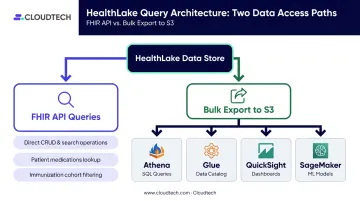
Normalized data supports two query paths:
- FHIR CRUD and Search operations — query the Data Store directly using standard FHIR API calls (for example, returning all patients on a specific medication, or pulling immunization records for a cohort)
- Bulk export to S3 — push the normalized dataset to S3, then connect to:
- Amazon Athena for ad-hoc SQL queries
- AWS Glue for schema cataloging
- Amazon QuickSight for population health dashboards
- Amazon SageMaker for training and deploying predictive ML models
Building a Healthcare Data Lake with AWS HealthLake
The setup sequence is: account preparation → Data Store creation → data import → transformation validation → analytics integration. The infrastructure complexity is managed by AWS, but the preparation work — particularly data format readiness and IAM configuration — determines how smooth the rollout is.
Prerequisites and Access Setup
Before starting, confirm these are in place:
- Active AWS account with HealthLake access enabled (available in US East N. Virginia, US East Ohio, US West Oregon, EU Ireland, EU London, AP Mumbai, and AP Sydney)
- IAM roles with permissions for HealthLake to read from and write to S3 — missing or misconfigured IAM roles are the most common cause of failed import jobs
- Designated S3 bucket for source data and export jobs
- Source data in FHIR R4 format — or a documented conversion plan for HL7 v2, CCD, or other formats before assuming data will flow in cleanly
Creating the Data Store and Running the Import Job
- Create a FHIR Data Store via the HealthLake console or CLI, specifying FHIR R4 as the version. Optionally, pre-load synthetic patient data (SYNTHEA) to validate the pipeline before importing real data.
- Configure the S3 source path and IAM role, then launch the import job.
- Monitor job status via the console or CLI. Import times scale with data volume — always inspect error logs for failed records before proceeding to the next stage.
Validating Transformation and Running Test Queries
Once import completes, verify NLP output by querying a sample DocumentReference resource. Confirm that ICD-10 codes, RxNorm links, and PHI tags appear as FHIR extension fields.
Run two practical test queries to validate data quality before connecting analytics tools:
- Query immunization status across a patient cohort
- Search for all patients prescribed a specific medication
If these return expected results, the pipeline is working as intended. With clean, validated data confirmed, the next step is connecting it to your analytics layer.
Connecting Analytics: QuickSight, SageMaker, and Athena
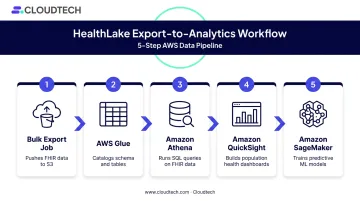
The export-to-analytics workflow:
- Run a bulk export job to push normalized FHIR data to S3
- Use AWS Glue to catalog the schema
- Query with Amazon Athena using SQL
- Build dashboards in Amazon QuickSight for population health reporting
- Feed exported data to Amazon SageMaker to train predictive models
One important note on export: HealthLake's StartFHIRExportJob API exports the full Data Store in one shot. The FHIR $export operation, by contrast, supports scoped exports using parameters like _type, _since, _typeFilter, and _security. This gives teams more granular filtering control. Plan your downstream partitioning strategy based on which operation fits your reporting needs.
Healthcare organizations tackling this stack for the first time often hit friction at two points: format conversion before import and IAM misconfiguration during job setup. Cloudtech, an AWS Advanced Tier Partner with a team primarily comprised of former AWS employees, has handled both for healthcare SMBs building HIPAA-compliant data architectures on AWS — including format remediation, IAM policy design, and analytics integration.
Key Use Cases for AWS HealthLake
Patient 360 and Clinical Decision Support
HealthLake consolidates data from multiple departments and systems into a single chronological patient profile — medications, diagnoses, procedures, test results, all in one queryable view. Clinicians get a complete picture without toggling between systems.
The gap this addresses is real: about 1 in 5 people who visited a doctor in 2024 reported waiting longer than reasonable for test results, a direct indicator of information exchange failures. A unified patient record reduces these delays by making relevant data immediately accessible at the point of care.
Population Health Management and Research
At the population level, HealthLake enables health systems to:
- Identify high-risk patient cohorts for preventive intervention
- Analyze disease trends across geographic regions or demographics
- Accelerate clinical trial enrollment using normalized, queryable datasets
- Automate billing and claims validation, including ICD-10 code mapping and fraud detection
AWS reports that Children's Hospital of Philadelphia used HealthLake to aggregate data from more than 35 studies covering over 5,000 patients, supporting cohort identification for the Children's Brain Tumor Network.
Chronic Disease Management and Predictive Analytics
The scale of chronic disease in the US makes predictive tools valuable: the CDC estimates approximately 40.1 million US residents had diagnosed or undiagnosed diabetes in 2023, while 119.9 million US adults — 48.1% — have hypertension.
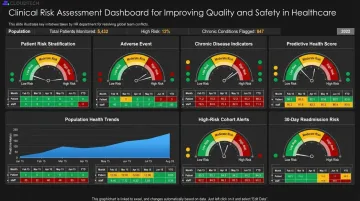
That volume of patients requires more than manual oversight. HealthLake provides the clean, structured data foundation that makes predictive modeling for these conditions possible. After export to SageMaker, organizations can train models to flag at-risk patients before complications occur, monitor disease progression, and personalize care pathways. The ML work happens post-ingestion; HealthLake's role is providing high-quality, normalized inputs.
Common Challenges and Best Practices
The Format Conversion Reality
FHIR R4 is the only format HealthLake accepts natively. Organizations arriving with HL7 v2, CCD, X12, or proprietary EHR exports face a conversion step that is often the longest part of the entire project. HL7's own V2-to-FHIR Implementation Guide makes clear that conversion requires semantic and vocabulary mapping — not just file format translation.
That complexity has real schedule implications. Audit your data formats before locking in a timeline, budget for conversion using AWS Glue or third-party FHIR converters, and test with a representative sample before committing to full-scale migration.
Operational Considerations
Two common friction points in production:
- Plan export segmentation early — scoped
$exportsupport helps, but downstream filtering and partitioning for specific studies or reports still requires upfront design. Define your data segmentation strategy before the first export run. - Make FHIR output usable for non-technical teams — raw FHIR JSON is dense and unfamiliar to clinical and operational stakeholders. Invest early in Athena views or QuickSight dashboards to surface data in a format they can actually work with.
Implementation Best Practices
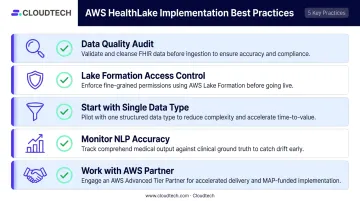
| Practice | Why It Matters |
|---|---|
| Conduct a data quality audit before import | Duplicates, missing fields, and inconsistent coding create downstream errors |
| Use AWS Lake Formation for fine-grained access control | Adds row- and column-level governance on top of exported S3 data |
| Start with a single data type (patient records or claims) | Limits scope, validates the pipeline, reduces rollout risk |
| Monitor NLP extraction accuracy continuously | Pre-trained models may miss specialty terminology |
| Work with an AWS Partner for complex format conversion | Shortens the learning curve and reduces implementation risk |
Frequently Asked Questions
What is the purpose of AWS HealthLake?
AWS HealthLake helps healthcare organizations centralize, standardize, and analyze health data at scale. It automatically converts fragmented, often unstructured medical information into a structured, FHIR-compliant data lake — enabling faster clinical insights, better patient care coordination, and regulatory compliance.
Does AWS have a health data lake?
Yes. AWS HealthLake is Amazon's purpose-built, fully managed health data lake service, designed specifically for healthcare and life sciences organizations. It handles ingestion, transformation, and querying of large volumes of health data securely on AWS.
How much does AWS HealthLake cost?
AWS HealthLake pricing uses a pay-as-you-go model. The Advanced tier is billed at $0.27 per datastore-hour, which includes 10 GB of storage and 3,500 FHIR queries per hour. Additional storage costs $0.37 per GB-month; NLP processing costs $0.0010 per 100 characters analyzed. Costs scale with data volume, so smaller organizations can start lean and expand as their dataset grows.
Is AWS HealthLake HIPAA compliant?
AWS HealthLake is a HIPAA-eligible service that supports end-to-end encryption, IAM access controls, and audit logging. Organizations must also have an AWS Business Associate Addendum (BAA) in place and configure their environment in line with HIPAA requirements.
What data formats does AWS HealthLake support?
AWS HealthLake natively supports FHIR R4. Organizations using HL7 v2, CCD, X12, or proprietary EHR formats must convert to FHIR R4 before ingestion, which typically requires additional tooling or implementation support.
How does AWS HealthLake integrate with Amazon SageMaker and QuickSight?
Once data is normalized and exported to Amazon S3, it connects directly to QuickSight for population health dashboards and to SageMaker for custom ML model training. AWS Glue and Athena handle schema cataloging and SQL querying in between.