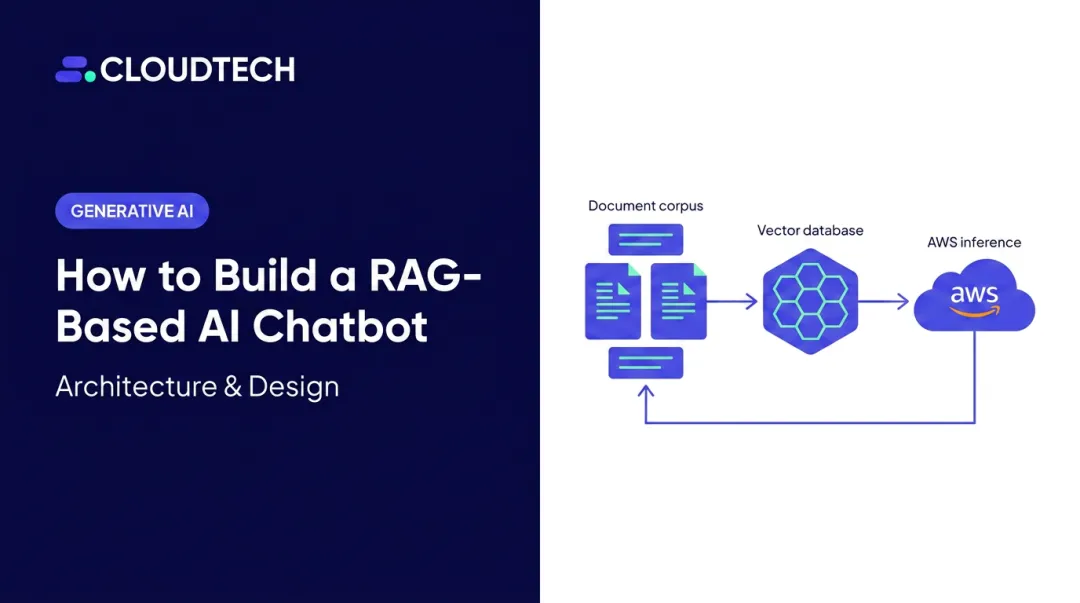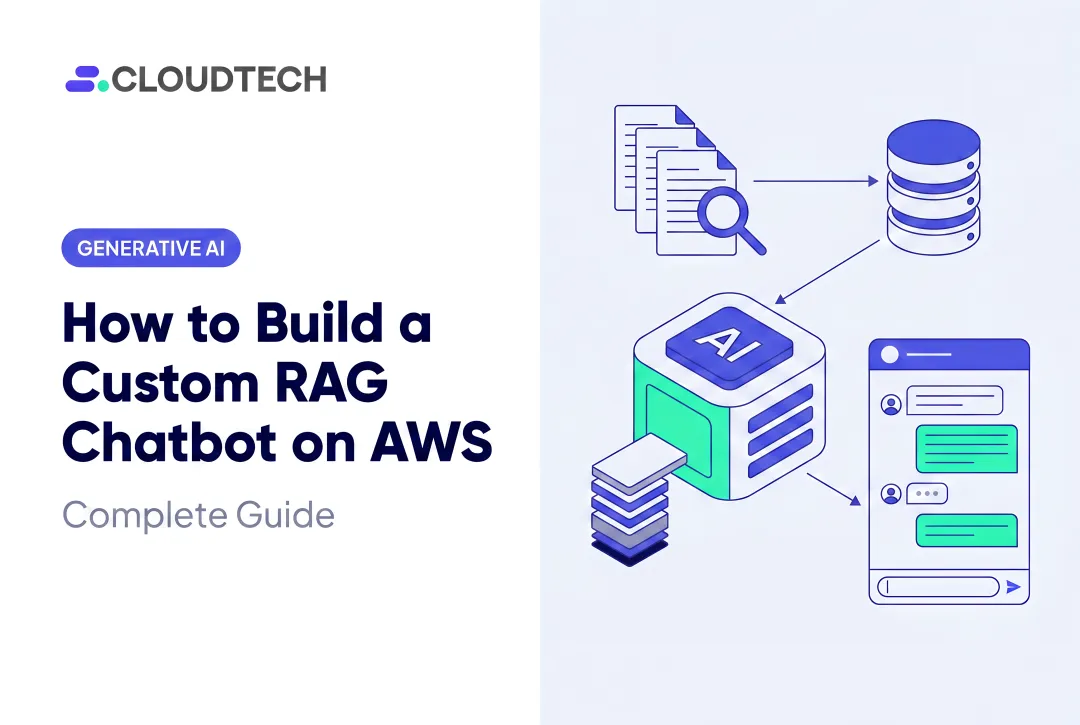
Retrieval Augmented Generation on AWS Bedrock combines foundation models with your own knowledge base, grounding every response in your actual documents rather than pre-trained guesswork. The mechanics sound simple enough. The results, though, vary dramatically based on how you configure it — and Stanford HAI research found that even specialized AI systems hallucinated in 1 out of 6 or more benchmark queries, which is exactly the risk RAG addresses.
This guide covers when RAG on Bedrock is the right fit, what you need before building, the five-step build sequence, the parameters that most affect response quality, and the mistakes that derail most first attempts.
Key Takeaways
- Bedrock supports RAG natively via managed Knowledge Bases — no custom vector database infrastructure required
- Model access must be explicitly requested before building; it's not enabled by default
- Default chunking starts at ~300 tokens; tuning chunk size is the fastest way to improve response quality
- Chunk size, number of retrieved chunks, and generation model are the three variables that most directly determine answer accuracy
- Re-sync the knowledge base manually after every document update; Bedrock does not auto-detect S3 changes
When Should You Build a RAG Chatbot with AWS Bedrock?
RAG on Bedrock is not a universal upgrade. Teams that need general conversational AI with no proprietary data get little value from the added setup complexity. RAG earns its place when the chatbot must answer questions grounded in your organization's own documents.
Use Cases Where RAG Makes Strong Sense
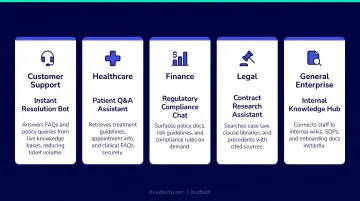
A 2024 Gartner survey found that 85% of customer service leaders plan to explore or pilot customer-facing conversational GenAI in 2025 — and RAG is the architecture that makes those chatbots actually reliable. Strong use cases include:
- Customer support bots that reference product manuals, FAQs, or troubleshooting guides
- Internal HR and IT helpdesk assistants answering policy and procedure questions
- Healthcare patient-query tools grounded in clinical guidelines or intake documentation
- Financial services compliance bots drawing from regulatory policy documents
- Legal and contract review assistants where citation accuracy is non-negotiable
When RAG Becomes the Wrong Approach
Not every knowledge problem is a RAG problem. Skip RAG when:
- Your knowledge base updates in real time (constant re-syncing creates operational overhead)
- Queries require live database lookups rather than document retrieval
- Source documents are poorly formatted, unstructured, or don't yet exist in a usable state
- The use case is purely conversational with no domain-specific grounding required
In those scenarios, a direct LLM call or a hybrid agent architecture will serve you better.
What You Need Before Building
Preparation directly shapes what you get out of a RAG chatbot. The right AWS configuration and clean source documents will save hours of troubleshooting. The wrong starting point means chasing ingestion failures and retrieval issues from day one.
AWS Account and Service Prerequisites
Before touching the Bedrock console, confirm:
- An active AWS account with IAM permissions to create and manage Bedrock, S3, and OpenSearch Serverless resources
- AWS CLI installed and configured for your target region
- A supported AWS Region where both Bedrock and OpenSearch Serverless are available — there are 21 overlapping regions, including
us-east-1,us-west-2,eu-west-1, andap-southeast-1
Model access is not automatic. You must explicitly request access through the Bedrock Model Access console for both your embedding model and generation model before any invocation will succeed. Two access modes exist:
| Mode | How It Works | Best For |
|---|---|---|
| On-demand | Pay per input/output token; no upfront commitment | Pilots, SMBs, variable workloads |
| Provisioned Throughput | Reserved capacity via a model ARN; requires pre-commitment | High-volume production workloads |
Anthropic models (Claude) also require submitting a use-case form during the access request.
Source Documents and Knowledge Base Readiness
Bedrock Knowledge Bases support PDF, DOCX, TXT, HTML, CSV, and MD formats. Source files must not exceed 50 MB; image files (JPEG/PNG) are capped at 3.75 MB.
Document quality is the most underestimated variable in RAG performance. Poor source files produce poor retrieval results, no matter how well everything else is configured. Before ingestion:
- Remove excessive headers, footers, and boilerplate that don't add retrieval value
- Ensure PDFs are searchable text, not scanned images
- Organize documents logically — by department, product line, or topic — if managing multiple categories
For SMBs building their first RAG system, working with an AWS Partner like Cloudtech can cut setup time considerably. IAM role configuration, S3 bucket policies, and OpenSearch Serverless provisioning are all areas where first-time implementations tend to stall without hands-on cloud architecture experience.
How to Build a RAG Chatbot with AWS Bedrock
The following five steps use Bedrock's managed Knowledge Bases feature, which reduces operational overhead for teams that want speed without managing vector database infrastructure from scratch.
Step 1: Enable Model Access in AWS Bedrock
Navigate to the Bedrock console → Model access → submit requests for:
- Embedding model: Amazon Titan Text Embeddings V2 (supports up to 8,192 tokens per input, available in 256, 512, or 1,024 dimensions)
- Generation model: Anthropic Claude 3 Sonnet (balanced quality and cost) or Claude 3 Haiku (lower latency and cost for simpler queries)
Access typically takes a few minutes but can vary by model and region. Confirm on-demand availability in your chosen region before writing any integration code. Invoking a model without the correct access type throws an availability error.
Step 2: Upload Source Documents to Amazon S3
Create an S3 bucket in the same AWS Region as your Bedrock resources. This is a hard requirement: Bedrock is regional and cannot reach across regions for document retrieval.
- Organize documents in a logical folder structure if you plan multiple knowledge base categories
- Verify the bucket policy grants Bedrock read permissions — misconfigured policies are the most common cause of ingestion failures
- Enable S3 versioning if documents will be updated over time
Step 3: Create the Knowledge Base and Vector Store
In the Bedrock console, navigate to Knowledge Bases → create a new knowledge base → point it to your S3 bucket.
Bedrock prompts you to configure a vector store. Amazon OpenSearch Serverless is the default managed option and supports a quick-create flow that handles all underlying infrastructure automatically. It also supports binary vector embeddings, which not all vector store options provide.
Select Titan Text Embeddings V2 as your embedding model and configure chunking. The AWS default splits content into approximately 300 tokens while preserving sentence boundaries, which works well for knowledge base articles, FAQs, and policy documents.
Step 4: Sync the Knowledge Base
Trigger the sync job from the console (or programmatically via StartIngestionJob). This runs three phases:
- Ingestion — Bedrock pulls documents from S3
- Processing — documents are chunked and converted to vector embeddings
- Storing — embeddings are written to the OpenSearch index with source document mapping
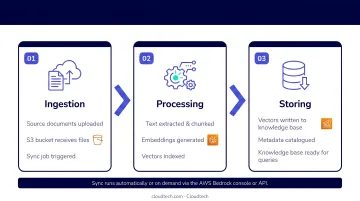
Check sync job status before testing. Common failures include unsupported file formats, files exceeding size limits, and IAM permission errors. Always re-sync after updating documents, since Bedrock does not auto-detect S3 changes.
Step 5: Configure and Test the Chatbot Interface
Use the Bedrock console's built-in Test Knowledge Base feature to validate before integrating with any application. Test:
- Questions directly related to your uploaded documents
- Out-of-scope questions to confirm the chatbot declines correctly
For production, integrate the RetrieveAndGenerate API. This API accepts a user query, retrieves semantically similar document chunks from the vector store, augments the prompt with that context, and returns a generated response with citations.
Required fields include input, knowledgeBaseId, and modelArn. The API returns output, citations, and a sessionId. Reuse the session ID across follow-up questions to maintain conversation context.
Key Parameters That Affect RAG Chatbot Quality
Getting the basic setup working is step one. Reliable production performance is a different challenge, and it comes down to four tunable variables.
Chunk Size
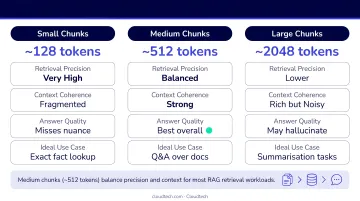
Chunk size determines how much text the vector store indexes as a single searchable unit.
- Chunks that are too large pull irrelevant context in alongside what you actually need
- Chunks that are too small leave the generation model without enough surrounding context to form a complete answer
- Start at 300–500 tokens, which aligns with AWS Knowledge Bases defaults
For dense technical documents — compliance manuals, clinical guidelines — smaller chunks with higher overlap tend to improve precision. For narrative content, larger chunks preserve meaning better. Test two or three chunk sizes against representative queries before committing.
Number of Retrieved Chunks
This controls how many text chunks are passed to the generation model as context. The default is typically 3–5.
- For simple factual queries: the default is sufficient
- For complex synthesis questions that draw from multiple document sections: increasing to 7–10 chunks meaningfully improves answer depth
- Trade-off: more chunks increase token cost and latency — Claude 3 models support up to a 200K context window, giving you significant headroom before hitting limits
Embedding Model Selection
The embedding model determines how accurately semantic meaning gets captured as a vector. Using different embedding models for ingestion vs. query time causes retrieval failures. Use the same model throughout.
Two models are available natively in Bedrock Knowledge Bases:
- Amazon Titan Text Embeddings V2 — purpose-built for the Bedrock ecosystem, a reliable default for most English-language document sets
- Cohere Embed (English, Multilingual, and Multimodal variants) — a strong alternative for multilingual or multimodal document sets
Generation Model and Temperature
- Model choice (Claude 3 Sonnet vs. Haiku vs. Llama 3.1) determines response quality, nuance, and cost
- Temperature directly controls answer consistency — lower values produce more deterministic, factual outputs; higher values introduce creativity alongside hallucination risk
For customer-facing or compliance-sensitive use cases: keep temperature low and add a system prompt instructing the model to answer only from the provided context. For internal tools where conversational naturalness matters more: moderate temperature settings work well.
Common Mistakes When Building RAG Chatbots on AWS Bedrock
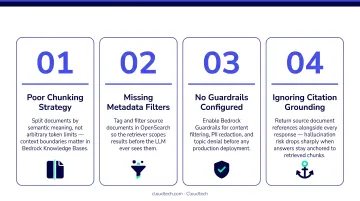
These are the errors that appear most often in first builds — and they're all avoidable:
Skipping model access requests: Teams start building, then discover their model isn't available on-demand in their region. Always confirm model access and inference type before writing integration code.
Poor document preparation: Uploading poorly structured files or documents heavy with boilerplate (repetitive headers, legal disclaimers across every page) creates noisy chunks that confuse retrieval. Clean, well-structured searchable PDFs consistently outperform messy uploads.
Forgetting to re-sync after updates: Bedrock does not automatically detect changes in S3. Every document update requires a manual trigger (
StartIngestionJob) or an automated re-sync pipeline to refresh the vector index.Shipping with default settings untested: Using default chunk sizes and retrieval counts without validating against real queries leads directly to underperformance in production. Budget time for iterative tuning before launch.
Frequently Asked Questions
Can AWS Bedrock do RAG?
Yes. AWS Bedrock supports RAG natively through its managed Knowledge Bases feature, which handles the full pipeline from document ingestion and chunking to vector embedding and retrieval-augmented generation. No custom vector database management is required.
What AI engine does AWS Bedrock use?
Bedrock is a managed platform providing access to foundation models from multiple providers, including Anthropic (Claude), Amazon (Titan), Meta (Llama), Cohere, Mistral, and DeepSeek. You choose the model that fits your use case and budget.
What is the difference between a RAG chatbot and a regular chatbot?
A regular LLM chatbot relies on pre-trained knowledge alone, which can produce outdated or hallucinated responses. A RAG chatbot retrieves relevant excerpts from your document corpus first, using them as grounding context — improving accuracy and providing source traceability.
What document types does AWS Bedrock Knowledge Base support?
Bedrock Knowledge Bases support PDF, DOCX, TXT, HTML, CSV, and MD formats. Source files must be searchable text. Always verify the latest AWS documentation for current format support and file size limits (50 MB maximum per source file).
How much does it cost to build a RAG chatbot with AWS Bedrock?
Costs break down into three components: model invocation (per token), embedding invocation (at ingestion and query time), and OpenSearch Serverless OCU charges for the vector store. See the AWS Bedrock pricing page for current rates. Adjusting chunk size and retrieval count are the fastest ways to control ongoing spend.
How long does it take to build a RAG chatbot with AWS Bedrock?
A functional prototype using managed Knowledge Bases can be ready in a few hours to a day. Production deployment — covering frontend, CI/CD, IAM hardening, and performance tuning — typically takes one to three weeks. AWS Partners like Cloudtech can compress that timeline considerably, especially for SMBs building on Bedrock for the first time.