AI chatbots built on large language models now make it possible to handle customer queries across dozens of languages without staffing native-speaking agents for every market. But results vary widely. A poorly configured multilingual chatbot can frustrate customers just as fast as an English-only one.
This guide covers exactly how to scale multilingual AI chatbot support: when it makes sense, what you need before deployment, the five-step implementation process, the variables that determine performance, and the mistakes that sink most rollouts.
Key Takeaways
- Start with 3–5 high-volume languages rather than attempting broad coverage at launch
- Native multilingual generation beats translation-overlay approaches on tone, accuracy, and resolution quality
- Knowledge base quality is the single biggest determinant of chatbot performance across languages
- Language detection accuracy degrades sharply on messages under 10 characters — design your routing to account for this
- Define escalation paths and human handoff logic before going live
How to Scale Multilingual Customer Support With AI Chatbots
Step 1: Audit Your Current Support Volume and Language Gaps
Before configuring anything, pull data. Analyze support tickets, live chat logs, and website traffic broken down by region and browser language settings. Look specifically for:
- Languages with high ticket volume but low resolution rates
- Escalation patterns that correlate with non-English inquiries
- Geographic markets generating traffic that doesn't convert into resolved support interactions
This audit gives you a prioritized shortlist — typically 3–5 languages — for your initial rollout. Attempting to support 40+ languages from day one produces a system that performs poorly everywhere. Starting narrow and scaling from real performance data produces better outcomes across every language you add.
Step 2: Choose a Platform With Native Multilingual Generation
Not all multilingual chatbots work the same way. There's a meaningful architectural difference between platforms that reason natively in the customer's language versus those that process queries in English and translate the output.
Translation-overlay systems introduce problems that compound at scale:
- Latency added at the translation step
- Loss of tone and regional nuance
- Errors on technical terminology and brand-specific language
- Colloquialisms and shorthand that survive in native queries but disappear after translation
A 2026 intent classification benchmark using 30,000 de-identified customer service queries found that machine-translated test sets consistently overstated real-world robustness compared to native queries (meaning translation-based approaches look better in testing than they perform in production).
When evaluating platforms, prioritize these capabilities:
- Per-message language detection (not just session-start detection)
- Support for mid-conversation language switching
- Omnichannel consistency across web, WhatsApp, email, and SMS
- Single-source knowledge base with multilingual output capability
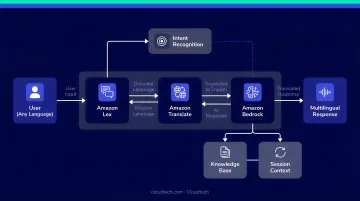
On the infrastructure side, AWS services provide a reliable technical base. Amazon Lex V2 supports locale-specific bot configuration, Amazon Translate handles real-time translation as a fallback layer, and Amazon Bedrock (specifically the Amazon Nova models) supports understanding and generation across 200+ languages, with optimized performance for 15 core languages including Spanish, French, German, Japanese, Korean, Arabic, and Hindi. Businesses working with an AWS consulting partner like Cloudtech can configure and deploy these services considerably faster than building from scratch.
Step 3: Build and Structure Your Knowledge Base for Multilingual Output
The knowledge base is where most multilingual chatbot deployments succeed or fail. The architecture that works best: maintain a single-language knowledge base (typically English) and let the AI generate responses natively in the customer's language, eliminating the overhead of maintaining parallel translated article sets for every supported language.
What your knowledge base must include:
- Product and service FAQs written in clear, unambiguous language
- Support policies, return and refund workflows
- Escalation triggers with defined handoff conditions
- Localization rules: regional currency formats, time zones, and any compliance-specific language requirements
Content quality matters as much as content coverage. Vague, contradictory, or outdated articles produce poor responses in any language. Gartner's 2024 research found that only 14% of customer service issues are fully resolved through self-service — and even simple issues fail self-service 64% of the time. Knowledge base gaps drive most of that failure.
Closing those gaps starts with sourcing better inputs. If you have historical customer conversation logs in your priority languages, include them as training data. Real customer language (shorthand, colloquialisms, regional phrasing) is far more valuable than clean, formal text.
Step 4: Configure Language Detection, Routing, and Escalation Logic
Language detection needs to fire on every incoming message, not just the opening one. Customers switch languages mid-conversation more often than teams expect. The system also needs to process code-switched inputs (Hinglish, Spanglish, and similar mixed-language patterns) without losing the thread — these are common in diverse domestic markets.
One technical constraint to plan around: Intercom's documentation notes that high-confidence language detection requires at least 10 characters. Apple's research on very short strings found error-rate reductions ranging 15–60% depending on language when strings are extremely short. For ultra-short messages, route through a language confirmation step or locale fallback rather than assuming detection is accurate.
Escalation path design checklist:
- Define conditions that trigger human handoff (repeated clarification requests, sentiment indicators, out-of-scope queries, compliance-sensitive topics)
- Pass full conversation context and detected language to the receiving agent so agents never start from scratch
- Build graceful handling for languages the chatbot doesn't yet support, rather than defaulting to English without explanation
- Calibrate escalation thresholds per language market since resolution complexity varies and some markets benefit from earlier handoff
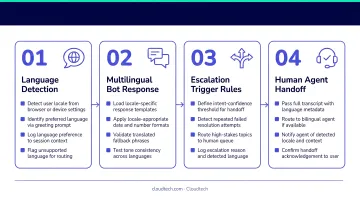
Cloudtech's conversational AI deployments use Amazon Connect as the transfer mechanism, passing gathered conversation data to live agents so they begin with full context and don't re-ask questions the AI already addressed.
Step 5: Run Pilot Tests in One or Two Priority Markets Before Full Rollout
Internal QA in English does not catch multilingual-specific failure modes. Real-market pilot testing is non-negotiable. It surfaces failure modes that internal QA consistently misses.
Track these metrics throughout the pilot:
- First Response Time (FRT) broken down by language
- Conversation completion rate per language market
- CSAT scores segmented by language
- Escalation rate per language (flagging both over-escalation and under-escalation)
Failure patterns to look for specifically:
- Incorrect language detection on short or ambiguous opening messages
- Product terms or brand-specific language that doesn't translate cleanly
- Tone mismatches (formal where informal is expected, or vice versa)
- Code-switching breakdowns where the chatbot loses track of the active language
Adjust before scaling. Problems that affect 5% of conversations in a pilot become significant volume issues once you're serving full markets.
When AI Chatbots Are the Right Fit for Multilingual Support
Multilingual AI chatbot scaling delivers the highest return in specific situations. It's not the right solution for every support operation.
Where it makes clear sense:
- Businesses serving customers across multiple geographies or language communities
- Companies experiencing support volume spikes outside business hours in non-English markets
- Teams where the cost of staffing native-language agents for every market is prohibitive
- Organizations with well-documented, structured support workflows that map cleanly to FAQ-style interactions
Where it becomes inefficient or risky:
- Highly regulated industries where AI responses require human review before delivery
- Support workflows where the vast majority of queries are complex and escalation-dependent
- Businesses with no existing knowledge base — deploying a chatbot with no structured content to pull from produces a poor experience regardless of language
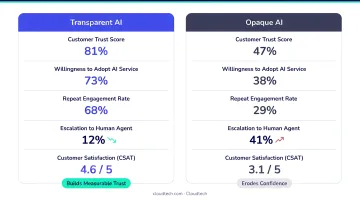
Gartner found that 64% of customers would prefer companies didn't use AI for customer service. That resistance is real — and ignoring it is a deployment risk.
Positioning multilingual AI as transparent first-line resolution, with clear human escalation paths, builds the trust that drives adoption. Customers who know they can reach a human quickly are far more likely to accept an AI interaction to start.
What You Need Before Deploying a Multilingual AI Chatbot
Skipping preparation is the most common reason multilingual chatbot deployments underperform. Three readiness areas need to be in place before you go live.
Platform and Infrastructure Requirements
- LLM-based chatbot platform with per-message language detection
- API integration with your CRM and ticketing system
- Omnichannel support across the channels your customers actually use
- Cloud infrastructure (such as AWS) capable of handling variable load across time zones without performance degradation
Serverless and event-driven architectures, such as AWS Lambda combined with Auto Scaling groups, handle the uneven traffic patterns typical of global support operations without requiring over-provisioned fixed capacity.
With infrastructure in place, the next step is making sure the content your chatbot draws from is clean and well-organized.
Knowledge Base and Data Readiness
The AI is only as good as the content it references. Gaps, contradictions, or unclear language in your source material will surface in every customer interaction.
- FAQs and policy documents written in clear, consistent language without jargon or ambiguity
- No outdated or contradictory content — the AI will surface it
- Historical customer conversation logs in priority languages, if available
- Localization rules documented: regional currency, time zones, compliance language
Team and Compliance Readiness
Technical setup and content quality get the chatbot running. This final layer ensures it runs safely and stays accurate over time.
- Identify which human agents will handle escalations and ensure language coverage or translation assistance is available for them
- Review industry-specific compliance requirements before deployment — HIPAA for healthcare, data residency rules for international markets
- Assign clear ownership of knowledge base maintenance post-launch, since content gaps compound quickly without an accountable owner
Key Parameters That Affect Multilingual AI Chatbot Performance
Once deployed, performance isn't static. These four variables require active monitoring.
Language Detection Accuracy
Short messages are the highest-risk detection scenario. A misidentified language on the first message can derail the entire conversation. Test your detection logic specifically with short, ambiguous inputs — single words, abbreviations, and mixed-script messages — before launch. Build fallback routing for messages under 10 characters.
Knowledge Base Coverage Depth
Even with a single-source knowledge base, some product terms or workflows don't translate cleanly into every target language. Resolution rates drop when the AI can't find a relevant knowledge article, triggering unnecessary escalations. Run regular knowledge base audits per language market — not just at launch.
Tone and Formality Calibration
Different languages carry different formality conventions. Spanish varies significantly across Latin America and Spain in formal versus informal address. Japanese requires distinct registers depending on context and relationship. A chatbot using the wrong register feels robotic even when the words are technically correct.
Research published in the ACM (N=187) found formal chatbot style was perceived as more competent in sensitive contexts, while casual style was sometimes seen as unprofessional. Tone calibration requires native-speaker review during the pilot phase — not just bilingual translators.
Escalation Trigger Design
Getting escalation thresholds wrong cuts both ways — too aggressive and you lose the cost benefits of AI; too passive and frustrated customers drop off before getting help. Calibrate thresholds per language market, since resolution complexity varies across them. Key factors to account for:
- Query complexity baseline: Some markets generate more nuanced or multi-step requests by default
- Customer tolerance for self-service: Varies by region and product category
- Language confidence scoring: Low-confidence detections should trigger earlier handoff
Common Mistakes When Scaling Multilingual AI Support
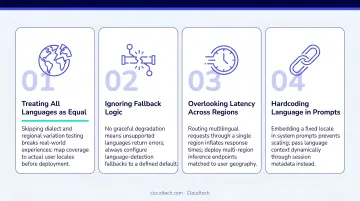
Most multilingual support failures trace back to the same four mistakes. Knowing them in advance saves you a costly rollout and a disappointing CSAT drop.
- Translation overlay instead of native generation. Plugging a translation API onto an English-only chatbot is the most common default. The problem: translation strips out the shorthand, misspellings, and colloquialisms that real customer messages include, so production performance is worse than your testing suggested.
- Too many languages, too little training data. Twenty languages with shallow knowledge base coverage performs poorly everywhere. Three to five languages with deep, well-maintained coverage performs well where it counts — and establishes a repeatable framework you can apply to each new language you add.
- Inconsistent language handling across channels. A chatbot that manages multilingual conversations on web but defaults to English-only on WhatsApp creates a fragmented experience. Language detection and response logic must be consistent across every channel a customer uses.
- Skipping real-market pilot testing. Internal English QA won't surface multilingual failure modes: short-message detection errors, code-switching breakdowns, regional tone mismatches. These problems surface in real-market testing before full rollout — not after launch.
Frequently Asked Questions
What is multilingual AI customer support?
Multilingual AI customer support uses AI-powered chatbots built on LLMs and NLP to understand and respond to customer queries in the customer's native language in real time. It allows businesses to serve customers across language communities without requiring language-specific human agents for every market.
How can generative AI chatbots improve multilingual customer support?
Generative AI chatbots generate contextually appropriate responses natively in the customer's language rather than translating from English. This produces more accurate, natural interactions — improving resolution rates, reducing escalations, and driving higher CSAT scores across language markets.
What is the difference between native multilingual AI and translation-based chatbots?
Native multilingual AI reasons directly in the customer's language using LLMs, preserving tone, nuance, and brand-specific terminology. Translation-based chatbots process queries in English and convert the output, introducing latency and errors — particularly on technical terms, idioms, and informal language.
How many languages should a business prioritize when starting?
Start with 3–5 languages representing your highest support volume or strongest growth markets. Build deep knowledge base coverage in those languages first, then expand incrementally based on performance data rather than launching broadly with shallow coverage.
What AWS services support multilingual AI chatbot development?
Three core AWS services power this capability:
- Amazon Lex V2 — conversational AI with locale-specific bot configuration
- Amazon Translate — real-time translation as a fallback layer
- Amazon Bedrock — access to foundation models (including Amazon Nova) for native multilingual generation across 200+ languages
How long does it take to deploy a multilingual AI chatbot?
A focused deployment covering 3–5 languages with a clean knowledge base typically takes 4–8 weeks. Timelines vary based on integration complexity, data readiness, and channel scope — partnering with an AWS-certified consultant can significantly shorten that window.