Introduction
According to Flexera's 2026 State of the Cloud Report, organizations waste 29% of their cloud spend on average — surveyed across 753 cloud decision-makers. That's nearly a third of every dollar going nowhere.
For SMBs and startups, that waste hits differently. Unlike large enterprises with dedicated FinOps teams, smaller organizations often discover the problem only after it's compounded for months. The warning signs tend to arrive late: billing surprises, budget overruns, or a finance review that surfaces charges no one can explain.
The good news: AWS costs aren't inherently excessive. They become expensive through a combination of poor provisioning decisions, limited visibility, and inconsistent governance. This guide covers how AWS costs typically accumulate, what drives them, and the specific strategies — across provisioning, operational practices, and architectural decisions — that bring them under control.
Key Takeaways
- AWS waste builds gradually through idle resources, over-provisioned instances, and missing cost controls — not from any single large expense
- The highest-leverage fixes are right-sizing compute, switching to the right pricing model, and eliminating orphaned resources
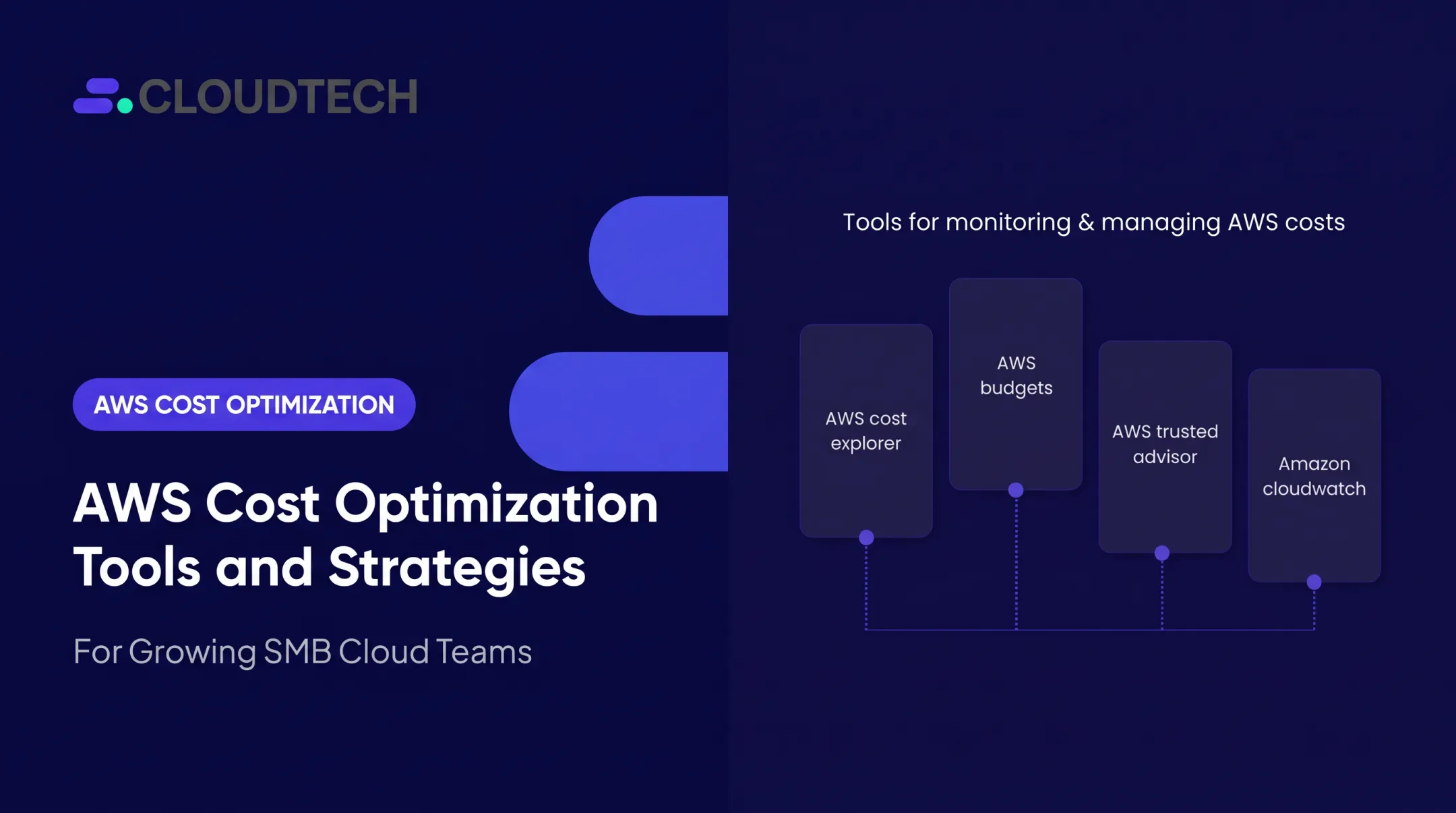
- AWS-native tools — Cost Explorer, Budgets, and Trusted Advisor — give you ongoing cost visibility at no extra cost
- Spot Instances and Savings Plans can reduce compute costs by up to 90% and 66% respectively
- SMBs can access structured optimization support through AWS-certified partners, often offset by AWS Partner Funding
How AWS Costs Typically Build Up
AWS costs rarely spike overnight. The pay-as-you-go model makes it easy to spin up resources, and just as easy to forget about them. A developer provisions an EC2 instance for a proof-of-concept, the project ends, and that instance keeps running for six more months. Multiply that pattern across teams and environments, and the cumulative drift becomes significant before anyone notices.
Much of the waste is invisible until you actively look for it:
- Orphaned EBS volumes left behind after EC2 instances are terminated
- Idle load balancers with no active traffic routing through them
- Development environments running 24/7 when they're only needed during business hours
- S3 snapshots accumulating without lifecycle rules to expire or transition them
Without a tagging strategy or account-level cost visibility, organizations often can't attribute charges to specific teams, projects, or applications. Without that attribution, there's no clear starting point for reducing spend.
Key Cost Drivers in AWS Environments
Most AWS overspend falls into three categories: compute, storage, and data transfer.
Compute
EC2 instances running at low utilization — or using on-demand pricing for workloads that run continuously — are the single largest source of avoidable spend. According to AWS's State of Cost Efficiency report, only 17.7% of eligible customers had EC2 memory metrics enabled. Enabling them was associated with 8 to 30 percentage points higher savings per right-sizing recommendation.
Pricing model misalignment makes this worse. Teams default to on-demand pricing out of convenience, even for predictable, steady-state workloads where commitment-based pricing would be far cheaper:
| Pricing Model | Max Discount vs. On-Demand | Best For |
|---|---|---|
| EC2 Reserved Instances (1-year) | Up to 40% | Stable, predictable workloads |
| EC2 Reserved Instances (3-year) | Up to 60% | Long-term steady-state instances |
| Compute Savings Plans | Up to 66% | Flexible compute across instance families |
| EC2 Instance Savings Plans | Up to 72% | Committed usage within a specific instance family |
| Spot Instances | Up to 90% | Fault-tolerant, interruptible workloads |
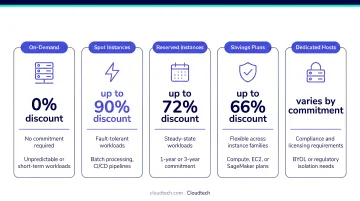
AWS pricing retrieved 2026-07-06.
Storage and Data Transfer
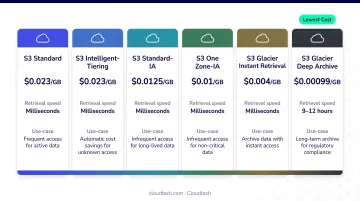
Unmanaged EBS volumes, outdated snapshots, and data sitting in high-cost storage tiers all generate steady charges that go unnoticed until the bill arrives. S3 Standard costs $0.023/GB-month; S3 Glacier Deep Archive costs $0.00099/GB-month — a 23x difference for data that no one accesses regularly.
Data transfer costs add up fast. Cross-region transfers and outbound internet traffic are easy to ignore during architecture planning — then impossible to ignore on the monthly bill.
AWS Cost-Reduction Strategies
Effective cost optimization addresses three dimensions simultaneously: the decisions made before resources are provisioned, how AWS is managed day-to-day, and the surrounding infrastructure context. Each layer compounds the others.
Strategies That Target Provisioning Decisions
These are often the highest-leverage changes because they set the baseline spend before any workload runs.
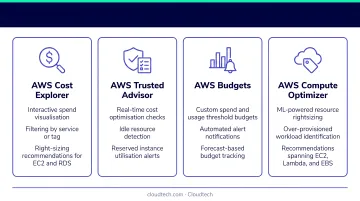
Right-size instances using AWS Compute Optimizer. Most teams provision based on peak estimates, which produces over-sized instances running at low utilization most of the time. AWS Compute Optimizer analyzes configuration and utilization metrics — covering EC2, Auto Scaling groups, EBS volumes, and Lambda functions — and generates specific right-sizing recommendations. Enabling memory metrics is a prerequisite: customers who did reported measurably higher savings per recommendation than those relying on CPU metrics alone.
Choose the right pricing model. On-demand pricing is appropriate for unpredictable or short-lived workloads. For anything that runs continuously and predictably, Reserved Instances or Savings Plans can cut costs by 30–72%. Compute Savings Plans offer the most flexibility — they apply across instance families, sizes, Availability Zones, and regions — making them easier to manage for teams whose usage mix evolves over time.
Select regions deliberately. AWS pricing varies meaningfully by region. Before defaulting to the nearest one, weigh latency requirements, data sovereignty constraints, and actual cost differences. Every resource deployed in a region inherits that region's pricing, so the decision affects the entire environment.
Establish a tagging policy from day one. Without consistent tags (by project, department, environment), you can't attribute charges to specific teams or workloads. Cloudtech — an AWS Advanced Tier Partner focused on SMBs — routinely sets up detailed tagging policies alongside AWS Budgets and Cost Explorer as part of its cost governance work. For SMBs engaging an AWS Partner, AWS Partner Funding may offset the cost of a structured optimization or governance engagement.
Strategies That Improve Operational Management
These apply to teams that have already grown their AWS footprint and need better visibility and control — without requiring architectural changes.
Use AWS Cost Explorer as your baseline. Cost Explorer visualizes costs and usage across services, accounts, and time periods. It supports filtering by service, tag, Availability Zone, purchase option, and more — and can generate Reserved Instance coverage reports and recommendations. It also forecasts costs up to 18 months forward and retains up to 13 months of historical data, making trend analysis practical.
Configure AWS Budgets with proactive alerts. Budgets let teams set spending thresholds by service, account, or tag, with SNS-based notifications that reach both finance and engineering before overruns occur. Forecast-based alerts fire before the threshold is hit, not after — which is the difference between preventing an overage and explaining one.
Schedule automatic shutdowns for non-production environments. Dev, test, and staging environments rarely need to run 24/7. Using AWS Instance Scheduler or Amazon EventBridge Scheduler to stop resources during nights, weekends, and holidays eliminates a significant portion of non-production spend without disrupting any active work.
Run AWS Trusted Advisor checks regularly. Trusted Advisor scans the environment and surfaces actionable recommendations across cost, performance, security, and fault tolerance. Its cost checks identify idle load balancers, underutilized EC2 instances, unattached EBS volumes, and low-utilization Reserved Instances. Note that full access to cost optimization checks requires a Business Support plan or higher.
Strategies That Address Infrastructure and Architecture
These changes often deliver the largest long-term savings, though they require cross-team coordination.
Implement Auto Scaling. Static resource allocation forces provisioning for peak load at all times. AWS Auto Scaling adds or removes resources dynamically based on demand metrics — target tracking, step scaling, or simple scaling — so teams pay for actual usage rather than hypothetical peaks. Pairing Auto Scaling with Elastic Load Balancing distributes traffic efficiently and avoids unnecessary scale-up events triggered by uneven load distribution.
Move infrequently accessed data to lower-cost storage tiers. Not all data belongs in S3 Standard. S3 Storage Class Analysis observes access patterns over 30 days or more and identifies which objects are candidates for transition. From there, lifecycle policies automate the move — without disrupting access to active data:
- S3 Standard-Infrequent Access — $0.0125/GB-month
- S3 Glacier Instant Retrieval — $0.004/GB-month
- S3 Glacier Deep Archive — $0.00099/GB-month
Audit and eliminate orphaned resources on a schedule. Terminated EC2 instances often leave behind unattached EBS volumes, outdated snapshots, and idle load balancers — all generating charges with no corresponding value. Trusted Advisor and CloudWatch identify these resources. Lambda functions triggered on a schedule can automate the cleanup, preventing orphaned resource costs from compounding silently between manual reviews.
Use EC2 Spot Instances for fault-tolerant workloads. Spot Instances provide access to unused AWS capacity at up to 90% off on-demand pricing, but they can be interrupted with a two-minute notice. That makes them well-suited for batch jobs, data processing pipelines, CI/CD workflows, and dev/test environments.
Configuring instances to hibernate rather than terminate on interruption preserves state and reduces friction for teams adopting Spot for the first time.
Conclusion
AWS cost optimization is ultimately about understanding where cost originates — and making deliberate choices at every layer. Blind cuts often degrade performance; targeted changes based on actual usage data improve both cost and reliability at the same time.
Optimization also doesn't stay solved. As workloads evolve and teams grow, what was efficient at one stage can become wasteful at the next. For SMBs and startups without a dedicated FinOps function, that ongoing vigilance is hard to sustain internally.
Working with an AWS Advanced Tier Partner like Cloudtech provides structured governance, tooling, and continuous oversight without the overhead of building an in-house team. Engagements are designed specifically for the SMB context, and many can be partially offset through AWS Partner Funding, reducing the out-of-pocket cost of getting expert help.
Frequently Asked Questions
What are the 4 pillars of cost optimization?
The AWS Well-Architected Framework identifies right-sizing resources, increasing elasticity, choosing the right pricing model, and optimizing storage as the core pillars of cost optimization. AWS also emphasizes continuous measurement and monitoring as a fifth pillar — treating cost efficiency as an ongoing practice rather than a one-time activity.
Which AWS service can provide recommendations for cost optimization?
AWS Trusted Advisor is the primary service for actionable cost recommendations, covering idle resources, underutilized instances, and unattached volumes. AWS Compute Optimizer provides right-sizing recommendations specifically, while AWS Cost Explorer surfaces usage-based insights and Reserved Instance coverage analysis.
What is the difference between Reserved Instances and Savings Plans?
Reserved Instances require commitment to a specific instance type and region, while Savings Plans commit to a minimum hourly spend across compute services with more flexibility across instance families, sizes, and regions. Savings Plans are easier to manage for teams with dynamic or evolving workloads.
How do I identify unused or idle AWS resources?
AWS Trusted Advisor's cost optimization checks flag idle EC2 instances, underutilized EBS volumes, and unused load balancers. AWS Cost Explorer's resource optimization report and CloudWatch utilization metrics provide additional visibility into resources that are running but delivering little value.
What is right-sizing in AWS and why does it matter?
Right-sizing matches instance type and size to actual workload requirements — avoiding both over-provisioning (which wastes spend) and under-provisioning (which hurts performance). AWS Compute Optimizer automates this analysis using configuration data and utilization metrics, including memory utilization metrics.
How much can organizations realistically save through AWS cost optimization?
Savings vary widely depending on the current state of the environment. Commitment-based pricing alone — Reserved Instances or Savings Plans — can reduce compute costs by up to 72% for steady-state workloads. The more waste that exists before optimization begins, the larger the potential improvement.