Introduction
Most SMBs don't struggle with the decision to migrate to AWS — they struggle with what happens after. Every choice made during migration, from how VPCs are segmented to which database service replaces a self-managed EC2 instance, directly shapes the scalability, security, and cost of your cloud environment for years to come.
According to Flexera's 2026 State of the Cloud Report, managing cloud costs is a top challenge for 85% of organizations, and an estimated 29% of cloud spend is wasted — much of it traceable to unplanned migrations and over-provisioned resources.
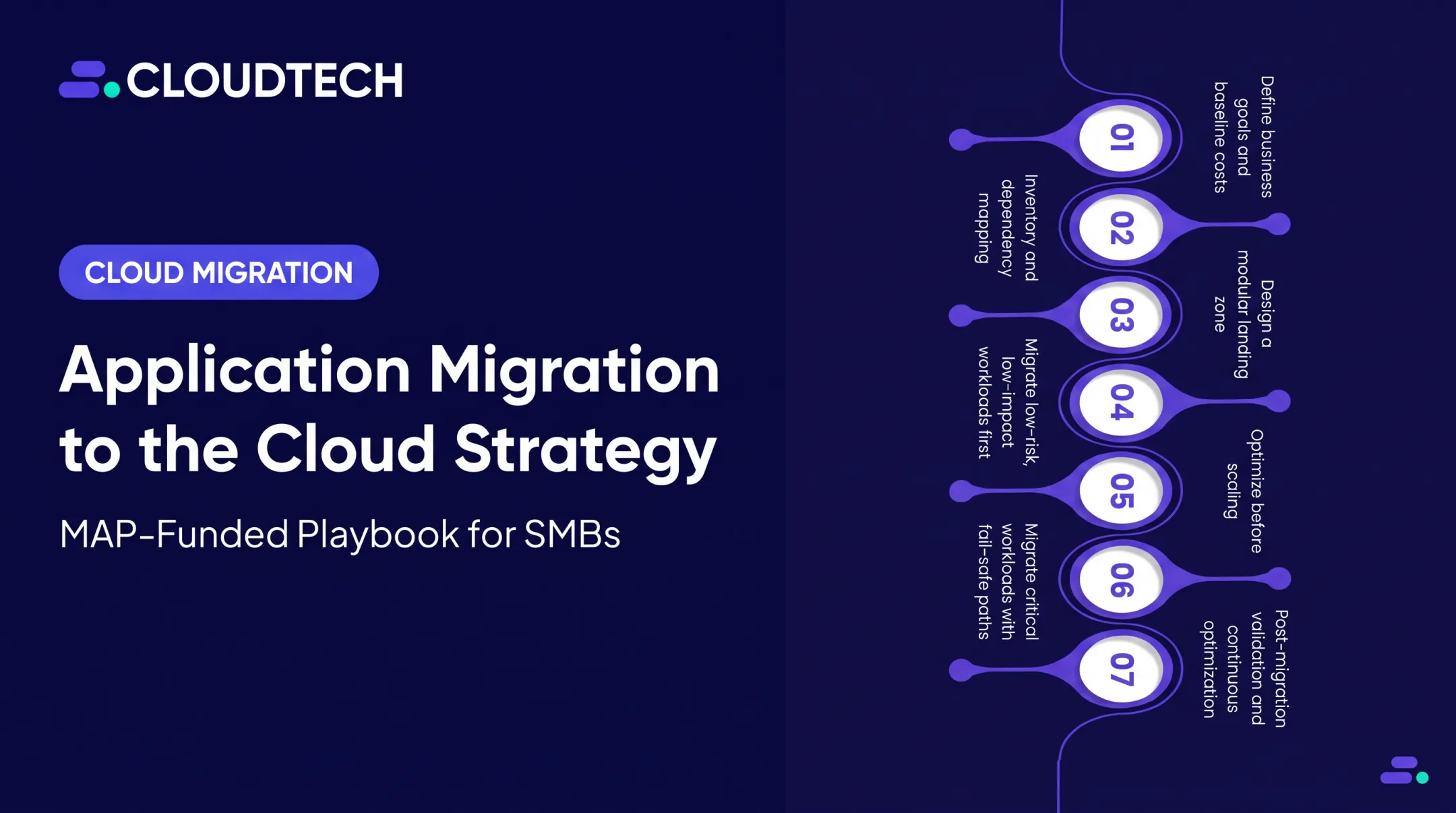
This guide walks through the complete AWS cloud migration checklist, covering four phases: pre-migration assessment, architecture and security planning, migration execution, and post-migration optimization. Each phase is written from an architecture-first perspective, giving SMBs in healthcare, financial services, manufacturing, and SaaS a clear path to migrate without the costly missteps that derail unplanned moves.
Key Takeaways
- AWS migration demands architectural planning across compute, storage, networking, security, and data — not a lift-and-shift copy job
- Four phases drive every migration: assessment, architecture planning, execution, and post-migration optimization
- Choosing the right migration strategy (one of the 7 Rs) for each workload is a core architectural decision
- Skipping dependency mapping is the biggest risk factor for post-migration failures
- The AWS Well-Architected Framework should guide every architectural decision made during migration
What Is AWS Cloud Migration Architecture?
AWS cloud migration architecture is the structured design of how workloads, data, networking, security controls, and services are organized within AWS after migration. It is distinct from simply copying existing infrastructure into the cloud.
The architecture defines how every component — VPCs, IAM roles, compute services, storage tiers, and databases — serves a specific purpose in the target environment. The goal is a cloud setup that is scalable, secure, and cost-optimized from day one, aligned with the AWS Well-Architected Framework's six pillars.
How It Differs from General Cloud Architecture
Migration architecture specifically accounts for the transition path:
- Which components transfer as-is versus need refactoring
- Services and workloads that get retired rather than moved
- Applications redesigned for cloud-native patterns (containers, serverless, managed services)
- Validation checkpoints confirming the target state before go-live
Teams that skip this planning phase tend to replicate on-premises constraints directly into AWS — paying cloud costs for an architecture that was never designed to run there.
Why Businesses Need a Structured AWS Migration Checklist
The business case for AWS is well-established. AWS reports that migrating to AWS leads to a 27% reduction in cost per user, a 58% increase in VMs managed per admin, and a 57% decrease in downtime on average. Businesses running on AWS save an average of 31% compared to on-premises infrastructure.
Those numbers, however, assume the migration was done well.
What Goes Wrong Without a Checklist
Ad-hoc migrations consistently produce the same three failure modes:
- Missed dependencies — a migrated application breaks because a dependent service was left on-premises or moved in the wrong sequence
- Security misconfigurations — overly permissive IAM policies, publicly accessible S3 buckets, and missing encryption create exposure that regulators and attackers exploit
- Cost overruns — teams replicate on-premises server sizes instead of right-sizing, resulting in cloud bills that exceed what they were paying before
A structured checklist addresses each of these before they become expensive problems — starting with a full workload inventory and ending with architecture validation. The sections below walk through exactly how to do that.
The Complete AWS Cloud Migration Checklist
Most successful migrations use a wave-based approach — moving low-risk, low-dependency workloads first to build team confidence before tackling business-critical systems. The four phases below reflect that sequencing.
Phase 1: Pre-Migration Assessment
This phase is where most SMB migrations succeed or fail. Rushing through discovery is the single most common root cause of post-migration breakages.
Step 1: Conduct a full infrastructure inventory
Document every server, virtual machine, database, and application in scope. For each asset, record:
- Current CPU, memory, and storage utilization (performance baselines)
- Business criticality (mission-critical, important, low priority)
- Migration complexity (simple lift-and-shift vs. complex refactor)
Step 2: Map all dependencies before anything moves
Identify which applications communicate with each other and which rely on shared databases or middleware. Note any compliance constraints — HIPAA, PCI-DSS, SOX — that restrict where workloads can be hosted on AWS.
A dependency map prevents the most common post-migration failure: a migrated app that cannot reach a service left behind on-premises.
Step 3: Assign a migration strategy to each workload
AWS defines seven migration strategies — known as the 7 Rs:
| Strategy | Description | Best For |
|---|---|---|
| Retire | Decommission the workload | Zombie apps, unused systems |
| Retain | Keep on-premises for now | Compliance holds, timing constraints |
| Rehost | Lift-and-shift to EC2 | Quick moves, legacy apps |
| Relocate | Move at the infrastructure level | VMware workloads |
| Replatform | Lift, tinker, and shift | Move to managed services with minor changes |
| Repurchase | Replace with a SaaS product | Outdated commercial apps |
| Refactor | Re-architect for cloud-native | Performance, scalability goals |
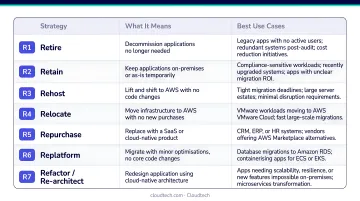
Document the rationale for each workload's assigned strategy. This decision drives every downstream architectural choice.
Phase 2: Architecture and Security Planning
Architecture is designed here, before migration begins. This is not a step to compress.
Design the target AWS architecture:
- Set up the VPC structure: subnets, route tables, internet and NAT gateways
- Define availability zones for high availability across workloads
- Select compute services per workload type: EC2 for stateful lift-and-shift workloads, ECS/EKS for containerized microservices, Lambda for event-driven functions
- Choose storage tiers matched to access patterns: S3, EBS, EFS, or S3 Glacier
Build a security-first foundation:
Security must be built into the architecture, not added after migration. Pre-configure:
- IAM roles and policies using least-privilege principles — scoped by workload, team, and job function
- CloudTrail enabled across all accounts and regions for complete API audit logging
- AWS Config deployed for continuous compliance monitoring and configuration drift detection
- KMS encryption applied by default to all storage services — S3, EBS, RDS
- Security groups and NACLs configured for network segmentation, with no unrestricted inbound access on sensitive ports
Getting this foundation right before migration begins is what separates smooth cutovers from costly rollbacks. Cloudtech's AWS-certified architects — most of them former AWS employees — deliver pre-configured landing zones with all of these controls embedded, typically in one to two weeks through the Cloud Foundation package. That's an architecture design cycle that enterprise teams spend months on, completed before your first workload moves.
Phase 3: Migration Execution
With the architecture validated, workloads move in waves — non-critical systems first, business-critical systems last.
Use the right AWS migration tool for each workload:
- AWS Application Migration Service (MGN) — server rehosting with continuous replication; enables multiple test migrations before live cutover, minimizing downtime
- AWS Database Migration Service (DMS) — live database replication with minimal downtime; AWS DMS has migrated more than 1.5 million databases, supporting both homogeneous and heterogeneous migrations
- AWS DataSync — large-scale file transfers; performs transfers up to 10x faster than open-source tools
- AWS Snowball — offline bulk data transfer for petabyte-scale migrations where network transfer is impractical
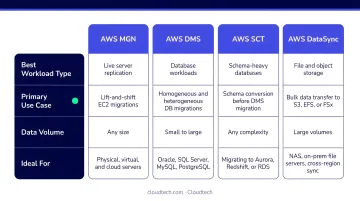
Execute migrations in waves:
- Pilot wave — migrate one or two non-critical systems; validate the process end-to-end
- Test in staging — perform a full test migration before production cutover
- Validate against baselines — confirm application behavior, user access, and performance match pre-migration measurements
- Define rollback triggers — document the conditions under which the cutover reverses, for every wave
Schedule migrations during off-peak hours and validate data integrity at each step before proceeding to the next wave.
Phase 4: Post-Migration Optimization
The first 60 to 90 days after cutover are when the most impactful cost and performance decisions get made — and most teams underinvest in this phase.
Right-size compute resources:
Initial resource allocations are based on projected usage, not live traffic data. After 2 to 4 weeks of real production traffic, use:
- AWS Cost Explorer — analyzes the last 13 months of spend and provides rightsizing recommendations for underutilized EC2 instances
- AWS Compute Optimizer — analyzes CloudWatch metrics to identify idle or over-provisioned resources across EC2, EBS, Lambda, and RDS
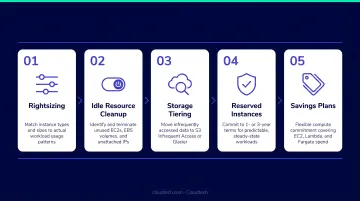
Once utilization patterns stabilize, shift predictable workloads from on-demand pricing to AWS Savings Plans, which provide up to 72% savings compared to on-demand prices.
Set up continuous monitoring:
- Amazon CloudWatch — metrics, alarms, and dashboards for real-time visibility
- AWS X-Ray — application tracing for distributed systems
- AWS Config — ongoing configuration compliance monitoring
Cloudtech's post-migration engagements cover right-sizing analysis with Compute Optimizer, Savings Plans recommendations, and CloudWatch monitoring setup — built as an ongoing optimization model, not a single delivery. One healthcare client, Klamath Health Partnership, achieved a 77% year-over-year reduction in infrastructure costs through this continuous optimization approach.
Key AWS Architecture Decisions During Migration
Several architectural decisions made during migration have lasting consequences. Get them right early — they're expensive to undo later.
VPC Design
The VPC is the foundational networking layer everything else depends on. Getting it wrong early creates costly re-architecture later.
- Single VPC works for straightforward migrations with limited environment separation requirements
- Multi-VPC with Transit Gateway is appropriate when workloads must be isolated across development, staging, and production environments — preventing lateral movement in the event of a compromise
Segment all VPCs into public and private subnets across multiple availability zones. Use VPC endpoints to allow private access to AWS services like S3 and KMS without traffic traversing the public internet.
Compute Architecture
The right compute service is workload-specific:
- EC2 — full infrastructure control, stateful workloads, compliance-sensitive environments requiring specific OS configurations
- ECS — containerized workloads, teams new to containers, deep AWS ecosystem integration
- EKS — complex microservices, existing Kubernetes expertise, multi-cloud portability requirements
- Lambda — event-driven, stateless, bursty workloads with usage-based pricing and minimal operational overhead
Data Architecture
Most SMBs benefit from moving to managed database services during migration rather than rehosting databases as-is on EC2:
- Amazon RDS — automates patching, backups, and Multi-AZ failover for relational workloads
- Amazon Aurora — cloud-native relational database with failover under 35 seconds; strong fit for replatforming scenarios
- Amazon DynamoDB — serverless NoSQL with millisecond latency and auto-scaling throughput
For SMBs without dedicated database administrators, the managed service model eliminates an entire category of operational risk — patching, failover, and backup handling included.
Well-Architected Framework Review
Every architectural decision during migration should be evaluated against the six pillars of the AWS Well-Architected Framework: Operational Excellence, Security, Reliability, Performance Efficiency, Cost Optimization, and Sustainability.
Once the initial migration is complete, conduct a formal Well-Architected Review. This surfaces high-risk issues and validates your target architecture against AWS best practices before they compound into larger problems.
Common AWS Migration Mistakes SMBs Make
Three mistakes account for the majority of failed or over-budget AWS migrations among SMBs:
- Skipping dependency mapping — Workloads silently connected on-premises break after cutover when a dependent service moved in the wrong wave or wasn't migrated at all. Document dependencies before you finalize wave sequencing, not during it.
- Over-provisioning compute and storage — Teams replicate on-premises server sizes under the assumption that "bigger is safer." Flexera projects cloud waste will reach 29% of total IaaS and PaaS spend in 2026, with over-provisioning as a primary driver. Right-sizing at migration beats cleaning it up later.
- Security misconfiguration — Publicly accessible S3 buckets, overly broad IAM policies, and disabled encryption are common in self-managed migrations. These gaps don't always surface immediately, but when they do, the consequences include regulatory fines, data breaches, and operational disruption.
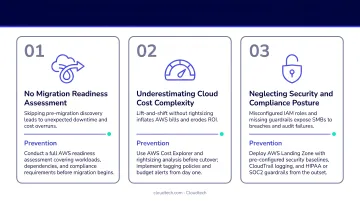
The most effective way to avoid the third mistake is to build security controls into the landing zone before migration begins — not retrofit them afterward. IAM permission boundaries, encryption defaults, and compliance packs for HIPAA, SOC 2, or PCI-DSS should be established as part of the foundation. Cloudtech's Cloud Foundation package does exactly this, so security guardrails are already in place by the time the first workload moves.
Frequently Asked Questions
What is the architecture of AWS cloud?
AWS cloud architecture is the structure of services, infrastructure, and design patterns used to build and run applications on AWS. It covers compute (EC2, Lambda), networking (VPC, Route 53), storage (S3, EBS), databases (RDS, DynamoDB), and security services (IAM, KMS) — all connected through APIs and managed globally across AWS Regions and Availability Zones.
What are the 6 pillars of AWS?
The six pillars of the AWS Well-Architected Framework are: Operational Excellence, Security, Reliability, Performance Efficiency, Cost Optimization, and Sustainability. Each pillar applies directly to migration decisions — from how you handle security controls to how you manage ongoing cloud costs.
What are the four types of cloud architecture?
The four main types are: public cloud (shared infrastructure hosted by a provider like AWS), private cloud (dedicated infrastructure for one organization), hybrid cloud (combination of on-premises and public cloud), and multi-cloud (workloads distributed across two or more providers). Most SMBs migrating to AWS begin with a public cloud or hybrid model.
What is EC2, S3, and Lambda?
Amazon EC2 provides virtual servers for running applications. Amazon S3 is object storage for files, backups, and data at scale. AWS Lambda is a serverless compute service that runs code in response to events without managing servers. These three services appear in nearly every AWS migration.
What is the AWS Well-Architected Framework and why does it matter for migration?
The AWS Well-Architected Framework gives migration teams a structured checklist to validate architecture decisions against AWS best practices. It's used both before go-live to catch gaps and after migration to benchmark ongoing operational health.
How long does an AWS cloud migration typically take?
A simple lift-and-shift of a small number of workloads can take 2 to 4 weeks. A full migration with re-architecture may take 6 to 18 months depending on scope and complexity. SMBs that work with an AWS Advanced Tier Partner like Cloudtech, which uses pre-packaged accelerators built by former AWS engineers, typically complete migrations up to 3x faster than in-house efforts.