on AWS](https://file-host.link/website/cloudtech-ff604p/assets/blog-images/4a545598-1991-420e-b9e5-e88d6de5ec04/1784159478776876_f775314294044d8589cee4b8ae8adaa9/360.webp)
A fully automated data ingestion pipeline on AWS solves this by replacing manual steps with event-driven triggers, serverless ETL, and managed orchestration — so data flows from source to analytics without human intervention.
That said, results vary widely. The wrong service selection, a misconfigured IAM role, or skipping data quality checks can silently break a pipeline that looks healthy from the outside. This guide covers what you need before you build, the five-stage build process, the key AWS services involved, common mistakes, and when managed services beat a custom approach.
According to IDC's 2023–2027 Global DataSphere forecast as reported by AWS, global data generation hit 129 ZB in 2023 and is expected to more than double by 2027. Pipelines that can't scale with that growth become liabilities fast.
Key Takeaways
- Automated AWS pipelines use S3, Glue, Lambda, Kinesis, and EventBridge to move data without manual intervention
- Architecture choice depends on data type, volume, and latency — batch and streaming are not interchangeable
- IAM least privilege and Secrets Manager credential handling are non-negotiable prerequisites
- Skipping data quality checks at ingestion causes downstream failures that are hard to isolate
- SMBs without dedicated data engineering teams ship pipelines faster by partnering with an AWS consulting firm
What You Need Before Building an Automated Data Ingestion Pipeline on AWS
Preparation is the phase most teams skip — and it's where most pipeline failures originate. A pipeline built on undefined architecture or loose permissions will fail silently or create security gaps that are expensive to fix later.
AWS Account and Permission Requirements
Every service in your pipeline needs an IAM execution role scoped to exactly what it requires — nothing more. AWS recommends least-privilege as the baseline standard: grant only the permissions needed for the specific task, then refine from there.
For a typical ingestion pipeline, your execution role needs:
- Read access to data sources (S3 prefixes, RDS endpoints, or third-party APIs)
- Write access scoped to specific target bucket ARNs and prefixes — not
s3:*on all buckets - Trigger permissions to start Glue jobs or invoke Lambda functions
- Secrets Manager read access for runtime credential retrieval (not included in the default
AWSGlueServiceRole)
This matters at scale. Unit 42's Cloud Threat Report found that 83% of organizations had hard-coded credentials in source-control systems — a direct consequence of skipping proper secrets management during setup.
Data Source and Destination Planning
Map every data source your pipeline will touch before writing any configuration:
- Source types: Relational databases, SaaS APIs, IoT streams, SFTP file drops, flat files
- Formats: CSV, JSON, Parquet, Avro — format affects transformation logic significantly
- S3 zone structure: Define separate buckets or prefixes for raw, processed, and curated data before provisioning
The raw → processed → curated landing zone model is a foundational architecture decision. Every downstream service — Glue crawlers, Athena queries, Redshift Spectrum — depends on this structure being consistent from day one.
Team Readiness and Tooling
A production-grade pipeline requires familiarity with:
- Python or Scala for Glue ETL scripts
- AWS CLI or CloudFormation/CDK for infrastructure provisioning
- CloudWatch for monitoring and alerting
For SMBs and startups without a dedicated data engineering team, this is often the real bottleneck. Cloudtech's data modernization engagements address it directly: each project begins with an assessment of data volume, access patterns, and source systems before any build work starts. Knowledge transfer is built into every engagement so client teams can operate independently after go-live.
How to Build a Fully Automated Data Ingestion Pipeline on AWS
The build follows five sequential stages. Skipping any one of them (particularly infrastructure provisioning or source connection configuration) is the most common cause of pipeline failures in production.
Step 1: Provision Your Infrastructure with CloudFormation or CDK
Define all pipeline infrastructure as code before touching any individual service. This includes:
- S3 buckets for raw, processed, and curated zones
- IAM roles for each pipeline service
- Glue databases and crawlers
- Lambda functions
Key CloudFormation resource types:
| Resource | Purpose |
|---|---|
AWS::S3::Bucket |
Raw, processed, curated storage zones |
AWS::IAM::Role |
Scoped execution roles per service |
AWS::Glue::Database |
Metadata catalog container |
AWS::Glue::Crawler |
Schema detection and catalog updates |
IaC matters for one practical reason: CloudFormation's drift detection flags any resource that's been modified outside the template. Without it, manual changes accumulate silently across dev, staging, and production , making environments impossible to reproduce reliably.
Step 2: Configure Your Data Source Connections
Ingestion configuration varies by source type:
- Relational databases: Use AWS DMS for full load plus change data capture (CDC), or configure Glue JDBC connections for PostgreSQL, MySQL, SQL Server, Oracle, and Redshift
- Streaming sources: Set up Amazon Data Firehose with buffer settings (default hints: 5 MiB / 300 seconds, adjustable to 1–128 MiB and 0–900 seconds depending on delivery requirements)
- File and partner transfers: Configure AWS Transfer Family endpoints (SFTP, FTPS, FTP, AS2) pointing directly to your raw S3 zone
Store all source credentials in AWS Secrets Manager. Both Glue and Lambda support runtime secret retrieval — Glue via its connection properties, Lambda via the AWS Parameters and Secrets Lambda Extension. Credentials hardcoded in scripts are not an acceptable alternative.
Step 3: Build and Deploy the ETL Transformation Layer
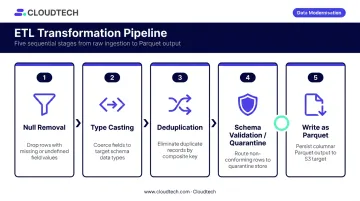
Create an AWS Glue ETL job that reads from the raw S3 zone and writes clean output to the processed zone. Glue Studio's visual editor generates PySpark code that you can customize directly.
A standard transformation job applies:
- Drop or flag records missing required fields (null removal)
- Enforce consistent data types across all fields (type casting)
- Identify and merge duplicate records using defined matching rules
- Reject or quarantine records that don't conform to the expected schema
- Write output as Parquet for efficient downstream querying
After deploying the ETL job, configure Glue Crawlers to run on a schedule. Crawlers detect schema changes in source data and update the Glue Data Catalog automatically, keeping Athena queries and Redshift Spectrum external schemas accurate without manual intervention. That catalog accuracy becomes critical in the next stage, where automation depends on knowing exactly what data is where.
Step 4: Automate Triggers and Orchestration
Two primary mechanisms handle pipeline automation:
Event-driven (real-time/near-real-time): S3 event notifications → Lambda → Glue job start. When a new file lands in the raw zone, Lambda fires automatically and kicks off the transformation job. One critical guardrail: never write Lambda output back to the same bucket that triggered it, or you'll create an infinite invocation loop.
Scheduled (batch): Amazon EventBridge Scheduler supports cron and rate expressions, one-time schedules, and retry policies. AWS Glue Workflows can also trigger on daily, weekly, or custom schedules.
For multi-stage pipelines, AWS Step Functions adds conditional branching (Choice states), retry logic (Retry/Catch error handling), and sequential job coordination . Use it when one job's output feeds directly into the next stage and failure handling needs to be explicit.
Step 5: Monitor, Log, and Verify the Pipeline
Set up CloudWatch before the pipeline goes live:
- Glue jobs write logs to
/aws-glue/jobs/errorand/aws-glue/jobs/output - Lambda creates
/aws/lambda/<function-name>on first invocation - Configure alarms for job failures, error rates, and Lambda throttles — CloudWatch provides recommended alarm configurations by service
Verification checklist before marking the pipeline production-ready:
- ✅ Raw files land in the correct S3 prefix
- ✅ Glue job logs show expected row counts before and after transformation
- ✅ Processed output schema matches defined expectations
- ✅ Glue Data Catalog reflects current table definitions without manual updates
- ✅ CloudWatch dashboard reflects healthy metrics (records processed, error rate, job duration)
Key AWS Services That Power Your Automated Data Ingestion Pipeline
No single service handles the full ingestion lifecycle. The right architecture composes several services, each responsible for a specific layer.
Amazon S3 as the Data Lake Foundation
S3 serves three roles at once — raw data landing zone, processed output target, and source for downstream analytics tools like Athena and Redshift Spectrum.
Key configuration decisions that affect pipeline cost and security:
- Bucket versioning: Disabled by default — enable it on processed and curated zones to retain object history
- Lifecycle policies: Transition infrequently accessed objects to cheaper storage classes; expire temporary raw files automatically
- SSE-KMS encryption: Encrypt all data at rest using KMS keys; S3 Bucket Keys reduce KMS request costs by up to 99%
S3 is designed for 11 nines (99.999999999%) durability — data loss at the storage layer is not a realistic failure mode. Pipeline failures happen at the ingestion and transformation layers, which is where monitoring effort should concentrate.
AWS Glue for Serverless ETL and Cataloging
Glue functions as both the ETL engine and the metadata layer. Its Data Catalog acts as a centralized schema registry shared across Athena, Redshift Spectrum, and other analytics services.
Glue supports both ETL (transform before load) and ELT (load raw, transform in place) patterns depending on job configuration. The serverless model eliminates cluster provisioning and capacity planning — you pay only for job runtime.
Amazon Data Firehose for Streaming Ingestion
Amazon Data Firehose (formerly Kinesis Data Firehose, renamed February 2024) handles managed delivery of streaming data to S3, Redshift, or OpenSearch. It buffers incoming records by size or time, optionally invokes Lambda for lightweight transformation, and delivers batched output automatically.
Firehose vs. Kinesis Data Streams — when to use which:
| Factor | Amazon Data Firehose | Kinesis Data Streams |
|---|---|---|
| Best for | Managed delivery to a destination | Custom consumers, independent replay |
| Latency | Seconds (buffering applies) | Sub-second put-to-get typical |
| Management | Fully managed, auto-scales | User builds consumer applications |
| Use case fit | Most SMB streaming pipelines | Sub-second latency or complex fan-out |
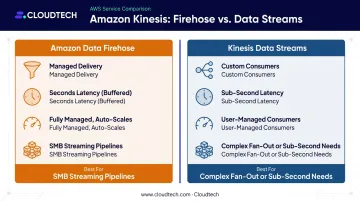
Choose Firehose for simpler, managed delivery. Choose Data Streams when you need custom consumers or latency below what buffering allows.
AWS Lambda and EventBridge for Event-Driven Automation
Lambda acts as the connective layer between services. Common trigger patterns include:
- S3 event → Lambda → Glue job start: Kicks off transformation the moment new data lands
- Lambda → SNS notification: Alerts on pipeline failures or threshold breaches
- Lambda → lightweight preprocessing: Filters or reshapes records before downstream load
Paired with EventBridge rules, this creates fully hands-off execution with no manual intervention required.
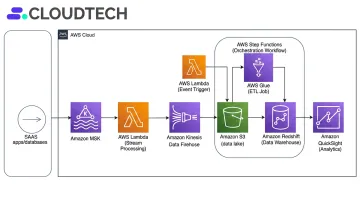
Cloudtech's pipeline implementations pair the Kinesis → S3 → Glue stack with Step Functions for orchestration and Lambda for event-driven triggers. One example: a ride-hailing client streamed GPS and trip data via Kinesis into S3 and transformed it in real time with Glue. Historical sync ran through DMS, letting the system respond to live demand changes within minutes.
Common Mistakes When Building AWS Data Ingestion Pipelines
Overly Permissive IAM Roles
Granting s3:* on all buckets is the most common security mistake in pipeline setups. It violates least-privilege principles and creates audit failures — particularly for teams in healthcare or financial services where access controls are part of compliance requirements.
Scope roles properly using the correct ARN format for each operation:
- Bucket-level operations:
arn:aws:s3:::bucket-name - Object-level operations:
arn:aws:s3:::bucket-name/*(or a narrower prefix)
These are not interchangeable — using the wrong scope is a common misconfiguration that passes initial testing but fails security audits.
Skipping Data Quality Checks at Ingestion
Pushing raw, unvalidated data directly into the processed zone without schema enforcement or null checks causes downstream analytics failures that are hard to trace. By the time the bad data surfaces in a dashboard, it's already been joined and aggregated across multiple tables.
Use AWS Glue Data Quality rules (built on Deequ, using DQDL syntax) or Lambda-based validation at the point of ingestion — before transformation begins. Gartner estimates poor data quality costs organizations $12.9M per year on average. Catching bad records at the ingestion layer is far cheaper than tracing and correcting them across joined and aggregated tables downstream.
Choosing the Wrong Ingestion Pattern for the Use Case
Teams frequently configure batch pipelines for use cases that need near-real-time data — fraud detection and inventory monitoring are the most common examples — or build expensive streaming infrastructure for data that only updates daily.
Match the pattern to the actual latency requirement:
- Batch (hourly/daily): Reporting, historical analytics, scheduled data syncs
- Streaming/near-real-time: Fraud detection, live inventory, operational dashboards requiring fresh data
- Event-driven: File-based workflows where new arrivals trigger processing
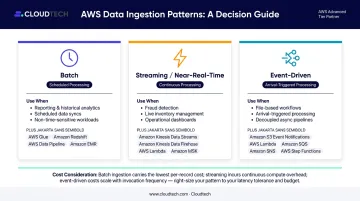
Streaming infrastructure costs significantly more at scale — Kinesis Data Streams can run 5-10x the cost of an equivalent S3-based batch setup. If your data latency requirement is hourly or longer, batch is almost always the right call.
When to Build a Custom Pipeline vs. Use a Managed AWS Service
Build a Custom Pipeline When:
- Transformations involve highly complex, proprietary business logic that managed services can't accommodate
- Legacy source systems lack native AWS connectors and require custom integration code
- Latency requirements fall below Firehose's minimum buffering window (sub-second delivery to a custom consumer)
Custom pipelines offer maximum flexibility, but they come with real costs: dedicated engineering ownership, ongoing maintenance, and no AWS-managed infrastructure to absorb operational overhead.
Use Managed AWS Services (or a Partner) When:
- Your team lacks dedicated data engineering capacity to build and maintain a production pipeline
- You need a production-grade pipeline in weeks, not quarters
- Your industry has compliance requirements (HIPAA, SOC 2) that need to be baked into the architecture from day one
Those criteria map directly to what Cloudtech's data modernization practice handles in practice. Klamath Health Partnership needed a HIPAA-compliant data lake built while migrating EHR records off infrastructure sitting on an active seismic fault. Using managed AWS services — S3, AWS Control Tower, and IAM — the engagement delivered a 77% year-over-year reduction in infrastructure costs. A separate financial services client deployed an event-driven pipeline across multiple data sources, avoiding opportunity losses estimated in the tens of millions of dollars.
For SMBs without a dedicated data engineering function, working with an AWS Advanced Tier Partner means the architecture is compliant, scalable, and matched to your workload from day one — not retrofitted after problems surface.
Frequently Asked Questions
What is the difference between data ingestion and data pipeline?
Data ingestion is the process of collecting raw data from source systems and importing it into a storage layer. A data pipeline is the broader end-to-end workflow that includes ingestion, transformation, validation, and loading into a target system. Ingestion is the first stage of a pipeline — not the complete picture.
Is AWS Glue ETL or ELT?
AWS Glue supports both patterns. In ETL mode, data is transformed before being written to the target. In ELT mode, raw data is loaded into S3 or Redshift first, then transformed in place. Which pattern you use depends on your job configuration and where transformation logic runs.
Is the AWS Data Pipeline service deprecated?
AWS Data Pipeline is in maintenance mode and has been unavailable to new customers since July 25, 2024. AWS recommends AWS Glue, AWS Step Functions, and Amazon MWAA as alternatives for new pipeline orchestration projects.
What AWS services are best for automated data ingestion?
The core stack for automated ingestion on AWS:
- Amazon S3 — storage and landing zone
- AWS Glue — serverless ETL and data cataloging
- Amazon Data Firehose — streaming ingestion
- AWS Lambda — event-driven automation
- Amazon EventBridge — scheduling and orchestration
The right combination depends on your data volume and latency requirements.
How do I trigger an AWS data ingestion pipeline automatically?
Two primary methods work well here: S3 event notifications invoke Lambda when a new file arrives (event-driven), and Amazon EventBridge Scheduler runs pipelines on a defined cron or rate expression (time-based). Together, they cover both reactive and scheduled automation without manual intervention.