Introduction
Every minute a website visitor waits for a response is a minute they're considering a competitor. An InsideSales study of 5.7 million inbound leads found conversion rates 8x higher when response occurred within five minutes compared to six or more minutes — yet less than 1% of companies actually respond that fast.
Traditional contact forms don't solve this. They depend on the visitor to take the first step, then sit in a queue waiting for a human to follow up hours later. For SMBs with lean sales teams, that gap kills pipeline.
AI chatbots change the equation entirely. They greet visitors proactively, ask qualifying questions, collect contact details through natural conversation, and push structured lead data into a CRM — all without human intervention, at any hour.
This guide covers what AI chatbots actually are (and how they differ from older rule-based tools), why SMBs need them, the highest-impact use cases, must-have features, a step-by-step implementation guide, and the pitfalls that undermine most deployments.
Key Takeaways
- Responding to a lead within five minutes produces 8x higher conversion rates than waiting six or more minutes
- AI chatbots use Natural Language Processing to understand varied phrasings — rule-based bots can't do this
- 41% of meetings booked through conversational AI tools occur outside standard business hours
- Effective chatbots qualify leads using frameworks like BANT through natural conversation — without scripted interrogation flows
- Security and CRM integration are non-negotiable — especially for healthcare and financial services SMBs
What Are AI Chatbots for Customer Engagement and Lead Capture?
An AI chatbot, in this context, is a conversational tool that proactively engages website visitors and social media users, collects contact information through natural dialogue, qualifies prospects against predefined criteria, and pushes structured lead data into CRM systems automatically.
That last part matters. A static contact form waits passively — the visitor must decide to fill it out, complete all fields, and hope someone follows up soon. A chatbot initiates the conversation, guides the visitor through a qualification sequence, and delivers a complete, scored lead record to sales the moment the chat ends.
How AI Chatbots Differ from Rule-Based Bots
Older rule-based bots follow rigid decision trees. Ask something outside the expected script and the bot either loops, errors out, or returns a generic fallback. Anyone who's tried to ask a simple question on a poorly built support bot knows the frustration.
Modern AI chatbots use Natural Language Processing (NLP) and machine learning to understand the intent behind varied phrasings. A visitor who types "what does this cost," "pricing info," or "how much do you guys charge" all get routed to the same relevant response — because the bot recognizes intent, not just keywords.
For SMBs evaluating platforms, this distinction is practical: NLP-based chatbots dramatically reduce drop-off rates caused by bots that can't understand how real people communicate.
Most modern platforms also support a hybrid model, where AI handles initial engagement and qualification, then escalates complex or high-value conversations to a human agent. The full transcript carries over automatically, so the prospect never has to repeat themselves — and your team picks up with full context already in hand.
Why SMBs Need AI Chatbots: Key Benefits
24/7 Lead Capture Without Added Headcount
Drift's 2023 analysis of 30M+ conversations found that 39% of conversations and 41% of meetings for its East Coast customer base occurred outside standard 9-to-5 hours. Those are leads that would disappear entirely without an always-on engagement tool.
A chatbot engages and qualifies visitors at 2 AM just as effectively as mid-afternoon — no on-call staff required.
Higher Conversion Rates vs. Static Forms
Forms ask for everything at once. Ten fields, a CAPTCHA, and a "Submit" button create friction that kills conversions.
Chatbots use progressive profiling — one question at a time, in a conversational format that feels less intrusive. Visitors answer because it feels like a dialogue, not an interrogation. The result: lower drop-off rates and more completed lead captures. A few reasons this works:
- Cognitive load stays low — one question never overwhelms
- Conversational pacing feels voluntary, not demanding
- Visitors share more when the exchange feels human
Automated Lead Qualification That Saves Sales Time
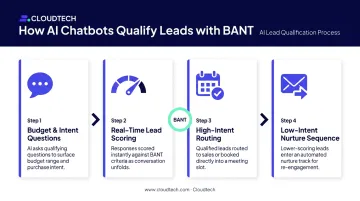
Chatbots apply qualification frameworks like BANT (Budget, Authority, Need, Timeline) through friendly conversation. Instead of your sales team spending time on every inbound inquiry to determine fit, the bot:
- Asks contextual questions to assess budget range and intent
- Scores leads in real time based on responses
- Routes high-intent prospects directly to sales (or books a meeting)
- Pushes lower-intent leads into nurture sequences automatically
Salesforce data shows sales reps spend 60% of their time on non-selling tasks — initial qualification is a significant part of that. Automating the first pass gives your team back selling time.
Richer Lead Data and Actionable Insights
Unlike forms, which only capture the fields you've built, chatbots collect behavioral context alongside contact details:
- Which page triggered the conversation
- What product or service the visitor mentioned
- Urgency signals in their phrasing
- Objections raised before sharing contact info
Over time, those transcripts become a feedback loop. Common objections, recurring product questions, and pricing concerns surface in aggregate — directly informing your marketing messaging and sales scripts.
High-Impact Use Cases: How AI Chatbots Drive Engagement and Capture Leads
Website Lead Qualification for B2B and Service Businesses
Placing a chatbot on high-intent pages — pricing, demo request, solutions pages — and having it proactively greet visitors based on time-on-page or scroll depth turns passive views into active pipeline.
A healthcare software vendor might deploy a bot on its pricing page that asks: "Are you evaluating scheduling tools for a single clinic or multiple locations?" Then: "What system are you currently using?" Two questions in, the bot has enough context to route the visitor to the right sales rep or book a relevant demo — without a human involved.
For SMBs in regulated industries like healthcare or financial services, the chatbot can also serve as a knowledgeable pre-sales assistant — answering questions about security certifications, integration compatibility, and compliance posture before asking for contact details. This builds credibility with skeptical buyers.
One compliance note: California's Business and Professions Code requires clear disclosure when a bot could be mistaken for a human in a commercial interaction. In some jurisdictions, disclosing AI identity isn't optional — it's legally required.
Appointment Booking and Multi-Channel Engagement
For service businesses — consulting firms, healthcare providers, financial advisers — the chatbot qualification-to-booking flow removes the back-and-forth that kills momentum:
- Visitor lands on a service page
- Bot asks two or three qualifying questions
- Bot surfaces available calendar slots from a connected tool (Calendly, Google Calendar)
- Visitor books directly in the chat window
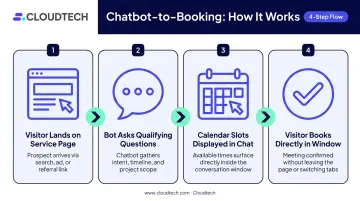
The commitment is locked in while interest is highest. No email thread, no scheduling link buried in a follow-up, no delay.
Booking is only half the picture. A visitor who starts a chat on your website and then switches to their phone shouldn't have to start over. Multi-channel continuity keeps that momentum alive across touchpoints:
- Re-engage via WhatsApp or Facebook Messenger after a session ends
- Trigger comment-to-DM flows on paid social ads, turning public engagement into private qualifying conversations
- Sync conversation history across channels so context carries over automatically
The FAQ-while-capturing approach is also worth building in. Prospects often have questions about pricing, integrations, or security before they're ready to share an email address. A bot that answers those questions first, then offers to "send a detailed breakdown" in exchange for an email, captures more leads because it delivers value before asking for anything.
Must-Have Features When Choosing an AI Chatbot
Evaluating chatbot platforms goes beyond the demo. These are the capabilities that actually matter at the SMB level:
Natural Language Understanding and Behavioral Triggers
- Intent recognition across varied phrasings (not just keyword matching)
- Entity extraction to capture specifics (company size, use case, timeline)
- Context retention across conversation turns so the bot doesn't repeat itself
- Proactive triggers based on user behavior: time on page, repeat visits, exit intent
CRM and Tech Stack Integration
- Bi-directional sync with HubSpot, Salesforce, or Zoho
- Full conversation transcript and lead score pushed to CRM on chat completion
- Native connections to calendar tools, email marketing platforms, and analytics systems
- Middleware options (Zapier, Make) for platforms without native integrations
Scalable Infrastructure with Security and Compliance Controls
For SMBs in healthcare or financial services, the chatbot platform must handle:
- Data encryption at rest and in transit
- GDPR/CCPA-compliant data handling, including deletion rights
- Role-based access controls
- Audit logging for compliance review
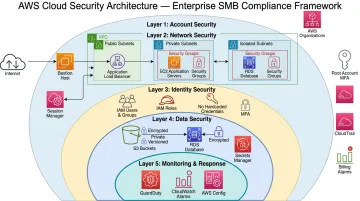
Chatbot platforms built on AWS infrastructure gain meaningful compliance capabilities out of the box: auto-scaling that handles traffic spikes without manual intervention, AWS KMS encryption, Amazon Macie for PII classification, and AWS Config for continuous compliance monitoring. For SMBs that need HIPAA or SOC2 alignment without managing their own servers, this architecture pattern closes the security gap at a cost that fits SMB budgets.
How to Implement an AI Chatbot: Step-by-Step Guide
Step 1: Define Purpose and Qualification Criteria
Before selecting a platform, answer three questions:
- What is the bot's primary goal? (Lead capture, appointment booking, FAQ deflection, or a combination)
- What does a qualified lead look like? (Industry, company size, budget range, intent signals)
- What are the three to five qualifying questions the bot must ask?
This clarity drives every downstream decision.
Step 2: Map the Conversation Flow
Outline the dialogue as a flowchart:
- Opening greeting (page-specific and contextual)
- Each qualifying question with branching paths based on answers
- The point at which contact information is requested (framed as value exchange: "I'll send you a personalized breakdown — what's the best email?")
- Escalation triggers for human handoff
- Fallback responses when the bot doesn't understand input
Step 3: Choose the Right Platform and Build
Match platform selection to your team's technical capacity, required channels, and CRM compatibility. Then build with real inputs:
- Use actual customer questions from your sales team, not hypothetical ones
- Configure NLP intents for common phrasings and regional variations
- Set fallback responses for inputs the bot can't parse
For SMBs dealing with HIPAA compliance or multi-source data sync, a cloud consulting partner can architect the integration correctly from the start rather than retrofitting it later.
Step 4: Connect and Test Integrations
- Map chatbot output fields to CRM contact fields
- Configure Slack or email alerts for high-intent lead escalations
- Connect calendar tools for appointment booking
- Set up analytics event tracking
- Run end-to-end tests across multiple conversation paths and verify a completed chat creates a correctly populated CRM record before going live
Step 5: Launch, Monitor, and Iterate
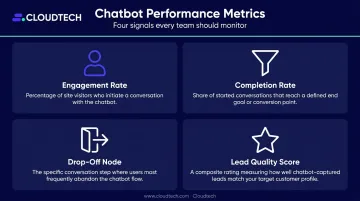
Once testing passes, start with a soft launch on one high-intent page. In the first month, track:
| Metric | What It Tells You |
|---|---|
| Engagement rate | % of page visitors who start a chat |
| Completion rate | % of starters who provide contact info |
| Drop-off node | Where visitors exit the conversation |
| Lead quality score | How sales rates chatbot-sourced leads |
Review transcripts weekly. A/B test opening messages. Retrain the AI as product or pricing changes.
Best Practices and Common Pitfalls
Design for the User, Not Your Data Requirements
Start with an engaging hook relevant to the page content. Offer a piece of value — an answer, a recommendation, a resource — before asking for contact details. Keep each message to two or three sentences. The conversation should feel led by the visitor's needs.
Plan the Human Handoff from Day One
Define escalation rules clearly:
- If the user explicitly asks for a person
- If sentiment signals frustration
- If a lead scores above a defined threshold
The human agent must receive the full transcript. Requiring the prospect to repeat themselves is one of the fastest ways to lose a warm lead.
For out-of-hours escalations, configure a graceful response that promises a specific follow-up time and sends a relevant resource to keep the lead warm.
Avoid "Set and Forget"
The chatbot needs active ownership, not a one-time launch. Treat it like a living team member:
- Update it whenever pricing, products, or promotions change
- Schedule quarterly knowledge base reviews
- Assign an internal owner responsible for monitoring metrics
- Build a feedback loop with the sales team so post-chat questions get added proactively
Frequently Asked Questions
How do you use AI chatbots for customer engagement and lead capture?
Deploy a chatbot on high-intent pages, configure it to greet visitors proactively, ask qualifying questions, and collect contact details through natural conversation. Lead data syncs to your CRM automatically, and the bot runs 24/7 — so no inquiry goes unanswered.
What is the difference between a rule-based chatbot and an AI chatbot?
Rule-based bots follow fixed scripts and fail when users deviate from expected phrasing. AI chatbots use NLP to understand the intent behind varied inputs, handle open-ended responses, and adapt the conversation dynamically , making them far more effective for lead qualification and genuine customer engagement.
How do AI chatbots integrate with CRM systems?
Most platforms offer native integrations with HubSpot, Salesforce, and Zoho, or connect via middleware like Zapier. When a chat ends, contact information, the full transcript, lead score, and intent tags are automatically pushed to the CRM as a new or updated record.
Can AI chatbots replace human customer service agents?
No — they're most effective as a complement. Chatbots handle high-volume initial inquiries and qualification, freeing agents to focus on complex conversations and high-value prospects. The best implementations use a hybrid model: the bot prepares the lead and escalates seamlessly to a human when the situation calls for it.
What metrics should I track to measure chatbot ROI?
Track four core metrics: engagement rate (visitors who interact), completion rate (visitors who provide contact info), lead-to-meeting conversion rate (chatbot leads that become booked calls), and cost per lead compared to other acquisition channels. Together, these show whether the chatbot is generating pipeline efficiently.
How long does it take to deploy an AI chatbot for an SMB?
A basic lead capture chatbot can go live in hours using no-code platforms. Setups involving CRM integrations, multichannel deployment, and regulated data environments typically take one to two weeks. If your environment involves HIPAA or SOC 2 requirements, prioritize vendors with documented compliance certifications before you begin configuration.