Introduction
According to Flexera's 2026 State of the Cloud Report, 29% of IaaS and PaaS spend is wasted — a figure drawn from 753 cloud decision-makers worldwide that reversed a five-year declining trend.
For SMBs without dedicated FinOps staff, that number isn't abstract. It shows up as EC2 instances running through weekends nobody works, EBS volumes attached to nothing, and RDS clusters sized for a traffic spike that happened once six months ago.
The problem isn't a single bad decision. It's dozens of small ones that compound quietly over time.
AWS built the Cost Optimization Hub as a centralized answer to fragmented cost visibility: a single dashboard that consolidates rightsizing, idle resource, Savings Plans, and Reserved Instance recommendations across accounts and regions. This guide explains how AWS costs accumulate, what drives them, and how to use the Hub as an actual decision-making tool — not just a list of suggestions.
Key Takeaways
- 29% of cloud IaaS/PaaS spend is wasted — idle resources, configuration drift, and missed commitments all drive costs up
- AWS Cost Optimization Hub is free and centralizes recommendations across all your accounts in one dashboard
- Covered action types include Stop, Rightsize, Upgrade, Graviton migration, and commitment purchases
- The Cost Efficiency metric (launched November 2025) refreshes daily so you can track optimization progress over time
- Execution is always manual — the Hub surfaces recommendations, not automated actions
- The default 14-day look-back window can produce risky rightsizing advice for variable or seasonal workloads
How AWS Cloud Costs Typically Build Up
AWS costs rarely spike from a single decision. They drift upward through a pattern AWS documentation describes as configuration drift — resources provisioned for a project that never get decommissioned after the project ends, instance types selected conservatively at launch that never get reviewed, and dev environments left running over long weekends.
The mechanics of this drift are what make it expensive:
- Idle EC2 instances continue charging at full On-Demand rates regardless of utilization
- Unattached EBS volumes accrue storage charges even when no instance references them
- Oversized RDS clusters burn compute and memory costs for headroom that never gets used
- Forgotten NAT Gateways rack up data-processing charges that go unnoticed across billing cycles
None of these individually appear alarming. Together, across accounts and regions, they compound into real budget leakage that's difficult to track without a centralized view.
That's the core problem: without one, engineers manually audit Cost Explorer, Trusted Advisor, Compute Optimizer, and individual service consoles — separately, on no fixed schedule — to piece together where waste actually lives. The Hub replaces that manual digging with a single prioritized list.
Key Cost Drivers in AWS Environments
AWS cost drivers fall into three categories, and each requires a different type of response.
Resource Specification Decisions
These are choices made at provisioning time: instance type, storage tier, database size. The problem isn't that teams make bad decisions — it's that the right decision at launch often becomes the wrong one six months later as workloads stabilize. Rightsizing corrects this drift by matching instance size to actual consumption patterns, typically after 2–4 weeks of CloudWatch data.
Behavioral Patterns During Active Use
These patterns accumulate quietly across engineering teams, often with no single owner tracking them:
- Persistent dev environments left running over weekends and holidays
- Lambda functions tested once and never decommissioned
- Savings Plans headroom unused because commitment purchasing lagged behind actual usage
No one is doing this intentionally. The cost builds because there's no visibility and no assigned owner.
Organizational Gaps
No tagging policy means no cost ownership. No account-level budget ownership means recommendations pile up with nobody accountable to act on them. The FinOps Foundation's 2024 survey of 1,245 respondents found reducing waste was the highest priority across all cloud-spending tiers — but waste reduction requires organizational structure to make those findings actionable.
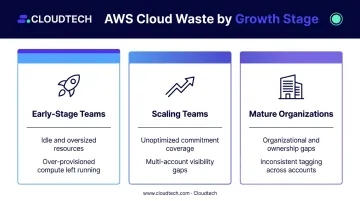
That survey also makes clear that the type of waste shifts as companies grow. Which driver dominates depends on company stage:
- Early-stage teams typically lose most to idle and oversized resources
- Scaling teams lose more to unoptimized commitment coverage and multi-account visibility gaps
- Mature organizations often find organizational gaps — unclear ownership, inconsistent tagging — are the primary blocker to acting on what they can already see
Cost-Reduction Strategies Using AWS Cost Optimization Hub
The Hub organizes recommendations around several core action types: Stop, Rightsize, Upgrade, Graviton migration, Savings Plans purchase, Reserved Instance purchase, along with Delete and ScaleIn. Effective use means prioritizing these by dollar impact and implementation risk. Treat them as a ranked action list, not a checklist.
Strategies That Change Resource Decisions
These recommendations target how resources are specified, or whether they should exist at all. They carry the highest immediate savings potential with the least architectural risk.
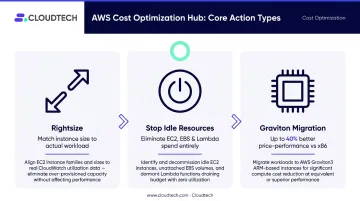
- Rightsizing EC2 and RDS instances: The Hub pulls rightsizing recommendations from AWS Compute Optimizer, using CPU and memory utilization metrics to identify instances where a smaller type would meet workload requirements. Each recommendation includes an estimated monthly savings figure, so teams can sort by dollar value and work top-down.
- Stopping idle resources: Stop recommendations flag inactive EC2 instances, underutilized EBS volumes, and low-traffic Lambda functions. Acting on these eliminates spend entirely rather than reducing it — making them the highest-ROI actions in the Hub.
- Graviton migration: AWS Graviton-based EC2 instances deliver up to 40% better price-performance than comparable x86-based instances. The Hub surfaces which existing workloads are compatible candidates for migration, giving teams a starting point without requiring manual instance-by-instance audits.
Strategies That Improve Visibility and Governance
These approaches are about getting more accurate and actionable recommendations — not just reading what appears by default.
- Multi-account and organization-level enrollment: Enabling the Cost Optimization Hub at the management account level, rather than individual member accounts, provides a consolidated view across all linked accounts. Without this, teams see only a fraction of their total optimization opportunity and miss cross-account patterns entirely.
- Using the Cost Efficiency metric: Announced in November 2025, the Cost Efficiency metric calculates as [1 - (potential cost savings / total optimizable spend)] × 100, using a rolling 30-day spend window. It refreshes daily, displays up to 90 days of historical scores, and moves in both directions — implementing recommendations raises the score, adding inefficient resources lowers it. This gives teams a benchmark they can track, not just a snapshot.
- Filtering and prioritizing effectively: The Hub supports filtering by account, region, resource type, and estimated savings. Start with the highest-dollar Stop and Rightsize recommendations. Commitment-based purchases come later — they require financial planning and workload stability validation before acting.
Strategies That Change the Context Around AWS Spend
These address purchasing structures and organizational accountability that determine whether Hub recommendations can actually be implemented and sustained.
- Commitment-based purchasing: The Hub surfaces Savings Plans and Reserved Instance recommendations based on actual usage patterns. Compute Savings Plans offer up to 66% discount versus On-Demand and apply across EC2, Lambda, and Fargate. EC2 Instance Savings Plans offer up to 72% but restrict to a specific instance family and region. Treat Hub estimates as a starting point — validate them against projected workload changes before committing to a 1- or 3-year term.
- Tagging and cost ownership: Hub recommendations are only actionable when teams know which resources belong to which workload. Without consistent tagging and account-level ownership, recommendations accumulate with no clear owner. This is one of the most common reasons savings opportunities go unrealized — not lack of visibility, but lack of accountability structure around what's visible.
- Pairing with AWS consulting expertise: For SMBs without dedicated FinOps staff, a list of 40 recommendations sorted by dollar value doesn't tell you which ones are safe to act on immediately versus which ones need workload validation first. Cloudtech's AWS-certified team helps SMBs translate Hub findings into a sequenced implementation plan: acting on Stop and Rightsize recommendations quickly, enforcing mandatory cost allocation tags (Owner, Environment, Cost Center, Project) via AWS Tag Policies, and applying proper validation before commitment purchases or instance type changes that could affect live workloads.
Where AWS Cost Optimization Hub Falls Short
The Hub is genuinely useful. It also has real limitations that matter before teams start acting on what they see.
14-day default look-back period. Compute Optimizer's default analysis window is 14 days. For workloads with periodic traffic spikes — end-of-month batch processing, seasonal e-commerce load, or event-driven architectures — 14 days of metrics can make a heavily used instance look idle.
Paid Enhanced Infrastructure Metrics extends analysis to up to 93 days for eligible EC2 and RDS instances, but this carries an additional charge. Acting on rightsizing recommendations without validating against a longer performance history is a real operational risk.
Gaps in service coverage. The current Hub resource list covers EC2, RDS, Lambda, EBS, ECS, DynamoDB, ElastiCache, SageMaker, Redshift, and several commitment types. It does not cover S3 storage, CloudFront, Route 53, or data-transfer charges — categories that represent substantial spend for many SMB workloads. Multi-cloud environments and SaaS costs fall entirely outside its scope.
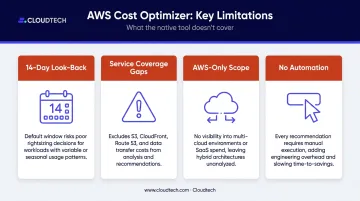
No automated execution. The Hub surfaces recommendations and links out to Compute Optimizer or the relevant service console for validation. The CLI exposes recommendation-listing functions, not resource-mutation commands. Every action — purchasing Reserved Instances, changing instance types, deleting idle resources — requires manual execution or separately built automation. That execution gap is where implementation risk lives.
Conclusion
The AWS Cost Optimization Hub is most valuable when treated as a prioritization tool, not a to-do list. The waste it surfaces — idle resources, over-specified instances, commitment gaps — each requires a different response and a different level of confidence before acting. Stop recommendations are usually safe to execute quickly. Rightsizing needs workload validation. Commitment purchases require financial planning.
The Hub's daily-refreshing Cost Efficiency metric makes one thing clear about cloud cost management: it's continuous, not a one-time project. New resources get provisioned, workloads change, and the score moves accordingly.
For SMBs that want to accelerate results without operational risk, the gap isn't usually visibility — it's the expertise to act on what the Hub shows. Cloudtech's AWS-certified team helps SMBs turn Hub findings into a sequenced implementation plan — one that accounts for workload context and carries AWS Advanced Tier Partner credentials behind every recommendation.
Frequently Asked Questions
What is the Cost Optimization Hub in AWS?
The Cost Optimization Hub is a free feature within the AWS Billing and Cost Management Console that consolidates cost optimization recommendations — rightsizing, idle resource deletion, Savings Plans, and Reserved Instance purchases — across accounts and regions into a single prioritized dashboard.
Is the Cost Optimization Hub in AWS free?
Yes, the Hub itself carries no additional charge. Some adjacent features it draws from — such as AWS Compute Optimizer's Enhanced Infrastructure Metrics for extended look-back periods — have their own costs separate from Hub access.
What is the Cost Optimization Hub score in AWS?
AWS calls it the Cost Efficiency metric, calculated as [1 - (potential savings / total optimizable spend)] × 100. It refreshes daily using a rolling 30-day spend window. Implementing recommendations raises the score; adding inefficient resources lowers it.
What resources does AWS Cost Optimization Hub support?
The Hub covers a broad range of compute, database, and commitment resources:
- Compute: EC2 instances, Auto Scaling groups, Lambda functions, ECS services
- Storage & Database: EBS volumes, RDS instances, DynamoDB tables, ElastiCache, MemoryDB
- AI/ML: SageMaker endpoints
- Commitments: Compute, EC2 Instance, and SageMaker Savings Plans; EC2, RDS, Redshift, and ElastiCache Reserved Instances
What are the limitations of AWS Cost Optimization Hub?
Four gaps worth knowing before relying on the Hub alone:
- Short look-back window: The 14-day default can produce risky rightsizing calls for variable workloads
- Limited service scope: S3 and data-transfer costs are excluded
- AWS-only coverage: No visibility into multi-cloud or SaaS spend
- No automation: Every recommendation requires manual action to implement
How does AWS Cost Optimization Hub differ from AWS Cost Explorer?
Cost Explorer visualizes historical spend and provides cost forecasting. The Hub focuses specifically on surfacing actionable optimization recommendations with estimated savings amounts. They're complementary — Cost Explorer shows where you've been; the Hub shows what to change.