Introduction
Picture this: a prospect visits your website at 10 PM, has three questions before they're ready to buy, and gets silence. By morning, they've signed with a competitor who responded immediately. This is the quiet revenue drain that AI chatbots are eliminating for growing businesses in 2025.
The adoption curve tells the story: the global conversational AI market was valued at $13.77 billion in 2024 and is projected to reach $49.80 billion by 2031 — a 19.6% annual growth rate driven by businesses deploying chatbots to capture exactly these missed moments. 58% of US small businesses reported using generative AI in 2025, up from just 23% in 2023.
This guide covers what AI chatbots actually are today, the concrete business benefits, the highest-impact use cases by function and industry, how to choose the right platform, and a practical implementation blueprint for companies ready to start small and scale with confidence.
Key Takeaways
- AI chatbots have evolved from rigid decision trees to context-aware generative systems that act across connected tools
- Growing businesses gain most through 24/7 engagement, lower support costs, and faster lead qualification
- Top use cases: customer support automation, sales qualification, HR self-service, and appointment scheduling
- Platform selection hinges on NLP quality, integration depth, compliance fit, and total cost — not just feature lists
- Start with one high-ROI use case, prove it, then expand
What AI Chatbots Are (and How They've Evolved Beyond Scripts)
An AI chatbot is software that uses natural language processing (NLP) and machine learning to simulate conversation, answer questions, and execute actions — without requiring a human for every interaction.
The distinction from older systems matters. Rule-based chatbots followed rigid decision trees: press 1 for billing, press 2 for support. They broke the moment a user phrased something unexpectedly.
Today's generative AI chatbots are a different category entirely. They understand intent, maintain context across a full conversation, and generate responses dynamically from connected data sources — not from a fixed menu of pre-written answers.
Chatbots vs. AI Agents
As platforms evolve, the line between these two is shifting — but the core difference still holds:
- AI chatbots respond to questions and guide conversation flows
- AI agents take multi-step actions across systems — updating CRM records, booking calendar appointments, triggering workflows, sending emails
The most capable business platforms now blur this line. What starts as a customer support chatbot can evolve into an agent that resolves tickets, updates accounts, and escalates intelligently — all without human involvement until genuinely needed.
For growing businesses, that means the chatbot you deploy for basic FAQs today can eventually handle account management, lead qualification, or internal helpdesk requests — without replacing the underlying platform.
The Business Case: Key Benefits AI Chatbots Deliver for Growing Companies
24/7 Availability Without Additional Headcount
Response speed directly affects revenue. Research published in the Harvard Business Review found that firms contacting a web-generated lead within one hour were nearly 7 times more likely to qualify it than those waiting longer. AI chatbots eliminate the gap entirely — engaging visitors at any hour, capturing lead details, and starting qualification before your team is even awake.
For SMBs without large support teams, this is the most immediate ROI.
Significant Cost Reduction on Repetitive Inquiries
High-volume, low-complexity questions — order status, FAQs, scheduling, password resets — consume disproportionate staff time. Chatbots handle these at scale without adding headcount. Gartner projects that agentic AI will autonomously resolve 80% of common customer service issues by 2029, producing a 30% reduction in operational costs. Businesses that deploy now are building toward that reality ahead of their competitors.
Accelerated Sales and Lead Qualification
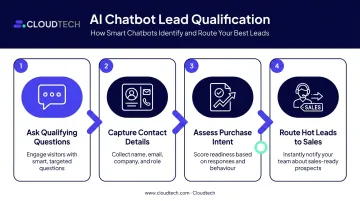
A chatbot embedded on a landing page or pricing page doesn't wait for a form submission. Instead, it works the lead immediately:
- Asks qualifying questions in real time
- Captures contact details before the visitor leaves
- Assesses purchase intent based on responses
- Routes hot leads directly to sales within seconds
For SMBs with small sales teams, that speed-to-contact is a measurable competitive edge.
Scalable Personalization Across Channels
Modern chatbots pull from CRM data to deliver personalized responses at a scale no human team can match. A single well-configured bot handles thousands of concurrent users across web, mobile, and messaging apps — all at once. Typical personalizations include:
- Addressing customers by name and account history
- Referencing past purchases or open support tickets
- Adjusting tone and recommendations based on context
The result is consistent, context-aware service delivered simultaneously across every channel.
Where AI Chatbots Create Real Value: Use Cases by Function
Customer-Facing Applications
Customer support automation
Chatbots resolve Tier 1 queries — returns, billing questions, shipping status, product FAQs — before they reach a human agent. This reduces ticket volume and keeps human agents focused on issues that actually require judgment.
Gartner found that only 14% of customer service issues are fully resolved through self-service today. That gap is a real automation opportunity — for businesses willing to build and maintain a quality chatbot experience.
One important caveat from the same research: 64% of customers in a 2024 Gartner survey said they'd prefer companies not use AI in customer service. The answer is transparent deployment: clear escalation paths, honest labeling, and customers always knowing they can reach a human.
Sales and lead generation
Chatbots act as always-on sales assistants. They greet visitors, answer pre-purchase questions, qualify intent based on specific criteria, and hand warm leads to human reps with full context already captured. Monster Reservations Group — a client of Cloudtech's — deployed an AI voice agent that achieved 95%+ accuracy in gathering customer preferences and a projected 67% reduction in cost-per-call, with human agents receiving complete qualification context before ever speaking to a prospect.
E-commerce and retail
Chatbot capabilities particularly suited to retail include:
- Real-time inventory lookups and product availability
- Personalized product recommendations based on browsing behavior
- Return and exchange processing without agent involvement
- Proactive abandoned cart recovery with targeted offers
Baymard Institute's benchmark puts average online cart abandonment at 70.22% across 50 studies — one of e-commerce's most persistent revenue leaks. Chatbots that engage hesitant shoppers in real time attack that number directly.
Internal Business Applications
HR and employee self-service
Internal chatbots handle the questions HR teams answer repeatedly: PTO balance inquiries, benefits explanations, onboarding checklists, policy lookups, payroll questions. Routing these to a chatbot frees HR professionals for work that requires human judgment — performance conversations, conflict resolution, strategic planning.
Industry-specific applications
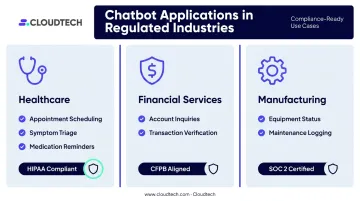
The same logic applies across regulated industries, where chatbots handle high-volume routine queries while compliance requirements shape how they're built and maintained.
| Industry | Key Chatbot Use Cases | Compliance Considerations |
|---|---|---|
| Healthcare | Appointment scheduling, symptom triage, medication reminders, 24/7 patient support | HIPAA — data handling and PHI protection are non-negotiable |
| Financial Services | Account balance inquiries, transaction verification, policy explanations | CFPB oversight; escalation failures carry regulatory risk |
| Manufacturing | Equipment status queries, maintenance request logging, shift coordination | Varies by data type; SOC 2 often relevant |
For regulated industries, compliance verification is a prerequisite, not an afterthought. AWS-native platforms like Amazon Lex and Amazon Bedrock are built with enterprise-grade security controls that support HIPAA, SOC 2, and GDPR requirements when properly configured.
How to Choose the Right AI Chatbot Platform
Evaluate NLP Quality First
The ability to understand what a user actually means — not just match keywords — is the most important differentiator between platforms. Before committing to any vendor, test using real queries from your support ticket history. Use rephrased versions of the same question. Include typos, vague phrasing, and edge cases. Platforms that fail on your actual customer language will fail in production.
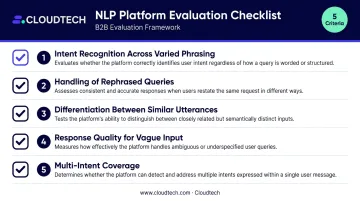
Forrester's conversational AI testing framework evaluates these five capabilities — use them as your testing checklist:
- Intent recognition across varied phrasing
- Handling of rephrased versions of the same query
- Differentiation between similar but distinct utterances
- Response quality for vague or verbose input
- Multi-intent coverage (when users ask two things at once)
Prioritize Integration Depth
A chatbot that can't connect to your existing systems is limited to answering static questions. Connected to your CRM, helpdesk, calendar, and e-commerce platform, it can take real action: updating records, booking meetings, checking order status, and triggering workflows.
What to look for:
- Native integrations with tools you already use (Salesforce, HubSpot, Zendesk, Shopify)
- API access for custom connections to proprietary systems
- Bidirectional data flow — the bot should read and write, not just retrieve
Assess Security and Compliance Requirements
Businesses in healthcare, financial services, or any regulated sector must verify specific compliance credentials before signing with a vendor:
- HIPAA — required for any handling of protected health information
- SOC 2 — security and availability controls attestation
- GDPR — applies to any data involving EU residents
Data residency, encryption standards, and audit logging are non-negotiable checkboxes.
Analyze Total Cost of Ownership
Published subscription prices don't tell the full story. Calculate the full cost:
- Platform licensing fees
- Implementation and configuration
- Integration development (often the largest surprise cost)
- Knowledge base preparation
- Ongoing training and optimization
Amazon Lex, for example, is priced at $0.00075 per text request — extremely cost-efficient at scale — but implementation on AWS-native infrastructure requires architecture expertise to configure correctly. Factoring in architecture setup and integration work gives you a realistic cost baseline before you commit.
From Pilot to Production: A Practical Implementation Blueprint
Step 1: Start With One High-ROI, Low-Complexity Use Case
Scope it narrowly. Good starting candidates:
- Handling the 20 most-asked customer support questions
- Automating internal IT password reset requests
- Qualifying inbound leads from a specific landing page
A narrow scope reduces risk, produces measurable results quickly, and builds organizational confidence before you expand.
Step 2: Prepare Your Knowledge Base and Connect Your Tools
A chatbot is only as good as the information it draws from. Before launch:
- Consolidate your content — FAQs, product documentation, policy guides, process manuals, all in one accessible location
- Configure integrations — connect the tools the bot needs to take action, not just respond
- Establish escalation paths — define exactly what triggers a handoff and what context transfers to the human agent
On the infrastructure side, AWS-native services cover the core requirements: Amazon Lex handles conversational interface and multi-turn dialogue, while Amazon Bedrock supports retrieval-augmented generation and agentic workflows — including HIPAA-compliant configurations for healthcare use cases.
Step 3: Monitor, Measure, and Iterate
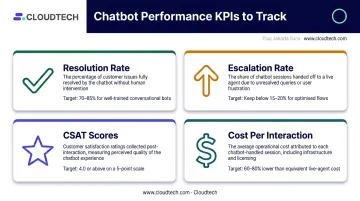
Key metrics to track from week one:
- Resolution rate: conversations closed without human escalation
- Escalation rate: how often (and why) the bot hands off to a human
- CSAT scores: collected via post-chat surveys immediately after the interaction
- Cost per interaction: benchmarked against your current human handling cost
Review unanswered or low-confidence queries weekly. Every gap in the bot's knowledge is training data for the next improvement cycle. Teams that schedule monthly retraining cycles and quarterly scope reviews get compounding returns — the bot handles more, escalates less, and costs less per resolved conversation over time.
Common Challenges When Adopting AI Chatbots
Most chatbot deployments run into the same handful of problems. Knowing them in advance saves time, budget, and frustrated customers.
Choosing features over outcomes
Impressive demos sell platforms that don't fit real workflows. Define your success metrics before evaluating vendors, then test with actual queries from your support history — not the examples the vendor hand-picks.
Underestimating integration complexity
Connecting a chatbot to a legacy CRM, proprietary database, or industry-specific system typically takes longer than expected. Map integration requirements in detail during vendor evaluation and budget explicitly for integration work. In most engagements, integration takes more time than the chatbot configuration itself.
Failing to maintain the human fallback
No AI chatbot should operate without a clear escalation path. A frustrated customer who can't reach a human is a worse outcome than having no chatbot at all. A good handoff means:
- Full conversation context transferred to the agent — they should never ask the customer to repeat themselves
- Clear trigger conditions for escalation (frustration signals, complex queries, specific topics)
- Smooth transition that preserves customer trust
Frequently Asked Questions
What not to tell ChatGPT?
Avoid sharing confidential client data, proprietary financial figures, employee personal information, or trade secrets with public AI tools. For business use cases involving sensitive data, enterprise-grade or private-deployment AI solutions with data governance controls are the appropriate choice.
What is the difference between an AI chatbot and an AI agent?
Chatbots respond to questions and follow conversation flows. AI agents take multi-step actions across connected systems: updating records, booking meetings, triggering workflows. The distinction matters more as businesses move beyond simple Q&A toward end-to-end automation.
How much does it cost to implement an AI chatbot for a small business?
Costs range from free or low-cost plans for basic FAQ bots to $50,000+ for complex, integrated implementations. Evaluate total cost of ownership — including setup, integration development, and ongoing optimization — rather than subscription price alone.
Are AI chatbots secure enough for handling customer data?
Enterprise-grade platforms include encryption, role-based access controls, and compliance certifications such as SOC 2, HIPAA, and GDPR. Businesses in regulated industries must verify credentials before deployment — platform certification doesn't automatically mean your specific implementation is compliant.
How long does it take to implement an AI chatbot?
A basic FAQ chatbot can go live in days to a few weeks on modern platforms. Complex implementations requiring deep CRM or system integrations typically take four to twelve weeks. Starting with a narrow pilot use case significantly compresses the timeline.
Can AI chatbots integrate with existing CRM and business tools?
Most leading platforms offer native integrations with Salesforce, HubSpot, Zendesk, and major e-commerce platforms. API access enables custom connections to proprietary or industry-specific systems when native integrations aren't available.