AI chatbots address this gap directly: real-time conversations that engage hesitant shoppers, answer product questions on the spot, and recover carts before visitors disappear. The pitch sounds compelling, and in many cases it delivers. But results vary widely based on how the chatbot is set up, what data it has access to, and whether anyone is actively optimizing it after launch.
This guide cuts through the vendor claims. You'll get a practical, step-by-step framework for implementing an AI chatbot that actually moves your conversion numbers — along with an honest look at when chatbots make sense and when they don't.
Key Takeaways
- Average ecommerce conversion rates sit between 1.5–3%; even modest chatbot-driven improvements compound significantly at scale
- Prioritize three chatbot use cases first: product recommendations, cart abandonment recovery, and post-purchase support — they deliver the fastest ROI
- Product data quality is the single biggest predictor of chatbot performance — fix the catalog before you deploy
- Cart abandonment averages 70%, largely driven by cost surprises and checkout friction — questions a well-configured chatbot can answer in real time
- Amazon Lex and Amazon Bedrock give high-volume ecommerce chatbots the scalable, secure infrastructure they need to perform under real traffic
How to Boost Ecommerce Conversion Rates with AI Chatbots
Step 1: Define Your Conversion Goals and Select the Right Use Case
Before choosing a chatbot platform, identify the specific conversion problem you're trying to solve. A chatbot scoped to one job consistently outperforms one trying to handle everything.
Pull up your funnel analytics and look for where visitors actually drop off:
- High exit rates on product pages → deploy a product guidance bot that answers spec questions and surfaces alternatives
- High cart abandonment rate → build a cart recovery flow that addresses cost, shipping, and trust concerns before the visitor leaves
- High post-purchase return rate → a support bot that handles sizing, compatibility, and usage questions reduces returns and builds repeat purchase behavior
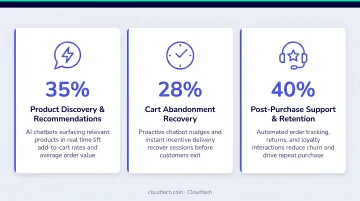
The three ecommerce chatbot use cases with the clearest conversion impact:
- Guided product recommendation — asks qualifying questions, then surfaces two or three relevant products rather than an overwhelming catalog
- Cart abandonment recovery — engages shoppers showing exit intent, works through price and shipping objections, and presents incentives in the moment
- Post-purchase support — catches sizing, compatibility, and usage questions before they turn into returns or negative reviews
Pick one. Build it well. Expand later.
Step 2: Prepare Your Product Data and Knowledge Base
This step is non-negotiable. A chatbot's ability to guide purchases is bounded entirely by the quality of the data behind it.
Audit your product catalog before deployment. For each product, verify:
- Complete descriptions (not just a manufacturer copy-paste)
- Key attributes: dimensions, compatibility, materials, use cases
- Current pricing and inventory status
- Frequently asked questions specific to that product
Thin catalogs produce chatbots that respond with "I don't have information on that" — which erodes trust faster than having no chatbot at all.
Beyond the catalog, build a knowledge base covering:
- Return and refund policies
- Shipping timelines and carrier options
- Sizing guides and fit recommendations
- Payment security and accepted methods
- Warranty and guarantee terms
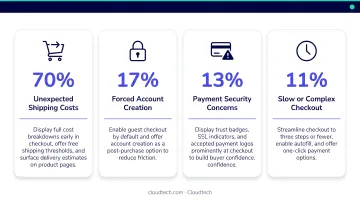
According to Baymard's research, the top reasons shoppers abandon carts include unexpected costs (39%), slow delivery concerns (21%), payment trust issues (19%), and complicated checkout (roughly 17-18%). A well-prepared knowledge base lets your chatbot resolve all four categories in the moment — before the visitor leaves.
Step 3: Configure Conversation Flows, Triggers, and Integrations
Trigger Logic
Don't wait for visitors to initiate. Design proactive triggers based on behavioral signals:
- Exit-intent triggers on product and cart pages — fires when the cursor moves toward the browser bar
- Time-on-page thresholds — engages visitors who appear to be comparing options or reading reviews
- Scroll-depth prompts on high-value category pages — reaches shoppers deep in the consideration phase
A chatbot that fires too early interrupts casual browsing. One that fires too late misses the hesitation window entirely. Trigger timing is the most impactful single configuration decision you'll make.
Conversation Flow Design
Build flows that mirror a knowledgeable sales assistant. The chatbot should:
- Ask qualifying questions ("What will you use this for?" / "What's your budget range?")
- Surface two or three relevant products — not an overwhelming list
- Handle the most common objections (price, shipping, returns)
- Present a clear next action: add to cart, view a comparison, or book a call with your team
Avoid the generic "How can I help you?" opener. Personalized prompts that reference what the visitor was just browsing engage more effectively than blank-slate greetings.
Integrations and Infrastructure
Connect your chatbot to your CRM, email marketing platform, and ecommerce backend so every captured lead and cart interaction flows automatically into your follow-up sequences. A chatbot that captures interest but drops the lead goes nowhere — the conversion often happens in the follow-up email, not the chat session itself.
For stores expecting high conversation volume, custom recommendation logic, or multi-language support, the underlying cloud infrastructure matters. AWS services like Amazon Lex (natural language understanding) and Amazon Bedrock (generative AI at scale) handle these requirements on a pay-as-you-go model. Cloudtech, an AWS Advanced Tier Partner, has built Amazon Bedrock-based conversational AI for clients needing multi-turn dialogue management, context-aware handoffs, and HIPAA/PCI-DSS-compliant data handling — architectural patterns that translate directly to ecommerce deployments.
Human Handoff Protocol
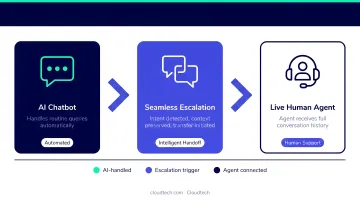
Define which query types should route to a live agent: disputes, complex complaints, and high-value custom orders. When the handoff occurs, the live agent should receive full conversation context. Shoppers who have to repeat themselves to a human after a chatbot interaction lose trust quickly.
YouGov research found that 45% of people who avoid AI shopping assistants do so because they prefer human assistance, and 41% don't trust AI shopping assistants at all. A clean escalation path isn't optional — it's how you protect the customer relationship for shoppers who need it.
Step 4: Launch, Measure, and Optimize Continuously
Metrics to Track
| Metric | What It Tells You |
|---|---|
| Chat engagement rate | % of visitors who interact with the chatbot |
| Chat-to-purchase rate | Conversion rate within chatbot-assisted sessions |
| Cart recovery rate | % of abandoned carts recovered via chatbot |
| Support ticket deflection | Support load reduction after deployment |
| AOV on chatbot-assisted orders | Whether chatbot drives higher-value purchases |
Evaluation Timeline
Don't judge results at 30 days. Run a minimum 60–90 day baseline comparison to account for traffic variability and seasonal effects. If possible, A/B test by deploying the chatbot on a subset of traffic first — this isolates the chatbot's impact from campaign or seasonal effects.
Run monthly transcript reviews. Look for:
- Questions the chatbot fails to answer consistently
- Points where users disengage from the conversation
- Flows that reliably lead to purchase
Use these findings to update your knowledge base and refine your triggers on a rolling basis. Stores that run monthly reviews typically see measurable lift in chat-to-purchase rates within two to three optimization cycles.
When AI Chatbots Make Sense for Your Ecommerce Store
Chatbots are not the right investment for every store. The use case matters more than the vendor pitch.
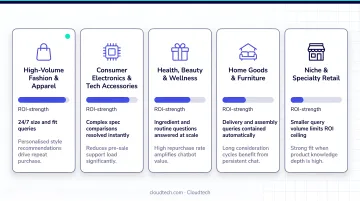
Chatbots generate strong ROI for:
- Complex-product stores (electronics, specialty equipment, skincare, apparel with detailed sizing) where shoppers need answers before they'll commit to a purchase
- High-support-volume stores where even partial deflection to self-service cuts costs sharply — Gartner benchmarks assisted-channel support at $13.50 per contact versus $1.84 for self-service
- Stores with international audiences, where staffing 24/7 coverage across time zones isn't practical
- Stores with no current cart recovery mechanism — given that roughly 70% of carts are abandoned, any recovery is additive
Chatbots underperform or are premature for:
- Very low-traffic stores where there isn't enough volume to move conversion metrics
- Commodity product stores where price is the only decision variable and shoppers aren't asking questions
- Stores that haven't resolved foundational product data or checkout UX problems — a chatbot won't fix a broken funnel, and in some cases will surface those gaps faster
What You Need Before Deploying an AI Chatbot
Preparation determines performance. Stores that rush deployment without addressing data quality and measurement setup consistently see weaker results.
Technical and Platform Requirements
Most major ecommerce platforms — Shopify, WooCommerce, Magento — support chatbot widget integration natively or via third-party apps. At minimum, you need:
- A product catalog with sufficient data completeness (see Step 2)
- A CRM or marketing automation tool for lead and cart capture
- API access sufficient for the chatbot platform you choose
For stores expecting high conversation volume or needing custom AI behavior (multi-language support, proprietary inventory integration, custom recommendation logic), scalable cloud infrastructure is worth planning upfront. Amazon Lex handles natural language understanding at $0.00075 per text request with no upfront commitment, while Amazon Bedrock supports generative AI applications at production scale with token-based pricing.
Getting this architecture right from the start — rather than rebuilding it later — is where working with an AWS-certified partner pays off.
Data and Measurement Readiness
Technical setup is only half the equation. Before launch, establish your baselines:
- Current sitewide conversion rate
- Cart abandonment rate
- Average monthly support ticket volume
- Average order value
Verify that your analytics stack — Google Analytics, your platform's native reporting, or a dedicated attribution tool — can capture chatbot-to-conversion events. Without this instrumentation in place, you won't be able to prove ROI or pinpoint which conversation flows need work.
Common Mistakes When Using AI Chatbots for Ecommerce
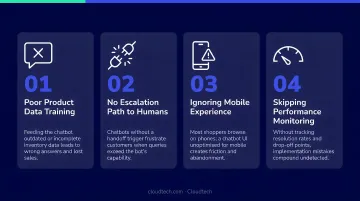
Most chatbot implementations don't fail because the technology is wrong — they fail because of avoidable setup decisions. These are the four that show up most often:
Deploying before product data is ready. A chatbot over a sparse catalog doesn't fix the underlying problem — it exposes it at scale through repetitive "I don't have information on that" responses.
Setting an overly broad scope. A chatbot trying to handle sales, returns, technical support, and general FAQs simultaneously tends to do all of them poorly. One primary job per chatbot instance, executed well, then expand.
No clear path to a human agent. A dead-end chatbot with no escalation option frustrates the shoppers most likely to complain or leave permanently. With 41% of consumers not trusting AI shopping assistants at all, a working handoff to a live agent isn't optional — it's a direct conversion safeguard.
Launching without measurement infrastructure. Without baseline tracking, you can't prove ROI, identify underperforming flows, or justify scaling the investment. Optimization becomes guesswork.
Frequently Asked Questions
What is a good conversion rate for an ecommerce store?
Most ecommerce stores convert between 1.4% and 2.95% of visitors, depending on category, traffic source, and device. Food and beverage and skincare sites sit around 2.4%; home furniture averages 0.6%. Improving even half a percentage point at meaningful traffic volume translates to significant revenue.
What is the conversion rate of a chatbot?
Chat-assisted sessions typically convert at 2–3x the site average, though overall store lift is more conservative once you account for selection bias — engaged visitors were already more likely to buy. Reported store-wide conversion improvements from chatbots generally range from 10–30%, depending on implementation quality and traffic volume.
What types of AI chatbots work best for ecommerce?
Generative AI chatbots — which understand natural language and adapt responses based on context — outperform rule-based bots for conversion. For ecommerce specifically, product recommendation bots and cart recovery bots deliver the strongest measurable results.
How long does it take to see results from an ecommerce AI chatbot?
Support deflection savings typically appear within 30–60 days. Conversion lift becomes measurable after 60–90 days of sufficient traffic volume. Plan for a 3–6 month evaluation period before drawing firm conclusions on ROI.
What are the biggest mistakes ecommerce stores make with AI chatbots?
The four most common failure points: deploying without complete product data, setting too broad a scope, omitting a human handoff option, and launching without analytics to measure impact. Any single one can undermine an otherwise well-configured chatbot.
Do I need technical expertise to implement an AI chatbot?
Most SaaS chatbot tools offer no-code deployment for Shopify or WooCommerce. Custom AI behavior or proprietary integrations — such as AWS-hosted solutions using Amazon Bedrock or Lex — benefit from technical expertise to ensure reliability and scalability from the start.