Introduction
Managing data at scale is one of the more consequential infrastructure decisions an SMB can make — and one that often gets deferred until the pain becomes undeniable. Reports slow down. Storage bills creep up. Different teams pull numbers from different places and arrive at different conclusions.
For businesses running on AWS, the central question usually lands here: should we be storing and analyzing data in Amazon S3 or Amazon Redshift?
The wrong choice has real consequences:
- Over-provisioned compute you're paying for but don't need
- Queries that take minutes when they should take seconds
- Raw data sitting in storage that nobody can query without significant prep work
According to research commissioned by AWS, only 19% of SMBs identify as highly data-driven — yet those that do financially outperform competitors at nearly double the rate. The architecture decisions you make now directly affect which group you end up in.
Getting that architecture right starts with understanding what each service actually does — and why most mature AWS data setups end up using both.
Key Takeaways
- Amazon S3 stores raw, multi-format data cheaply with no schema required upfront
- Amazon Redshift runs fast SQL queries on structured, pre-organized data for reporting
- The core distinction: schema-on-read (S3) vs. schema-on-write (Redshift)
- Most SMBs use both: S3 for ingestion and storage, Redshift for analytics
- Redshift Spectrum lets you query S3 data directly, without loading it into Redshift first
Data Lake vs. Data Warehouse on AWS: Quick Comparison
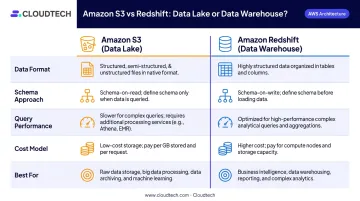
Here's how Amazon S3 and Amazon Redshift compare across the dimensions that matter most for your architecture decision:
| Dimension | Amazon S3 (Data Lake) | Amazon Redshift (Data Warehouse) |
|---|---|---|
| Data Format | Structured, semi-structured, and unstructured (CSV, JSON, Parquet, images, logs) | Structured, relational data in defined tables and columns |
| Schema Approach | Schema-on-read — structure applied at query time | Schema-on-write — structure required before loading |
| Query Performance | Flexible but depends on file format and partitioning (Athena, Spectrum) | Optimized for complex SQL using columnar storage and MPP |
| Cost Model | Low per-GB storage ($0.023/GB-month); separate compute charges for querying | Higher compute cost; faster performance for frequent queries |
| Best For | ML training data, log archives, IoT streams, multi-source ingestion | BI dashboards, weekly reports, structured transactional analytics |
What Is a Data Lake on AWS? (Amazon S3)
AWS defines a data lake as a centralized repository for storing structured and unstructured data at any scale — as-is, without requiring pre-defined schemas. Amazon S3 serves as the foundational storage layer for this pattern on AWS.
S3's technical characteristics matter for SMBs evaluating it at scale:
- Durability: Designed for 99.999999999% (11 nines) durability — AWS reports over 700 trillion objects stored and more than 200 million requests per second
- Storage cost: S3 Standard starts at $0.023/GB-month for the first 50 TB
- Format support: Parquet, ORC, JSON, CSV, binary files — S3 imposes no format requirements
- Scalability: No capacity to manage, no cluster to size
The schema-on-read approach is what makes S3 well-suited for fast-moving data environments. Data doesn't need structure before it's stored — teams can ingest raw data immediately and define how to interpret it when they're ready to query. This is especially useful when your data model is still evolving or when source systems produce data in mixed formats.
How S3 Connects to the AWS Analytics Ecosystem
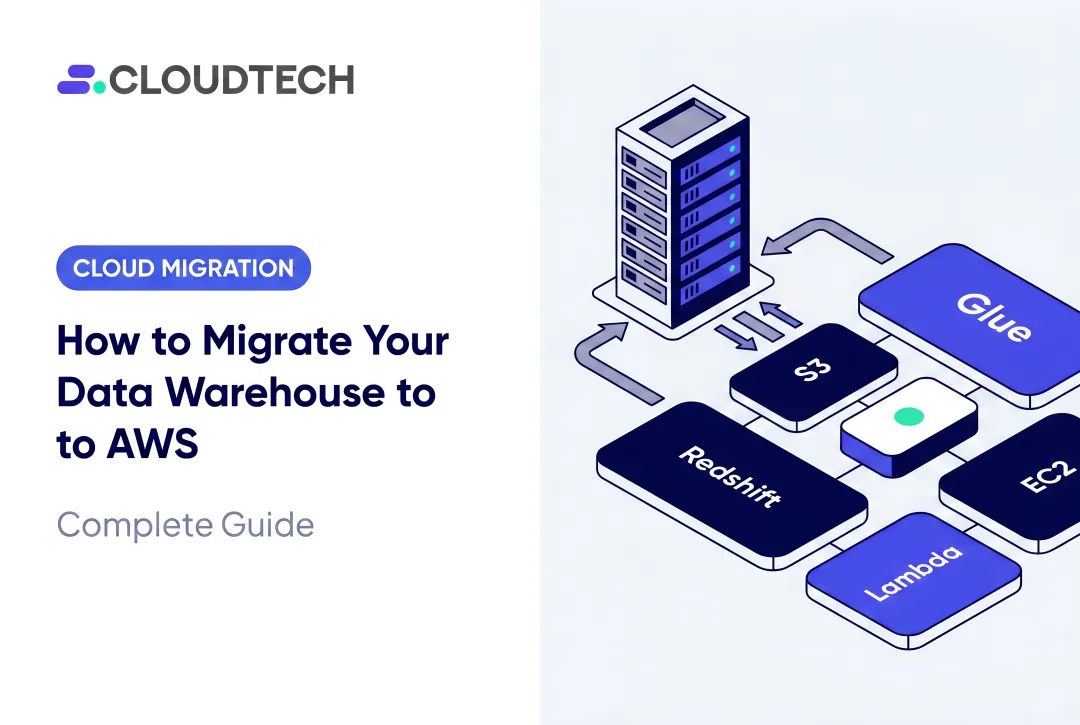
S3 doesn't operate in isolation. It works as the central hub for a broader set of AWS services:
- AWS Glue — crawls S3 buckets, infers metadata, and populates the Glue Data Catalog with table and column definitions
- Amazon Athena — runs serverless SQL directly against S3 using Glue catalog metadata; charges $5/TB scanned
- Amazon SageMaker — uses S3 as the training data source; Pipe mode can stream data directly from S3 buckets
- AWS Lake Formation — provides centralized governance, access control, and column/row-level security over S3-stored data
Use Cases Where S3 Excels
S3 is the right choice when data volume, variety, or velocity makes pre-structured storage impractical. For SMBs, the strongest use cases include:
- Log archiving: Application, server, or clickstream logs stored cheaply and queried selectively with Athena
- ML training data: Keeping labeled datasets, raw features, and model artifacts centrally accessible for SageMaker
- Multi-source ingestion: Centralizing data from CRM, ERP, IoT devices, and third-party APIs in native formats before processing
- Healthcare data storage: Unstructured patient records, DICOM imaging files, and EHR exports stored in HIPAA-compliant S3 buckets, then selectively queried with Athena or processed with AWS Glue
Cloudtech implemented this architecture for a community health provider that migrated EHR data to an S3-based lake, cutting infrastructure costs by 77% year-over-year while maintaining full HIPAA compliance.
What Is a Data Warehouse on AWS? (Amazon Redshift)
Amazon Redshift is a fully managed, cloud-native data warehouse. Where S3 stores everything, Redshift is built specifically for running complex SQL queries fast — using columnar storage and massively parallel processing (MPP) across a leader node and compute nodes that execute work in parallel.
The schema-on-write model is the key trade-off. Data must be cleaned, transformed via ETL tools like AWS Glue or dbt, and loaded in a defined schema before Redshift can query it. That upfront work pays off when teams run the same reports repeatedly — query times are fast and predictable in ways that raw S3 queries aren't.
Redshift is not an ETL tool — it's the destination for data that has already been transformed. ETL runs upstream, handled by AWS Glue, Amazon Kinesis Data Firehose, or third-party tools that stage data in S3 and issue COPY commands into Redshift.
Key Redshift Features for SMBs
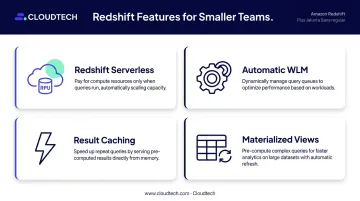
Smaller teams benefit from Redshift's managed operational model:
- Redshift Serverless — provisions and scales capacity automatically in Redshift Processing Units (RPUs), eliminating cluster management entirely
- Automatic WLM — adjusts query concurrency based on workload demand
- Result caching — serves identical queries from cache rather than re-executing
- Materialized views — store pre-computed query results for repeated-access patterns
Use Cases Where Redshift Delivers Clear Value
Redshift fits when your data is already structured and your queries follow predictable patterns:
- Weekly financial reporting: Aggregating transaction data across periods, cost centers, or product lines
- Executive dashboards: Connecting QuickSight, Tableau, or Looker directly to structured Redshift tables
- Compliance analytics: Running structured queries over regulatory data with consistent, auditable results
- Customer transaction analysis: Analyzing purchase history, churn signals, or revenue attribution across structured records
A Cloudtech client — a nonprofit health insurer — migrated off a legacy Oracle warehouse to Redshift and unlocked near real-time analytics across billions of rows. AWS Glue handled metadata cataloging and dbt managed transformations before data reached Redshift, a clean separation of concerns that Redshift's architecture is built for.
Data Lake vs. Data Warehouse: Which Is Right for Your Business?
After walking through the capabilities of each, the decision usually narrows to five practical factors:
| Factor | Choose S3 (Data Lake) | Choose Redshift (Data Warehouse) |
|---|---|---|
| Data variety | Multi-format, unstructured, or semi-structured data | Structured, relational data with defined schemas |
| Query type | Exploratory, ad hoc, infrequent | Scheduled reports, recurring dashboards |
| Schema readiness | Schema still evolving | Schema well-defined and stable |
| Budget | Minimize compute costs; pay only when querying | Accept higher compute cost for consistent performance |
| Team SQL proficiency | Comfortable with Athena or Spark | Running SQL-based BI tools daily |
For many SMBs, neither option alone is the right answer. A phased approach tends to work best: start with S3 as the raw ingestion layer for all incoming data, then selectively move processed data into Redshift as reporting needs solidify and schemas stabilize.
This approach sidesteps two costly missteps. The first is spinning up a Redshift cluster before your data model is actually ready. The second is assuming Athena can handle all your SQL needs at the query volumes a real BI team generates.
The Lake House Architecture: Using S3 and Redshift Together
The Lake House Architecture is AWS's recommended pattern for mature data environments — and the one most growing SMBs eventually land on. The concept is straightforward: S3 holds raw and historical ("cold") data while Redshift holds recent, frequently queried ("hot") data, with Redshift Spectrum bridging them.
Redshift Spectrum allows Redshift to query S3 data directly using SQL, without loading it into Redshift tables first. It uses a dedicated server fleet outside the Redshift cluster, pushes predicates and aggregations to that fleet to minimize data returned, and delivers results back to Redshift for final processing. Partition filters prune unnecessary S3 data, which keeps both query time and scan costs manageable.
How the Shared Catalog Works
AWS Glue crawlers scan S3 buckets and populate the Glue Data Catalog with table definitions and column metadata. Both Athena and Redshift Spectrum reference this catalog — meaning S3 data can be queried by either engine using standard SQL, without duplicating the schema definition work.
This shared catalog is what makes the Lake House pattern practically useful. One metadata layer serves multiple query engines — which matters when your analytics team uses Athena for ad hoc exploration and Redshift for scheduled reporting against the same underlying data.
Governance With AWS Lake Formation
For SMBs in regulated industries, Lake Formation adds the governance layer this architecture needs. It centralizes access control across the S3/Glue/Redshift stack and implements column-, row-, and cell-level security through data filters.
In practice, that means a healthcare client can expose claims data to analysts without surfacing individual patient identifiers — and a financial services client can segment access by business unit without maintaining separate data copies.
Cloudtech's team regularly implements Lake Formation alongside Glue cataloging and Redshift Spectrum as part of data lake and warehouse engagements for healthcare and financial services clients.
Architecture Decisions That Compound
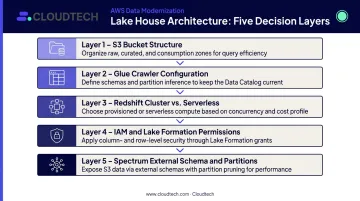
Getting a Lake House Architecture right involves decisions that compound on each other:
- S3 bucket structure and naming conventions
- Glue crawler configuration and catalog organization
- Redshift cluster sizing vs. Serverless RPU configuration
- IAM policy design and Lake Formation permission grants
- Spectrum external schema setup and partition management
Cloudtech's AWS-certified architects — 70% of whom are former AWS employees — design and deploy these architectures for SMBs, typically delivering functional environments in weeks. That background means the team has seen how these services behave at production scale, not just in documentation. If you're evaluating S3, Redshift, or a combined approach, a scoping conversation before committing to infrastructure is time well spent.
Frequently Asked Questions
What is the difference between Redshift and S3 data lake?
Amazon S3 is object storage used as a data lake — it holds raw, multi-format data with no schema required at storage time, and queries run via Athena or Spectrum when needed. Amazon Redshift is a managed SQL data warehouse optimized for fast, structured queries on pre-organized data. The core difference is flexibility of format versus speed of analysis.
Does AWS have a data lake?
Yes. AWS's data lake solution is built on Amazon S3 as the storage foundation, with AWS Glue for cataloging and ETL, Amazon Athena for serverless SQL querying, and AWS Lake Formation for governance and access control.
Is AWS Redshift an ETL tool?
No — Redshift is the destination for data that's already been transformed, not the tool that transforms it. ETL is handled by separate services: AWS Glue for batch data integration, Amazon Kinesis Data Firehose for streaming ingestion, or third-party tools that prepare and load data into Redshift via the COPY command.
Can you use Amazon S3 and Redshift together?
Yes, and this is common practice. Redshift Spectrum lets Redshift query S3 data directly using SQL without loading it into Redshift tables, enabling a unified view across historical S3 data and current Redshift data. The Lake House Architecture formalizes this pattern for production use.
What is Redshift Spectrum and how does it work?
Redshift Spectrum is a Redshift feature that queries data stored in S3 directly using SQL. It uses a dedicated compute fleet outside the Redshift cluster — pushing filters and aggregations down to reduce data returned — and relies on the Glue Data Catalog for table definitions before the cluster handles final aggregation.