Introduction
A customer contacts your business at 2 AM with an urgent question. No hold music. No waiting until morning. They get an instant, accurate, personalized response — and your team doesn't lift a finger.
That's conversational AI automation in practice. It's no longer a capability reserved for large enterprises — SMBs are deploying it now, and customers are starting to expect it regardless of company size.
The market reflects this shift. According to MarketsandMarkets, the conversational AI market is valued at $13.77 billion in 2024 and is forecast to reach $49.80 billion by 2031 — a 19.6% annual growth rate. Meanwhile, a Gartner survey found 85% of customer service leaders planned to explore or pilot customer-facing conversational AI in 2025.
For SMBs that haven't started yet, the window to act is narrowing. Competitors who move first capture loyalty, efficiency gains, and cost advantages that compound quickly.
This guide gives you a practical roadmap — from understanding the technology to deploying it in your business without common pitfalls.
Key Takeaways
- Conversational AI uses NLP and machine learning to deliver human-like interactions, not just scripted responses
- SMBs can achieve measurable gains in cost, efficiency, and customer satisfaction without enterprise budgets
- Implementation follows five steps: define goals, choose a platform, train and integrate, launch, then continuously optimize
- Real deployments show results: 30% query resolution automation, 65% faster data collection, 40% higher customer engagement
- Amazon Lex and Amazon Kendra make conversational AI accessible for SMBs already on AWS
What Is Conversational AI Automation?
Conversational AI automation is the use of machine learning (ML) and natural language processing (NLP) to automate two-way, human-like interactions between businesses and their customers or employees — across both text and voice channels.
That definition only clicks once you see what it's replacing. Rule-based bots follow rigid decision trees and predefined scripts — they respond to exact keywords and break down the moment a user phrases something unexpectedly. Conversational AI understands intent, retains context across a conversation, and improves over time through machine learning. As IBM notes, AI chatbots use ML and NLP to understand inputs and refine responses — a fundamentally different architecture from pattern-matching keyword bots.
What Conversational AI Covers
The scope goes well beyond a customer-facing chat widget:
- Customer-facing chatbots — answering product questions, processing returns, handling order status
- Voice assistants — phone-based agents that handle inbound calls without a human operator
- Internal virtual agents — HR bots answering policy questions, IT helpdesk automation
- Transactional systems — booking appointments, processing payments, filing insurance claims
For SMBs, that range matters. A single conversational AI deployment can handle customer inquiries, reduce support ticket volume, and free up staff for higher-value work — all at once.
How Conversational AI Automation Works: Core Components
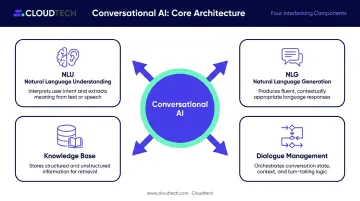
Understanding the mechanics helps SMBs make smarter platform and vendor decisions. Conversational AI is built on four interlocking components:
| Component | What It Does |
|---|---|
| NLU (Natural Language Understanding) | Interprets user intent and context from input |
| NLG (Natural Language Generation) | Formulates human-like responses from structured data |
| Dialogue Management | Controls conversation flow, state, and next actions |
| Knowledge Base | Supplies the factual content the AI retrieves and presents |
The Knowledge Base Is the Foundation
NLP handles the conversation mechanics — but the quality of answers depends on what the AI has access to. A well-maintained knowledge base (FAQs, product specs, policies, pricing) determines whether the AI gives accurate responses or frustrating non-answers. Keeping it current isn't a one-time setup task. It's ongoing work.
How the System Gets Smarter
Training quality and feedback loops drive long-term performance. A few principles that apply across platforms:
- Volume and variety: Google recommends 10–20 training phrases per intent, using varied expressions — not repetitions of the same phrasing
- Data quality over quantity: Microsoft notes that labeled-data quality directly affects model accuracy more than raw data volume
- Edge case coverage: Systems trained on diverse, real-world inputs handle slang, ambiguous phrasing, and emotionally charged messages far better than those trained on clean, scripted examples
- Continuous retraining: Every interaction becomes potential training data — deployments that go months without updates lose accuracy as user language evolves
Business Impact: Why Conversational AI Automation Matters for SMBs
Cost Reduction and Operational Efficiency
Automating repetitive, high-volume inquiries means human agents spend time on complex, high-value work — not answering the same five questions for the hundredth time. IBM's customer service research attributes conversational AI to a 23.5% lower cost per contact across organizations.
LAQO, a Croatian digital insurer, is one example: its AI assistant resolves 30% of customer queries automatically and has reduced contact center effort by 10%.
For SMBs with lean support teams, that kind of deflection changes staffing math significantly.
24/7 Availability and Customer Expectations
Salesforce found that 83% of customers expect to interact with someone immediately upon contact. Human agents can't meet that expectation at 2 AM. Conversational AI can — without degrading response quality after hours.
Scalability During Peak Periods
Seasonal spikes, product launches, promotional campaigns — these create demand surges that lean teams can't staff for in time. Conversational AI handles thousands of simultaneous conversations without additional headcount. Camping World deployed IBM's Arvee virtual assistant and achieved 40% higher customer engagement while managing peak-period volume without expanding its support team.
Personalization at Scale
Handling volume at scale only creates value if the conversations feel relevant. McKinsey found that 71% of consumers expect personalization, and 76% become frustrated when it's absent. Conversational AI connected to CRM data can reference past interactions, purchase history, and behavioral patterns to give responses that feel tailored — not templated.
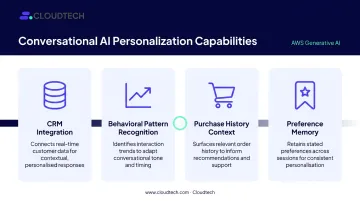
Key capabilities that enable this include:
- CRM integration — pulls customer history to inform every response
- Behavioral pattern recognition — adapts tone and recommendations based on prior interactions
- Purchase history context — surfaces relevant products or services without the customer repeating themselves
- Preference memory — retains communication preferences across sessions
Real-World Use Cases Across Industries
Healthcare
Megi Health and Magdalena Clinic deployed a conversational AI platform for patient interaction and monitoring. Infobip reports a 65% reduction in data-collection time and 86% CSAT. Use cases include patient intake, appointment scheduling, prescription reminders, and 24/7 symptom triage — all interactions that previously required staff time.
Financial Services
LAQO's generative AI assistant (built on Infobip and Azure OpenAI) resolves 30% of queries without human involvement, cutting contact center effort by 10%. Virgin Money's Redi virtual assistant handled more than 195,000 interactions in its initial months, with 90% resolved without transfer to a human agent.
Both deployments target the same pattern: account queries, fraud alerts, claims intake, and loan status updates — high-frequency, low-complexity interactions that tie up agents unnecessarily.
Retail and E-Commerce
Camping World's implementation of IBM watsonx Assistant demonstrates how retail businesses handle contact volume spikes without proportional staffing increases. Beyond volume management, retail deployments typically automate:
- Order tracking and shipment status updates
- Returns and exchange processing
- Product recommendations based on browsing or purchase history
- Promotional FAQ responses during peak seasons
This keeps agents focused on escalations and high-value conversations rather than repetitive lookups.
How to Implement Conversational AI Automation: A Step-by-Step Guide
Step 1 — Define Goals and Identify Use Cases
Before touching any technology, document:
- Your top 5 highest-volume inquiry types
- Current average response and resolution times
- Specific outcomes you want (reduced ticket volume, lower AHT, higher CSAT)
Starting without clear goals produces expensive, unfocused deployments. Start narrow: one use case, well-executed, generates the proof of value that justifies expansion.
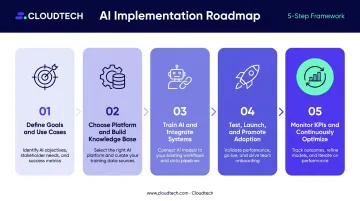
Step 2 — Choose the Right Platform and Build Your Knowledge Base
Platform selection criteria for SMBs:
- NLP strength — how well does it handle free-form language?
- Multi-channel support — web chat, voice, SMS, messaging apps?
- CRM and ERP integration — can it access customer context in real time?
- Scalability — does pricing stay manageable as volume grows?
AWS-native tools like Amazon Lex (for building voice and text conversational interfaces) and Amazon Kendra (for intelligent enterprise search and content retrieval) are purpose-built for this and integrate natively with existing cloud infrastructure. For SMBs already on AWS, this reduces integration complexity significantly.
Cloudtech, as an AWS Advanced Tier Partner, helps SMBs identify and deploy the right combination of these tools — often with AWS Partner Funding that reduces out-of-pocket implementation costs.
Step 3 — Train the AI and Integrate with Existing Systems
Training quality determines deployment quality. Feed the system with real historical data — chat logs, support tickets, email threads. This establishes realistic intent models from day one rather than building on hypothetical scenarios.
Integration is equally critical:
- CRM integration provides customer context so the AI personalizes responses
- Helpdesk integration enables clean escalation with full conversation history passed to human agents
- ERP integration allows real-time order, inventory, or account lookups
Without these integrations, the AI can answer general questions but can't act on customer-specific context — limiting its value for most SMB support and sales workflows.
Step 4 — Test, Launch, and Promote Adoption
Phased rollout works better than big-bang launches. Start with one channel and one use case, gather real interaction data, identify gaps, then expand.
Internal preparation matters just as much. Support staff need to understand how escalations work and how to read AI performance dashboards before go-live.
Salesforce found that 75% of consumers want to know when they're speaking with an AI, and 45% are more likely to use an AI agent when a clear escalation path exists. Build that transparency into the UX from the start — it directly affects adoption rates.
Step 5 — Monitor KPIs and Continuously Optimize
Key metrics to track post-launch:
- Resolution rate — percentage of conversations handled without human intervention
- Escalation rate — how often the AI hands off (and why)
- Average handling time — total conversation duration
- CSAT score — customer satisfaction post-interaction
- Response latency — conversation speed
Post-launch optimization isn't optional. Systems that go unmaintained lose accuracy as customer language, products, and workflows evolve. Plan for regular knowledge base updates, intent retraining on new interaction data, and periodic reviews of escalation triggers. The difference between a high-performing deployment and a stagnant one is almost always active maintenance.
Common Challenges and How to Overcome Them
Natural Language Limitations and Data Quality
Ambiguous phrasing, regional slang, and emotionally charged messages can challenge even well-trained systems. The solution isn't avoiding these inputs — it's planning for them.
- Train on diverse, real-world conversational data (not just idealized examples)
- Build feedback loops that flag mishandled queries for review
- Design clear human escalation paths for sensitive or complex situations
Privacy, Security, and Compliance
Conversational AI handles personal data — and in healthcare or financial services, that means HIPAA or GDPR obligations apply directly. Organizations building on AWS can address this through a multi-layered compliance architecture:
- AWS KMS for encryption at rest and in transit
- Amazon Macie for PII discovery and classification
- AWS Config for continuous compliance monitoring
- IAM and RBAC for role-based access control
- Terraform and CloudFormation for repeatable, auditable deployments via infrastructure-as-code
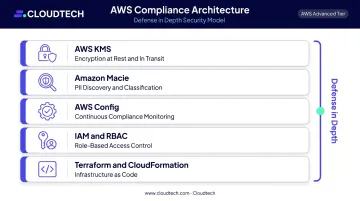
Compliance works best when it's embedded from architecture design onward — not bolted on at the end.
User Adoption and Trust
Some customers are hesitant to engage with AI — particularly for sensitive topics. Three practices reduce friction:
- Be transparent: tell users upfront they're interacting with an AI
- Make escalation obvious and easy: a visible "talk to a person" option builds trust, not skepticism
- Demonstrate consistent accuracy: trust is earned through reliable performance over time, not promised in onboarding copy
Addressing these three challenges — language limitations, compliance, and user trust — early in the design process dramatically reduces costly rework later.
Frequently Asked Questions
What is an example of conversational AI?
Amazon Alexa is a widely recognized voice-based example. Others include AI chatbots on e-commerce sites that answer order questions 24/7, and healthcare bots that help patients schedule appointments and track symptoms. Conversational AI appears across industries and both text and voice channels.
How is conversational AI different from a regular chatbot?
Traditional chatbots follow rigid, pre-scripted decision trees and only respond to exact keywords or menu selections. Conversational AI uses NLP and machine learning to understand intent, retain context, and improve over time — making it significantly more flexible and effective for real-world interactions.
What industries benefit most from conversational AI automation?
Healthcare, financial services, retail/e-commerce, and manufacturing/logistics see the strongest returns. Any sector handling repetitive, high-volume customer inquiries — scheduling, order tracking, account queries, claims intake — stands to gain the most in efficiency and cost reduction.
How long does it take to implement conversational AI?
Timelines vary by complexity. Simple chatbot deployments using pre-built platforms like Amazon Lex can go live in weeks. More complex multi-system integrations — requiring extensive CRM connections and training data preparation — typically take a few months from kickoff to production.
What are the biggest challenges of implementing conversational AI?
The top three are data quality for effective training, privacy and regulatory compliance, and user adoption. Each is manageable with proper planning, the right platform choice, and a commitment to ongoing optimization.
Is conversational AI automation expensive for small businesses?
Upfront costs vary, but AWS's pay-as-you-go model means SMBs pay only for resources consumed — no large infrastructure investment required. AWS Partner Funding opportunities, available through partners like Cloudtech, can further reduce or eliminate out-of-pocket costs for initial implementation.