According to AWS's enterprise strategy research, organizations can reduce total cost of ownership by as much as 40% by migrating to AWS — but capturing that value requires getting the approach right from the start.
This guide covers everything you need to make that happen: the migration phases, the core AWS services available today, how to pick the right strategy for each workload, and the best practices that separate successful migrations from expensive do-overs.
Key Takeaways
- AWS migration follows three core phases: Assess, Mobilize, and Migrate & Modernize — skipping the first two is the most common cause of failed migrations
- AWS now defines seven migration strategies (the 7 Rs), not six — Relocate is the addition most guides miss
- Match services to workload type: MGN for servers, DMS for databases, DataSync or Snow Family for bulk data
- Security and compliance baselines must be established before any workload moves
- Working with an AWS Advanced Tier Partner can unlock AWS funding programs that reduce out-of-pocket migration costs
Why Businesses Migrate to AWS
The business case for cloud migration is straightforward once you look at what staying on legacy infrastructure actually costs.
AWS gives businesses on-demand scalability, managed services that reduce operational overhead, and disaster recovery that doesn't require duplicate hardware. A 2022 IDC study commissioned by AWS found that organizations using AWS achieved 69% fewer unplanned outages and a 413% five-year ROI, with a 10-month payback period.
On the risk side, legacy on-premises infrastructure creates compounding problems:
- Mounting maintenance costs — IT budgets dominated by "keeping the lights on" rather than driving growth
- Limited disaster recovery — on-premises DR requires duplicate hardware, complex failover, and manual intervention
- Inability to scale rapidly — fixed capacity means you either over-provision (wasting money) or under-provision (risking performance under load)
- Security and compliance debt — aging systems struggle to meet modern regulatory requirements without expensive customization
For SMBs especially, these limitations hit harder. Without dedicated infrastructure teams, the operational drag of legacy systems pulls engineering resources away from the work that actually moves the business forward.
AWS migration isn't one-size-fits-all. The right approach depends on the size, complexity, and goals of your organization — which is exactly what the rest of this guide addresses.
The AWS Migration Process: Key Phases
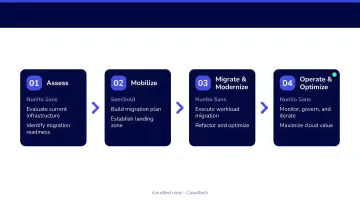
AWS structures migration into three core phases. Organizations that compress or skip the first two almost always pay for it later.
Phase 1: Assess
Before a single workload moves, you need a clear picture of what you have. The Assess phase involves:
- Inventorying current IT assets (servers, databases, applications, dependencies)
- Evaluating cloud readiness for each workload
- Building a business case with projected costs and expected outcomes
- Identifying which workloads are candidates for each migration strategy
AWS Transform provides assessments that evaluate migration cost, feasibility, and business value — including right-sizing recommendations and scenario comparisons. Organizations that skip this step typically discover mid-migration that they've underestimated dependencies or misidentified which workloads are actually ready to move.
Phase 2: Mobilize
Mobilize translates the assessment findings into an actionable plan. This phase covers:
- Selecting the migration strategy (rehost, replatform, refactor, etc.) for each workload
- Designing the landing zone and account structure
- Establishing security, identity, and compliance baselines
- Sequencing workloads into migration waves
AWS Prescriptive Guidance recommends keeping individual migration waves within 6 to 10 weeks. Shorter waves mean faster feedback loops and less risk exposure per cycle.
Phase 3: Migrate & Modernize
This is the execution phase. What actually moves during this stage includes:
- Workloads and applications, migrated using services like AWS Application Migration Service
- Databases, transferred with AWS Database Migration Service
- Data stores and file systems, moved via AWS DataSync or Snowball for large volumes
Most organizations run in hybrid mode for days or weeks during cutover to maintain business continuity while validating the migrated environment.
Post-migration isn't the finish line. The Operate and Optimize work starts the moment the first workload lands: monitoring performance, right-sizing resources, eliminating unnecessary spend, and refining architecture as usage patterns emerge. For most SMBs, the 30-90 days after migration deliver as much cost and performance improvement as the migration itself.
Core AWS Migration Services Explained
AWS offers purpose-built services organized by migration category. You don't need all of them — you need the right combination for your workload type.
Assessment and Discovery
| Service | What It Does |
|---|---|
| AWS Transform | Central hub for assessments, migration planning, cost modeling, and right-sizing recommendations. New customers are directed here. |
| Migration Evaluator | Builds data-driven business cases with cost projections; compares BYOL vs. License Included options. Integrates with AWS Transform. |
Note: AWS Migration Hub and Application Discovery Service are no longer open to new customers as of late 2025. AWS Transform is the current recommended starting point.
Application and Database Migration
| Service | What It Does |
|---|---|
| AWS Transform MGN (formerly Application Migration Service) | AWS's primary lift-and-shift tool. Continuously replicates source servers to AWS, converting them to native EC2 instances with minimal cutover downtime. No code changes required. |
| AWS Database Migration Service (DMS) | Handles homogeneous (MySQL to MySQL) and heterogeneous (Oracle to Amazon Aurora) migrations. DMS Schema Conversion now incorporates generative AI to reduce manual schema rewriting on complex cross-engine projects. |
Data Transfer Services
Once your applications and databases are accounted for, data transfer is the next decision. Three options, depending on your volume and connectivity:
- AWS DataSync — Automated, fast, secure transfers between on-premises storage and AWS services like S3 and EFS. Best for organizations with adequate internet bandwidth.
- AWS Snow Family (Snowcone, Snowball) — Physical devices for offline data transfer when bandwidth isn't sufficient for large-scale data movement. The right choice when network transfer would take weeks or months.
- AWS Transfer Family — Managed SFTP, FTPS, and FTP endpoints for organizations with existing file transfer workflows that need to be preserved in the cloud.
Choosing the Right AWS Migration Strategy: The 7 Rs
AWS Prescriptive Guidance currently defines seven migration strategies. Most guides still reference six — the missing one is Relocate, which matters for specific virtualization scenarios.
| Strategy | What It Means | Best For |
|---|---|---|
| Rehost | Lift-and-shift, no code changes | Fast migration of large server counts |
| Relocate | Move to cloud version of same platform (e.g., VMware on AWS) | Virtualized environments needing minimal change |
| Replatform | Targeted optimizations without core architecture changes | Workloads where managed services yield quick gains |
| Repurchase | Switch to a SaaS product | Legacy apps with good commercial alternatives |
| Refactor | Redesign as cloud-native (containers, serverless, managed DBs) | Apps where scalability or speed is a competitive priority |
| Retain | Keep in place for now | Workloads not yet ready or justified for migration |
| Retire | Decommission | Apps with no remaining business value |
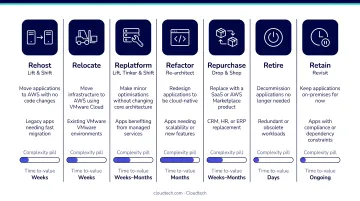
Most organizations use a mix of these across their portfolio — a typical SMB migration might rehost 60% of workloads, replatform 25%, and retire the remaining 15%. The table gives you the categories; choosing correctly for each workload is where the real work begins.
Matching Strategy to Workload
Rehost is the fastest path to AWS and works well when speed matters most. It won't tap into cloud-native capabilities, but it moves workloads quickly and safely. Use AWS Application Migration Service (MGN).
Replatform hits a productive middle ground. Moving an on-premises database to Amazon RDS, for example, requires no application code changes but delivers meaningful benefits in availability, automated backups, and reduced DBA overhead.
Refactor demands the most effort but unlocks the most value. If a core application is a bottleneck for growth, limited by its inability to scale or iterate quickly, re-architecting it with containers, serverless functions, or managed databases can dramatically change what's possible. But do this selectively. Not every application justifies that investment.
Use this as a quick decision guide before assigning strategies:
- Rehost — speed is the primary goal, minimal risk tolerance
- Relocate — VMware or virtualized environment, want minimal disruption
- Replatform — ready for managed services, not ready to rewrite code
- Repurchase — a SaaS alternative exists and fits the use case
- Refactor — the app is a growth constraint and ROI justifies the effort
- Retain — migration isn't justified yet (compliance, dependency, timing)
- Retire — the app has no active users or business function
Mismatching strategy to workload is expensive to undo. Run a dependency and performance assessment before you assign strategies — it's the step most teams skip, and the one most likely to cause problems mid-migration.
AWS Migration Best Practices
Security and Compliance First
Establish your security foundation before any workload moves:
- Configure IAM roles and policies with least-privilege access
- Set up VPC architecture with appropriate network segmentation
- Enable AWS KMS encryption for data at rest and in transit
- Deploy AWS Config to enforce and track resource configurations
For healthcare organizations, AWS Artifact provides the Business Associate Addendum (BAA) required under HIPAA. For financial services, PCI DSS attestation documentation is available through Artifact as well. Map your compliance requirements to AWS controls before migration begins — retrofitting compliance after the fact is far harder to get right.
Migrate in Waves, Not All at Once
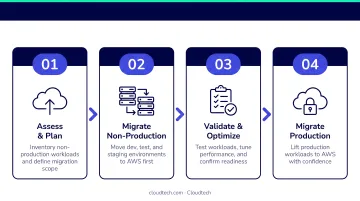
Big-bang cutovers are high-risk. The structured alternative:
- Start with non-production workloads — dev, test, and staging environments first
- Use continuous replication (AWS Application Migration Service (MGN)) to keep source and target in sync until cutover, shrinking the risk window
- Validate thoroughly before each wave proceeds
- Tackle production workloads in order of increasing complexity
Validate at Every Stage
Teams that skip validation are among the most common sources of post-migration outages. Before decommissioning anything on-premises:
- Run performance, functionality, and security tests on each migrated workload
- Keep source systems running in parallel until the migrated environment is confirmed stable
- Sign off on each wave explicitly before moving to the next
Manage Costs Proactively
Over-provisioning is the most common first-migration mistake. Counter it by:
- Using Migration Evaluator right-sizing recommendations from the start
- Monitoring spend with AWS Cost Explorer and setting guardrails with AWS Budgets
- Right-sizing instances early — it's much easier to adjust before teams anchor to a configuration
How Cloudtech Helps SMBs Navigate AWS Migration
Cloudtech is an AWS Advanced Tier Partner based in New York, with a team that includes former AWS employees and AWS-Certified Solutions Architects. The firm focuses exclusively on SMBs across healthcare, financial services, and manufacturing.
Unlike consultants who hand off a playbook and move on, Cloudtech embeds with clients from initial discovery through post-migration optimization. Each engagement follows a structured sequence:
- Discovery workshop to capture technical requirements and business goals
- Collaborative roadmap design
- AWS environment setup
- Migration execution
- Hands-on knowledge transfer and team enablement
In a documented healthcare engagement, Cloudtech helped a nonprofit healthcare insurer move from a legacy Oracle Exadata environment to an AWS-native architecture built around a centralized S3 data lake — achieving a 77% year-over-year reduction in infrastructure costs while maintaining HIPAA compliance throughout. The client's internal team finished the engagement trained and fully equipped to manage and scale the environment on their own.
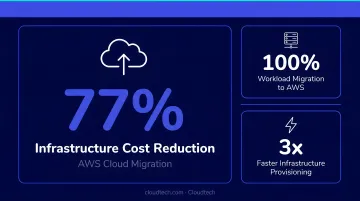
That cost outcome was partly enabled by AWS Partner Funding — a program Cloudtech helps clients access to offset migration costs, which matters especially for SMBs working with tighter budgets.
For businesses ready to start the migration conversation, reach out at connect@cloudtech.com or call (332) 222-7090.
Frequently Asked Questions
What AWS migration services are available?
AWS organizes migration services into three categories: assessment tools (AWS Transform, Migration Evaluator), application and database migration tools (AWS Transform MGN, AWS DMS), and data transfer services (DataSync, Snow Family, Transfer Family). The right combination depends on whether you're moving servers, databases, or large datasets — most migrations use services from multiple categories.
What is the difference between rehost, replatform, and refactor?
Rehost is a direct lift-and-shift with no code changes: fastest to execute but it won't take advantage of cloud-native capabilities. Replatform makes targeted optimizations (like moving to a managed database) without changing core architecture. Refactor redesigns the application to be cloud-native. Complexity and potential benefit both increase in that order.
How long does an AWS migration typically take?
Timelines vary widely by scope. AWS Prescriptive Guidance recommends keeping individual migration waves within 6 to 10 weeks, but total project duration depends on workload count, dependency complexity, data volume, compliance requirements, and migration strategy — with assessment and planning being the biggest determinants.
How much does AWS migration cost?
Key cost factors include AWS service usage, replication infrastructure (EC2, EBS), database migration instances, and data transfer fees. AWS Partner Funding programs — available through certified partners like Cloudtech — can offset significant costs, and Migration Evaluator helps build a projected cost model before committing to a migration path.
How do I minimize downtime during AWS migration?
Use AWS Transform MGN's continuous replication, which keeps source and target systems in sync until the moment of cutover. Migrate in waves starting with non-critical workloads, and thoroughly test migrated environments before decommissioning on-premises systems. Parallel operation during cutover is standard practice.
Do I need an AWS partner to migrate to AWS?
AWS provides self-service tools, but SMBs without dedicated cloud teams benefit significantly from working with a certified partner. Partners bring proven methodology, reduce migration risk, and can unlock AWS funding programs that may reduce or eliminate out-of-pocket costs — advantages that typically outweigh the cost of the engagement itself.