For small and mid-sized businesses, the math is getting harder to justify. Hardware ages, compliance burdens multiply, and internal teams spend increasing time keeping lights on rather than building products.
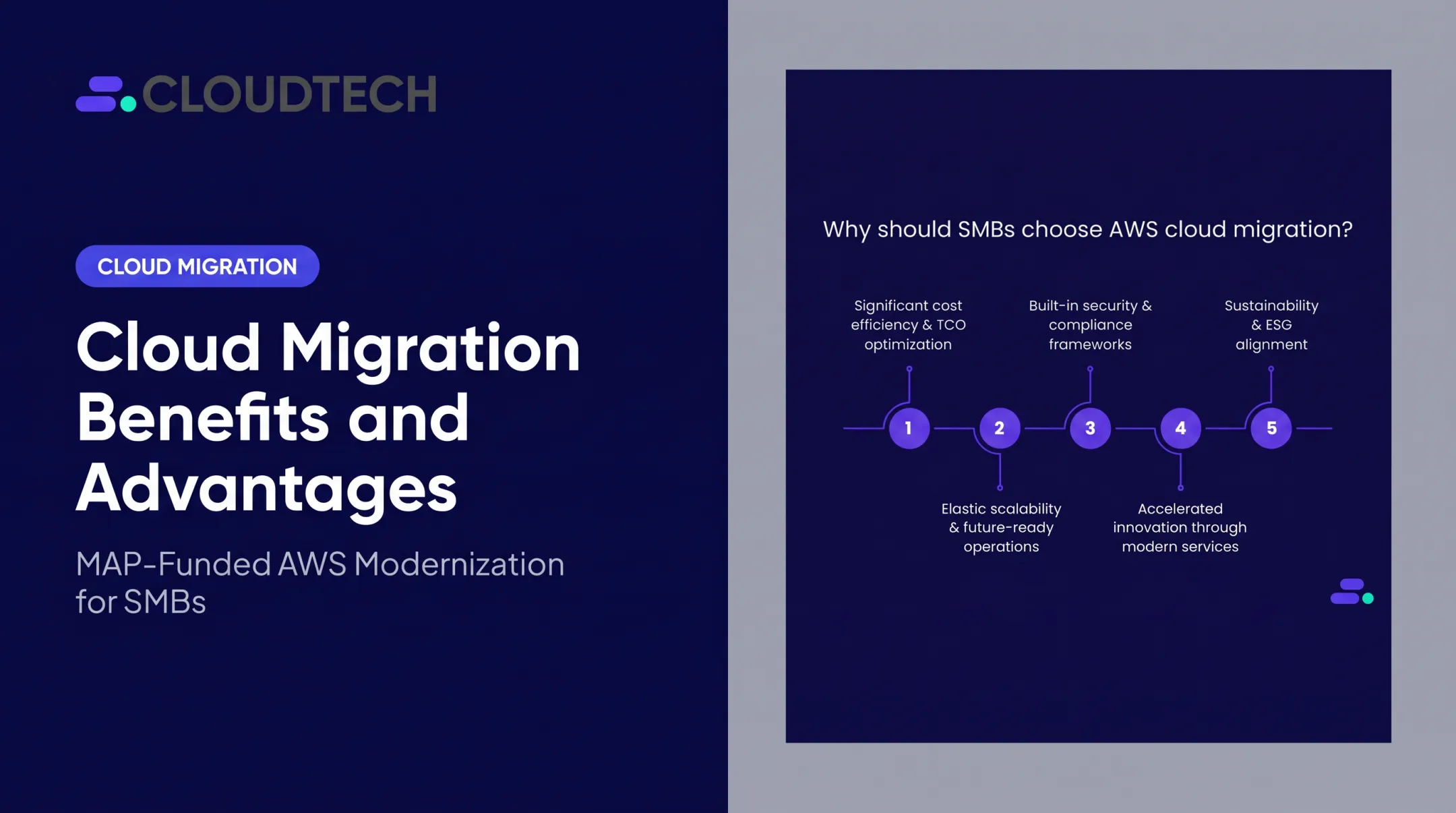
AWS cloud migration addresses all of this, not as a theoretical improvement, but in the day-to-day reality of lower bills, faster deployments, fewer security incidents, and infrastructure that scales without requiring a capital expenditure conversation every time the business grows.
This article covers what AWS migration actually delivers: the specific advantages, the measurable business outcomes, and what happens when organizations continue deferring the decision.
Key Takeaways
- Migrating to AWS can reduce compute, networking, and storage costs by up to 66% compared to on-premises infrastructure
- AWS supports 143 security standards and compliance certifications, including HIPAA, PCI-DSS, GDPR, and FedRAMP
- Organizations report 43% lower time to market for new features after migrating to AWS
- Delaying migration accumulates hidden costs: hardware refresh cycles, technical debt, and slower product releases
- AWS Partner Funding, available through Advanced Tier Partners like Cloudtech, can offset or eliminate your out-of-pocket migration costs entirely
What Is AWS Cloud Migration?
AWS cloud migration is the process of moving your organization's digital assets (databases, applications, servers, and IT workloads) from on-premises data centers or legacy environments to Amazon Web Services' managed cloud infrastructure.
It applies to organizations of all sizes. The underlying goal is consistent: replace physical hardware with on-demand cloud resources so you can run applications, store data, and manage IT operations without owning or maintaining physical infrastructure.
Migration is a means to an end, not a technical project in its own right. The real goals are operational:
- Reduce infrastructure costs by eliminating hardware ownership
- Improve application performance with scalable cloud resources
- Increase resilience through built-in redundancy and failover
- Free internal teams to focus on growth instead of maintenance
Key Benefits of Migrating Your IT Resources to AWS Cloud
The benefits below are framed around the outcomes businesses actually track: cost, security, and agility. Each section includes the specific metrics and use cases most relevant to SMBs considering a move off on-premises infrastructure.
Cost Efficiency: Eliminate CapEx and Pay Only for What You Use
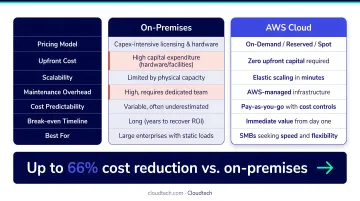
The core cost advantage of AWS migration is the shift from fixed capital expenditure to variable, consumption-based pricing. On-premises infrastructure requires upfront hardware investment, ongoing maintenance, power, cooling, and periodic refresh cycles, regardless of whether that capacity is fully utilized. AWS replaces all of that with pay-as-you-go pricing.
In practice, this works through several pricing mechanisms:
- Pay-as-you-go: You pay only for the compute, storage, and networking you consume
- Reserved Instances and Savings Plans: Committing to one- or three-year usage unlocks discounts of up to 72% compared to On-Demand pricing
- Spot Instances: Access spare EC2 capacity at discounts of up to 90% for workloads that can tolerate interruption
- Right-sizing: Match instance types to actual workload requirements, eliminating over-provisioned capacity
The cumulative impact is significant. According to a 2023 Enterprise Strategy Group economic validation, organizations can reduce compute, networking, and storage costs by up to 66% by migrating from on-premises to AWS. For SMBs running lean IT teams, that freed budget often becomes the first meaningful investment in product or growth that wasn't possible under a CapEx model.
When this matters most:
- Companies running aging hardware approaching end-of-life
- Businesses with unpredictable or seasonal workloads, such as retail, logistics, e-commerce
- SMBs that cannot justify large CapEx investments but need enterprise-grade infrastructure
KPIs impacted: Infrastructure operating costs, total cost of ownership, IT staff hours devoted to maintenance, hardware refresh cycles, cloud spend as a percentage of revenue.
Enterprise-Grade Security and Compliance Without the Overhead
Replicating AWS's security infrastructure on-premises would cost most organizations far more than the cloud alternative, and the result would still be less comprehensive. AWS provides deeply integrated, continuously updated security tools covering encryption, identity management, threat detection, and compliance automation.
The foundation is the AWS shared responsibility model: AWS secures the underlying infrastructure (physical facilities, virtualization, hardware), while customers configure access controls, data encryption, and monitoring for their workloads. In practice, this means smaller IT teams can maintain strong security posture without needing dedicated security operations staff.
In practice, a well-architected AWS environment includes:
- AWS IAM: least-privilege access, MFA enforcement, and granular role-based permissions
- Amazon GuardDuty: continuous threat detection across logs, network traffic, and API calls
- AWS Shield: managed DDoS protection
- AWS Config and Audit Manager: automated compliance monitoring and audit-ready reporting
- Amazon CloudWatch and CloudTrail: full observability and API activity logging
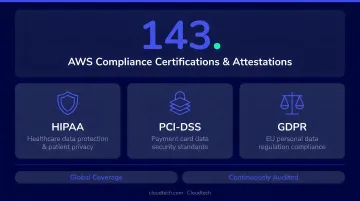
AWS supports 143 security standards and compliance certifications, including PCI-DSS, HIPAA/HITECH, FedRAMP, GDPR, FIPS 140-3, and NIST 800-171. For regulated industries, this breadth of coverage is difficult to replicate in a self-managed data center, and the operational burden of maintaining it falls primarily on AWS rather than on internal teams.
The security risk of staying on-premises is real. Verizon's 2024 Data Breach Investigations Report found that vulnerability exploitation accounted for 14% of all breaches (nearly triple the prior year), with edge devices and VPNs representing a growing share of exploitation targets.
When this matters most: Healthcare organizations managing PHI, financial services firms handling payment data, companies expanding into new markets with data sovereignty requirements.
KPIs impacted: Security incident frequency, mean time to detect and respond, audit preparation time, compliance certification costs, downtime from security events.
Scalability, Business Agility, and Faster Time to Market
On-premises infrastructure scales in one direction: up, slowly, and at capital expense. AWS scales in both directions, instantly, and at marginal cost.
AWS Auto Scaling dynamically adjusts compute capacity to match workload demand, eliminating both over-provisioning and capacity shortfalls without manual intervention. Amazon EC2 instances can be launched in minutes, with capacity scaling in seconds. Services like AWS CodePipeline automate CI/CD workflows, compressing release cycles.
The business impact shows up in measurable ways. According to AWS research citing ESG 2023 data, organizations that migrate to AWS report:
- 43% lower time to market for new features
- 29% boost in staff productivity
- 78% faster deployment of new compute and storage resources
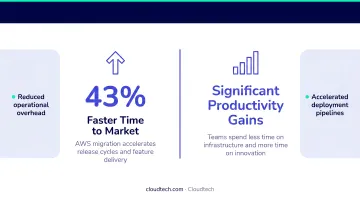
For SaaS businesses, retailers managing seasonal demand, and any organization where slow IT provisioning creates bottlenecks, these aren't abstract metrics; they translate directly to competitive positioning and revenue.
When this matters most:
- High-growth companies scaling rapidly
- SaaS providers with frequent release cycles
- Businesses with variable or seasonal workloads
- Organizations where provisioning delays are visibly slowing product or operations teams
What Happens When You Delay Your AWS Migration
The costs of staying on legacy infrastructure don't stay fixed; they compound.
Hardware requires refresh cycles. IDC reports that 44% of organizations refresh server and compute infrastructure every three years or less. Each cycle is a capital expense that produces no new capability, just maintaining the status quo. Meanwhile, developers on legacy systems lose an average of 23% of their working time to technical debt, according to AWS modernization guidance.
The operational consequences are predictable:
- Reactive firefighting when hardware fails unexpectedly
- Inability to scale quickly to meet demand spikes
- Slower product releases caused by provisioning delays
- Difficulty adopting AI and analytics tools that require cloud-native infrastructure
The competitive consequence is harder to quantify but more damaging over time.
Businesses running on legacy infrastructure while competitors use cloud-native agility, real-time analytics, and elastic scaling face a structural disadvantage: slower delivery, weaker customer experience, and a harder time attracting technical talent who expect modern tooling.
The longer migration waits, the more expensive and disruptive the eventual transition becomes, and the further ahead cloud-native competitors get.
How to Get the Most Value from Your AWS Migration
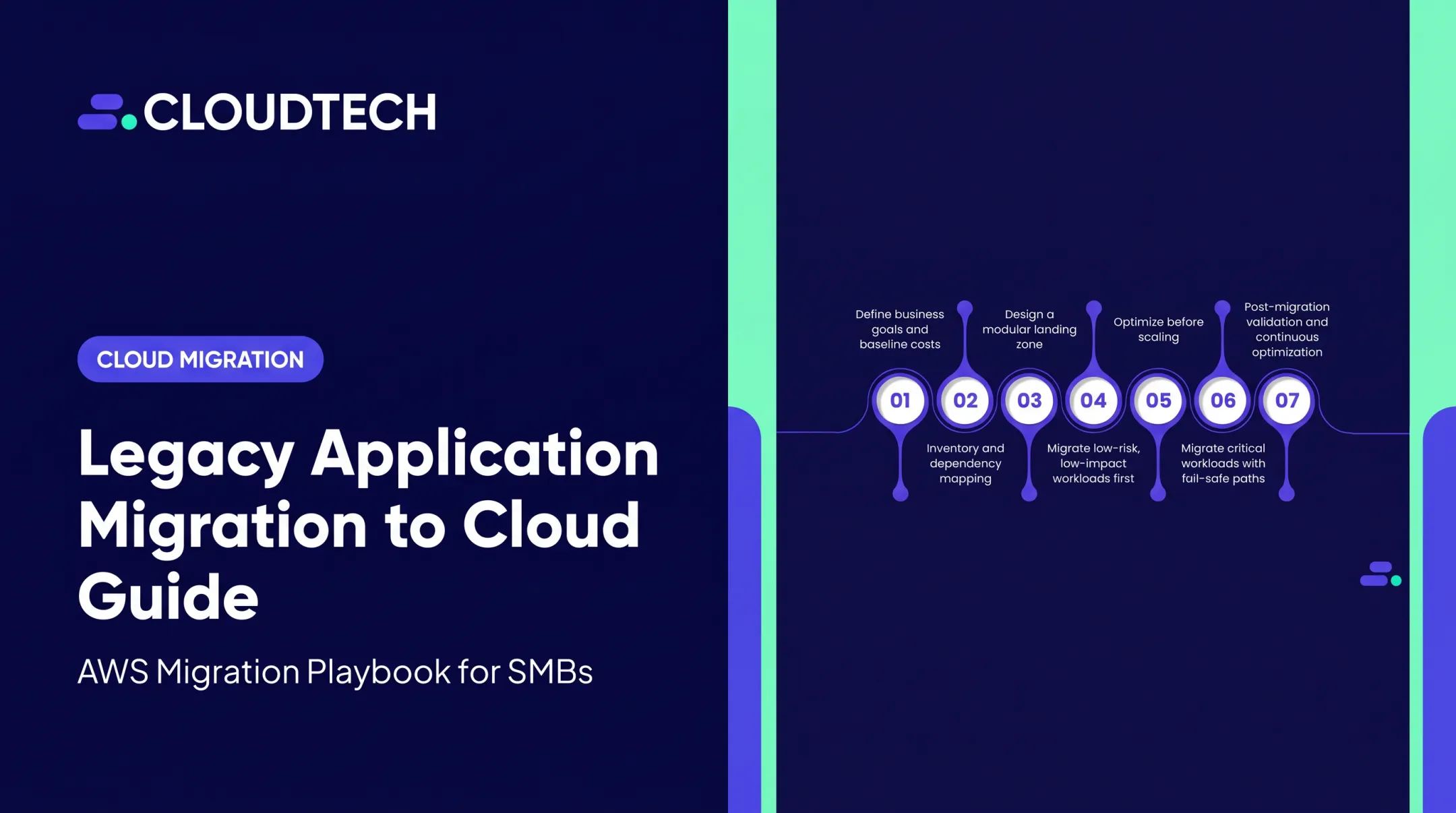
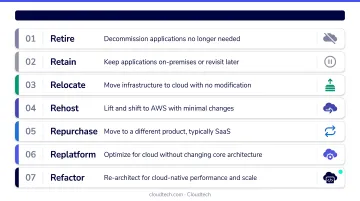
Migration delivers maximum value when treated as a strategic program, not a one-time technical exercise. That starts with a thorough assessment of current workloads, clear business objectives (cost reduction, compliance, speed to market), and mapping each application to the right strategy using the 7 Rs framework:
- Retire: decommission unused or redundant applications
- Retain: keep workloads that aren't ready for migration
- Rehost: lift-and-shift to AWS with minimal changes
- Relocate: move infrastructure to AWS without refactoring
- Repurchase: switch to a SaaS alternative
- Replatform: make targeted optimizations during migration
- Refactor/Re-architect: redesign for cloud-native capabilities
Post-migration is where long-term value is built. Once you're on AWS, ongoing optimization compounds your returns:
- Monitor resource utilization continuously with Amazon CloudWatch
- Right-size compute instances to match actual workload demands
- Use Reserved Instances or Savings Plans for predictable workloads
- Adopt new AWS services as your business needs evolve
Cloudtech, an AWS Advanced Tier Partner based in New York City, helps SMBs navigate this process from initial assessment through post-migration optimization. The team is comprised primarily of former AWS employees (including Principal Solutions Architect Joe Miligan, who has advised Capital One, Cisco, and Bristol Myers Squibb), bringing direct AWS product knowledge to every engagement.
Cloudtech's structured approach begins with a one-day discovery workshop for both technical and business stakeholders, followed by a prioritized roadmap and phased execution.
For Klamath Health Partnership, that process delivered a 77% year-over-year reduction in infrastructure costs and a fully HIPAA-compliant data lake on AWS.
As an Advanced Tier Partner, Cloudtech has access to AWS Partner Funding that can reduce or eliminate out-of-pocket migration costs for qualifying businesses, and as one of only 26 global partners selected for AWS's Small Business Acceleration Initiative, Cloudtech is specifically positioned to serve SMBs efficiently. The result is an engagement built around your outcomes, not a vendor checklist.
Conclusion
The case for migrating IT resources to AWS rests on three compounding outcomes: lower operational costs, a stronger security and compliance posture, and the organizational agility to build, deploy, and scale faster than is possible on legacy infrastructure.
These aren't one-time gains. They compound as internal teams grow more proficient, infrastructure gets further optimized, and new AWS capabilities are adopted to meet evolving business needs.
The businesses extracting the most value from AWS treat migration as an ongoing practice, not a one-time project. They continuously refine their architecture, manage costs proactively, and layer in new capabilities, turning their cloud environment into a platform that supports whatever comes next. For SMBs looking to move quickly without the overhead of a large internal cloud team, working with an AWS Advanced Tier Partner like Cloudtech can compress that timeline significantly, with pre-packaged solutions that go live in weeks, not months.
Frequently Asked Questions
Which of the following are benefits of migrating to the AWS cloud?
The primary benefits include significant cost reduction through pay-as-you-go pricing (up to 66% lower infrastructure costs), enterprise-grade security backed by 143 compliance certifications, on-demand scalability, faster deployment cycles, built-in disaster recovery, and access to AI and analytics capabilities that aren't practical to run on-premises.
What are the 7 migration strategies for AWS?
AWS uses the "7 Rs" framework to guide migration decisions:
AWS uses the "7 Rs" framework to guide migration decisions:
- Retire: decommission unused applications
- Retain: keep in place for now
- Rehost: lift and shift to AWS without changes
- Relocate: move to cloud platform without rewriting code
- Repurchase: replace with a SaaS alternative
- Replatform: optimize for cloud without full redesign
- Refactor/Re-architect: redesign using cloud-native services
The right strategy depends on each application's complexity, age, and business value.
How long does it take to migrate IT resources to AWS?
Timelines vary widely. Simple rehosting projects can finish in weeks, while full refactoring of legacy applications may take months. Working with an experienced AWS partner (particularly one offering structured discovery workshops and pre-defined delivery frameworks) can substantially compress timelines compared to building a migration approach from scratch.
What are the biggest risks of migrating to AWS, and how can they be mitigated?
The most common risks (cost overruns, downtime, security misconfigurations, and internal skills gaps) are best addressed through thorough pre-migration assessment, phased execution with rollback procedures, and certified AWS experts who configure security controls before any workloads move.
How much does it cost to migrate to AWS?
Costs vary based on your environment's size, the strategies applied, and the level of partner support engaged. AWS Partner Funding programs, accessible through AWS Advanced Tier Partners like Cloudtech, can offset or eliminate a significant portion of migration costs for qualifying businesses. A scoping conversation is the best first step.
Is AWS cloud migration suitable for small and medium-sized businesses?
AWS is particularly well-suited for SMBs because its pay-as-you-go model removes the CapEx barriers of on-premises infrastructure. SMBs access the same enterprise-grade security, scalability, and tooling as large organizations, without the capital commitment. A boutique AWS partner like Cloudtech can make the process faster and more cost-effective than going it alone.