The internal engine room largely runs on human effort.
This guide covers what conversational AI actually means for back-office operations, which processes deliver the highest return, which sectors benefit most, and how to implement it practically — including what to do first.
Key Takeaways
- Intelligent automation completes back-office services 3–5x faster than manual processing, according to EY research on automation ROI
- Finance, HR, IT helpdesk, and procurement deliver the highest ROI for conversational AI deployment
- Healthcare and financial services benefit most — high document volume and compliance demands amplify returns
- LLM-based AI agents handle unstructured data and multi-step workflows — traditional chatbots cannot
- SMBs can go live with targeted conversational AI in weeks using cloud-native AWS tools
What Is Conversational AI for Back-Office Process Automation?
Beyond Chatbots and RPA
Conversational AI uses natural language processing (NLP), machine learning, and increasingly large language models (LLMs) to understand written or spoken human input — and act on it. That action capability is what makes it relevant for back-office work.
This is different from two things people often confuse it with:
- Traditional chatbots rely on decision trees and keyword matching. They handle FAQ-style interactions well, but break down the moment a question is phrased differently or a workflow requires multiple steps.
- RPA (Robotic Process Automation) automates structured, rule-based tasks by mimicking user actions in software interfaces. It's powerful for repetitive digital tasks, but it cannot interpret language or handle ambiguous inputs.
Conversational AI sits between these two — understanding intent expressed in natural language, then triggering or completing workflows across integrated systems.
Why Back-Office Work Is a Natural Fit
Back-office operations are heavily query-driven and document-heavy. Employees ask systems for data, request approvals, file reports, and process invoices — all language-based interactions. That makes conversational AI a natural interface layer.
According to EY's intelligent automation practice, intelligent automation can produce a 25%–40% decrease in operational costs and complete services 3–5 times faster than manual processing.
That speed and cost reduction comes from how conversational AI operates in practice. It sits on top of existing ERP, HRMS, ticketing, and accounting platforms as an intelligent interface — employees interact in natural language, and it reads, writes, routes, and escalates across those systems without anyone logging into multiple applications or manually transferring data.
Key Back-Office Processes Conversational AI Can Automate
Conversational AI delivers the most value where processes are high-volume, repetitive, query-intensive, or require extracting information from documents. Four areas consistently produce strong results.
Finance and Accounts Payable
Invoice processing is one of the clearest wins. Vendors submit invoices via a chat interface or email, and the AI extracts key data — vendor name, amount, PO number, line items — matches it against records, flags exceptions, and routes for approval. No manual data entry required.
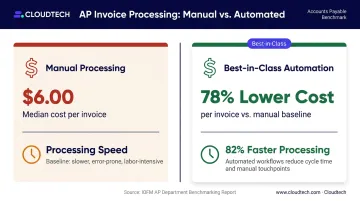
APQC's cross-industry benchmark puts the median total cost to process an AP invoice at $6.00. Organizations with the most automated AP operations report 78% lower cost per invoice and 82% faster processing compared to peers, according to Ardent Partners.
Conversational AI also handles AP query resolution directly. A staff member can ask "What is the payment status of Invoice #1042?" in plain language and get an immediate, accurate answer pulled from the ERP — without logging into three systems.
HR and Employee Onboarding
HR teams field the same questions constantly: leave balances, benefits enrollment deadlines, policy details. Conversational AI handles these through an intelligent assistant integrated with the HRMS — answering instantly and escalating only when a question genuinely requires human judgment.
IBM's internal AskHR system offers a well-documented benchmark: it automates more than 80 HR tasks, handles over 2.1 million employee conversations annually, and has achieved a 40% reduction in HR operating costs over four years, with 94% containment of common questions.
Onboarding is another strong use case. Conversational AI guides new hires through document submission, system access requests, and training enrollment — all from a single interface — cutting HR administrative burden significantly.
IT Helpdesk and Service Requests
Conversational AI acts as a first-line IT support agent. Employees submit tickets in natural language, and the AI interprets intent, auto-resolves common requests, and routes complex issues to the right team with full context already captured.
Common auto-resolved requests include:
- Password resets and account unlocks
- Software access provisioning
- VPN configuration and connectivity issues
This cuts resolution time and ticket handling costs. And because the AI captures structured information during every interaction, it improves routing accuracy and reduces back-and-forth between employees and IT staff.
Procurement and Vendor Management
Employees can ask "Where is PO #5023?" or "Who is our approved vendor for office supplies?" and receive immediate answers. Standard purchase requests and vendor communications are handled the same way — employees initiate them through a chat interface, and the AI executes without manual handoffs. The result is a faster procurement cycle with fewer coordination bottlenecks.
APQC reports a median of just 1.0 calendar day from purchase requisition to issuing a services purchase order, a benchmark that leading automation adopters are already achieving.
Which Back-Office Sectors Benefit Most From Conversational AI?
Conversational AI improves operations in any organization with high-volume internal processes. But three sectors see disproportionate returns.
Healthcare and Life Sciences
Healthcare back-office work is expensive and painful. A 2024 peer-reviewed analysis estimates approximately $1 trillion in annual US healthcare administrative spending, including roughly $200 billion for financial transactions alone. The system processes more than 9 billion claims annually.
Prior authorization is the biggest bottleneck: more than 90% of authorizations are eventually approved, but fewer than 25% are auto-determined — meaning human staff manually process the vast majority. Estimated cost runs $40–$50 per submission for private payers.
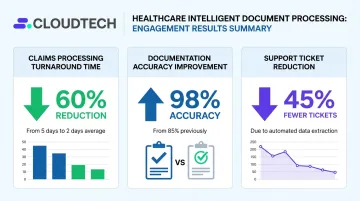
Cloudtech has addressed these pain points for healthcare clients using AWS-powered intelligent document processing. Results from one engagement include:
- Claims turnaround reduced from 4–6 weeks to 24–48 hours
- Documentation accuracy improved from 75% to 99.8%
- 45% reduction in support tickets within two months of deploying a Bedrock-powered AI assistant
Financial Services
Financial services back offices handle regulatory reporting, KYC/AML document review, reconciliation, and audit trail management. McKinsey research indicates that banks typically allocate 10%–15% of FTEs to KYC/AML work alone. Conversational AI changes that math in two concrete ways:
- Cuts average low-risk review time from 100 minutes to 30 minutes (matching leading organizations using straight-through processing)
- Delivers 15%–20% productivity uplift in financial crime investigation — translating directly to FTE cost reduction
The same systems build the audit trails regulators require, so compliance doesn't take a back seat to speed.
Manufacturing and Logistics
Manufacturing back offices benefit from conversational AI across inventory queries, supplier communication, and quality compliance documentation. Instead of toggling between disconnected systems, operations teams ask questions and trigger actions through one natural language interface.
Jabil's AWS-based generative AI platform reduced data-processing time by 74% and solution-deployment time by 67%–83%, according to an AWS case study. McKinsey separately reports that generative AI can reduce logistics documentation lead time by up to 60%.
Top Benefits of Deploying Conversational AI in Back-Office Operations
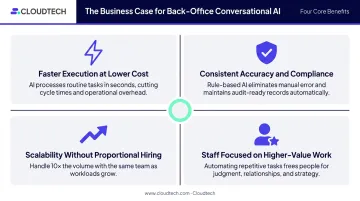
Four measurable advantages make the business case for back-office conversational AI — regardless of industry or team size:
- Faster execution at lower cost. High-volume, repetitive language tasks get handled automatically. Amazon Finance Technology reported 92% faster regulatory analysis using AI on AWS; IBM AskHR processed over 1 million HR transactions in 2024 while cutting operating costs by 40%.
- Consistent accuracy and audit-ready compliance. Every transaction follows the same rules, every time. Full audit trails are created automatically, eliminating the data entry errors that trigger costly corrections — a decisive ROI factor for regulated industries.
- Scalability without proportional hiring. More invoices, more HR requests, more support tickets — conversational AI absorbs volume growth without adding headcount. For SMB finance and HR teams already stretched thin, that directly addresses the talent shortage.
- Staff focused on higher-value work. When routine queries are off the plate, employees redirect toward analysis, exception handling, and vendor relationships — improvements that show up in output quality and retention rates.
Types of Conversational AI Best Suited for Back-Office Workflow Automation
Not all conversational AI is equally capable. For back-office automation, the right type depends on process complexity, unstructured data requirements, and integration depth.
| Type | Best For | Limitation |
|---|---|---|
| Rule-based chatbots | Simple, structured queries — FAQ-style HR questions, basic status lookups | Break down with ambiguous inputs or multi-step workflows |
| NLP-powered virtual assistants | IT helpdesk, AP query resolution, HR task automation with variable phrasing | Limited reasoning across complex, multi-step processes |
| LLM-based AI agents | Invoice extraction, compliance document review, onboarding orchestration | Higher implementation complexity; requires thoughtful data governance |
LLM-Based Agents: Where the Market Is Moving
LLM-based conversational AI agents — built on models available through Amazon Bedrock, such as Anthropic Claude — can handle unstructured documents, reason across multi-step workflows, and autonomously execute tasks. For back-office processes involving contracts, invoices, or compliance documents, that reasoning capability is what separates useful automation from brittle scripting.
Amazon Bedrock Agents connect to knowledge bases, APIs, and AWS Lambda functions to determine and execute multi-step tasks. Amazon Q Business provides permissions-aware answers and enterprise search over connected organizational data — useful for internal query resolution across HR, finance, and IT contexts.
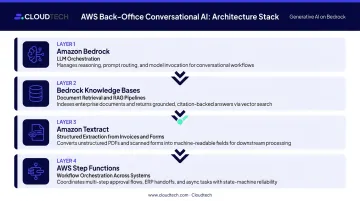
Building on AWS removes the biggest barriers for SMBs: pre-built foundational models, managed infrastructure, and no requirement to train models from scratch. Cloudtech's generative AI implementations use this full stack:
- Amazon Bedrock — reasoning and LLM orchestration
- Bedrock Knowledge Bases — document retrieval and RAG pipelines
- Amazon Textract — structured extraction from invoices and forms
- AWS Step Functions — workflow orchestration across systems
How to Implement Conversational AI in Your Back-Office: A Practical Roadmap
Step 1 — Identify the Right Processes to Automate
Start with processes that are high-volume, query-rich, or document-heavy with clear patterns. AP invoice processing, HR FAQ handling, and IT helpdesk are consistent first choices — they're high-impact and well-defined enough for an initial deployment.
A process audit helps here. According to Deloitte's research, 41% of organizations lacked a clear enterprise-wide intelligent-automation strategy — a gap that directly correlates with failed pilots. Start with one well-scoped process rather than attempting broad transformation.
Step 2 — Choose the Right Infrastructure and AI Type
Cloud-native deployment removes the need to build from scratch. AWS services — Amazon Lex for voice and text interfaces, Amazon Q Business for enterprise search and query resolution, and Amazon Bedrock Agents for complex multi-step workflows — give SMBs access to enterprise-grade AI without enterprise infrastructure investment.
Working with an AWS Advanced Tier Partner can reduce implementation risk considerably. Cloudtech, for example, delivers pre-packaged AWS solutions in weeks using a team that is 70% former AWS employees — which helps SMBs avoid the common trap of over-scoping their first deployment. AWS Partner Funding, including MAP/IMR credits for qualifying generative AI workloads, can also reduce or eliminate out-of-pocket costs on the initial proof of concept.
Step 3 — Integrate With Existing Systems and Set Guardrails
Conversational AI must connect to your ERP, HRMS, ticketing, and accounting systems via APIs. Before go-live, define:
- Access controls — who can query what, and what actions the AI is authorized to take
- Escalation protocols — when and how the AI hands off to a human
- Audit logging — how every interaction is captured for compliance
- Data security boundaries — encryption in transit and at rest, role-based access, and compliance alignment (HIPAA, SOC 2, GDPR as applicable)
These guardrails need to be defined upfront, not retrofitted after deployment.
Step 4 — Test, Train, and Iterate
Deploy to a narrow, well-defined process first. Track these metrics over the first 90 days:
- Accuracy rate — is the AI resolving queries correctly?
- Resolution rate — what percentage of requests are handled without human intervention?
- Escalation frequency — how often does the AI hand off, and why?
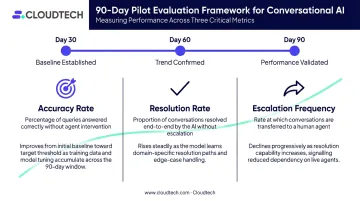
That 90-day window matters more than most teams expect. Gartner predicted that at least 30% of generative AI projects would be abandoned after proof of concept — most often due to poor data quality, unclear business value, or escalating costs. Use the early-stage feedback loop to improve accuracy before expanding scope, not after you've already committed to a broader rollout.
Frequently Asked Questions
Which type of conversational AI is best for back-office workflow automation?
LLM-based AI agents are the most capable for complex, multi-step workflows involving unstructured data — think invoice extraction or compliance document review. NLP-powered virtual assistants work well for query-heavy tasks like IT helpdesk and HR. Rule-based chatbots suit simple, structured requests where inputs are predictable.
Which back-office sectors benefit most from conversational AI?
Healthcare, financial services, and manufacturing see the highest ROI due to document volumes, compliance requirements, and complex internal queries. Any organization with large back-office teams handling repetitive, language-based tasks will benefit — sector is less important than process volume and complexity.
How does conversational AI differ from RPA in back-office automation?
RPA follows fixed, scripted rules to automate structured digital tasks — it cannot interpret language. Conversational AI understands natural language input and acts on it. The two are often most powerful in combination: conversational AI handles intake and interpretation, RPA executes downstream structured steps.
What are the main challenges of implementing conversational AI in back-office operations?
The most common challenges are legacy system integration, data security and compliance requirements, staff adoption, and unrealistic expectations about initial accuracy. A phased rollout starting with one well-defined, high-volume process addresses most of these directly — limiting integration scope while building organizational confidence before broader deployment.
How long does it take to implement conversational AI for back-office processes?
Targeted deployments — an IT helpdesk assistant or AP query bot — can go live in weeks using cloud-native tools and pre-built frameworks. Broader, multi-system agentic automation typically takes 2–4 months for an initial rollout, depending on integration complexity and process scope.
Why is conversational AI important for back-office process automation?
Back-office bottlenecks are fundamentally about human time spent on routine queries and data tasks. Conversational AI handles that load by interpreting natural language and triggering automated actions — so teams process higher volumes, reduce errors, and scale output without adding headcount.