Introduction
Physicians now average 57.8 work hours per week, with 13 hours spent on indirect patient care — documentation, order entry, prior authorizations — and another 7.3 hours on administrative tasks like insurance forms. That's roughly 20 hours weekly that never touches a patient.
Behind those hours sits a mountain of paper: intake forms, referral packets, prior authorization requests, EOBs, lab reports, discharge summaries. Most of it still moves through manual workflows — staff reading, typing, sorting, and re-entering the same data across multiple systems.
For small-to-mid-size healthcare organizations, this creates a structural problem — one that slows revenue, delays care, and creates compliance exposure.
This guide covers:
- What healthcare document intelligence actually is
- How a production pipeline works, step by step
- The highest-impact use cases
- What HIPAA compliance requires of any system handling patient data
- Practical starting points for moving from manual processing to automated workflows
Key Takeaways
- Healthcare document intelligence combines OCR, machine learning, and NLP to automatically extract and validate data from medical documents
- Fully electronic workflows save up to 70 minutes per patient visit versus manual claim processing
- Prior authorization alone consumes roughly 13 staff and physician hours per week per practice
- HIPAA compliance requires encryption, role-based access, and field-level audit logging beyond basic document storage
- Starting with one high-volume, well-defined workflow (intake or referrals) delivers measurable ROI fastest
What Is Healthcare Document Intelligence?
Healthcare document intelligence applies AI — specifically OCR, machine learning, and natural language processing — to automatically capture, classify, extract, and validate data from medical documents.
That's different from basic OCR. Standard OCR converts an image of text into machine-readable characters — it reads words but understands nothing about them.
Document intelligence goes further: it identifies document structure, interprets clinical context, and extracts specific fields — a diagnosis code, a policy number, or even a patient's date of birth — even when those fields appear in different locations across different document layouts.
The Five-Layer Pipeline
A production document intelligence system works in sequence:
- Ingestion — Documents arrive from fax servers, email, portal uploads, EHR exports, and scanning systems simultaneously
- Classification — The system identifies what type of document it's looking at (referral form, lab result, EOB) and splits mixed files into individual documents
- Extraction — AI models pull structured data from both formatted fields and free-form clinical text
- Validation — Extracted data is checked against business rules before it touches any downstream system
- Routing — Clean, validated data flows directly into EHRs, billing platforms, or scheduling tools
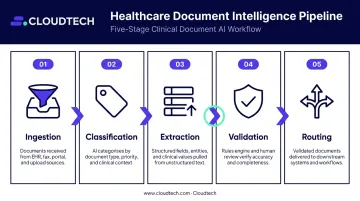
Each stage matters because the documents feeding into that pipeline are far more varied than most teams anticipate.
What Documents Are in Scope
The document types span every stage of care:
- Patient intake and registration forms
- Referral documents from external providers
- Prior authorization requests and supporting documentation
- Insurance claims and Explanations of Benefits (EOBs)
- Lab reports and diagnostic results
- Discharge summaries and clinical notes
- Mixed fax packets containing multiple document types in a single transmission
That last category is the hardest part. A single fax received as one file might contain a referral form, an insurance card, and a lab result — three document types, each requiring a different processing pipeline. Without automation, staff manually split and route each packet. Document intelligence eliminates that step entirely, cutting a common source of processing delays and misrouted records.
The Real Cost of Manual Document Processing
Every patient encounter generates multiple documents. Across thousands of weekly interactions, manual data entry doesn't just slow things down. It creates cascading failures across billing, scheduling, and clinical operations.
Where the Bottlenecks Hit
Revenue cycle delays: A claim that takes an extra two days to submit extends the revenue cycle by two days. Multiply that across thousands of weekly claims.
Scheduling lag: Referral packets that sit in a manual intake queue delay appointment booking. For specialty practices with high referral volume, this affects patient access to care.
Authorization delays: The 2025 AMA survey found physicians handle roughly 40 prior authorizations per week, consuming 13 staff and physician hours. Slow manual processing means slower payer decisions and delayed treatment.
The Accuracy Problem
Manual data entry in healthcare isn't just slow — it's risky. According to the Optum 2024 Revenue Cycle Denials Index, the national claim denial rate hit 12% in 2023. Of those denials:
- 24.33% stemmed from registration and eligibility issues
- 15.89% from missing or invalid claim data
- 12.08% from documentation deficiencies
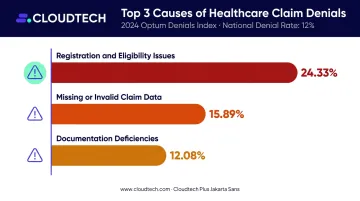
All of these are preventable. A wrong ICD code, a misread policy number, or an incomplete form field each triggers a denial that requires staff time to research, correct, and resubmit.
The Compliance Cost
HIPAA doesn't just require accurate records. It requires traceable ones. Manual workflows make this difficult: documents get misfiled, processing steps go unlogged, and correction histories are incomplete.
The financial exposure is real. HIPAA civil penalties range from $145 per violation (Tier 1, unknowing violations) up to $2,190,294 per Tier 4 violation assessed on or after January 28, 2026.
IBM's 2025 report puts the average healthcare data breach cost at $7.42 million, the highest of any industry for the 14th consecutive year. For smaller organizations, that exposure doesn't require a massive breach. Incomplete audit trails from manual processing create liability on routine compliance reviews.
The Automation Opportunity
These costs aren't inevitable. The 2025 CAQH Index reports $258 billion in administrative costs already avoided through automation, with $21 billion in remaining potential savings from full electronic workflow adoption. The 2024 CAQH Index found that fully electronic administrative workflows save an average of 70 minutes per patient visit — not from a single workflow, but across the bundle of administrative transactions tied to each encounter.
How Healthcare Document Intelligence Works: Step by Step
Step 1 — Document Ingestion
Documents enter from multiple channels simultaneously: fax servers, email attachments, portal uploads, scanning systems, and EHR exports. A production system handles all of these in parallel.
Before extraction begins, image preprocessing cleans up the raw input — correcting skewed scans, improving resolution, removing noise. A slightly rotated fax page that looks perfectly readable to a human eye can break a poorly configured extraction model — so preprocessing is never optional.
Step 2 — Classification and Separation
The system identifies what's in each incoming file and splits mixed documents automatically. A practical example: a 12-page fax arrives as a single PDF. Pages 1–3 are a referral form, pages 4–5 are an insurance card, and pages 6–12 are lab results. The classifier splits that file into three separate documents, each routed to a different processing pipeline.
This step alone eliminates hours of manual sorting. Amazon Textract handles layout-aware document analysis, while Amazon Comprehend Medical adds clinical entity understanding — distinguishing a prior authorization form from a clinical chart based on content, not just structure.
Step 3 — Data Extraction
AI models extract specific fields from both structured forms and unstructured clinical text. Structured extraction finds labeled fields — "Patient Name," "Date of Birth," "ICD-10 Code" — and pulls their values. NLP-based extraction goes further, parsing physician notes to identify diagnoses, medications, and clinical context that aren't presented as labeled form fields.
Every extracted field should carry a confidence score alongside its value. That score drives what happens next.
Step 4 — Validation and Exception Handling
Raw extraction output isn't ready for an EHR or billing system. It needs to pass validation first:
- Confirms ICD codes exist in the current codeset
- Verifies logical consistency (discharge date must follow admission date)
- Cross-references patient IDs against the master record
Fields that fail validation — or carry low confidence scores — route to a human review queue rather than blocking the entire document. Staff confirm or correct flagged fields only. They're not re-processing documents from scratch.
This exception-handling layer is what makes real-world accuracy high. Design it deliberately — it's the difference between a system that works in a demo and one that works in production. Amazon A2I (Augment AI) supports exactly this kind of human-in-the-loop review workflow.
Step 5 — Integration and Audit Trail
Validated data flows directly into downstream systems via APIs — EHRs, revenue cycle management platforms, scheduling tools, document management systems. HL7 and FHIR are the interoperability standards that govern how health information is structured and exchanged across these systems.
Every action throughout the pipeline — extraction, validation decision, human review, correction — must be logged at the field level. That means capturing which field was extracted, what confidence score it carried, whether a human reviewed it, and what change was made — not a summary log entry. Services like AWS CloudTrail and Amazon CloudWatch provide this audit infrastructure natively. That field-level log is what satisfies HIPAA's audit trail requirements and supports compliance reporting.
Top Use Cases of Healthcare Document Intelligence
Medical Billing and Claims Processing
Document intelligence extracts claim fields — patient demographics, procedure codes, diagnosis codes, provider details — and submits them directly to billing systems. The gap between document receipt and claim submission compresses significantly.
Pre-submission validation catches errors before they reach the payer. A missing modifier, an invalid code combination, a mismatched patient ID — these get flagged and corrected in-house rather than triggering a denial.
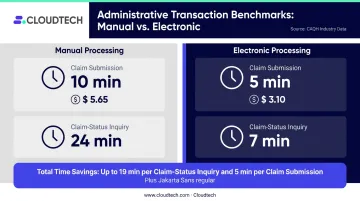
The CAQH benchmark data is concrete: manual claim submission takes 10 minutes at $5.65 per transaction. Electronic submission takes 5 minutes at $3.10. Claim-status inquiries drop from 24 minutes to 7 minutes. Across thousands of monthly transactions, that math compounds fast.
Prior Authorization Processing
Prior authorization is the most time-intensive documentation workflow that most practices run. Document intelligence extracts clinical justification details, treatment requests, and supporting documentation from incoming authorization packets, then routes them to the correct approval queue automatically.
The 2024 CAQH Index found that electronic prior authorization processing saves 14 minutes per authorization compared to manual handling, with an estimated $515 million in potential annual industry savings from full adoption of electronic standards.
Patient Intake and Registration
Intake forms submitted via portal, email, or paper scan get processed automatically. Key fields captured include:
- Demographics extracted and matched to existing records
- Insurance details captured and verified
- Consent data recorded with timestamp
- Patient record updated before the appointment begins
Front-desk staff spend less time on manual entry and more time on patient-facing work. Error rates in the patient master drop. For practices running high daily appointment volumes, this compounds quickly.
Referral Intake and Scheduling
Incoming referral documents contain the diagnosis details, requested services, and physician instructions that scheduling teams need immediately. Without automation, someone reads the fax, types the relevant fields into the scheduling system, and routes the referral — a process that can take 15–30 minutes.
Automation extracts those fields and delivers structured data to scheduling systems directly. For specialty practices handling large referral volumes, cutting that manual step can mean same-day booking instead of next-day callbacks.
Medical Records Digitization and Compliance Workflows
Document intelligence handles large-scale digitization of archived records — sorting, indexing, classifying — and maintains traceable processing logs for every document going forward. When an audit request arrives, the system surfaces relevant records and processing histories on demand rather than requiring staff to reconstruct a paper trail.
Compliance, Security, and HIPAA Considerations
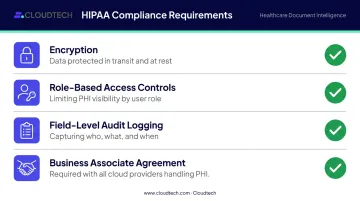
Any system that touches Protected Health Information (PHI) must meet specific HIPAA requirements. These aren't optional configurations — they're baseline requirements:
- Encryption in transit and at rest for all documents containing PHI
- Role-based access controls limiting who can view, edit, or export patient data
- Field-level audit logging — every extraction, validation, review, and correction logged with who, what, and when
- Business Associate Agreement (BAA) with any cloud provider processing PHI on your behalf
Managed Services vs. Greater Control
For healthcare organizations building on AWS, HIPAA-eligible services — including Amazon Textract, Amazon Comprehend Medical, and AWS HealthLake — can operate within a HIPAA-compliant architecture when a BAA is in place.
AWS eligibility means the service can be included in a HIPAA-compliant workload. It's not a blanket compliance certification for the workload itself — the architecture, configuration, and access controls still require careful implementation.
Most SMB healthcare organizations land on a hybrid approach:
- Managed cloud services (Amazon Textract, Comprehend Medical) reduce time-to-value but require careful evaluation of BAA terms and where PHI travels during processing
- VPC-deployed configurations offer greater data isolation for organizations with stricter residency requirements, at higher implementation cost
- Key question: Does PHI persist in any vendor system after processing completes? Confirm this in writing before any PHI flows through a new pipeline
Compliance Is Ongoing
Document formats change. Payer templates update. Regulatory requirements evolve. A document intelligence deployment isn't compliant on day one and then permanently compliant — it requires:
- Continuous model accuracy monitoring
- Retraining when extraction performance drifts
- Regular access control audits
- Updated processing documentation as document templates change
Plan for this operationally and budget for it — teams that build ongoing monitoring into their model from the start consistently outperform those that don't.
How to Implement Healthcare Document Intelligence
Start With a Document Inventory
Before evaluating any platform, map what your organization actually processes. For each document type, capture:
- Source format (fax, portal upload, email, paper scan)
- Layout consistency (fixed template vs. variable)
- Handwriting frequency
- Key fields to extract
- Acceptable error rate per field
Organizations that skip this step build for the documents they tested on, not the documents they receive in production. This inventory also determines whether off-the-shelf models are sufficient or whether custom training on your specific document mix is necessary.
Choose a Contained Pilot Use Case
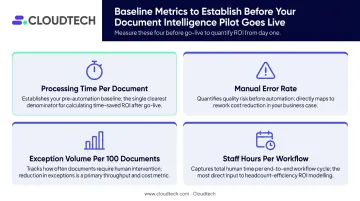
Patient intake automation or referral processing are ideal first deployments — high volume, well-defined, measurable. Before go-live, establish baselines:
- Processing time per document
- Manual error rate
- Exception volume per 100 documents
- Staff hours per workflow
Those baselines are what let you demonstrate concrete improvement within the first 60–90 days — and build the internal case for expanding the program.
For healthcare SMBs looking to move quickly, AWS-certified partners like Cloudtech deploy document intelligence pipelines on HIPAA-compliant AWS infrastructure. A well-scoped single workflow — patient intake, for example — can reach production readiness in weeks rather than months.
Plan for Ongoing Operations
Document intelligence systems require investment after launch:
- Feed reviewer corrections back into model retraining
- Monitor exception queue volume weekly
- Track accuracy by document type to catch drift before it compounds
- Audit access controls on a quarterly schedule
The organizations that see the strongest long-term results treat post-launch operations as a core part of the program, not an afterthought.
Frequently Asked Questions
What is healthcare document intelligence?
Healthcare document intelligence uses AI — including OCR, machine learning, and NLP — to automatically capture, classify, extract, and validate data from medical documents. It replaces manual data entry across workflows like billing, patient intake, and records management.
How is document intelligence different from standard OCR in healthcare?
OCR converts images of text into machine-readable characters. Document intelligence goes further — understanding document structure and clinical context, identifying specific fields like diagnosis codes or policy numbers, and validating extracted data against business rules before routing it downstream.
Is healthcare document intelligence HIPAA compliant?
Compliance depends on architecture and configuration. A properly deployed system needs encryption in transit and at rest, role-based access controls, field-level audit logging, and a signed BAA with the cloud provider. Service eligibility alone does not establish compliance.
What types of healthcare documents can be processed automatically?
Patient intake forms, referral documents, prior authorization requests, insurance claims and EOBs, lab reports, discharge summaries, clinical notes, and mixed fax packets containing multiple document types in a single file.
How long does it take to implement a healthcare document intelligence system?
A single well-defined workflow like patient intake can reach production readiness in 8–12 weeks with focused implementation effort. Multi-document-type deployments with full EHR integration typically take 3–6 months. Working with an experienced AWS implementation partner can compress this timeline considerably.
What ROI can smaller healthcare organizations expect?
The clearest gains come from labor efficiency, reduced claim denial rates, and faster revenue cycle turnaround. Per the 2024 CAQH Index, claim submission processing time drops from 10 minutes to 5 minutes per transaction, with similar reductions across eligibility checks and prior authorizations.