Introduction
Only 20% of decision-makers who should be using business intelligence tools actually do so directly — the remaining 80% depend on a small group of analysts to source data, build metrics, and deliver insights, according to Forrester's 2024 research. That access gap creates a compounding problem: by the time insights reach the people who need them, the decisions have already been made.
Generative AI is closing this gap. Instead of routing every data question through a small analyst team, it gives every business user the ability to ask questions of their data directly — in plain language — and get answers in seconds.
This guide covers what you need to know to evaluate and act on generative AI for analytics:
- What generative AI for business analytics actually is
- The highest-impact use cases for SMBs
- A practical implementation roadmap
- Risks you need to manage before you deploy
- How to choose the right tools for your team's size and budget
Key Takeaways
- GenAI moves analytics from static, backward-looking reports to real-time conversational insights any team member can access
- The highest-ROI use cases: natural language querying, automated reporting, anomaly detection, and AI agents for multi-step analysis
- Staged implementation — starting with data readiness and a focused pilot — reduces risk before you scale
- Hallucination, privacy, and cost risks are manageable with the right guardrails built in from the start
- SMBs can access enterprise-grade analytics through AWS-native tools without building a large internal data team
What Is Generative AI for Business Analytics?
Generative AI refers to AI systems that produce new outputs — text, code, summaries, visualizations — by learning patterns from large datasets. This distinguishes it from traditional predictive analytics, which classifies or forecasts within a predefined scope.
Unlike conventional BI tools, GenAI doesn't just answer the question you asked. It can generate narratives, surface patterns you didn't know to look for, explain why something happened, and recommend what to do next.
In business analytics, this creates a new layer on top of the familiar descriptive/predictive/prescriptive spectrum: augmented analytics. Gartner's 2024 coverage of this category describes it as enabling natural-language queries, automated workflows, and broader access to advanced analytics — capabilities that once required SQL expertise or a dedicated analyst to access.
Generative AI vs. Traditional Business Analytics
The core architectural difference isn't just the interface — it's the direction of interaction.
| Dimension | Traditional BI | Generative AI Analytics |
|---|---|---|
| Who initiates insight | User must log in and look | AI surfaces anomalies proactively |
| Query method | SQL or structured filters | Plain-language questions |
| Output format | Static charts and tables | Narrative explanations + visuals |
| Skill requirement | Analyst-dependent | Accessible to any business user |
| Insight timing | Retrospective | Real-time and forward-looking |
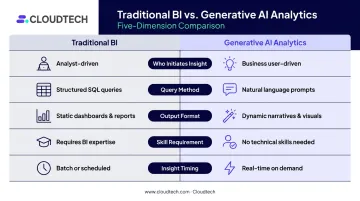
Traditional BI requires users to know what question to ask, structure it correctly, and interpret the output themselves. For SMBs without a dedicated analyst team, that's a real barrier. GenAI analytics inverts this dynamic — the system flags what matters before you think to look.
Key Use Cases of Generative AI in Business Analytics
Generative AI creates value across the entire analytics lifecycle — from data integration and querying through to visualization, reporting, and automation. The use cases below represent the highest-impact entry points for most organizations.
Natural Language Querying and Conversational Analytics
Business users can now type plain-English questions — "Why did our margins compress last quarter?" — and receive narrative answers grounded in live data, without writing a single line of SQL.
The critical enabler here is a semantic layer: a standardized set of metric definitions that ensures "revenue" means the same thing whether the CFO or the sales director asks the question. Without it, different users get different answers to the same query — which erodes trust in the system quickly.
Amazon Q in QuickSight supports this pattern directly, offering natural-language questions, AI-generated narratives, period comparisons, and driver analysis that traces why a metric changed. AWS reported that its own analytics sales team reduced monthly business review preparation from 2-3 hours to 5 minutes using QuickSight Q — a vendor-reported result, but a directionally significant one.
AI-Generated Reports, Dashboards, and Visualizations
Modern GenAI tools let users generate formatted charts and dashboard layouts through conversational prompts. A prompt like "show me monthly sales trends with year-over-year comparison" produces a structured visualization in seconds — no manual configuration required.
Users who previously waited days for an analyst to build a report can now iterate independently, in real time. Self-service analytics stops being a goal and starts being the default.
Automated Anomaly Detection and Proactive Insights
Traditional analytics is reactive — someone logs into a dashboard, notices something looks off, and investigates. Embedded GenAI flips that model by monitoring connected data streams continuously and delivering alerts when metrics deviate from expected patterns.
The practical difference:
- Reactive: margin problem surfaces during Friday board prep
- Proactive: alert lands in your inbox Tuesday morning with context already attached
Workflow Automation and AI-Assisted Reporting
GenAI embedded in workflow tools takes over the manual data-gathering cycle that eats analyst time each week. In practice, that means:
- Auto-generating weekly performance summaries
- Distributing insights directly through Slack or email
- Ensuring consistent reporting formats across teams without manual effort
AI Agents for Complex Multi-Step Analysis
AI agents go beyond single-query automation. Rather than answering one question at a time, they reason through multi-step analytical tasks — identifying the right data sources, running analysis, and surfacing preliminary findings with minimal human prompting.
Frameworks like AWS Bedrock Agents, LangChain, and Microsoft's AutoGen enable this pattern. Cloudtech's implementations use Bedrock Agents as the orchestration layer — in one healthcare SaaS deployment, agents connected to indexed S3 content and Redshift datasets, resolving complex queries in seconds and reducing support tickets by 45% within two months.
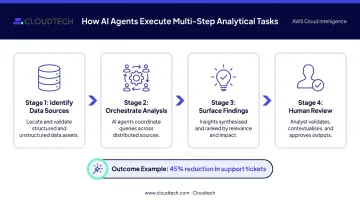
Agents work best with clearly defined scope. For high-stakes decisions, human-in-the-loop review remains essential.
Industry-Specific Applications
- Healthcare: GenAI converts clinical interactions into structured notes and summaries, reducing administrative burden. McKinsey has modeled GPT-4 handling this workflow in production contexts.
- Financial services: Research synthesis, report generation, and risk document analysis — McKinsey's 2023 banking analysis identifies these as primary GenAI value drivers.
- Manufacturing: GenAI applied to maintenance records and technical knowledge bases supports diagnosis and maintenance planning, per McKinsey's 2025 analysis.
- Retail/logistics: Demand signal interpretation and inventory planning through AI-assisted analysis, though most production results to date use predictive ML rather than pure GenAI.
Business Benefits: What Generative AI Delivers
McKinsey's 2023 analysis estimated GenAI could add $2.6T–$4.4T annually in global economic value, with labor productivity growth of 0.1–0.6 percentage points per year through 2040. These are economy-wide figures — but they signal where the competitive pressure is heading.
The more practical question for any business leader: what does GenAI change day-to-day inside an organization? The answer spans four operational areas:
- Decision-making speed: The time from question to answer compresses from days to seconds. Finance, operations, sales, and marketing teams access data independently — no analyst queue required.
- Reduced manual work: Report generation, data documentation, and query execution get automated, freeing analysts for judgment-heavy work rather than routine execution.
- Stronger data governance: GenAI automates metadata generation, data lineage tracking, and business rule documentation — tasks that are typically manual and inconsistent. When teams can reference AI-generated docs to understand how a metric is calculated, data trust improves organization-wide.
- SMB access to enterprise analytics: The old model required a dedicated analytics team and expensive BI licenses. Cloud-native GenAI analytics — particularly on AWS — gives SMBs enterprise-grade capability at a fraction of that cost, with consumption-based pricing that scales with usage.
How to Implement Generative AI for Business Analytics: A Practical Roadmap
Organizations that skip to production without a structured pilot frequently encounter governance failures and poor adoption. Implementation is iterative — plan for that from the start.
Step 1: Assess Data Readiness
GenAI is only as reliable as the data it works with. Gartner reported in 2025 that 63% of organizations either lacked or were unsure they had the right data-management practices for AI — and predicts that through 2026, organizations will abandon 60% of AI projects unsupported by AI-ready data.
Before selecting tools, audit:
- Where your data lives and who owns it
- How consistently it's structured across systems
- Whether definitions are standardized (or whether "customer" means different things in CRM vs. finance)
- What gaps exist in completeness and recency
Poor data doesn't just limit GenAI — it causes it to produce confidently wrong answers.
Step 2: Select a High-Impact, Low-Risk Pilot Use Case
A strong first pilot has four characteristics:
- The process is clearly defined with measurable success criteria
- The required data is already clean and available
- Failure carries minimal operational risk
- KPIs are defined before any technical work begins
Good starting points: internal data chatbots, automated weekly reporting, or NLQ-powered dashboards. Avoid starting with use cases that directly inform high-stakes financial or clinical decisions.
Step 3: Choose the Right AWS-Powered GenAI Infrastructure
The core AWS GenAI analytics stack covers three distinct roles:
| Service | Primary Role | Best Fit |
|---|---|---|
| Amazon Q in QuickSight | NLQ and governed BI | Business users querying dashboards conversationally |
| Amazon Bedrock | Managed foundation model access | RAG architectures, agents, custom GenAI workflows |
| Amazon SageMaker | Custom model training and fine-tuning | Domain-specific models requiring deep customization |
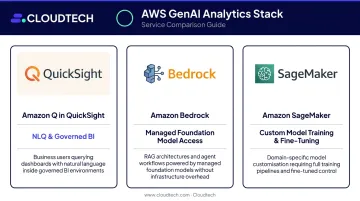
These services integrate natively with each other and with existing AWS data infrastructure — reducing the complexity of stitching together a multi-vendor stack.
For SMBs without in-house AWS expertise, Cloudtech (an AWS Advanced Tier Partner) offers pre-packaged accelerators that remove the barrier to entry. Their engagements include a fixed-fee GenAI POC (4–8 weeks), an AI Insights with Amazon Q framework, and RAG architecture builds. A 4-week Data Modernization Assessment is also available to confirm the data foundation is GenAI-ready before any model goes into production.
Step 4: Establish Governance Before Scaling
Governance must be in place before expanding beyond a pilot:
- Data access policies defining which sources feed GenAI systems
- Role-based access controls limiting what each user can query
- Audit trails for AI-generated outputs
- Human-in-the-loop requirements for high-stakes decisions
Organizations that deploy first and govern later typically face expensive remediation cycles — and in regulated industries like healthcare or financial services, compliance exposure on top of that.
Step 5: Measure, Iterate, and Scale
Run a structured 90-day review before scaling. Track metrics that correspond to your use case:
- NLQ: query accuracy rate and adoption rate across user groups
- Automated reporting: time saved per analyst per week
- Anomaly detection: alert precision rate and false positive frequency
Gather user feedback, document failure modes, and make a structured go/no-go decision on scaling. The goal isn't to prove the pilot worked — it's to understand how it worked and where it didn't.
Risks, Challenges, and How to Mitigate Them
GenAI carries distinct risks that traditional software doesn't — LLMs generate outputs probabilistically, not deterministically. Wrong answers don't come with error messages.
Hallucination and accuracy risks: LLMs can produce confident, plausible, but factually wrong answers — a dangerous failure mode when wrong numbers drive real decisions. The primary mitigation is Retrieval-Augmented Generation (RAG), which grounds AI responses in verified internal data rather than letting the model generate estimates freely. AWS confirms that grounding responses in external data reduces hallucinations and increases relevance.
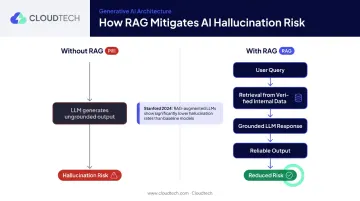
Semantic layer standardization adds a complementary control. That said, RAG reduces hallucination risk significantly but doesn't eliminate it: Stanford's 2024 research found hallucinations occurring in at least 1 in 6 queries even in well-designed professional RAG systems.
Data privacy and security: Without proper controls, sensitive data can enter training datasets or be exposed through AI interactions. Key mitigations include:
- Restricting which data sources feed GenAI systems
- Disabling training on user inputs where possible
- Enforcing role-based access controls
- Aligning cloud platform compliance certifications with your industry requirements (critical for HIPAA-covered healthcare and regulated financial services)
Cost overruns and model drift: LLM inference costs escalate quickly at scale, making usage monitoring and access limits during development essential. Smaller, domain-specific models often outperform large general-purpose LLMs at lower cost for targeted business tasks.
Models also degrade as inputs diverge from training data. AWS SageMaker Model Monitor addresses this directly, detecting data and model-quality drift and triggering alerts when violations occur.
Choosing the Right Generative AI Tools for Your Business Analytics Stack
Tool selection comes down to fit: your data environment, your users, and your governance requirements — not abstract feature comparisons.
AWS-Native Tools for GenAI Analytics
For SMBs building on AWS, the native stack is the most practical starting point:
- Amazon Q in QuickSight: NLQ for business dashboards, AI-generated narratives, period comparisons, and executive summaries. AWS was named a Challenger in the 2024 Gartner Magic Quadrant for Analytics and Business Intelligence Platforms.
- Amazon Bedrock: Fully managed access to foundation models including Anthropic Claude, Amazon Titan, and others — the building block for RAG architectures and custom GenAI workflows.
- Amazon SageMaker: Custom ML training, fine-tuning, and drift monitoring for organizations requiring deeper model control. AWS earned first-time Leader status in the 2024 Gartner Magic Quadrant for Data Science and Machine Learning Platforms.
Key Evaluation Criteria for Any Platform
When assessing any GenAI analytics tool, apply these four questions:
- Does it query live data or pull from cached snapshots? Live data access is non-negotiable for business-critical analytics.
- Is there a mechanism to standardize metric definitions? Without it, users get different answers to the same question.
- Can non-technical users get answers independently? If every query still routes through an analyst, you've changed the interface — not the access problem.
- What governance, auditability, and compliance controls exist? This is especially critical for regulated industries like healthcare and financial services.
Cloudtech's AWS consulting team can help SMBs navigate this evaluation and configure the right architecture for their specific data environment and industry requirements.
Frequently Asked Questions
What is generative AI for business analytics?
Generative AI for business analytics refers to AI systems that generate new outputs — natural language insights, reports, visualizations, and narrative explanations — from business data. Unlike static dashboards, these systems allow non-technical users to interact with data conversationally, ask follow-up questions, and receive answers without analyst intermediaries.
How is generative AI different from traditional business analytics tools?
Traditional BI is passive: users must know what to ask, structure it correctly, and interpret static outputs. GenAI analytics is proactive and conversational — it surfaces anomalies, generates narrative explanations, and enables self-service access for any business user. The distinction is architectural: GenAI replaces the query-and-dashboard model with a continuous, conversational data layer.
What are the most valuable generative AI use cases for small and mid-sized businesses?
The highest-ROI entry points for SMBs are automated reporting, natural language querying of business data, internal data chatbots, and anomaly detection. These deliver time savings with lower implementation complexity than enterprise-scale deployments, making them practical first pilots.
What are the biggest risks of using generative AI for business analytics?
The three primary risks are AI hallucinations producing wrong numbers (mitigated by RAG and semantic layers), data privacy exposure without proper governance controls, and cost escalation if inference usage isn't monitored. Each has established mitigation strategies that must be built in from the start.
What data readiness is required before adopting generative AI analytics?
GenAI requires clean, consistently structured, and well-governed data to deliver reliable outputs — gaps in data quality directly increase hallucination risk. A data readiness assessment should precede any tool selection or pilot launch.
How long does it take to implement generative AI for business analytics?
A focused pilot using pre-built cloud services like AWS Bedrock or Amazon Q in QuickSight can go live in weeks. Enterprise-wide scaling with custom models and deep integrations typically takes several months. Working with an AWS-certified partner like Cloudtech — which delivers pre-packaged GenAI solutions built on Bedrock — can reduce pilot timelines to as little as two to four weeks.