The good news: AWS prescribes a proven three-phase methodology — Assess, Mobilize, and Migrate & Modernize — built from patterns observed across thousands of customer migrations. Each phase produces specific outputs that the next phase depends on. Skip one, and you pay for it later.
This guide breaks down what each phase actually involves: what gets done, what tools are used, and where teams most often go wrong.
Key Takeaways
- AWS cloud migration follows three sequential phases: Assess (evaluate readiness), Mobilize (build the foundation), and Migrate & Modernize (execute and optimize)
- Skipping or rushing Assess and Mobilize is consistently where migrations run over budget or stall
- The 7Rs framework maps each workload to the right migration strategy: selected during Mobilize, applied in Phase 3
- Cost, security, and performance optimization after go-live demand the same rigor as the migration itself
- SMBs can access MAP funding through AWS Advanced Tier Partners to offset migration costs
What Is AWS Cloud Migration?
AWS cloud migration is the process of moving an organization's digital assets — servers, databases, applications, and data — from on-premises infrastructure or another cloud environment to Amazon Web Services.
Migration goes well beyond provisioning AWS accounts. It's a planned transition that moves through discovery, strategy, execution, and validation — and how you run that process determines whether you end up with a leaner, more resilient operation or just a more expensive version of what you had on-premises.
Why AWS Migration Requires a Structured Approach
Most migrations that fail don't fail during execution — they fail in the planning gap before execution begins.
The complexity is real:
- Applications have undocumented dependencies that break when moved in isolation
- Data must remain intact, secure, and compliant throughout transfer
- Business operations can't stop during cutover
- Compliance obligations (HIPAA, SOC 2, PCI-DSS) apply before, during, and after migration
Unstructured migrations produce predictable problems:
- Over-provisioned resources that inflate monthly bills
- Architectural shortcuts that create technical debt
- Downtime during cutover
- Post-migration cloud costs that exceed what the on-premises environment cost
Gartner's 2025 guidance identifies four cost traps in cloud migrations: unrealistic ROI expectations, inexperienced resources, inefficient cloud purchasing, and failure to optimize operations for the cloud model. All four are preventable with proper phase discipline.
For SMBs without dedicated cloud teams, working with an AWS Advanced Tier Partner significantly reduces exposure to these traps. Cloudtech, for example, holds AWS Advanced Tier Partner status and is one of only 26 global partners selected for AWS's Small Business Acceleration Initiative — direct recognition of their proven SMB migration capability.
The 3 Phases of AWS Cloud Migration
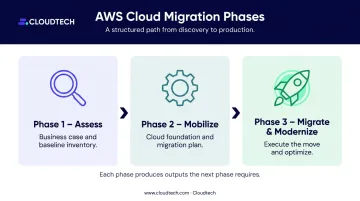
AWS structures migration as three sequential phases. Each phase produces outputs the next phase requires:
- Assess → builds the business case and baseline inventory
- Mobilize → establishes the cloud foundation and migration plan
- Migrate & Modernize → executes the move and optimizes post-migration
The most common mistake: organizations treat Assess and Mobilize as overhead and jump straight to migration. This shortcut is why migrations stall, overspend, or break production systems.
Phase 1: Assess — Evaluate Your Cloud Readiness
What This Phase Accomplishes
The Assess phase builds a complete, accurate picture of your current environment: what exists, what it costs, how workloads connect to each other, and whether they're cloud-ready as-is or need changes before moving.
Without this baseline, every subsequent decision — which workloads to move first, which migration strategy to use, how much the migration will cost — is a guess.
Key Activities
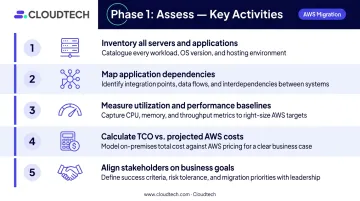
- Inventory all on-premises servers, applications, and data stores — including systems that IT teams have forgotten or don't actively manage
- Map application dependencies — identify APIs, shared databases, scheduled jobs, and third-party connectors between systems
- Measure utilization and performance baselines — understand actual resource usage, not just provisioned capacity
- Calculate TCO vs. projected AWS costs — establish a data-driven financial case for migration
- Align stakeholders on business goals — confirm what success looks like before any work begins
AWS Tools Used During Assess
| Tool | What It Produces |
|---|---|
| AWS Migration Evaluator | On-premises utilization baseline, projected AWS costs, directional business case and TCO comparison |
| AWS Application Discovery Service | Configuration, usage, and behavior data from on-premises servers for dependency analysis (note: no longer open to new customers; AWS directs new users to AWS Transform) |
| Cloud Adoption Readiness Tool (CART) | Self-assessment across six perspectives (business, people, process, platform, operations, security) with a readiness report and recommended actions |
What a Completed Assess Phase Produces
- A documented business case for migration
- A prioritized application portfolio with dependency maps
- An initial understanding of migration complexity and cost
- Stakeholder alignment on business objectives
With these outputs in hand, the team has what it needs to enter Mobilize with a clear plan rather than open questions.
What Cloudtech consistently finds during assessments: SMBs rarely go in with a clean picture, and the gaps matter. Common discoveries include:
- Undocumented API dependencies between systems that appear self-contained
- SQL Server and Oracle licenses that become non-compliant in cloud environments
- IAM configurations that expose compliance gaps
- True migration costs that far exceed initial estimates
Catching these during assessment — not mid-migration — is the difference between a controlled project and an emergency.
Phase 2: Mobilize — Build the Foundation Before You Move
What This Phase Accomplishes
Mobilize closes the gaps identified in Assess, builds the technical and organizational infrastructure needed to support migration, and validates the approach through small-scale pilots before committing to full execution.
The term "foundation" is often misunderstood as just network setup. In operational terms, it covers five distinct areas:
- Technical: AWS Landing Zone, multi-account architecture, network topology
- Security: IAM configuration, encryption, compliance guardrails (HIPAA, SOC 2, etc.)
- Governance: Account structure, tagging policies, cost controls
- Process: Runbooks, operating procedures, cutover plans
- People: Team roles, training, stakeholder communication frameworks
All five must be in place before scaling migration in Phase 3.
Key Activities
These activities build the infrastructure, governance, and team readiness that Phase 3 depends on:
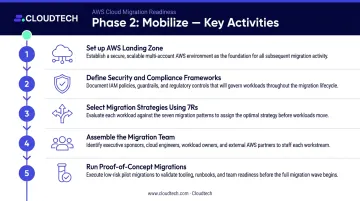
- Set up an AWS Landing Zone — the secure, multi-account AWS environment using AWS Control Tower; establishes identity management, governance controls, networking, and logging
- Define security and compliance frameworks — configure IAM roles, KMS encryption, AWS Config rules, VPC flow logs, and WAF protections before any workload moves
- Select migration strategies using the 7Rs framework — assign a migration approach (Rehost, Replatform, Refactor, etc.) to each workload based on complexity and business value
- Assemble the migration team — define roles, responsibilities, and escalation paths
- Run proof-of-concept migrations — validate the approach on representative workloads before committing to full waves
The Role of AWS MAP
The AWS Migration Acceleration Program (MAP) supports organizations through Mobilize with tooling, methodology, partner expertise, and in some cases financial investment. AWS confirmed in 2024 that SMBs can use MAP, with program type varying based on workload count and migration complexity. Partners like Cloudtech actively pursue MAP funding on qualifying engagements — which can substantially reduce or eliminate out-of-pocket migration costs for SMBs.
What Completion Looks Like
- A validated, operational Landing Zone
- A wave plan: prioritized batches of workloads to migrate
- Documented runbooks and standard operating procedures
- Trained team ready to execute at scale
Organizations that compress Mobilize to save time almost always spend more time — and more money — untangling problems in Phase 3. The phase isn't overhead; it's the structure that makes execution possible.
Phase 3: Migrate and Modernize — Execute, Monitor, and Optimize
Migration Execution
Phase 3 runs in two stages. First, the migration factory is initialized — the platform is finalized and repeatable migration procedures are automated using the runbooks built in Phase 2. Then, workloads migrate in sequential batches called waves.
Each wave follows the same pattern:
- Run pilot migration for the wave's workloads
- Execute cutover
- Validate performance and functionality in AWS
- Monitor for issues
- Decommission legacy infrastructure only after validation
Wave sequencing decisions are made during Mobilize — typically ordered by risk level, dependencies, and business impact. Low-risk, independent workloads move first to build team confidence before tackling complex, interdependent systems.
AWS Tools Used During Phase 3
| Tool | Role |
|---|---|
| AWS Transform MGN | Automated rehosting — replicates source servers and converts them for launch in AWS |
| AWS Database Migration Service (DMS) | Migrates relational, warehouse, NoSQL, and other data stores with ongoing replication support |
| Amazon CloudWatch | Real-time metrics, logs, dashboards, and alarms during migration and post-cutover |
| AWS Managed Services | Operational support for monitoring, incident management, patching, and backup |
| AWS Cost Explorer | Tracks cost and usage trends post-migration |
| AWS Trusted Advisor | Inspects the environment and flags improvements across cost, security, performance, and reliability |
Note: AWS Migration Hub is no longer open to new customers as of November 7, 2025. AWS now directs teams to AWS Transform for discovery and tracking.
The Modernize Component
Migration and modernization are not the same thing. A lift-and-shift of a monolithic application moves that monolith to AWS — it runs exactly as it did on-premises, with no cloud-native benefit.
Modernization is what happens after migration. It means applying capabilities that weren't viable on-premises:
- Serverless functions to eliminate idle compute costs
- Containerization for portable, scalable application deployment
- Managed databases to offload patching and maintenance
- Auto-scaling to match capacity to actual demand
This work is separate from migration, happens iteratively, and requires dedicated budget and planning — it should not be treated as an automatic byproduct of moving to AWS.
McKinsey's 2022 research across more than 700 digital use cases found that lift-and-shift alone can reduce technology risk but delivers only marginal economic returns. The value concentrates in business innovation — new products, faster delivery cycles, and cost structures that weren't possible on-premises — and that requires modernization, not just migration.
Post-Migration Optimization
Post-cutover optimization should be structured, not ad hoc:
- Apply the AWS Well-Architected Framework (six pillars: Operational Excellence, Security, Reliability, Performance Efficiency, Cost Optimization, and Sustainability) across migrated workloads
- Use AWS Cost Explorer and Trusted Advisor to identify idle resources, over-provisioned instances, and cost reduction opportunities
- Establish ongoing governance: tagging policies, budget alerts, and regular architecture reviews to prevent cost drift
The 7Rs Framework: Choosing the Right Strategy for Each Workload
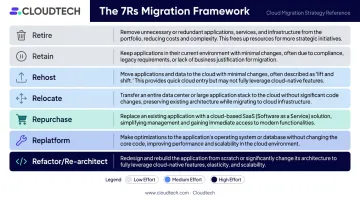
Not every application migrates the same way. The 7Rs framework gives teams a structured method for assigning the right approach to each workload based on complexity, business value, and cloud compatibility.
The Seven Strategies
| Strategy | Definition |
|---|---|
| Retire | Decommission workloads no longer needed |
| Retain | Keep in source environment — not ready or justified for migration |
| Rehost | Lift-and-shift to AWS with no application changes |
| Relocate | Move servers or platforms without rewriting or re-architecting |
| Repurchase | Replace with another product or SaaS offering |
| Replatform | Migrate with limited cloud optimizations, core architecture unchanged |
| Refactor/Re-architect | Modify architecture and code to use cloud-native capabilities |
When Each Strategy Applies (SMB Context)
Three strategies do most of the work in SMB migrations:
- Rehost — Use when speed is the priority. An SMB migrating before a data center lease expires can lift-and-shift workloads with AWS Application Migration Service and optimize later.
- Replatform — Use when a workload runs fine on-premises but would benefit from managed services. Moving a self-managed MySQL database to Amazon RDS cuts maintenance overhead without touching application code.
- Refactor — Use when a legacy application's architecture is actively limiting the business. A monolithic e-commerce platform that fails under traffic spikes is a strong candidate for re-architecture into microservices or serverless functions.
7R decisions are made during Mobilize, but they govern every workload in Phase 3. Teams that skip this step default to rehosting everything — a fast path to the cloud that often locks in the same inefficiencies that made on-premises costly in the first place. A 30-minute classification conversation per workload during planning can prevent months of rework after go-live.
Common AWS Migration Mistakes
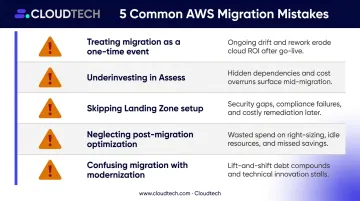
Five mistakes account for most AWS migration failures. Recognizing them before you start is far cheaper than fixing them mid-flight:
- Treating migration as a one-time event — rushing cutover, skipping pilots
- Underinvesting in Assess — incomplete dependency mapping
- Skipping Landing Zone setup — leaving security and governance gaps
- Neglecting post-migration optimization — over-provisioned resources, inflated bills
- Confusing migration with modernization — a location change isn't a transformation
Treating Migration as a One-Time Event
Many SMBs expect to flip a switch and be done. Migration is a phased program. Wave-based planning exists precisely because moving everything at once creates unmanageable risk. Rushing cutover without proper testing — or skipping pilot migrations — is how production systems break.
Underinvesting in Assess
Poor dependency mapping during Assess leads directly to broken applications post-migration. A common example: a workload appears self-contained but relies on an on-premises directory service for authentication. Move the application without accounting for that dependency and users get locked out.
Skipping Landing Zone Setup
A Landing Zone isn't optional infrastructure. It's the baseline for account architecture, IAM, governance, data security, networking, and logging. Organizations that skip it create security and compliance gaps that are expensive to retrofit — particularly in regulated industries like healthcare and financial services.
Neglecting Post-Migration Optimization
The migration finished, but the bill is higher than expected. This is the most common post-migration complaint, and it's almost always caused by over-provisioned resources — compute instances selected "just in case" that run at 20% utilization. Right-sizing, Reserved Instances, and storage tiering need to be planned as part of cutover, not treated as an afterthought.
Confusing Migration with Modernization
A migrated application is not a modernized application. Running a legacy monolith on EC2 is not cloud transformation — it's a location change. Modernization requires separate planning, separate investment, and a clear architectural target.
Conclusion
AWS cloud migration follows a clear sequence: Assess builds the business case and baseline, Mobilize establishes the foundation and migration plan, and Migrate & Modernize executes the move and optimizes for cloud performance.
The organizations that succeed aren't the ones that move fastest — they're the ones that invest appropriately in each phase before moving to the next.
For SMBs without an in-house cloud team, that investment is most efficiently made with an AWS-certified partner. Cloudtech is an AWS Advanced Tier Partner with a team built primarily of former AWS engineers — purpose-built to deliver end-to-end migration execution at a price point SMBs can actually work with.
That covers the full migration lifecycle:
- MAP funding capture to offset project costs
- Landing zone deployment and account structure setup
- Wave-based migration execution with minimal business disruption
- Post-migration optimization across the AWS Well-Architected framework
Frequently Asked Questions
How long does each phase of AWS cloud migration typically take?
AWS prescriptive guidance suggests Assess runs roughly through the first five weeks, Mobilize from weeks 6–14, and Migrate & Modernize from week 15 onward for a structured program. Actual timelines depend on environment complexity, workload volume, and team readiness — simpler SMB migrations can complete in six to twelve weeks total.
What is the 7Rs framework and how is it used in AWS migration?
The 7Rs is a decision framework used during Mobilize to assign the right migration strategy — Retire, Retain, Rehost, Relocate, Replatform, Repurchase, or Refactor — to each workload. Those assignments drive how every application is handled in Phase 3.
What AWS tools are used during the migration process?
Key tools by phase:
- Assess: Migration Evaluator, CART
- Mobilize: AWS Control Tower, Landing Zone Accelerator
- Migrate & Modernize: AWS Transform MGN, Database Migration Service, CloudWatch, Trusted Advisor
Application Discovery Service and Migration Hub are no longer open to new customers; AWS now routes teams to AWS Transform instead.
Can small and mid-sized businesses realistically migrate to AWS?
Yes — AWS's SMB migration resources and MAP program are built for exactly this. Pre-packaged migration frameworks and MAP funding (available through AWS Advanced Tier Partners) reduce both the cost and complexity of migration for SMBs.
What happens after the migration is complete?
Post-migration work centers on cost right-sizing, security hardening, and performance monitoring against the AWS Well-Architected Framework's six pillars. From there, teams incrementally modernize using cloud-native services like Lambda, managed databases, and containerization.
How do I know if my organization is ready to move from Assess to Mobilize?
The signal is a documented business case, a completed application inventory with dependency maps, stakeholder alignment on migration goals, and a clear understanding of workload complexity and projected AWS costs. If any of these outputs are missing, Assess isn't finished.