Introduction
Internal communications teams at growing businesses face a relentless cycle of repetitive work: answering the same HR questions daily, routing approval requests manually, and sending announcements that employees ignore. According to Coveo's 2022 Workplace Relevance Report, the average employee spends 3.6 hours per day searching for workplace information — and fails to find what they need 44% of the time. The core failure isn't the content itself — it's how employees access and receive it.
Conversational AI addresses this directly — yet most teams only use it for content drafting, like auto-generating announcements or summarizing meeting notes. That's a fraction of what the technology can do operationally.
This guide breaks down exactly how conversational AI works inside internal communications — from the moment an employee submits a question to the moment a response is delivered or a workflow is triggered. With concrete mechanics, not high-level theory.
Key Takeaways
- Conversational AI interprets natural language queries and responds automatically, handling routine requests without human involvement
- It handles the highest-volume internal tasks: HR Q&A, IT triage, onboarding sequences, and compliance reminders
- Each request moves through a defined pipeline — from intent recognition to knowledge retrieval to response delivery
- NLP-driven AI understands intent, not just keywords — handling language variation across every employee
- SMBs can deploy enterprise-grade communication automation on AWS infrastructure without enterprise costs
What Is Conversational AI in Internal Communications?
Conversational AI is a system that interprets natural language input, identifies what the employee is asking or requesting, and either delivers an accurate response or triggers a workflow — automatically, at scale, without requiring a human to intervene for routine exchanges.
This is distinctly different from a static FAQ page or intranet search bar. Those tools require employees to know where to look and how to phrase their query correctly. Conversational AI meets employees in the tools they already use — Slack, Microsoft Teams, a mobile app — and responds in plain language.
Three Types Worth Knowing
IBM distinguishes three distinct categories, each suited to different use cases:
| Type | How It Works | Best For | Main Limitation |
|---|---|---|---|
| Rule-based | Follows decision trees and pre-written scripts | Narrow, predictable FAQs | Breaks on unexpected phrasing |
| NLP-driven | Classifies intent, extracts entities, maps to workflows | HR requests, IT routing, form completion | Requires intent training and maintenance |
| LLM-powered | Generates dynamic answers using foundation models + organizational content | Cross-document questions, contextual answers | Requires grounding, access controls, and evaluation |
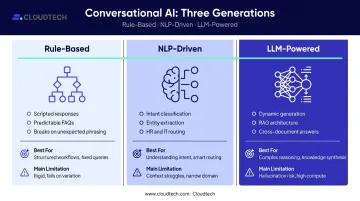
Which type fits your organization depends on query complexity and how much variability employees introduce when asking questions. Static repositories exist in almost every organization, yet employees still can't find information reliably — Coveo's research puts the failure rate at 44%. The right conversational system doesn't just store answers; it surfaces them in the moment they're needed.
How Does Conversational AI Automate Internal Communications?
Conversational AI works through a defined sequence of stages. Understanding each one helps organizations deploy it more effectively — and set accurate expectations for what can be handled automatically versus what still requires human involvement.
Initiation: How the System Gets Triggered
The process starts when an employee submits a query in natural language. This can happen through:
- A chat interface in Microsoft Teams or Slack
- An employee app or intranet search bar
- A voice prompt in a voice-enabled system
Initiation isn't always employee-driven. The system can also trigger proactively — sending a notification when a benefits enrollment window opens, when a new hire's start date arrives, or when a policy renewal deadline approaches.
One critical operational dependency at this stage: the system must be integrated with channels employees actually use, and it must handle unpredictable query spikes. Open enrollment, organizational change announcements, and policy updates can generate thousands of queries in a short window.
Organizations that deploy on scalable cloud infrastructure — such as AWS — handle these spikes without performance degradation, because compute scales with demand rather than being bound to fixed server capacity.
Core Operation: NLP Processing and Knowledge Retrieval
Once a query is received, the NLP engine breaks it into two components:
- Intent — what the employee wants to accomplish ("How many vacation days do I have left?" vs. "What is the vacation policy?" are different intents, even though both mention vacation)
- Entities — specific details embedded in the query, like a date, department name, or policy type
The system then matches the identified intent to a knowledge source — an HR policy database, employee handbook, IT ticketing system, or custom knowledge base — and retrieves the most relevant information. In LLM-powered systems using retrieval-augmented generation (RAG), the response is generated dynamically from retrieved content rather than pulled from a pre-written script.
AWS documents this pattern through Amazon Bedrock Knowledge Bases: the model retrieves relevant content from enterprise data sources, synthesizes a response, and can return citations to the original source — which matters for compliance-sensitive communications.
Response accuracy depends on three variables:
- Quality and structure of the connected knowledge base
- Precision of intent classification training
- The system's ability to handle ambiguous or compound queries
Regulation and Control: Context, Permissions, and Escalation
This stage is where most deployments either earn employee trust or lose it — and it's the one most organizations underestimate during planning.
Context tracking means follow-up questions are understood in sequence. If an employee asks about the vacation policy and then asks "What about for part-time employees?" — the system understands the second question as a follow-up, not a new topic.
Permission-based filtering ensures employees only see information they're authorized to access. Manager-level data stays separate from individual contributor views. Regional policy variations don't bleed into global defaults. For HR and compliance communications, this isn't optional.
Escalation logic handles the cases the system can't. When a query falls outside the system's confidence threshold or requires human judgment, the system routes it to the appropriate team — HR, IT, or communications — rather than generating a guess. From an employee's perspective, a clean handoff to the right person — with context already captured — is indistinguishable from good service. That's the bar escalation logic needs to clear.
For regulated industries like healthcare and financial services, this control layer requires role-based access control (RBAC), IAM least-privilege policies, and comprehensive audit trails — the same AWS security architecture Cloudtech applies across HIPAA and SOC2 compliance engagements.
Output and Downstream Integration
The final output isn't just a text response. Depending on the configuration, conversational AI can produce:
- A direct answer delivered in the employee's native interface
- A triggered workflow — submitting a time-off request, opening an IT ticket, routing an approval
- A proactive notification sent to the right employee segment at the right moment
These outputs integrate into downstream systems via APIs — logging interactions to HR platforms, updating employee records, triggering approval chains, and feeding engagement analytics dashboards. This creates a closed loop: communication events generate operational data, which feeds back into how future communications are targeted and timed.
IBM's AskHR deployment illustrates what this looks like at scale: 2.1 million employee conversations annually, 94% containment of common questions, and a 75% reduction in HR support tickets since 2016 — all achieved by connecting conversational AI to live HR data and letting the pipeline handle the operational layer.
What Internal Communication Tasks Can Conversational AI Automate?
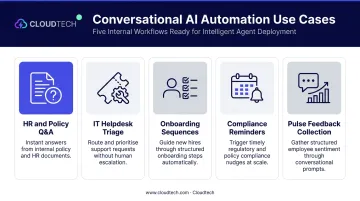
Conversational AI delivers the clearest ROI on high-frequency, predictable tasks — the ones that consume significant team time but follow repeatable patterns. Five task categories consistently show the strongest results:
- HR and policy Q&A: Answers questions about vacation balances, benefits deadlines, expense limits, and parental leave instantly and consistently — across every time zone and shift
- IT helpdesk triage: Resolves Tier 1 queries (password resets, access requests, device troubleshooting) autonomously and routes complex issues to the right technician, cutting ticket volume without escalating costs
- Onboarding sequences: Delivers role- and location-specific onboarding messages at the right stage of a new hire's journey, triggered by events rather than managed manually
- Compliance reminders: Monitors enrollment windows, training deadlines, and certification renewals, then sends targeted reminders to the right employee segments — reducing missed deadlines and the follow-up they generate
- Pulse feedback collection: Prompts employees for brief check-ins within normal workflow conversations and feeds responses directly into analytics dashboards, giving communications teams real-time sentiment data on demand
Where Conversational AI Fits in the Workplace
Where It Performs Best
Conversational AI for internal communications works best in specific organizational contexts:
- Distributed or hybrid workforces — where employees across time zones can't wait for business-hours responses
- High employee-to-HR ratios — common in manufacturing, healthcare, logistics, and retail, where HR teams can't scale headcount proportionally with employee growth. SHRM's benchmarking data shows an average of 1.7 HR staff per 100 employees, making self-service automation practically necessary
- Multi-tool environments — where information is scattered across disconnected platforms and employees lose time switching between them
For SMBs scaling quickly, the infrastructure barrier has dropped significantly. Cloudtech implements these systems on AWS using Amazon Bedrock for LLM-powered response generation, Amazon OpenSearch Serverless for vector-based knowledge retrieval, Amazon Q Business as the natural language interface, and AWS Lambda for serverless workflow orchestration.
The result is a production-ready GenAI deployment — without the overhead of an enterprise implementation. Starting costs for an Amazon Q-powered build begin at $5,000, compared to SaaS platforms that charge $50,000+ annually.
Where Human Communication Still Belongs
Automation should handle the operational layer so human communicators can focus on what automation can't do well:
- Leadership announcements during organizational change
- Sensitive HR matters requiring empathy and judgment
- Crisis communications requiring contextual awareness
- Any situation where the employee needs to feel heard, not processed
The point is focus: automation absorbs the repetitive, transactional layer so human communicators can give full attention to moments that actually matter.
Industry Variation
Different industries use conversational AI in different ways:
- Manufacturing and logistics — mobile-accessible, real-time query handling for frontline workers who can't stop work to search an intranet
- Healthcare — policy-specific Q&A accuracy under strict compliance constraints, with HIPAA-compliant data handling built into the architecture
- Financial services and SaaS — heavy use for IT self-service and onboarding velocity, where new employee ramp time directly affects output
Conclusion
Conversational AI automates internal communications by operating through a defined pipeline: receiving queries in natural language, identifying intent, retrieving accurate information from governed knowledge sources, and delivering responses or triggering workflows automatically. Each stage — initiation, NLP processing, permission-controlled retrieval, escalation logic, and output delivery — contributes to an outcome that no static FAQ page or manual process can match at scale.
Organizations that treat this as strategic infrastructure — integrated with HR systems, IT platforms, and communication channels — see real, measurable returns: reduced manual workload, faster response times, and stronger employee experience scores. Organizations that skip the integration work — dropping a chatbot onto an intranet without connecting it to live data or business workflows — typically get surface-level convenience, not operational change.
The pipeline is what makes the difference. Build it with the right integrations and governance in place, and conversational AI becomes a durable part of how your organization operates — not a short-lived experiment.
Frequently Asked Questions
What is conversational AI in internal communications?
Conversational AI uses natural language processing to understand employee queries and respond automatically — handling routine HR, IT, and policy questions without human involvement. It integrates with tools employees already use, like Slack or Microsoft Teams, and responds in plain language instead of pointing them to a document repository.
How is conversational AI different from a basic chatbot?
Rule-based chatbots match keywords to scripted responses and break when questions are phrased differently. Conversational AI understands intent and context — so "Can I carry over unused PTO?" and "What happens to my vacation days at year end?" are recognized as the same question, regardless of how they're worded.
What types of internal communications tasks can conversational AI automate?
Common use cases include HR policy Q&A, IT helpdesk triage, onboarding communication sequences, compliance and enrollment reminders, and employee feedback collection through pulse check-ins embedded in natural conversation flows.
How does conversational AI integrate with existing HR and IT systems?
The system connects to existing knowledge bases, HRIS platforms, IT ticketing systems, and communication channels via APIs — pulling live data to generate accurate responses and triggering workflows directly within those systems, such as opening a ticket or submitting a time-off request.
Is conversational AI secure enough for sensitive employee communications?
Enterprise-grade systems include permission-based access controls, data encryption, and escalation logic to prevent unauthorized data from surfacing. AWS-native deployments add IAM least-privilege policies, audit trails, and compliance controls suited to regulated industries like healthcare.
How long does it take to implement conversational AI for internal communications?
A straightforward Q&A system on Amazon Q Business can go live in weeks. More complex deployments integrating multiple HR and IT systems take several months, with timelines driven by data readiness and compliance scope. Cloudtech structures these engagements as a fixed-fee 4–8 week pilot POC before moving to full production.