Introduction
Aging servers. Software nobody maintains anymore. A data center lease coming up for renewal. These are the pressures pushing SMBs toward cloud migration — but picking the wrong approach wastes both time and budget.
According to Flexera's 2024 State of the Cloud Report, 89% of organizations now use multi-cloud and 73% operate hybrid cloud models, yet managing cloud spend remains the top challenge for 84% of those same organizations. The gap between migrating and migrating well is real, and it costs companies more than they expect.
That's what the 7 Rs of cloud migration address. Originally developed by Gartner and later formalized by AWS, this framework gives every workload in your portfolio a clear classification: from retiring dead weight to fully re-architecting mission-critical applications.
This guide breaks down each of the seven strategies with practical use cases and supporting data, so you can match each workload to the right approach before a single server moves.
Key Takeaways
- The 7 Rs (Retire, Retain, Rehost, Relocate, Replatform, Repurchase, Refactor) map every migration path
- Rehost gets you to the cloud fastest; Refactor delivers the highest long-term ROI
- Most organizations apply multiple Rs across their portfolio, not just one
- McKinsey found migration inefficiencies cost the average company 14% more than planned annually
- Choosing the wrong strategy compounds technical debt rather than resolving it
From 5 Rs to 7 Rs: The Evolution of Cloud Migration Frameworks
The framework traces back to 2011, when Gartner research director Richard Watson identified five ways to migrate applications to the cloud: rehost on IaaS, refactor for PaaS, revise, rebuild, and replace. This gave organizations an early vocabulary for migration decisions.
Each subsequent addition addressed a gap the previous version couldn't handle:
- 2016 — AWS's Stephen Orban expanded to six strategies, adding Retain to acknowledge that not every workload should move to the cloud.
- 2017 — After VMware Cloud on AWS launched, AWS added Relocate as a seventh strategy to cover hypervisor-level migrations that didn't fit any existing category.
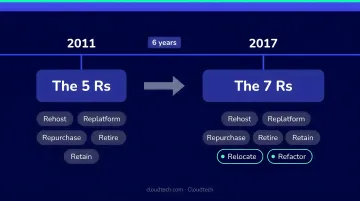
The result is the current seven-strategy model, documented in AWS Prescriptive Guidance, which gives teams a practical framework for categorizing any workload — from a simple lift-and-shift to a full rebuild.
The 7 Rs of Cloud Migration Explained
Retire
What it is: Decommissioning applications that no longer deliver business value.
Common triggers for retirement include:
- Low CPU or memory utilization sustained over 90+ days (zombie or idle apps)
- No active inbound connections over an extended period
- End-of-life operating systems with no upgrade path
- Duplicate functionality covered by another system
AWS recommends retiring applications early — before migration waves begin — because it shrinks the portfolio, reduces complexity, and strengthens the overall business case. As AWS notes in its migration retirement guidance, retiring unused applications lets teams concentrate resources on widely used workloads.
One practical caution: retirement becomes riskier when the original developers have left and documentation is sparse. Knowledge capture matters before decommissioning.
Retain
What it is: Keeping specific workloads in their current environment rather than migrating them now.
Retain is not a failure to migrate — it's a deliberate decision to defer. Valid reasons to retain include:
- Compliance mandates such as HIPAA or PCI DSS that restrict where data can reside
- Specialized hardware dependencies that have no cloud equivalent
- Recently upgraded systems where migration ROI doesn't yet justify the cost
- No clear business case for moving the workload
The critical distinction: Retain means revisit later, not ignore forever. It prevents cloud waste by keeping workloads that aren't migration-ready out of a migration wave where they'd create problems.
Healthcare organizations, for example, sometimes retain certain on-premises workloads during a phased migration specifically to maintain compliance continuity while other systems are moved first.
Rehost (Lift and Shift)
What it is: Moving applications from on-premises to the cloud without any architectural changes.
Rehost is the most widely used starting point for large migrations. AWS's own field guidance notes that in large legacy migrations, organizations often find it worthwhile to rehost 70% or more of applications — primarily because speed and low disruption outweigh optimization concerns in the early stages.
Best fit for:
- Organizations exiting a data center on a hard deadline
- Teams with limited in-house cloud expertise
- Workloads where the business priority is speed, not optimization
The primary AWS tool for automating rehosting is AWS Transform MGN (formerly AWS Application Migration Service), which replicates source servers into an AWS account with minimal manual effort.
The honest tradeoff: Rehost doesn't inherently reduce costs or improve performance. A workload that was inefficient on-premises will be inefficient in the cloud too — just running on someone else's hardware. Plan for optimization after the move, not during it.
Relocate (Hypervisor-Level Lift and Shift)
What it is: Transferring entire server environments at the hypervisor or platform level, with no changes to application code, architecture, or operational processes.
Relocate is technically distinct from Rehost because it moves the platform, not just the workload. Common examples:
- Moving VMware workloads to VMware Cloud on AWS
- Migrating Kubernetes workloads to Amazon EKS
This makes Relocate the fastest migration method in the framework — your team keeps using the same tools, the same operational processes, and the same skill set. End users typically notice nothing.
When Relocate makes sense: Organizations deeply invested in VMware or containerized environments that need to exit on-premises infrastructure without retraining staff or rewriting applications. According to a VMware IDC study, VMware Cloud on AWS delivered a 361% three-year ROI and approximately 50% lower combined infrastructure and operations costs — though these figures come from a vendor-sponsored study and should be weighed accordingly.
Replatform (Lift, Tinker, and Shift)
What it is: Moving an application to the cloud while making targeted optimizations — without changing the core application code.
Replatform sits in the middle of the complexity spectrum. You're not just picking up and moving, but you're not rebuilding either. Practical examples include:
- Migrating a Microsoft SQL Server database to Amazon RDS
- Containerizing Java or .NET applications using AWS App2Container
- Switching from Windows to Linux to reduce licensing costs
The benefit is access to managed services — auto-scaling, automated backups, patching — without the cost and timeline of a full re-architecture. AWS states that containerizing and consolidating applications can yield up to 60% compute savings compared to one-application-per-server configurations.
An IDC white paper commissioned by AWS found Amazon RDS delivered a 264% three-year ROI, 39% lower cost of operations, and 97% less unplanned downtime — with DBAs managing 60% more databases through automation. Attribution matters here: this is an AWS-sponsored study, so results should be treated as directional rather than universal.
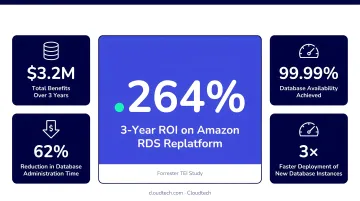
For most SMBs, Replatform offers the best balance between migration speed and cloud benefit — meaningful optimization without the risk and complexity of a full refactor.
Repurchase (Drop and Shop)
What it is: Replacing an existing on-premises application with a SaaS or cloud-native alternative.
Common examples:
- Swapping a self-managed CRM for Salesforce
- Replacing an on-premises HR system with Workday
- Moving from a self-hosted email server to Microsoft 365 or Google Workspace
Repurchase eliminates infrastructure management overhead entirely and shifts you to a consumption-based pricing model. The vendor handles uptime, security patches, and feature updates.
Key considerations before repurchasing:
- User training costs — new software means a learning curve
- Data migration complexity — moving historical data to a new platform is rarely trivial
- Integration requirements — the new SaaS product must connect with your existing authentication, networking, and other business systems
Repurchase accelerates cloud adoption, but the total cost of the switch often exceeds the software licensing fees alone. Factor in training, data migration, and integration work when estimating the true cost.
Refactor (Re-architect)
What it is: Completely re-architecting an application to be cloud-native, using serverless computing, microservices, autoscaling, and distributed architectures.
Refactor is the most complex and most transformative strategy in the framework. AWS explicitly states it is not recommended for large migrations because modernizing the application during migration introduces significant risk and extends timelines.
When Refactor is justified:
- Monolithic applications that bottleneck product delivery
- Legacy systems too expensive to maintain or scale
- Applications with strict performance or scalability requirements that on-premises infrastructure cannot meet
Cloudtech's refactor engagement with an OTT video delivery platform shows: decomposing a monolithic API into microservices using Amazon API Gateway, AWS Lambda, and Amazon ECS (Fargate), while building a real-time analytics pipeline with Kinesis, Glue, and Redshift. The outcomes were measurable — 99.95% uptime, video buffering under 3%, and query times dropping from 30 seconds to under 5.
Refactor requires skilled cloud architects, extensive planning, and longer execution timelines. For SMBs, refactoring one or two high-value applications is a sound strategy — attempting to refactor an entire portfolio in a single migration wave adds risk without proportional benefit.
Cloud Migration Statistics Worth Knowing
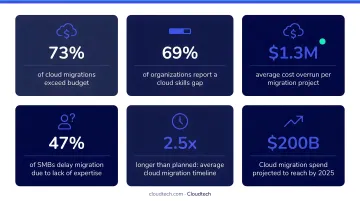
Cloud adoption is accelerating — but most migrations are still mid-stream, and the cost of poor planning is measurable. Here's what the data shows:
Adoption is widespread, but incomplete:
- 89% of organizations use multi-cloud; 73% use hybrid cloud (Flexera 2024)
- Half of surveyed European companies are actively engaged in large-scale cloud migrations or new cloud-native development (McKinsey 2024)
- Less than one-third of those organizations have 50% or more of their workloads on cloud — meaning most migrations are still in progress
The cost of getting it wrong:
- Migration inefficiencies cost the average company 14% more than planned each year, with McKinsey estimating over $100 billion in wasted migration spend over a three-year period
- Managing cloud spend is the top challenge for 84% of organizations post-migration
- 78% cite lack of cloud expertise as a significant constraint
The upside of doing it right:
- Amazon RDS (a common Replatform outcome) delivered 264% three-year ROI in an IDC study
- Large legacy migrations commonly rehost 70%+ of applications in the first wave, cutting data center costs while freeing teams to focus optimization efforts where they matter most
That's exactly where the 7 Rs come in — they give you a decision framework to match each workload to the right strategy, rather than applying one approach to everything.
How to Choose the Right Migration Strategy for Your Business
There's no universal answer — the right strategy depends on each workload's specific profile. A practical assessment evaluates four dimensions for each application:
- Business value — Is this application central to operations, or peripheral?
- Technical complexity — How difficult is it to move, modify, or replace?
- Compliance requirements — Does it handle regulated data that restricts where it can run?
- Migration urgency — Is there a hard deadline driving the timeline?
A Recommended Sequencing Approach
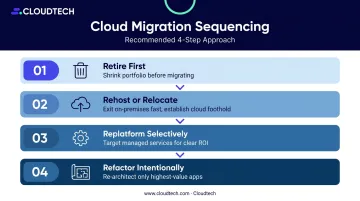
Most organizations benefit from this order:
- Retire first. Shrink the portfolio before doing anything else. Every application you decommission is one fewer workload to migrate, secure, or maintain.
- Rehost or Relocate for speed. Move stable, lower-complexity workloads quickly to exit on-premises infrastructure and establish a cloud foothold.
- Replatform selectively. Managed services often deliver clear ROI on specific workloads — without requiring a full rebuild.
- Refactor intentionally. Reserve re-architecture for your highest-value applications where cloud-native design creates a meaningful operational edge.
The SMB Reality
SMBs face constraints that enterprise migration playbooks often ignore: limited internal cloud expertise, tighter budgets, and smaller IT teams. Choosing the wrong strategy doesn't just delay results — it creates technical debt that's expensive to unwind.
This is where working with an AWS-certified partner matters. Cloudtech, an AWS Advanced Tier Partner with verified expertise in Cloud, Application, and Infrastructure Modernization, specializes in helping SMBs assess their application portfolios and build the right mix of migration strategies. The team includes former AWS professionals and AWS-certified solutions architects who have executed these decisions across healthcare, financial services, and manufacturing clients.
Cloudtech's approach starts with a structured discovery workshop, produces a prioritized migration roadmap, and delivers solutions in weeks — not months. Cloudtech can also access AWS Partner Funding that may reduce out-of-pocket migration costs for qualifying SMBs.
The Klamath Health Partnership engagement shows what this looks like in practice: a combination of Retire, Rehost, and Replatform strategies delivered a 77% year-over-year reduction in infrastructure costs, a HIPAA-compliant data lake, and full team enablement — starting from a one-day discovery workshop.
Frequently Asked Questions
What is rehosting in cloud migration?
Rehosting, also called lift and shift, moves applications from on-premises to the cloud without architectural changes, using tools like AWS Transform MGN. It's the fastest, lowest-disruption migration path and suits organizations that need to exit a data center quickly or lack in-house cloud-native expertise.
What are the statistics for cloud migration?
Flexera 2024 reports 89% of organizations use multi-cloud and 73% use hybrid cloud. McKinsey found migration inefficiencies add 14% to annual spend, while an IDC study found Amazon RDS delivered 264% three-year ROI for database replatforming specifically — results vary across migration types.
What are the 7 Rs of AWS migration?
The 7 Rs are: Retire, Retain, Rehost, Relocate, Replatform, Repurchase, and Refactor. Each represents a different approach to moving — or intentionally not moving — a workload to AWS, selected based on the application's business value, technical complexity, and compliance requirements.
What is an example of a rehost migration strategy in AWS?
A concrete example: migrating an on-premises web application server to an Amazon EC2 instance using AWS Transform MGN. The tool replicates the server's data and configuration directly into AWS without modifying any application code, preserving functionality while eliminating the on-premises dependency.
Which of the 7 Rs is most commonly used in cloud migration?
Rehost is typically the most widely used strategy — AWS field guidance notes that large legacy migrations often rehost 70% or more of applications. Many organizations later evolve those rehosted workloads into Replatform or Refactor once they've established their cloud foundation.
How do I choose the right cloud migration strategy for my business?
Assess each workload across business value, technical complexity, compliance needs, and urgency — most organizations apply a mix of Rs across their portfolio. Working with an AWS-certified migration partner accelerates that assessment and prevents the strategy mismatches that drive cost overruns.