Introduction
Picture this: a high-intent prospect visits your pricing page at 11 PM, spends 12 minutes reading your case studies, and submits a contact form. By 9 AM the next morning, when your team finally sees the notification, that lead has already signed with a competitor who responded within minutes.
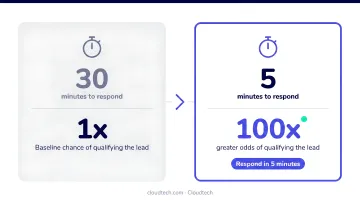
This isn't a rare edge case. Research from MIT and InsideSales.com found that responding to a web-generated lead within 5 minutes versus 30 minutes produces 21x higher odds of qualification. For small teams without dedicated sales staff, that window closes constantly.
Before going further: this guide focuses on lead nurturing (moving already-captured leads toward a buying decision), not lead generation. Most SMBs invest heavily in capturing leads and almost nothing in what happens next. AI chatbots are specifically built to close that gap, working around the clock without adding headcount.
Here's what this guide covers:
- Why traditional nurturing fails resource-constrained teams
- What AI chatbots do at each stage of the nurturing process
- Which capabilities matter most for SMBs
- How to implement one, step by step
- The metrics that indicate real progress
Key Takeaways
- AI chatbots let SMBs nurture leads 24/7 without adding headcount
- Effective chatbots qualify, segment, and personalize leads throughout the funnel
- Prioritize CRM integration and conditional logic over flashy features
- Start by automating answers to your 5–10 most common lead questions
- Track engagement rate, time-to-qualification, and meeting-booked rate, not chatbot volume
Why Traditional Lead Nurturing Isn't Working for SMBs
Email drip sequences were designed for a buyer who checked email twice a day and had patience. That buyer no longer exists.
McKinsey's B2B Pulse 2024 found that B2B customers now use an average of 10 interaction channels during their buying journey, up from five in 2016. Meanwhile, most SMB nurturing programs still rely on one: email.
The One-Way Communication Problem
Email and static forms push content at leads. They don't invite dialogue. A prospect who reads your nurturing sequence and has a specific question about pricing or implementation doesn't get an answer. They get the next email in the queue three days later.
That gap kills momentum. By the time a sales rep follows up, the prospect has either gone cold or made a decision without you.
Conversational tools change this dynamic. A chatbot surfaces intent signals that email simply can't capture:
- What questions a lead asks (and how urgently)
- Which topics they return to across multiple sessions
- What they avoid, often as telling as what they engage with
Email never gives you that picture in real time.
The SMB Staffing Reality
The communication gap above compounds a staffing problem that's unique to smaller teams. According to the SBA's 2024 FAQ on small business, 81.9% of U.S. small businesses have no employees at all. Even among SMBs with staff, very few have a dedicated sales development rep whose only job is nurturing inbound leads.
The practical result: leads go cold not because of bad strategy, but because no one had time to follow up. For a team already stretched thin, an AI chatbot that qualifies, responds, and follows up automatically isn't a luxury; it's the only scalable option.
What AI Chatbots Do at Each Stage of Lead Nurturing
Awareness, Consideration, and Decision: Different Roles
A chatbot's job changes depending on where a lead sits in the funnel:
| Funnel Stage | Lead Mindset | Chatbot Role |
|---|---|---|
| Awareness | Exploring options | Answer product FAQs, share relevant content |
| Consideration | Evaluating solutions | Share case studies, clarify differentiators |
| Decision | Ready to buy | Book a demo, answer pricing questions, hand off to sales |
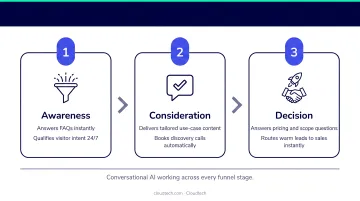
Treating every lead the same regardless of stage is one of the most common SMB nurturing mistakes. A single generic sequence fails both the early researcher and the near-ready buyer.
Real-Time Personalization Through Conditional Logic
AI chatbots adapt conversation flow based on prior behavior. A lead who visited your pricing page gets a different opening than one who just read a blog post.
Here's a simple example of conditional branching:
- Lead visits pricing page → chatbot opens with: "Looks like you're exploring pricing. Want me to walk you through what's included at each tier?"
- Lead visits a case study → chatbot opens with: "Glad you found that case study. Are you dealing with a similar challenge?"
Salesloft's Drift Conversational AI report, which analyzed over 30 million B2B conversations, found that 53% of site visitors chose pre-programmed button responses while 47% preferred typing open-text. A well-designed chatbot handles both: structured paths for efficiency, open-text handling for nuance.
Lead Scoring and Automated Segmentation
During a conversation, a chatbot can capture:
- Job title and decision-making authority
- Budget range
- Timeline to purchase
- Specific pain point
Based on those answers, it routes high-potential leads directly to a sales rep while keeping lower-intent leads in an automated nurturing sequence. No manual sorting required.
Handling Objections and Keeping Momentum
Instead of a lead waiting 24 hours for a reply to a specific question, the chatbot answers immediately and shares relevant resources: a pricing page, a case study, an implementation FAQ. That immediate response is what keeps a hesitant lead from going cold before your team even knows they exist.
Automated Sales Handoff
When a lead signals readiness (asks about pricing, requests a demo, mentions a specific deadline), the chatbot books a meeting directly into the sales rep's calendar and passes along the full conversation history. The rep walks into that call already knowing the lead's role, budget range, and primary concern.
MIT/InsideSales.com research found that responding within 5 minutes versus 30 minutes produces 100x higher odds of making contact. For most SMB teams without dedicated SDRs on standby, a chatbot-triggered handoff is the only realistic way to hit that window consistently.
Key Capabilities to Look for in an AI Chatbot (SMB Edition)
Not all chatbots are worth deploying. Five capabilities tend to separate the tools that generate pipeline from the ones that just generate noise, especially for lean teams without dedicated ops support.
Qualifying Workflows With Conditional Logic
A chatbot that only collects email addresses is an expensive contact form. What you need is a bot that asks 3–4 targeted qualifying questions (role, team size, timeline, budget range) and routes conversations differently based on the answers.
Skip this, and your sales rep gets a list of names with no context. Build it in, and they get a prioritized queue of leads who've already indicated they're worth a call.
CRM and Tool Integrations
Your chatbot must sync lead data directly into your CRM (whether that's HubSpot, Salesforce, or Zoho) without manual export. According to Validity's State of CRM Data Management report, 44% of companies lose more than 10% of annual revenue due to poor-quality CRM data.
Manual data transfer is where that problem starts. Native integrations are more reliable than webhook-only setups, particularly for teams without a dedicated developer.
Omnichannel Deployment
B2B leads don't arrive through a single channel. McKinsey found buyers use an average of 10 channels during their journey, though note that the specific report behind this figure is worth verifying against McKinsey's latest B2B research. A chatbot that only covers your website creates blind spots everywhere else.
Look for tools that maintain conversation context across channels, so a lead who started a conversation on LinkedIn isn't treated as a stranger when they visit your website.
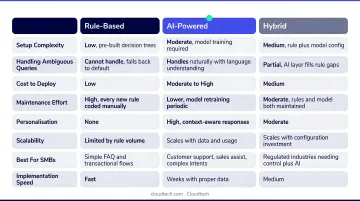
AI vs. Rule-Based: What SMBs Actually Need
| Type | Pros | Cons |
|---|---|---|
| Rule-based | Predictable, easy to manage | Breaks when users go off-script |
| AI-powered | Handles natural language, flexible | Requires training, higher hallucination risk |
| Hybrid | Structured qualifying flow + AI fallback | Best of both for resource-limited teams |
Gartner recommends pairing traditional rule-based logic with generative AI rather than deploying AI alone, citing hallucination risk and unexpected cost overruns as the main reasons. For most SMBs without a technical team managing the tool daily, a hybrid approach is the safer bet.
Transparent, Predictable Pricing
SMBs can't absorb per-resolution fees that spike unexpectedly. Look for:
- Flat monthly pricing or clearly defined usage tiers
- A free trial to validate before committing
- No steep annual contract minimums at the entry level
How to Implement an AI Chatbot for Lead Nurturing: Step-by-Step
Step 1: Audit Your Lead Drop-Off Points
Before choosing a tool, identify where leads go cold today. After the first contact form? After a demo request with no follow-up? Map the gap so the chatbot solves a real problem, not an imaginary one.
Step 2: Define What "Qualified" Means
Write down the 3–4 criteria that indicate a lead is ready for a sales conversation: decision-maker role, budget above a threshold, timeline within 90 days. These criteria become your qualifying questions and routing logic.
Without this definition, the chatbot has no way to prioritize. Everything looks equally interesting.
Step 3: Build a Short Qualifying Flow
Design the conversation simply first:
- Greeting: reference where the lead came from to set context
- Intent question: ask what brought them here today
- 2–3 qualifying questions: role, timeline, primary challenge
- Content offer or meeting book: matched to their answers
- Handoff: high-intent leads go to a rep; others enter a nurturing sequence
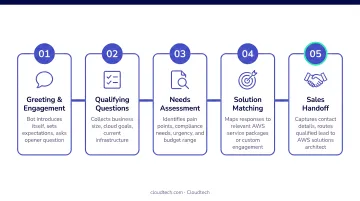
Keep the initial flow to 5–7 steps. Complexity can be added after the first 30 days of live data.
Step 4: Integrate With Your CRM and Set Up Alerts
Connect the chatbot to your CRM so lead data flows in automatically. Set up a Slack or email notification for your sales rep when a high-intent lead completes the qualifying flow.
This is where SMBs most often skip steps, and where the most value leaks out. Salesforce's SMB Trends report found teams spend an average of 23% of their workday manually inputting data, and manual workload is a challenge to winning deals for 53% of SMBs.
For SMBs that want more control over this infrastructure, AWS-native services like Amazon Lex and Amazon Bedrock can power conversational AI that connects directly to your existing CRM and sales tools. An AWS-certified partner like Cloudtech can configure these systems inside your own cloud environment, keeping your lead data within infrastructure you own and govern.
Step 5: Test, Launch, and Iterate
- Week 0: Internal team testing, walking through every flow and edge case
- Week 1: Soft launch monitored daily, watching drop-off points
- Month 1 review: Analyze conversation logs, refine qualifying questions, adjust routing
The first version doesn't need to be perfect. The chatbot improves with real conversation data faster than it improves with more planning.
Measuring What Matters: KPIs for AI Chatbot Lead Nurturing
Engagement and Completion Rate
Completion rate: the percentage of leads who start a chatbot conversation and finish the qualifying flow.
A low completion rate (say, under 40%) usually signals one of two problems: the flow is too long, or the questions feel intrusive. Both are fixable.
Watch completion rate by entry point too. Leads who arrive from a demo request page complete at higher rates than those from a blog post. That difference should inform how you segment your nurturing flows.
Time-to-Qualification and Meeting-Booked Rate
These two metrics matter more than raw chatbot interaction volume. An SMB that books 10 qualified demos per month is in a fundamentally better position than one with 500 chatbot interactions that produce no pipeline. High volume without qualification is noise.
The Salesloft/Drift report found that high-intent playbooks booked 2x as many meetings and sourced 3x more opportunities than standard playbooks, the difference being how specifically the chatbot targeted intent signals. That's the metric to optimize toward.
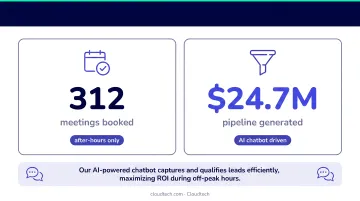
Intent signals also surface outside business hours. 39% of chat interactions and 41% of meetings booked happened outside standard 9-to-5 business hours. If you're not running a chatbot after hours, you're leaving that pipeline on the table.
Qualitative Lead Behavior Signals
Not every ready-to-buy lead clicks "Book a Demo." Look at conversation logs for:
- Repeated visits to the pricing page
- Requests for case studies or implementation details
- Questions about timeline or onboarding
- Mentions of a specific decision deadline
These signals indicate a warming lead even without an explicit conversion action. Build escalation triggers around them, not just around demo requests.
Frequently Asked Questions
Can chatbots boost small business growth?
Yes. Chatbots help SMBs grow by engaging leads 24/7, cutting response lag, and qualifying prospects automatically, freeing the sales team for high-intent conversations. The result is more efficient pipeline growth without adding headcount.
Can I use AI to generate leads?
AI chatbots handle both lead generation and nurturing. They capture contact details from website visitors, then follow up with personalized conversations designed to move those leads toward a buying decision.
How are SMBs using AI?
The most common SMB AI use cases are answering customer FAQs, qualifying inbound leads, booking meetings, automating follow-up sequences, and syncing data into CRMs, all without requiring a large sales or marketing team.
What is the difference between a lead generation chatbot and a lead nurturing chatbot?
Lead generation chatbots focus on capturing new contact information from visitors. Lead nurturing chatbots work with already-captured leads: personalizing content, answering objections, scoring readiness, and triggering sales handoffs at the right moment.
How do AI chatbots integrate with CRM systems?
Most modern chatbot platforms offer native integrations with HubSpot, Salesforce, and Zoho, automatically syncing lead data, conversation history, and qualification scores without manual entry, and triggering follow-up workflows directly inside the CRM.
How much does it cost to implement an AI chatbot for a small business?
Entry-level tools start around $15–50/month, mid-tier options run $50–150/month, and enterprise platforms exceed $500/month. Prioritize tools with transparent flat-rate pricing and a free trial before committing. AWS-native builds offer more customization and control, with costs that scale based on your usage and implementation scope.