Introduction
Getting data from operational databases into Amazon Redshift sounds straightforward — until you're debugging a stalled CDC task at 2 AM or discovering your migrated tables have no sort keys and query performance is half what you expected.
AWS Database Migration Service (DMS) is a managed cloud service that moves databases, data warehouses, and other data stores into Amazon Redshift with minimal downtime. But "managed" doesn't mean "automatic." The difference between a migration that works and one that performs well comes down to configuration decisions most teams get wrong the first time.
This guide is written for data engineers, cloud architects, and SMB technical teams planning a DMS-to-Redshift migration. It covers how the process works end-to-end, which components you need, how to tune for performance, and the pitfalls worth avoiding before you hit them.
TL;DR
- AWS DMS supports three migration modes: Full Load, CDC only, and Full Load + CDC (the most common)
- DMS stages data through Amazon S3 before loading into Redshift via the
COPYcommand, not as a direct database-to-database transfer - Every migration requires a replication instance, source/target endpoints, and a properly configured VPC
- Performance depends on parallelism settings, primary key configuration, and batch apply tuning
- DMS is best suited for ongoing replication from relational sources, not schema transformation or one-time small dataset loads
What Is AWS DMS Migration to Redshift?
AWS DMS is a fully managed service that reads data from a source database, converts it to CSV files on the replication instance, and uploads those files to an intermediate S3 bucket. From there, it issues a Redshift COPY command to load the data into your target cluster.
That S3 staging step is what makes DMS architecturally distinct from a direct database-to-database copy — and it has real implications for how you configure networking and IAM.
Why Redshift as the Target?
Redshift's columnar storage and massively parallel processing (MPP) architecture make it the right destination for analytical workloads. Where an OLTP database like RDS PostgreSQL is optimized for fast row-level reads and writes, Redshift is built to scan billions of rows across distributed compute nodes — the kind of throughput that BI tools and reporting pipelines depend on at scale.
DMS supports migration from a wide range of relational sources into Redshift, including:
- Amazon RDS for PostgreSQL, MySQL, Oracle, SQL Server, and MariaDB
- Amazon Aurora (MySQL-compatible and PostgreSQL-compatible)
- On-premises Oracle, SQL Server, PostgreSQL, MySQL, and SAP ASE
- MongoDB and Amazon DocumentDB
How DMS Compares to Alternatives
| Tool | Best For | Limitation |
|---|---|---|
| AWS DMS | Ongoing replication from relational sources | Not a transformation tool |
| AWS Glue | Complex ETL with business logic | Higher engineering overhead |
| Zero-ETL (Aurora) | Near-real-time Aurora-to-Redshift sync | Source-specific |
| Native COPY | One-time S3-to-Redshift bulk loads | Requires manual file management |
How AWS DMS Migrates Data to Amazon Redshift
Migration Task Types
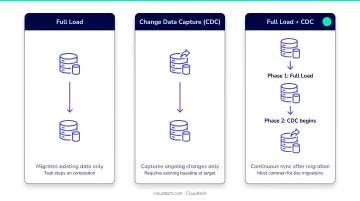
DMS offers three task types. Choosing the wrong one is a common early mistake:
- Full Load — migrates a complete snapshot of existing data at a point in time. Use this for one-time migrations where the source goes offline at cutover.
- CDC only — captures changes from transaction logs after a separate initial load. Rarely used without a preceding full load.
- Full Load + CDC — migrates existing data, then automatically switches to continuous replication. This is the standard choice for keeping Redshift in sync with an active operational database.
The Internal Data Flow
For full load tasks, DMS reads from the source using SELECT queries. For CDC, it reads from transaction logs (binary logs for MySQL, WAL for PostgreSQL, transaction logs for SQL Server). Regardless of task type, the data flows through the same path:
- DMS writes data to CSV files on the replication instance
- Files are uploaded to an intermediate S3 bucket via the AWS SDK
- DMS issues a Redshift
COPYcommand to load from S3
Critical constraint: The Redshift cluster and DMS replication instance must be in the same AWS account and the same AWS Region. Cross-account or cross-region staging is not supported.
CDC Batch Apply Mode
Redshift's MPP architecture makes individual row-level commits expensive. DMS handles this through batch apply mode, which is the default for Redshift CDC targets. Instead of committing each change as it arrives, DMS accumulates changes in a net changes table and then processes them as bulk operations:
DELETE— removes rows that were deleted in the sourceINSERT— adds newly created rowsUPDATE— handled as a delete + insert pair for MPP compatibility
This reduces commit overhead on the cluster — particularly on large tables with frequent row-level changes.
Prerequisites and Core Components
Step 1: Provision the Replication Instance
The replication instance is an EC2-based compute resource running the DMS software. It acts as the intermediary between source and target — all data passes through it.
When configuring the replication instance:
- Instance class: size based on data volume and table count;
dms.r5.4xlargeis a common starting point for large migrations - VPC placement: must have network access to both the source database and the Redshift cluster
- Subnet group: must include subnets that can route to both endpoints
- Security groups: must allow outbound connections to source database port and Redshift port 5439
Step 2: Configure Source and Target Endpoints
The source endpoint points to your operational database. The target endpoint points to your Redshift cluster. Key Redshift endpoint settings that directly affect load speed:
| Setting | Default | Range | Impact |
|---|---|---|---|
MaxFileSize |
32 MB | 1–1,024 MB | Controls CSV file size sent to S3 |
FileTransferUploadStreams |
10 | 1–64 | Parallel threads uploading to S3 |
Step 3: Create and Run the Migration Task
When creating the DMS task, configure:
- Migration type: Full Load, CDC only, or Full Load + CDC
- Table mappings: selection rules to specify which schemas and tables to include
BatchApplyEnabled = true: required for CDC to Redshift; without this, changes are applied row by row- Pre-migration assessment: run this before starting; it catches connectivity and permission issues early
IAM and Networking Requirements
Three IAM roles are required:
dms-access-for-endpoint: grants DMS access to the intermediate S3 bucketdms-vpc-role: enables VPC connectivitydms-cloudwatch-logs-role: enables task logging
The DMS console creates these automatically. CLI or API-based setups require manual creation.
Redshift Table Preparation
Schema design decisions made before the migration runs have a direct impact on query performance afterward. DMS can auto-create target tables using DROP_AND_CREATE mode, but the result is tables with DISTSTYLE AUTO and no sort keys — not suitable for production workloads.
For any production migration, prepare your Redshift tables in advance:
- Pre-create tables with appropriate distribution keys, sort keys, and primary keys
- Set the target table preparation mode to
TRUNCATE_BEFORE_LOADorDO_NOTHINGinstead ofDROP_AND_CREATE - Define primary keys on target tables — Redshift does not enforce them, but DMS requires them for CDC batch processing
- Set primary keys as sort keys to gain both replication throughput and query performance benefits
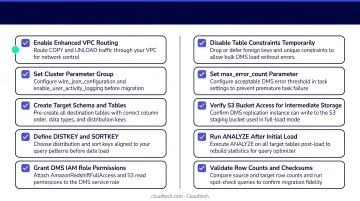
Without primary keys on target tables, UPDATE and DELETE operations during CDC are applied statement by statement rather than in batch. This degrades replication throughput significantly at scale.
For SMB teams without dedicated AWS expertise in-house, working with an AWS Advanced Tier Partner like Cloudtech — which holds 12 AWS Service Delivery Designations covering data and migration services — can help avoid these setup mistakes and potentially access AWS Partner Funding to reduce migration costs.
Performance Optimization and Best Practices
Full Load Parallelism
According to an AWS Database Blog benchmark published February 2024, tuning parallel load settings on a dms.r5.4xlarge instance with 500 tables of 1 million records each produced dramatic improvements:
| Configuration | Full Load Time | Improvement |
|---|---|---|
| Default | ~30 minutes | Baseline |
MaxFullLoadSubTasks=49 |
16.0 minutes | ~50% faster |
ParallelLoadThreads=16 |
21.2 minutes | ~30% faster |
| Combined tuned settings | 7.88 minutes | 76% faster |
Key settings to tune:
MaxFullLoadSubTasks— default 8, max 49. Controls how many tables load in parallel.ParallelLoadThreads— default 0, max 32. Multithreaded loading per table for Redshift targets.ParallelLoadBufferSize— default 100, max 1,000. Buffer size for multithreaded loads.
CDC Batch Apply Tuning
For heavy transactional workloads, the default batch apply settings flush too frequently. Increasing timeout values reduces commit frequency on the cluster:
BatchApplyTimeoutMin— default 1 secondBatchApplyTimeoutMax— default 30 secondsBatchApplyMemoryLimit— default 500 MBBatchSplitSize— default 0 (no split limit)
Raising BatchApplyTimeoutMax allows DMS to accumulate more changes before flushing, which reduces the number of transactions hitting Redshift per unit time.
Additional Optimization Settings
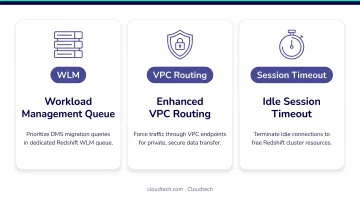
Three settings frequently get overlooked but have a real impact on migration stability:
- Redshift WLM — DMS tasks compete for WLM queue slots when concurrent BI queries or ETL jobs run during migration. Dedicate a WLM queue to DMS, or schedule the migration during off-peak hours.
- Enhanced VPC Routing — By default, Redshift routes
COPYtraffic over the public internet. Enabling this setting forces all traffic through the VPC, improving security and removing external bandwidth constraints. Also configure an S3 VPC endpoint when you enable it — otherwiseCOPYcommands will fail. - Session timeout — Redshift defaults to a 4-hour idle session timeout. If a DMS task pauses and the session drops, it causes errors on restart. Set a longer timeout before you begin:
ALTER USER dmsuser SESSION TIMEOUT 72000;
Common Issues and Misconceptions
DMS Does Not Optimize Your Schema
Many teams assume DMS will produce production-ready Redshift tables. It won't. DMS-generated tables use DISTSTYLE AUTO with no sort keys — acceptable for exploration, but not for analytics at scale.
Before loading data, take these two steps:
- Pre-create tables with appropriate distribution and sort keys
- Set
TargetTablePrepModetoTRUNCATE_BEFORE_LOADorDO_NOTHING
Duplicate Records After CDC Restarts
Because Redshift doesn't enforce primary key constraints, DMS can insert duplicate rows if a CDC task restarts and replays events. Two mitigations:
- Set
ApplyErrorInsertPolicy=INSERT_RECORDto handle insert errors without halting replication - Plan a post-migration deduplication step — don't assume the target is clean after a restart
LOB and CLOB Truncation
Redshift's maximum VARCHAR size is 65,535 bytes. BLOBs, CLOBs, and NCLOBs from source databases are converted to VARCHAR and truncated if they exceed this limit.
Before migration starts, audit source columns for oversized objects. The standard workaround is offloading large binary or text data to S3 and storing only the object reference in Redshift — a pattern worth building into your schema design from day one.
When AWS DMS May Not Be the Right Fit
DMS is a solid tool for what it's built for. It's the wrong choice in several common scenarios:
- Aurora MySQL or Aurora PostgreSQL as the source? Use Aurora zero-ETL integration with Redshift instead. It delivers near-real-time replication without the overhead of managing a replication instance.
- Data needs significant transformation? Reach for AWS Glue or the native
COPYcommand. DMS moves data — it doesn't reshape it. Running denormalization, type casting, or business logic enrichment through DMS leaves you with staging tables that still need a separate ETL pass. - One-time migration of a small dataset? Skip DMS entirely. A
COPYfrom a CSV export is faster to configure and cheaper to run than spinning up a replication instance for a job you'll do once — especially when there's no ongoing CDC requirement afterward.
Frequently Asked Questions
What is AWS Database Migration Service (DMS)?
AWS DMS is a managed cloud service for migrating relational databases, NoSQL stores, data warehouses, and other sources to AWS or between database environments. It supports both one-time migrations and ongoing replication with minimal downtime.
Is Amazon Redshift a database service?
Redshift is a fully managed, petabyte-scale cloud data warehouse — not a traditional OLTP database. It uses columnar storage and massively parallel processing optimized for analytical queries, meaning it handles analytical queries rather than transactional writes — unlike RDS or Aurora.
Why use Amazon Redshift instead of Amazon RDS?
Redshift is designed for analytical workloads: BI reporting, large-scale aggregations, and historical data analysis. Its columnar MPP architecture processes large aggregations and BI queries far faster than row-based RDS at scale.
What is the difference between full load and CDC in AWS DMS?
Full load migrates a complete snapshot of existing data at a point in time. CDC reads transaction logs to replicate only inserts, updates, and deletes that occur after the initial load — keeping Redshift continuously in sync with the source database.
Does AWS DMS support ongoing replication to Redshift after the initial migration?
Yes. The "Migrate existing data and replicate ongoing changes" task type performs a full load and then switches to CDC automatically, keeping Redshift in sync without manual intervention.
Can AWS DMS migrate from multiple different source databases to Amazon Redshift?
DMS supports Oracle, SQL Server, PostgreSQL, MySQL, Aurora, MariaDB, SAP ASE, MongoDB, and more — making it straightforward to feed data from multiple source systems into a single Redshift warehouse.