— 2026 Guide](https://file-host.link/website/cloudtech-ff604p/assets/blog-images/ba8bc7e9-ce52-4043-9076-08b5087d7394/1784160025237256_4bf2b1f8936f4b7899c51b67e9e28766/360.webp)
Introduction
According to Microsoft's 2023 Work Trend Index, 62% of workers struggle with excessive time spent searching for information, with the heaviest communication users burning 8.8 hours per week just on email. Add in IT ticket submissions, HR portal navigation, and days-long waits for routine answers — and the administrative drag on productivity becomes a measurable cost problem.
Gartner forecasts task-specific AI agents will appear in 40% of enterprise applications by end of 2026, up from under 5% in 2025. That jump signals a genuine shift in how employee service works.
Today's conversational AI systems understand context, retain it across a conversation, and fully resolve requests rather than routing them into a ticket queue.
This guide covers what conversational AI in employee service automation is, how it works, where it delivers the most impact in IT and HR, what benefits to expect, and how SMBs can get started without enterprise-scale budgets.
Key Takeaways
- Conversational AI combines NLP and LLMs to understand employee requests and take action — not just retrieve answers
- IT helpdesk and HR operations are the highest-impact deployment targets for most organizations
- IBM's AskHR cut HR operating costs 40% over four years — a benchmark for what well-deployed systems can deliver
- Cloud-native platforms let SMBs deploy without building from scratch
- Agentic AI now executes multi-step workflows autonomously — a significant leap beyond simple Q&A bots in 2026
What Is Conversational AI in Employee Service Automation?
Conversational AI is technology that enables software to understand and respond to human language — text or voice — using natural language processing (NLP), natural language understanding (NLU), machine learning (ML), and large language models (LLMs). According to IBM, these systems use data, ML, and NLP to simulate human interaction in ways that move well past scripted, keyword-triggered responses.
The critical distinction is between rule-based chatbots and modern conversational AI. Rule-based systems follow authored decision trees — they can only handle exact keyword matches and pre-programmed scenarios. Conversational AI interprets intent, retains context across multiple turns, and can trigger real backend actions.
Conversational AI vs. Traditional Chatbots
| Dimension | Rule-Based Chatbot | Conversational AI |
|---|---|---|
| Input flexibility | Scripted keywords only | Natural language, varied phrasing |
| Context retention | None — each message is isolated | Multi-turn memory across conversation |
| Action capability | Informational responses only | Workflow execution (tickets, approvals, resets) |
| Availability | Business hours typical | 24/7 |
| Improvement over time | Static, requires manual updates | ML-driven, improves with each interaction |
How the Technology Works: The Core Pipeline
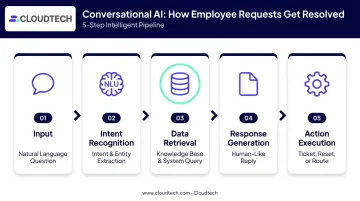
A conversational AI system handles an employee request through five steps:
- Input: The employee asks a question in natural language ("I can't access the VPN")
- Intent recognition: NLU identifies what the employee needs and extracts key entities (VPN, access issue)
- Data retrieval: The system queries connected knowledge bases, ITSM tools, or HR systems for relevant information
- Response generation: NLG produces a human-like, contextually appropriate reply
- Action execution: In advanced setups, the system logs a ticket, resets credentials, or routes the case without human intervention
Machine learning ties the pipeline together. Each employee interaction trains the model on new phrasings and edge cases specific to your workforce — which means a system deployed for IT helpdesk requests in January handles a wider range of questions by March, without anyone rewriting rules.
Key Use Cases: IT Helpdesk and HR Automation
Conversational AI in IT Service Desks
The highest-volume IT requests are also the most repetitive: password resets, software access provisioning, VPN troubleshooting, hardware request submissions, and incident reporting. These are exactly the tasks a well-trained conversational AI agent can resolve without human escalation.
Ivanti's 2024 research found that office workers contact IT about three times per month on average — and 62% of those who seek DIY help do so because they believe it's faster than the help desk. One-third of respondents said their employer offered no self-service option at all. That gap represents direct demand for conversational AI.
For SMB IT teams — where one or two people often manage everything — this matters most. When conversational AI handles tier-1 requests autonomously, IT staff redirect time to infrastructure, security, and strategic work rather than password resets.
Conversational AI in HR Operations
HR is the other primary target. Common automatable queries include:
- Policy questions — PTO balances, benefits explanations, leave policies
- Onboarding guidance — Walking new hires through steps, deadlines, and paperwork
- Payroll queries — Pay stub access, deduction questions, tax form retrieval
- Employee data updates — Address changes, direct deposit modifications
- Issue routing — Directing sensitive matters to the right HR professional
When connected to an HRIS platform, the system pulls personalized, role-specific answers rather than generic policy text.
IBM's AskHR deployment illustrates what's possible at scale. The system handles over 2.1 million employee conversations annually, contains 94% of common questions, and processed more than 1 million HR transactions in 2024. Support tickets dropped 75% since 2016. That's an enterprise deployment, not an SMB benchmark — but it shows the ceiling of the model.
Some systems go further. A Moveworks deployment at Johnson Controls shows an AI assistant sending nudges for training deadlines, performance reviews, and onboarding completion — triggered by detected patterns, not employee initiative.
IT and HR are the entry points, but the surface area is wider:
- Internal policy search and document retrieval
- Meeting summaries and action item tracking
- Project status updates across tools
- Knowledge base access for distributed teams
Each use case adds another layer of employee productivity without adding headcount.
Core Benefits of Conversational AI for Employee Service Teams
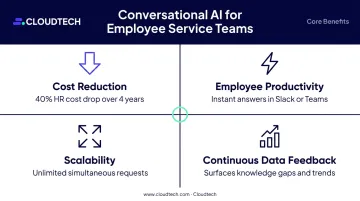
Conversational AI delivers across four areas that matter most to service teams:
- Cost reduction — IBM cut HR operating costs by 40% over four years, with productivity gains up to 75% in selected HR tasks (2022–2024)
- Employee productivity — instant answers in Slack or Teams replace ticket queues and waiting
- Scalability — handles unlimited simultaneous requests without adding headcount
- Continuous data feedback — every interaction surfaces knowledge gaps and recurring issues
Cost reduction is the most cited benefit, and IBM's case provides the clearest figure: a 40% reduction in HR operating costs over four years, with productivity gains of up to 75% in selected HR tasks between 2022 and 2024. That's IBM at enterprise scale — SMB outcomes will vary — but the mechanism holds broadly: fewer routine queries reach human agents, so teams focus on work that actually needs them.
Employee productivity improves when answers arrive in the tools employees already use. Instead of submitting a ticket and waiting, an employee gets an instant resolution in Slack or Teams. Gallup's 2025 survey of nearly 16,000 U.S. workers found that 58% of employees with substantial influence over technology adoption reported high job satisfaction, compared to just 24% among those with no influence. The quality of workplace technology connects directly to engagement.
For SMBs specifically, scalability is a structural advantage. Human teams hit capacity ceilings during onboarding surges, open enrollment, or rapid growth — support demand spikes faster than headcount can follow. Conversational AI handles unlimited simultaneous interactions without proportional cost increases.
Continuous improvement through data is the benefit most teams overlook. Every employee interaction generates structured information: what's being asked, what's unresolved, where knowledge base gaps exist. IT leaders identify recurring problems; HR spots policy communication failures. Over time, the system becomes a feedback engine for organizational improvement, not just a support channel.
How to Implement Conversational AI for Employee Services
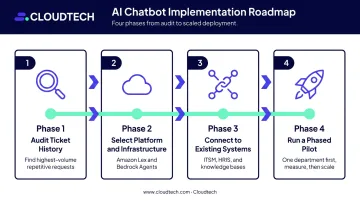
A practical implementation follows four phases:
- Audit your ticket history — Identify the highest-volume, most repetitive service requests. These are your automation targets. Don't start with complexity.
- Select your platform and infrastructure — Cloud-native services like Amazon Lex (for conversational interfaces) and Amazon Bedrock Agents (for multi-step workflow execution) provide NLP and LLM capabilities with enterprise-grade security without requiring custom model training from scratch.
- Connect to existing systems — Integrate the conversational layer with your ITSM tools, HRIS platforms, and internal knowledge bases. This is where the resolution capability comes from — the AI needs access to authoritative data.
- Run a phased pilot — Deploy with one department first. Measure containment rates, resolution accuracy, and employee satisfaction before scaling organization-wide.
What separates a fast deployment from an expensive one is pre-built integrations and no-code or low-code configuration tools. Cloudtech builds conversational AI implementations on AWS for SMBs using pre-packaged accelerators on Amazon Bedrock, moving from scoping to live in weeks rather than months.
Human-in-the-loop escalation is non-negotiable. The system must recognize when a request exceeds its scope and hand the conversation to a human agent — with full context attached. That handoff keeps employees confident the system won't leave them stuck, which is what builds long-term trust in the tool.
Challenges to Anticipate Before You Deploy
Accuracy and Hallucination Risk
LLM-based systems can generate confident but incorrect answers — what NIST's 2024 Generative AI Risk Profile calls "confabulation." The mitigation is grounding: connect the system to verified, regularly updated internal documentation rather than relying on general knowledge. Configure the system to say "I don't know — let me connect you with someone who can help" instead of guessing. AWS Bedrock Guardrails adds contextual grounding checks and sensitive-information filters, though these reduce risk rather than eliminate it entirely.
Data Privacy and Compliance
Employee-facing AI handles sensitive personal, payroll, and potentially health information. Required controls include:
- Role-based access controls limiting what each user can query
- Data encryption at rest and in transit
- Audit logs for all interactions involving sensitive data
- Compliance with applicable regulations — GDPR for EU employees, HIPAA for healthcare organizations handling ePHI
In regulated industries like healthcare and financial services, this layer isn't optional. Build security and compliance architecture into the system from the start — it's far harder to retrofit later.
User Adoption and Change Management
Employees may be reluctant to discuss sensitive HR or IT matters with an AI. Effective adoption strategies include:
- Clear communication about what the system can and cannot do
- Transparency about how conversation data is used and stored
- Visible, easy pathways to reach a human agent at any point
- A phased rollout starting with low-stakes, high-frequency wins (instant password resets build credibility more reliably than a broad launch)
2026 Trends Shaping Conversational AI in the Workplace
Agentic AI: From Q&A to End-to-End Execution
The most significant shift in 2026 is the move toward agentic AI — systems that don't just answer questions but plan and execute multi-step workflows. A parental leave request, for example, could trigger the AI to update the HRIS, notify the manager, schedule check-in dates, and arrange coverage — all from a single employee conversation.
Analyst forecasts back the momentum. Gartner puts task-specific agents in 40% of enterprise applications by end of 2026, while Forrester's 2026 Predictions report expects leading HCM platforms to add role-based agents that orchestrate work across HR, IT, finance, and legal under a single employee interface.
That convergence is already visible in practice. ServiceNow now markets a unified employee layer spanning multiple departments, combining chat and autonomous workflows into one interface.
One important counterweight: Gartner also predicts that over 40% of agentic AI projects will be canceled by end of 2027 due to escalating costs, unclear value, or inadequate risk controls. The lesson for SMBs is to prove the basics first — accurate answers, clean handoffs, measured containment — before expanding into autonomous multi-step execution.
Voice and Multimodal Interfaces: Promising, But Not Yet Ready to Ship
Voice and multimodal interfaces are gaining real traction as a next priority, particularly for frontline workers in manufacturing, healthcare, and logistics who can't pause to type. AWS has demonstrated viable voice-LLM architectures, but production deployment at scale is still in early stages. For 2026 planning, treat voice as a trend to watch rather than one to build on today.
Frequently Asked Questions
What is conversational AI in employee service automation?
It's AI technology that uses NLP and machine learning to understand and act on employee requests — IT issues, HR queries, policy questions — in natural language. Employees get self-service resolution without waiting for a human agent on routine tasks.
How is conversational AI different from a regular chatbot?
Traditional chatbots follow rigid scripts and only handle exact keyword matches. Conversational AI understands intent and context, retains information across a multi-turn conversation, and can trigger real backend actions like ticket creation, password resets, or data updates.
What HR and IT tasks can conversational AI automate?
The most common use cases span both IT and HR workflows:
- Password resets, access provisioning, and VPN troubleshooting
- PTO queries, payroll questions, and benefits explanations
- Employee onboarding guidance and software troubleshooting
- Internal knowledge base retrieval
How long does it take to implement conversational AI for employee services?
Cloud-native deployments using pre-built integrations and AWS services like Bedrock can go live in weeks. More complex rollouts with heavy customization and multiple system integrations typically run 3–6 months depending on data readiness and scope.
What are the biggest challenges of deploying conversational AI internally?
The three main challenges are: maintaining accuracy by grounding the system in verified knowledge bases (preventing hallucinations), ensuring data security and regulatory compliance for sensitive employee data, and driving adoption through transparent communication and easy escalation to human agents.
Is conversational AI practical for small and mid-sized businesses?
Yes. Cloud-native platforms have removed the enterprise price barrier. Pre-packaged solutions built on AWS infrastructure can be implemented cost-effectively and scaled incrementally as the organization grows, without requiring a large in-house AI team.