The scale of the problem is real: a 2025 survey of over 1,100 U.S. new hires found that more than half said onboarding overemphasized administrative tasks, and nearly 4 in 10 second-guessed accepting the job. Meanwhile, only 44% of organizations use technology to automate any onboarding tasks at all, leaving significant room to close the gap.
Conversational AI addresses this directly — not as a simple FAQ bot, but as an AI-powered system that understands natural language, guides new hires through multi-step onboarding flows, triggers backend workflows, and escalates to humans when needed.
This article covers when conversational AI onboarding automation makes sense, what groundwork is required, a step-by-step implementation process, the variables that most affect results, and the mistakes that consistently derail deployments.
Key Takeaways
- Conversational AI handles repetitive onboarding tasks (FAQs, document collection, compliance reminders), freeing HR for relationship-building
- Knowledge base quality and HRIS integration depth are the two biggest predictors of whether a deployment succeeds or fails
- Workflow mapping must happen before configuration — poor scoping produces bot failures and frustrated new hires
- It works best in high-volume, distributed, or understaffed HR environments — not as a universal fix
- Human escalation paths are non-negotiable for sensitive topics: compensation, accommodations, and legal disclosures
How to Automate Employee Onboarding with Conversational AI: A Step-by-Step Process
Step 1: Map Your Onboarding Workflow and Define the Bot's Scope
Before touching any tool, document every interaction that occurs between offer acceptance and the new hire's 90-day mark. This workflow map is the foundation for everything the AI will handle.
What to capture in your workflow map:
- Document collection and e-signature requirements
- IT provisioning requests and access setup
- Benefits enrollment questions and deadlines
- Policy acknowledgments and compliance training
- Manager introductions and team onboarding milestones
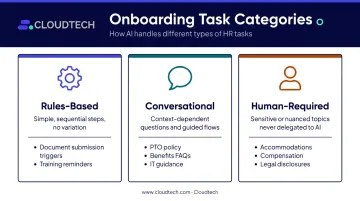
Once mapped, categorize each task into one of three buckets:
| Category | Description | Examples |
|---|---|---|
| Rules-based | Simple, sequential steps with no variation | Document submission triggers, training reminders |
| Conversational | Questions and guided flows that vary by context | PTO policy questions, benefits FAQs, IT setup guidance |
| Human-required | Sensitive or nuanced — never delegate to AI | Accommodation requests, compensation discussions, legal disclosures |
Before configuration begins, define success criteria: the question types the bot must answer accurately, the tasks it should trigger, and the resolution rate acceptable at launch. Teams that skip this step build bots that field random queries but fail to guide new hires through a coherent experience.
Step 2: Audit, Clean, and Structure Your Knowledge Base
Conversational AI is only as reliable as the content it draws from. Audit all existing onboarding documentation for accuracy, completeness, and current status before configuring any platform.
Minimum content required before launch:
- Employee handbook (current version)
- IT setup and access instructions
- Benefits enrollment guide
- Compliance training requirements
- Role-specific onboarding checklists
Flag outdated content for revision. Then organize verified content into a structured, searchable knowledge base with a single source of truth per topic.
AI systems using Retrieval-Augmented Generation (RAG) pull answers directly from indexed documents — gaps and contradictions surface immediately as incorrect bot responses. Lumeris built a RAG-based HR assistant on Amazon Kendra and Amazon Bedrock and reported over 90% answer accuracy with immediate responses, compared to a previous 1–2 day email wait.
Their team indexed People and Culture documents, built a custom thesaurus, and tested the assistant before rollout. The accuracy came from getting the knowledge base right first — not from the technology alone.
Do not launch on top of outdated or contradictory documentation. The cleanup is faster than rebuilding trust with new hires after bad answers.
Step 3: Select and Configure Your Conversational AI Platform
Evaluate platforms on three criteria:
- Natural language understanding — Handles varied phrasings of the same question without breaking
- Integration depth — Connects natively to your HRIS, Slack, Teams, or email
- Security and compliance standards — Meets your data privacy and regulatory requirements
For organizations building on AWS, the core services are: Amazon Lex for conversational NLP (voice and text), Amazon Bedrock for generative AI capabilities and RAG-based knowledge retrieval, and Amazon Connect for voice and chat channel delivery. These services combine to create a production-ready onboarding bot on AWS cloud infrastructure.
Configuration essentials:
- Upload and connect your verified knowledge base
- Define intent categories (e.g., "ask about PTO," "request IT access," "find benefits info")
- Build conversation flows for common onboarding journeys by role and department
- Set escalation triggers for topics that must route to a human HR contact
For SMBs without an in-house cloud team, working with an AWS-certified partner like Cloudtech can cut deployment timelines from months to weeks using pre-built solution patterns and hands-on implementation support.
Step 4: Integrate with HR Systems and Run a Controlled Pilot
Connect your conversational AI layer to core HR systems so the bot can personalize responses without manual input:
- HRIS — employee data, role information, start dates
- LMS — training enrollment and completion tracking
- IT provisioning tools — access request triggers
- E-signature platforms — document collection and status tracking
Without these integrations, the bot defaults to generic answers regardless of who is asking. With them, it delivers role-specific checklists, triggers IT access automatically, and sends compliance deadline reminders tied to each individual's start date.
Before full rollout, run a structured pilot with one department or a small cohort. Track:
- Questions the bot answers correctly vs. incorrectly
- Unnecessary escalations that signal missing intents
- Content gaps that produce failed responses
Define clear pass/fail thresholds — resolution rate, new hire satisfaction score, number of incorrect answers flagged — so the decision to scale is data-driven.
Step 5: Launch, Monitor, and Continuously Improve
Roll out in phases, starting with the highest-volume or most consistent hire types. Tell new hires upfront that they are interacting with an AI assistant, what it can help with, and how to reach a human when needed.
Transparency matters here. Research on chatbot identity disclosure shows that prior disclosure increases tolerance of service failures through greater perceived sincerity — and the same logic applies in HR contexts.
Post-launch metrics to track:
- Ticket deflection rate
- Average resolution time for new hire queries
- Onboarding task completion rates by day 30, 60, and 90
- New hire satisfaction scores on bot interactions
Establish a quarterly content review cadence at minimum. Use bot conversation logs as a continuous feedback mechanism — recurring unanswered questions signal either gaps in onboarding content or workflows that need restructuring.
When Is Conversational AI the Right Fit for Onboarding?
Conversational AI delivers its strongest return in environments with high repetition and volume. The more frequently the same questions are asked — and the fewer HR reps available to answer them — the stronger the case for automation.
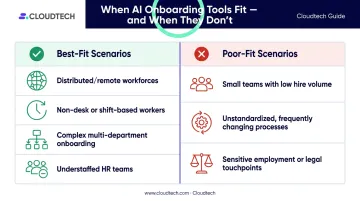
Best-fit scenarios:
- Distributed or remote-first workforces with no HR rep physically present
- Organizations onboarding non-desk or shift-based workers who cannot attend live orientation
- Companies with complex, multi-department onboarding that currently runs on email chains and manual follow-ups
- HR teams that are understaffed relative to hire volume
Where conversational AI alone is insufficient:
- Small teams with low, irregular hire volume where one HR conversation adds more value than any bot
- Organizations with unstandardized or constantly changing processes requiring frequent bot retraining
- Any onboarding touchpoint involving sensitive employment matters, legal disclosures, or emotional support
When hire volume is low and processes shift frequently, the setup and maintenance cost rarely justifies the return. Knowing where that line falls is what separates a useful deployment from an abandoned one.
What You Need Before You Start
Preparation directly affects implementation speed and post-launch performance. Teams that skip the groundwork phase consistently experience higher bot failure rates, lower satisfaction scores, and costly rework.
System and Integration Requirements
- A cloud infrastructure environment capable of hosting an NLP-based AI system (AWS-native environments work well here)
- API access to your existing HRIS, LMS, and IT provisioning tools
- A communication channel through which new hires will interact with the bot — Slack, Microsoft Teams, a web portal, or SMS
Content and Data Readiness
Your knowledge base must be clean, current, and comprehensive before any AI is trained on it. Incomplete or contradictory content produces inaccurate bot responses — and this is where most conversational AI onboarding deployments break down first.
Before training begins, confirm your content meets these standards:
- Complete: Covers all common new hire questions across IT, HR, benefits, and policies
- Current: Reflects your latest policies, tools, and compliance requirements
- Consistent: No conflicting information across documents or departments
- Structured: Organized in a format your AI platform can index and query reliably
Team Readiness and Governance
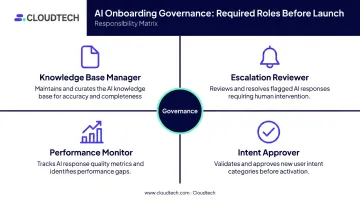
Define internal ownership before launch:
- Who manages and updates the knowledge base?
- Who reviews bot escalations?
- Who monitors performance metrics?
- Who approves new intents or workflow changes?
Without clear ownership, AI onboarding systems degrade quickly when policies change and no one updates the bot's content. Poor governance — not weak technology — is what causes most post-launch failures.
Key Variables That Determine Your Results
Two organizations can implement the same conversational AI platform and see dramatically different outcomes. These four variables explain most of the gap.
Knowledge Base Quality and Coverage
The bot can only answer what it has been taught. Gaps force it to either produce incorrect answers or deflect every query to a human — defeating the purpose of automation.
A well-structured, regularly audited knowledge base is the most consistent predictor of conversational AI success. The Lumeris case illustrates this clearly: their team grounded the assistant specifically in indexed People and Culture documents before rollout, producing over 90% accuracy from day one.
Escalation Path Design
New hires will always encounter questions the bot cannot handle. If the path from bot to human is unclear or slow, they lose confidence in both the AI and the HR function.
Define explicit escalation triggers before launch:
- The bot detects frustration signals or repeated failed queries
- The question involves legal, medical, or compensation topics
- The new hire explicitly requests a human
Always label AI interactions clearly. New hires should never be uncertain whether they are talking to a bot or a person.
HRIS Integration Depth
Without live data from HR systems, the bot cannot personalize responses by role, location, start date, or department. That makes it a generic FAQ machine. Deeper integration unlocks capabilities that change the experience entirely:
- Role-specific onboarding checklists tailored to each new hire's position
- Automatic IT provisioning triggers tied to start date and department
- Compliance deadline reminders matched to the individual's hire date
This is what separates a useful onboarding assistant from one that new hires stop trusting after day three.
Human Oversight and Review Frequency
Conversational AI trained on static content becomes inaccurate as policies, tools, and processes evolve. Organizations that treat the knowledge base as a living document — reviewed quarterly at minimum, updated as policies change — outperform those that treat launch as the finish line.
Without regular human review, outdated information erodes trust and can create compliance exposure.
Common Mistakes and How to Avoid Them
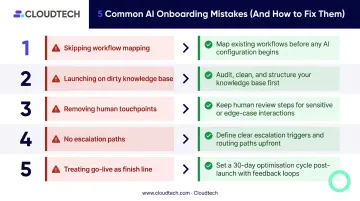
Most implementations stumble at the same predictable points. Here are the five most common mistakes — and how to sidestep each one.
Skipping workflow mapping before configuration. Teams that jump directly into bot setup end up with an AI that handles random queries but can't guide new hires through a coherent journey. Map the full onboarding workflow before touching any tool.
Launching on a dirty knowledge base. Outdated, incomplete, or contradictory documentation guarantees inaccurate bot responses. Audit all content first and designate a single verified source so only accurate documents feed the system.
Removing human touchpoints entirely. Over-automating onboarding — especially in the first week — damages belonging and engagement. Gallup research found employees were 3.4 times more likely to rate onboarding as successful when managers stayed actively involved. AI handles administrative friction; it doesn't replace human connection.
Skipping escalation paths and transparency standards. Bots that don't identify themselves as AI — or that leave new hires stuck with no way forward — create frustration that reflects badly on HR. Define escalation triggers before launch and always label AI interactions clearly.
Treating go-live as the finish line. Neglecting post-launch monitoring and content updates is the most common long-term failure mode. Assign a content owner, schedule quarterly reviews, and treat conversation logs as a continuous feedback source.
Conclusion
Automating employee onboarding with conversational AI works when the groundwork is solid — a clean knowledge base, mapped workflows, integrated HR systems, and clear escalation paths. Poor preparation, not the technology itself, is the root cause of most implementation failures.
The goal is not to replace the human elements of onboarding. It is to clear the administrative backlog so HR teams can spend their time on the conversations, relationships, and culture work that actually shape how new hires experience their first 90 days. Get the foundation right, and conversational AI frees HR to do what it does best.
Frequently Asked Questions
How do you automate the employee onboarding process?
Map your onboarding workflow and separate tasks into three buckets: rules-based, conversational, and human-required. From there, structure your knowledge base, configure a conversational AI platform with the right intents and escalation triggers, integrate with your HRIS, and run a pilot before scaling. The cleaner that separation between repetitive and judgment-heavy tasks, the better your automation performs.
Is real-time guidance a benefit of using conversational AI in onboarding?
Real-time guidance is one of the primary advantages. Conversational AI answers new hire questions at any hour, guides them through onboarding tasks step-by-step, and flags incomplete actions without requiring an HR rep to be available. This matters most for distributed teams spanning multiple time zones.
What tasks can a conversational AI chatbot handle during employee onboarding?
Common automatable tasks include answering policy and benefits FAQs, collecting and routing documents, triggering IT access provisioning, sending compliance training reminders, guiding new hires through enrollment steps, and delivering role-specific resources on demand. Sensitive topics — compensation, accommodations, legal disclosures — should always route to a human.
How do you ensure the conversational AI chatbot gives accurate, policy-compliant answers?
Ground the AI in a verified knowledge base using Retrieval-Augmented Generation (RAG), which ties responses to source documents rather than the model's training data alone. Run quarterly content reviews and assign a named content owner to keep documentation current and prevent outdated answers from reaching new hires.
Can small and mid-sized businesses realistically implement conversational AI for onboarding?
Yes, and more quickly than most expect. By working with an AWS-certified partner and using cloud-native AWS services, SMBs can deploy pre-built conversational AI solutions in weeks — not months. No in-house cloud or AI team required, and costs stay well below what enterprise projects typically demand.