Introduction
Most IT helpdesks are running on fumes. Agents spend their days answering the same password reset requests, processing access provisioning tickets, and triaging routine issues that look identical to the ones they handled last Tuesday. Meanwhile, employees wait hours — sometimes days — for resolutions to problems that should take minutes.
The volume problem is real and growing. HDI's 2024 benchmark study of 100+ technical support organizations found that 46% saw ticket volumes increase over the prior year, driven by new applications, devices, and expanded workforces.
That backlog has a measurable cost. Freshservice's 2024 ITSM benchmark — analyzing 167 million tickets across 9,442 organizations — put the average resolution time at 24.15 hours, with first response averaging nearly 11 hours.
Traditional ticketing systems were designed to organize that backlog, not eliminate it. Conversational AI takes a different approach: it resolves requests autonomously, routes the rest intelligently, and gives IT leaders the data to address root causes rather than just manage queues. This guide covers how it works and what it takes to deploy it effectively.
Key Takeaways
- Conversational AI handles IT requests through natural dialogue — understanding what users mean, not just the words they type
- It operates through four stages: intake, intent recognition, knowledge retrieval, and resolution or escalation
- Core capabilities include 24/7 availability, automated resolution, intelligent routing, and continuous learning
- Routine tickets — password resets, access provisioning, account unlocks — deliver the fastest, highest-value automation wins
- AWS-native services make full-featured conversational AI deployments accessible to SMBs without enterprise-level spending
What Is Conversational AI for IT Support?
Conversational AI for IT support uses NLP, machine learning, and automated workflows to handle employee IT requests through natural dialogue — replacing (or augmenting) the traditional submit-a-ticket, wait-for-a-response cycle.
It's not a FAQ bot — and that distinction matters more than most vendors let on.
| Rule-Based Chatbot | Conversational AI | |
|---|---|---|
| Interaction style | Scripted, keyword-triggered | Intent-driven, context-aware |
| Multi-turn dialogue | No | Yes |
| Action execution | No | Yes (via API) |
| Learns over time | No | Yes |
| Handles novel requests | No | Partially |
As TechTarget notes, static chatbots rely on predefined answers, while conversational AI uses NLP to analyze meaning and ML to learn from new interactions. That difference determines whether your system can actually resolve a request or just point someone to a knowledge article.
The combination of large language models, cloud infrastructure, and integration APIs has made it practical to connect conversational AI to real enterprise systems (Active Directory, ticketing tools, knowledge bases) and take action, not just provide answers.
Platform capabilities like RAG, backend-system integration, and generative AI are no longer on the roadmap. They're available now — which is exactly what makes this moment the right time to evaluate.
How Conversational AI Works in IT Helpdesk
Conversational AI handles IT support requests through four distinct stages — from the moment an employee types a question to the moment the issue is resolved or escalated. Here's how each stage works in practice.
Request Intake
An employee types or speaks their issue in plain language — "I can't log into the VPN" or "I need access to the shared marketing folder" — through Slack, Microsoft Teams, a web widget, or a voice interface. No form to fill out, no ticket category to guess.
The system begins processing immediately. Some implementations also operate proactively: when monitoring tools detect an anomaly (repeated failed logins, degraded application performance), the AI can reach out to affected users before they ever submit a request.
What this eliminates:
- Context-switching to a separate IT portal
- Waiting for a confirmation email
- Manually selecting ticket categories
Intent Recognition and Knowledge Retrieval
The NLP engine parses the message, identifies the intent, and extracts relevant entities — user ID, system name, error code, affected application. It then queries connected knowledge bases or system APIs to find a resolution path.
One important detail: the system improves with use. Atlassian's Jira Service Management documentation notes that virtual agents use ML to recognize intents even when messages don't match stored examples exactly. Each real request from your employees makes the model sharper — not just hypothetical training data.
Escalation Logic and Human Handoff
When the AI's confidence falls below a defined threshold — or the issue requires human judgment (security incidents, hardware failures, novel errors) — it escalates to a live agent. The full conversation context transfers with it, so the agent picks up without asking the employee to repeat themselves.
This stage is where many deployments succeed or fail. A poorly configured handoff — wrong team, no context, delayed routing — erodes trust in the entire system. Atlassian's escalation policy framework identifies three standard models: hierarchical, functional, and automatic. Organizations that map these paths before go-live avoid the most common source of post-launch complaints.
Resolution and Output
The system delivers one of three outcomes:
- Automated resolution — password reset completed, account unlocked, software provisioned via API
- Guided self-service — step-by-step walkthrough the employee completes themselves
- Contextualized escalation — a fully documented ticket handed to the right team
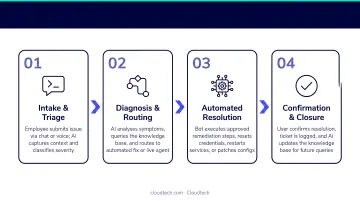
First-contact resolution rate, mean time to resolution (MTTR), and ticket deflection rate are the primary metrics that reflect how well each stage is performing.
Key Capabilities That Power IT Helpdesk Automation
Intelligent Ticket Routing and Classification
Incoming requests are automatically categorized by issue type, urgency, and affected system, then routed to the correct team or resolved autonomously. This eliminates manual triage — the step that consumes disproportionate amounts of IT staff time early in every shift.
Effective routing requires training the model on your organization's specific taxonomy. A generic model won't know that "can't reach the portal" means the customer-facing app team in your environment, not the network team.
Self-Service and Knowledge Base Integration
The AI surfaces relevant documentation, step-by-step guides, and past resolution notes in real time. Freshservice's 2024 benchmark reported approximately 53% ticket deflection for generative-AI-powered self-service — meaning more than half of requests never required agent involvement at all.
Common self-resolvable issues include:
- VPN setup and troubleshooting
- Software access requests
- Printer configuration
- New device onboarding steps
- Known error walkthroughs
Workflow Execution and System Integration
Unlike basic chatbots that surface recommendations, advanced conversational AI executes actions directly via API integrations. ServiceNow's documentation confirms Virtual Agent conversations can complete password resets, password changes, and account unlocks without human intervention.
Other executable actions typically include:
- Provisioning software licenses
- Updating ITSM records
- Submitting procurement requests
- Triggering automated diagnostics
Analytics and Insight Generation
Every interaction is logged, building a structured dataset across four dimensions: ticket volume patterns, common failure points, unresolved query types, and user satisfaction signals.
This shifts IT leadership from reactive ticket management to systemic problem-solving. Instead of resolving the same VPN issue every Monday, you can trace it to its source and fix it once.
How Conversational AI Transforms IT Support Operations
From Reactive to Proactive Support
Traditional helpdesks respond to reported problems. When conversational AI connects to monitoring systems, it detects anomalies and notifies affected users before a ticket is submitted. A Moveworks analysis of 200+ organizations found non-AI companies averaged over 30 hours MTTR, while AI-enabled organizations achieved under 15 hours — a gap that adds up to hundreds of hours lost across a year's worth of incidents.
Shifting Agent Workload
Password and MFA-related requests alone account for a significant share of helpdesk volume. A Gartner Peer Community poll of 251 participants found 36% reported 10–20% of help desk calls are password/MFA related, with 21% reporting that figure reaches 21–30%.
Three benchmark data points show where automation has the most traction:
- Level 1 resolution rate averages 18.6% across organizations (MetricNet), ranging from 4% to 37%
- Top ticket categories are Software & Applications (38.2%), Onboarding/Offboarding (16.6%), and IAM (15.9%) — Fixify's 2026 report, based on 50,000+ tickets across 30+ organizations
- Password/MFA requests represent up to 30% of total helpdesk volume in many environments
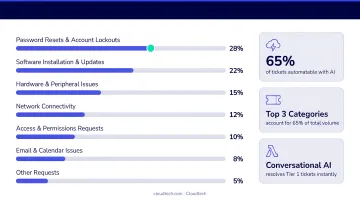
Handle those autonomously, and IT staff redirect their time toward complex incidents, infrastructure work, and higher-value projects.
24/7 Coverage Without Shift Constraints
For distributed teams and remote workforces, the morning ticket backlog is a real drag — every overnight issue sits unresolved until agents clock in. Conversational AI handles those requests in real time, across every time zone, without shift constraints. The queue shrinks before the workday begins.
Scalability Without Proportional Headcount
As headcount grows, ticket volume grows. A conversational AI system handles increased volume without requiring additional Tier 1 agents. For SMBs that can't justify hiring multiple support staff, this is particularly relevant — the system scales with the business rather than requiring a hiring cycle every time a new product line or location is added.
Cloudtech's conversational AI implementations for SMBs are built on Amazon Lex, Amazon Connect, and AWS Lambda — an AWS-native stack that integrates with existing ITSM tools and scales as the organization grows. Because it's built on infrastructure SMBs likely already use, deployment costs stay well below what enterprise-grade platforms typically require.
Implementing Conversational AI for IT Support on AWS
The Core AWS Service Stack
A production-grade conversational AI IT support system on AWS uses four services working together:
| Service | Role |
|---|---|
| Amazon Lex | Natural language understanding and conversation management |
| AWS Lambda | Serverless workflow execution (password resets, provisioning, ITSM updates) |
| Amazon Connect | Voice-channel support for employees who prefer calling |
| Amazon Bedrock | Large language model integration for generative AI capabilities and knowledge retrieval |
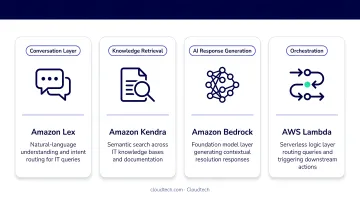
An AWS blog post from January 2025 demonstrates how Amazon Lex and Amazon Bedrock can be integrated to deliver LLM-powered omnichannel support experiences — covering both chat and voice without separate platform purchases.
Implementation Prerequisites for SMBs
Organizations that deploy narrowly and expand consistently outperform those that try to automate everything in the first phase. Before implementation begins, four things need to be in place:
- A structured knowledge base — even a basic one. The AI can only retrieve what's been documented.
- Defined escalation paths — which issues go to which team, and under what conditions
- Integration with at least one ticketing system — ServiceNow, Jira, or Zendesk
- A prioritized list of the top 10–15 most common IT requests — these become the first automation targets
A focused initial deployment covering those top use cases can typically go live in 4–8 weeks with proper preparation. Broader rollouts that include additional integrations or more complex workflows generally take 2–4 months.
AWS Partner Funding and Cost Access
As an AWS Advanced Tier Partner — and one of only 26 global partners selected for the AWS Small Business Acceleration Initiative — Cloudtech can help qualifying SMBs access AWS Partner Funding that may significantly offset or eliminate out-of-pocket implementation costs.
If budget is the primary barrier to deploying conversational AI, explore AWS Partner Funding before ruling out enterprise-grade capability. The path to automation is often more accessible than it appears.
Frequently Asked Questions
What is the difference between a chatbot and conversational AI for IT support?
Rule-based chatbots follow scripts and match keywords to predefined responses — they break the moment a user phrases something differently. Conversational AI understands intent, maintains context across a multi-turn conversation, and can execute backend actions like resetting passwords or provisioning access. In practice, that difference shows up in ticket deflection rates: rule-based bots typically resolve fewer than 20% of requests, while conversational AI regularly handles 60–70%.
What types of IT issues can conversational AI resolve without human involvement?
Common automatable Tier 1 tasks include password resets, account unlocks, software access provisioning, VPN troubleshooting, hardware request logging, and step-by-step walkthroughs for known errors. Tier 1 tickets typically account for 40–60% of total helpdesk volume, so automating even a portion delivers meaningful capacity back to your support team.
How does conversational AI handle sensitive or security-related IT requests?
Well-configured systems include role-based access controls and identity verification steps — such as MFA confirmation before executing provisioning actions — and automatically escalate security-sensitive requests to human agents.
What AWS services are used to build conversational AI for IT support?
The core services are Amazon Lex for natural language understanding, AWS Lambda for serverless workflow execution, Amazon Connect for voice-channel support, and Amazon Bedrock for LLM and generative AI integration. An AWS partner can configure these to work with your existing ITSM platform.
How long does it take to deploy conversational AI in an IT support environment?
A focused initial deployment covering the top 10–15 use cases can go live in 4–8 weeks. Broader rollouts with more complex integrations typically take 2–4 months depending on the number of connected systems.
Is conversational AI for IT helpdesk viable for small and mid-sized businesses?
Yes. AWS-native services make production-grade conversational AI accessible without enterprise infrastructure. AWS Partner Funding through firms like Cloudtech can further reduce or eliminate implementation costs for qualifying SMBs — meaning a deployment that would have cost six figures three years ago can often be completed for a fraction of that today.