Introduction
Sales reps spend a disproportionate amount of time chasing contacts who were never going to buy. Manual lead qualification is slow, inconsistent, and blind to timing — and the timing problem is significant. Research from InsideSales analyzing 5.7 million inbound leads across 400+ companies found that conversion rates are 8x higher when a lead is engaged within the first five minutes — yet only 0.1% of inbound leads receive that level of response speed.
Speed alone doesn't capture the full picture. A separate analysis of more than 30 million B2B conversations found that 39% of conversations and 41% of booked meetings happened outside standard 9–5 EST business hours — windows where no human rep is available to respond.
AI chatbots exist to close that gap. This guide covers the specific mechanisms behind how they work: behavioral triggers, conversational data collection, automated scoring models, and CRM handoff.
Key Takeaways
- AI chatbots engage visitors through behavioral triggers, not passive pop-ups — timing matters
- Contact data and intent signals are both captured through natural, conversational exchanges
- Automated qualification uses frameworks like BANT paired with lead scoring models
- All data syncs to CRM in real time, eliminating manual entry and enabling instant routing
- Chatbot-to-sales handoffs accelerate follow-up speed and reduce lead response lag
What Are AI Lead Capture Chatbots?
An AI lead capture chatbot is a conversational system deployed on a website or digital channel that engages visitors in real time, collects prospect information, and assesses buying intent. It then routes qualified leads to a sales team automatically — no human required on standby, around the clock.
Why They Exist
Traditional contact forms have two fundamental problems: low completion rates and zero qualification capability. A form collects whatever the visitor decides to type. It cannot probe for budget, adapt based on company size, or recognize urgency in how someone phrases a question.
Live chat solves the adaptability problem but reintroduces the availability problem. Someone has to be there.
AI chatbots handle both — combining 24/7 availability with dynamic, context-sensitive conversation.
What They Are Not
Rule-based bots and conversational AI are not the same thing. Rule-based bots follow fixed decision trees: if a visitor clicks option A, the bot says X; if they click option B, the bot says Y. The conversation is entirely predetermined.
Conversational AI works differently. As Gartner describes, it uses natural-language technologies and composite AI to interpret free-form input and adapt responses dynamically. This means combining generative AI, rule-based methods, and machine learning. The visitor types naturally; the system understands intent rather than pattern-matching keywords.
In practical terms, the two approaches differ across every key dimension:
- Input method: Rule-based bots require button clicks; conversational AI accepts typed, natural language
- Flexibility: Rule-based paths are fixed; conversational AI adapts mid-conversation based on context
- Qualification depth: Rule-based bots capture what's scripted; conversational AI probes and follows up dynamically
- Scalability: Rule-based logic breaks with edge cases; conversational AI handles unexpected responses
The same chatbot can serve pre-sale lead generation and post-sale customer support. For SMBs running lean teams, that dual-purpose capability cuts tool costs without sacrificing coverage.
How AI Chatbots Capture Lead Information
AI chatbots don't sit and wait — they operate through a defined engagement sequence, collecting information without disrupting the visitor experience.
Initiation: Behavioral Triggers and When to Engage
Chatbots don't have to fire the moment a page loads. They can be activated by behavioral signals:
- Time on page — a visitor spending 45 seconds on the pricing page signals higher intent than someone who just landed
- Return visits — a second or third visit suggests active consideration
- Traffic source — a visitor arriving from a targeted ad campaign warrants a different opening than organic search traffic
- Scroll depth — reading 80% of a features page indicates genuine interest
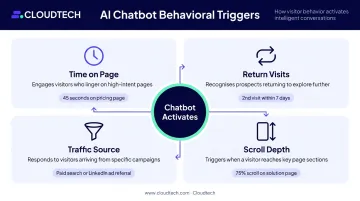
Initiation can be manual (visitor clicks the widget), automated (trigger fires after a defined condition is met), or continuous (chatbot re-engages returning visitors using stored session data).
For example: a visitor returning to a pricing page for the second time triggers a message referencing their prior visit and offering to answer specific questions. The right trigger timing varies — a SaaS pricing page behaves differently than a healthcare services inquiry form, so test what prompts engagement for your specific audience.
Conversational Data Collection
Once engaged, the chatbot collects two types of data simultaneously:
Explicit data — information the visitor directly provides:
- Name, email, company name, job title
- Team or company size, industry
- Budget range, decision timeline
Implicit signals — what the conversation reveals without being asked directly:
- Urgency cues ("we need this before Q4")
- Specificity of questions (broad curiosity vs. integration-specific questions)
- Hesitation patterns or sudden disengagement
That combination of stated facts and behavioral signals is what makes chatbot-collected data more useful than a static form. Progressive profiling takes it further across multiple visits.
Progressive Profiling Across Sessions
A well-configured chatbot doesn't demand all information in a single conversation. The progressive profiling approach — collecting data across multiple interactions rather than front-loading every question — reduces drop-offs by keeping any single conversation short.
On a return visit, the chatbot recalls prior answers and picks up where the last session ended. If a visitor already provided their company size and industry, those questions don't appear again. Only new qualification fields are surfaced.
Real-time validation runs throughout: the system flags incorrect email formats or invalid phone numbers mid-conversation, so the CRM receives clean data from the start.
How AI Chatbots Qualify and Score Leads
Once data is captured, qualification happens automatically — through signal analysis, scoring models, and conditional question logic that work faster than any human intake process.
Lead Qualification Signals
Three types of signals feed into qualification:
| Signal Type | What It Captures | Examples |
|---|---|---|
| Firmographic | Company profile fit | Industry, company size, revenue, tech stack |
| Intent | Stated buying signals | Budget mentioned, timeline given, specific integration questions |
| Engagement micro-signals | Behavioral indicators | Response speed, depth of answers, question focus |
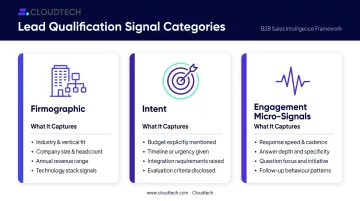
Firmographic data is often enriched automatically from third-party databases. That means a chatbot may already know a visitor's company size, industry, and tech stack before they type a single word — and can tailor its opening questions accordingly.
The BANT Framework in Conversation
BANT — Budget, Authority, Need, and Timeline — is the standard framework for assessing whether a lead is worth pursuing. AI chatbots embed these criteria conversationally rather than firing them as a rigid checklist.
Instead of asking "What is your budget?" the chatbot might ask "Are you currently evaluating options, or is this more exploratory?" — and use the response to inform whether a budget question is appropriate next.
Conditional logic prevents irrelevant questions entirely:
- A solo founder doesn't get asked about team procurement processes
- A visitor who mentions a six-month timeline gets different follow-up than one who says "we need this now"
- If budget has already been established, those questions are skipped on return visits
Scoring Models and Automated Routing
Scoring assigns numerical values combining profile fit and behavioral signals, producing a lead tier that triggers a specific downstream action:
- Hot lead → immediate sales team notification or direct calendar booking
- Warm lead → enrollment in a nurture sequence with scheduled follow-up
- Low-fit contact → routed to self-service resources, no sales time spent
A 2025 peer-reviewed study using 23,154 CRM records from one B2B software company found that a gradient boosting classifier achieved 98.39% accuracy and a 0.9891 ROC AUC score in lead prioritization — though this represents a single-company technical case, not a universal benchmark.
Over time, machine learning refines the scoring model automatically — patterns that consistently precede closed deals get weighted more heavily, while signals correlated with low-quality leads lose influence. Sales teams benefit from a system that gets sharper with every cycle, without anyone touching the configuration.
CRM Integration, Lead Routing, and Personalization
Real-Time CRM Sync
The moment a conversation ends, the chatbot maps captured fields directly to CRM records — whether in Salesforce, HubSpot, Pipedrive, or another platform. What syncs automatically:
- Contact fields (name, email, company, role, company size)
- Full conversation transcript
- Lead score and tier assignment
- Firmographic enrichment data
This happens without any manual data entry. Sales reps open a CRM record and find a complete picture: what the prospect said, what signals they showed, and what the scoring model determined. McKinsey estimates that automated lead-management solutions — covering identification, prioritization, routing, and opportunity management — can increase reps' selling time by 15%–20%, though that gain reflects the broader automation stack, not chatbot data entry alone.
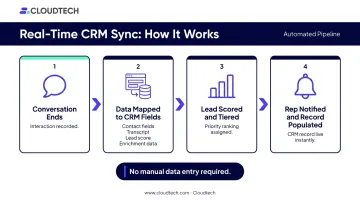
Bi-directional sync ensures returning visitors are never asked for information already on file. If a prospect already exists in the CRM, their record is updated rather than duplicated.
Personalization Within the Conversation
Dynamic tokens let the chatbot reference earlier answers mid-conversation — "Since you mentioned your team is around 50 people, our mid-market configuration might be the better fit" — rather than treating every interaction as if it started from zero.
Source-based customization adjusts messaging based on how a visitor arrived. Someone who clicked a targeted ad for a specific product gets a different opening than someone who found the site through an organic search. The conversation stays relevant to where the visitor is in their decision process.
The Infrastructure Behind Reliable Integration
Running these integrations reliably at scale requires a stable cloud backend. The chatbot platform is the front-end layer, but the data handling, API calls to CRM systems, and event-driven workflows that keep everything in sync run on cloud infrastructure underneath.
For SMBs without internal engineering teams, this is where the complexity concentrates. The core technical tasks involved include:
- Building Lambda functions that trigger CRM API calls on conversation completion
- Configuring API Gateway endpoints for reliable webhook delivery
- Managing data pipelines that route lead information to the right CRM fields
None of it is straightforward to build from scratch — which is why most SMBs rely on chatbot platforms that bundle this infrastructure or on AWS consulting partners who specialize in serverless integration architecture.
Conclusion
AI chatbot lead capture works because every component has a defined job: behavioral triggers start the conversation, NLP-driven dialogue gathers what matters, scoring models rank intent, and CRM integration gets the right contact to the right rep. The system runs continuously — but only as well as it's been configured.
Configuration quality determines whether all of this actually works. Businesses that understand how each component functions can define cleaner ICP rules, set up scoring models calibrated against actual close rates, and close the gaps that let qualified leads slip through.
A practical starting point:
- Map your highest-intent pages and identify where qualified visitors drop off
- Define what a qualified lead actually looks like for your sales team — in specific, measurable terms
- Work backwards into the trigger conditions and qualification questions that surface those leads reliably
Frequently Asked Questions
How do you use AI to prequalify leads?
Configure the chatbot with ICP-based rules — company size, budget range, decision-making authority, and timeline — so it asks targeted questions and scores responses automatically. Leads that meet the threshold get routed to sales; those that don't get placed into nurture sequences, with no human review required.
Which AI tools can generate leads?
Purpose-built B2B chatbot platforms include Drift, Intercom, and HubSpot, each with lead capture and qualification functionality. The right choice depends on your CRM, sales process complexity, and whether you need B2B or B2C qualification logic.
What is the difference between lead capture and lead qualification in a chatbot?
Lead capture is collecting contact details and initiating a conversation. Lead qualification is assessing whether that contact fits your ideal customer profile. Qualification requires scoring logic and BANT-style questioning — capabilities basic rule-based bots don't have.
What data do AI chatbots collect from website visitors?
AI chatbots collect explicit data (name, email, company, role, budget, timeline) alongside implicit signals like urgency in phrasing, question specificity, and engagement depth. Enrichment integrations can also append firmographic data from third-party sources automatically.
How do AI chatbots integrate with CRM systems?
Chatbots map conversation fields directly to CRM records and sync in real time — either natively if the chatbot is built into the CRM platform, or via API and integration layer. Bi-directional sync ensures returning visitors aren't asked for information already on file.
What is the BANT framework, and how do chatbots use it?
BANT stands for Budget, Authority, Need, and Timeline — a qualification framework for assessing financial fit, buying authority, problem-solution fit, and purchase timing. AI chatbots embed these criteria conversationally using conditional logic, so only relevant questions appear based on what the visitor has already shared.