The concept sounds simple. In practice, results vary significantly based on which architecture pattern you choose, how you configure IAM, which model you select, and how well your prompts are structured. Each decision compounds on the others.
This guide covers when serverless Bedrock makes sense, exactly what to build and in what order, the variables that control performance, and the mistakes most teams make before getting it right.
Key Takeaways
- Three patterns handle most use cases: Lambda Function URLs for prototypes, API Gateway WebSockets for chat, and AppSync subscriptions for multi-user apps
- IAM permissions scoped to specific model ARNs are non-negotiable; least privilege prevents costly misconfigurations
- Lambda's default 3-second timeout will silently kill every Bedrock inference request; set it to 60–120 seconds minimum
- Streaming via
InvokeModelWithResponseStreamis an architectural requirement, not an afterthought — it's what makes LLM responses feel responsive - Pay-per-token pricing makes serverless Bedrock significantly more cost-efficient than always-on infrastructure for variable workloads
How to Build a Serverless LLM App with Amazon Bedrock
Step 1: Enable Amazon Bedrock Access and Configure IAM
Most commercial AWS regions now enable access to foundation models by default when your role has the required AWS Marketplace permissions. The exceptions matter: Anthropic models require a one-time use-case submission before your first invocation, and GovCloud accounts require enablement through a linked commercial account.
Check the Model access section of the Bedrock console before writing a single line of code. Skipping this is the most common reason first invocations fail silently.
For IAM, create or update your Lambda execution role with these permissions:
bedrock:InvokeModel— for synchronous, non-streaming callsbedrock:InvokeModelWithResponseStream— for token-by-token streaming
Don't wildcard the resource ARN. Scope both permissions to specific foundation model ARNs (for example, arn:aws:bedrock:*::foundation-model/anthropic.claude-...). The AWS Security Blog's least-privilege guidance is explicit on this: model-scoped allowlists are the correct pattern, not account-wide Bedrock access.
Use the IAM Policy Simulator to verify the role before deployment, not after your first invocation fails.
Step 2: Choose Your Serverless Architecture Pattern
Three patterns cover virtually every serverless Bedrock use case:
| Pattern | Best For | Key Constraint |
|---|---|---|
Lambda Function URLs + RESPONSE_STREAM |
Prototypes, single-user Q&A tools | Manual auth/CORS design required |
| API Gateway WebSocket + Lambda + DynamoDB | Multi-turn chat with session state | More connection-state plumbing |
| AWS AppSync GraphQL subscriptions | Multi-user apps, GraphQL clients | Schema and resolver complexity |
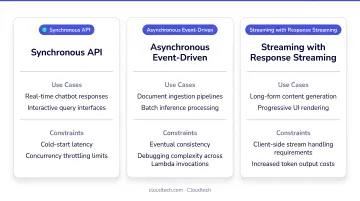
The critical differentiator between patterns is timeout exposure. API Gateway HTTP APIs have a 30-second maximum integration timeout — for longer LLM responses, streaming is the only way to stay within that ceiling.
Lambda Function URLs with RESPONSE_STREAM invoke mode bypass this constraint entirely. They're not API Gateway integrations, so API Gateway timeout quotas don't apply.
For authentication:
- Lambda Function URLs — manually verify the Cognito JWT inside the Lambda handler
- WebSocket APIs — attach a Lambda REQUEST authorizer to the
$connectroute - AppSync — set the API's default auth mode directly to Cognito User Pool (simplest path)
Step 3: Build and Deploy the Lambda Function
Your Lambda handler needs to do three things: parse the incoming prompt, invoke Bedrock via the AWS SDK, and return the response.
For streaming (Node.js):
export const handler = awslambda.streamifyResponse(async (event, responseStream) => {
  const response = await bedrockClient.send(new InvokeModelWithResponseStreamCommand({...}));
  for await (const chunk of response.body) {
    responseStream.write(chunk.chunk.bytes);
  }
  responseStream.end();
});
Node.js managed runtimes support response streaming natively with awslambda.streamifyResponse(). Python requires either a custom runtime or the Lambda Web Adapter — making Node.js 18+ the simpler starting point for most teams.
Before moving to configuration, confirm your function's invoke mode is set to RESPONSE_STREAM in the Function URL settings, or streaming won't activate regardless of your handler code.
Configuration settings that matter:
- Timeout: Lambda's default is 3 seconds; the maximum is 900 seconds. Set at least 60–120 seconds for Bedrock workloads
- Environment variables: model ID, AWS region, DynamoDB table name (if storing conversation history)
- Memory: size based on your expected workload; streaming reduces peak memory pressure since you're not buffering the full response
Step 4: Connect the Frontend and Secure with Authentication
Deploy your chosen API layer (Function URL, WebSocket API, or AppSync endpoint) and integrate it with the Lambda function. For each:
- CORS: Lambda Function URLs and HTTP APIs both support CORS configuration natively; REST APIs with Lambda proxy integration require the Lambda to return CORS headers directly
- Frontend hosting: React apps hosted on Amazon S3 with CloudFront as CDN is the standard pattern — CloudFront handles SSL termination and edge caching
For Cognito JWT verification:
- AppSync handles this natively when you set Cognito User Pools as the default authorization mode — no custom code required
- WebSocket APIs need a Lambda authorizer attached to
$connectthat validates the JWT passed as a query parameter at connection time - Lambda Function URLs require manual JWT verification inside your handler: validate the signature against the JWKS endpoint, then check expiration, issuer, and audience claims
Never expose your Bedrock endpoint without authentication. An open endpoint is an open billing account.
When Should You Build Serverless LLM Apps with Amazon Bedrock?
Serverless Bedrock suits some AI projects well and falls short on others. Knowing which camp you're in before you build saves time and cost.
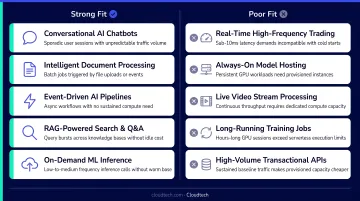
Strong fit:
- Usage is intermittent or unpredictable (pay-per-invocation beats always-on costs)
- The team lacks dedicated ML infrastructure expertise
- Time-to-deployment matters more than deep model customization
- Use cases like AI chatbots, document summarization, customer support automation, content generation, and internal knowledge base Q&A
This is particularly true for SMBs in healthcare, financial services, and SaaS that need AI capabilities without a dedicated ML team. IDC research shows AI moved from third to first among SMB forward-looking technology priorities between 2024 and 2025. The pay-per-use model is a key driver of that shift, lowering the barrier for teams that can't justify dedicated infrastructure costs.
Not every workload belongs here, though. Serverless Bedrock is a poor fit when:
- Applications requiring heavily customized or fine-tuned models (SageMaker is the better path)
- Workloads demanding sub-100ms latency at massive, consistent scale
- Data residency or regulatory constraints requiring fully private model hosting
Key Variables That Affect Performance
Once the architecture works, these four variables determine whether your app is actually good.
Foundation Model Selection
Bedrock offers models from Anthropic (Claude), Amazon (Titan), Meta (Llama), Mistral, AI21 Labs, Cohere, and a growing list of other providers. When choosing a model, evaluate these factors:
- Context window size: Claude's default is 200,000 tokens, with Sonnet 4 and 4.5 offering 1 million tokens in preview — larger windows mean more conversation history per request
- Reasoning quality: Models vary in how well they handle multi-step logic, factual accuracy, and nuanced instructions
- Per-token cost: Check the Bedrock pricing page at build time — rates change and vary significantly across providers
- Regional availability: Not every model is available in every AWS region; confirm support before architecting around a specific choice
Temperature and Inference Parameters
These parameters control the character of model outputs and directly affect cost:
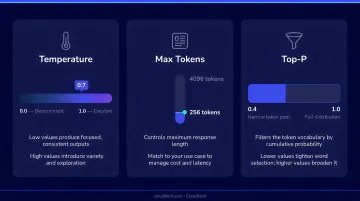
- Temperature (0–1): Lower values (0.1–0.3) produce consistent, deterministic outputs — correct for customer support and factual Q&A. Higher values (0.7–0.9) improve variety for creative or generative tasks
- max_tokens: Caps response length. Setting this too high on every request inflates cost even when the model produces short answers — size it to your actual use case
- top_p / top_k: Shape token sampling probability. For Claude specifically, AWS recommends adjusting either
temperatureortop_p, not both simultaneously
Streaming vs. Non-Streaming
Non-streaming calls InvokeModel and returns the full response at once. Users wait 10–30 seconds staring at a blank screen. That's a product-killing experience for chat interfaces.
Streaming via InvokeModelWithResponseStream delivers tokens as they're generated, improving perceived performance. AWS Lambda documentation specifically notes that response streaming improves time to first byte for latency-sensitive applications.
The catch: streaming requires architectural support. You can't toggle it at the SDK level without updating your Lambda handler and your infrastructure layer (Function URL streaming mode or WebSocket push).
Prompt Engineering Quality
Your model and infrastructure create the conditions for good output. Your prompts determine the actual quality of what users see.
Effective system prompts include:
- A clear role definition for the model
- Output format requirements (JSON, markdown, specific structure)
- Relevant context scoped to the use case
- Constraints that prevent hallucination or off-topic responses
Context window management matters for multi-turn chat: including more conversation history improves coherence but increases token count and cost per call. Design a truncation strategy before you hit production.
Common Mistakes and How to Troubleshoot Them
Most serverless Bedrock failures trace back to a handful of recurring issues. Here's what to watch for and how to fix each one.
Missing or Misconfigured IAM Permissions
The Lambda execution role is missing bedrock:InvokeModel or bedrock:InvokeModelWithResponseStream, or the resource ARN is inconsistently scoped.
Check model access status in the Bedrock console under "Model access." Test the IAM policy using the AWS IAM Policy Simulator. Confirm the execution role ARN includes Bedrock permissions scoped to the correct model and region.
Lambda Timeout Exceeded
The default Lambda timeout is 3 seconds. LLM inference regularly takes 15–30+ seconds. The function fails silently and you get no useful error.
Set Lambda timeout to at least 60–120 seconds for Bedrock workloads. Enable response streaming to avoid hitting API Gateway's integration timeout. Monitor average response times in CloudWatch and add meaningful headroom above your p95.
Poor UX from Unstreamed Responses
Your Lambda calls InvokeModel synchronously, buffers the full response, then returns it — causing a 10–30 second unresponsive delay for every query.
Switch to InvokeModelWithResponseStream. Update the architecture to support streaming at the infrastructure level. Verify the client is reading chunks as they arrive, not buffering the full response before rendering.
Cold Start Latency Compounding with Inference Time
Lambda cold starts add initialization latency on top of Bedrock's inference time, creating spiky response times during low-traffic periods or after idle.
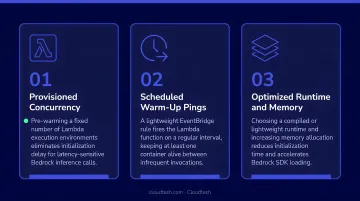
Three options help here:
- Use Lambda Provisioned Concurrency for latency-sensitive production workloads — it initializes execution environments before invocations arrive
- Enable Lambda SnapStart where available for sub-second startup without code changes
- Keep your Lambda deployment package lean; large dependency bundles extend cold start duration
Frequently Asked Questions
What AWS services are required to build a serverless LLM app with Amazon Bedrock?
The core stack is Amazon Bedrock (FM access), AWS Lambda (compute), and either API Gateway or AppSync (API layer). Add Amazon Cognito for authentication, DynamoDB if you're storing conversation history, and S3 with CloudFront for static frontend hosting.
How much does it cost to run a serverless LLM app on Amazon Bedrock?
Bedrock uses on-demand token-based pricing — you pay per input and output token, with rates varying by model. Lambda costs are based on request count and compute duration; API Gateway charges per request or message.
Does Amazon Bedrock support real-time response streaming?
Yes. Bedrock supports streaming via InvokeModelWithResponseStream, and clients receive tokens progressively as they're generated. Your infrastructure must also be configured for it — Lambda Function URLs (RESPONSE_STREAM mode), API Gateway WebSocket, or AppSync subscriptions — since changing only the SDK call isn't enough.
How do I secure a serverless Amazon Bedrock application?
Three layers: IAM permissions scoped to specific model ARNs (least privilege), Amazon Cognito for user authentication with JWT validation (natively in AppSync, via Lambda Authorizer for WebSocket, or manually for Function URLs), and no public or unauthenticated access to any API endpoint.
What foundation models are available on Amazon Bedrock?
Bedrock includes models from Anthropic, Amazon, Meta, Mistral, AI21 Labs, Cohere, DeepSeek, Google, and xAI. Availability varies by AWS region, so check the regional compatibility docs before finalizing your architecture. Anthropic models require a use-case submission to unlock access in the console.
Building a serverless LLM app with Amazon Bedrock is well within reach for SMBs and startups. The difference between a working prototype and a production-ready app usually comes down to architecture decisions, security layering, and model parameter tuning — none of which are obvious the first time through.
Teams moving into production — especially in regulated industries like healthcare or financial services — benefit from working with AWS-certified partners who've navigated these decisions before. Cloudtech's AWS-certified architects help SMBs design and deploy production-grade Bedrock applications using proven serverless patterns. Cloudtech has delivered Bedrock-powered solutions achieving outcomes like p95 feedback latency under 4 seconds, 45% reductions in support tickets, and roughly 40% lower operational overhead — often with AWS Partner Funding that reduces or eliminates out-of-pocket costs for qualifying SMBs.