AWS provides the right services for this architecture, but the results vary widely. Chunk size, embedding model choice, IAM configuration, document quality — get any of these wrong and the chatbot either returns irrelevant answers or breaks entirely. Gartner predicted that by 2026, more than 80% of enterprises would have used generative AI APIs or deployed GenAI-enabled applications — and most are discovering that production-ready deployment is significantly harder than the proof-of-concept.
This guide covers what RAG is, which AWS services are required, a step-by-step build process, key performance parameters, common mistakes, and when it makes sense to build versus partner.
Key Takeaways
- A RAG chatbot combines Amazon Bedrock (LLMs + embeddings) with Amazon OpenSearch (vector store) to answer questions from your own documents
- Core services: Bedrock, Lambda, OpenSearch, DynamoDB, and S3, with LangChain handling orchestration
- Chunk size, embedding model, retrieved document count (k), and document quality are the primary performance levers
- IAM least-privilege access and DynamoDB-backed conversation memory are required for any production deployment
- SMBs can prototype fast — production adds real complexity in scaling, security, and CI/CD
What You Need Before Building
Skipping prerequisite setup is the fastest path to permission errors, indexing failures, and wasted debugging time. Get these in place first.
AWS Account and Permissions
Configure IAM roles before touching any other service. At minimum:
- Lambda execution role with access to Bedrock, S3, OpenSearch, and DynamoDB
- Bedrock model access enabled — most foundation models are available by default in commercial regions, but Anthropic Claude models require completing a First Time Use form before invocation
- Region selection confirmed — not all Bedrock models are available in every region; check the AWS Regional availability matrix before provisioning other services
A SageMaker notebook or local Python environment is required for the document indexing phase.
Source Documents and Data Readiness
Your documents directly determine answer quality. A well-built RAG system on poorly prepared documents will still produce poor results.
- Use clean, well-structured text-based files (PDFs, Word docs, plain text)
- Scanned images without OCR cannot be chunked or embedded — preprocess them first
- Narrow, relevant document sets outperform large, unfocused collections
- Remove duplicate, outdated, or off-topic content before indexing
Technical Skills Required
This stack requires familiarity with:
This stack requires familiarity with:
- Python for scripting indexing pipelines and Lambda functions
- AWS IAM for configuring roles, policies, and least-privilege access
- LangChain for orchestrating retrieval chains and prompt templates
Teams without this background should budget time for ramp-up or consider working with an AWS-certified partner. Misconfigured IAM alone can create both security gaps and extended debugging cycles.
How to Build a Custom RAG Chatbot on AWS
Step 1: Set Up Your AWS Environment and Enable Foundation Models
Start with your AWS account and IAM structure. Create execution roles for Lambda with specific permissions scoped to Bedrock, S3, OpenSearch, and DynamoDB — not wildcard access.
Navigate to the Amazon Bedrock console to verify model availability in your chosen region. Most foundation models are available by default, but Anthropic Claude models require additional approval (a use-case form) before you can invoke them. Confirm this before building around Claude.
Available foundation models on Bedrock include providers like Amazon, Anthropic, Cohere, Meta, Mistral AI, and others. For a RAG stack, you typically need two model types:
- An embedding model — Amazon Titan Text Embeddings or Cohere Embed v4 for converting documents and queries to vectors
- A generative model — Anthropic Claude for generating answers from retrieved context
Step 2: Configure Your Vector Store with Amazon OpenSearch Service
Create an OpenSearch domain (managed) or serverless collection from the AWS console. For testing in an SMB context, a single-node domain with minimum EBS storage keeps costs manageable. Note the domain endpoint — you'll reference it throughout the build.
Critical index configuration:
OpenSearch must be configured with a KNN-enabled index. The index must:
- Set
index.knntotrue - Use a
knn_vectorfield type - Match the vector dimension of your embedding model exactly
Dimension mismatch is a common cause of indexing failures. Amazon Titan Text Embeddings G1 outputs 1,536-dimensional vectors; Titan Text Embeddings V2 defaults to 1,024 (with 512 and 256 also supported). Set your index dimension before indexing a single document.
For authentication, configure AWS Signature Version 4 (AWS4Auth) and ensure the Lambda IAM role has read/write permissions on the OpenSearch domain.
Step 3: Ingest and Index Your Documents
Upload source documents (PDFs, Word files, text files) to an S3 bucket. This bucket serves as your knowledge base source.
The indexing pipeline:
- Load documents using LangChain's
PyPDFLoader(for PDFs) or equivalent loaders fromlangchain_community - Split into chunks using
RecursiveCharacterTextSplitter— AWS Bedrock Knowledge Bases defaults to ~300 tokens per chunk; AWS advanced chunking guidance recommends hierarchical chunking with 1,500 parent tokens and 300 child tokens, with 20% overlap between child chunks - Generate embeddings using
BedrockEmbeddingsfrom LangChain, which wraps Amazon Titan Embeddings via the Bedrock API - Store vectors in OpenSearch using
OpenSearchVectorSearch.from_documents
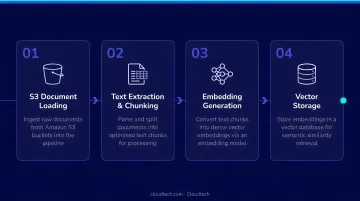
Chunk size directly affects answer quality. Too small, and retrieved chunks lack context; too large, and they introduce noise that confuses the model. Start with AWS defaults (~300 tokens) and test against your actual document corpus before locking in a strategy.
Step 4: Build the RAG Retrieval and Response Logic in AWS Lambda
Create a Lambda function with a Python 3.9+ runtime and attach the IAM execution role configured in Step 1.
Packaging note: If your LangChain, OpenSearch, and supporting libraries exceed the Lambda 250 MB unzipped deployment limit, package dependencies as a Lambda layer or use a container image instead — a common friction point for teams new to Lambda.
Inside the Lambda function:
- Initialize the Bedrock LLM (Claude via
BedrockChat) with a low temperature setting for factual responses - Set up a retriever from the OpenSearch vector store using
as_retriever, specifyingk(number of chunks to retrieve) insearch_kwargs— LangChain defaults tok=4 - Build a RAG chain with
create_retrieval_chain, combining the retriever with a prompt template instructing the model to answer only from provided context - Add
DynamoDBChatMessageHistorywith atable_nameandsession_idto preserve conversation history across Lambda invocations — without this, every question is treated as a fresh conversation
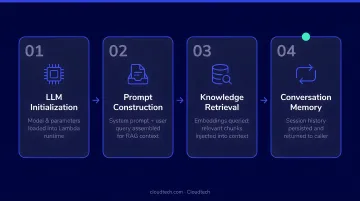
With the chain in place, Step 5 exposes this logic through an HTTP endpoint any external application can call.
Step 5: Expose the Chatbot via API Gateway and Test
Add Amazon API Gateway as a Lambda trigger. This creates an HTTP endpoint that external applications — web apps, Slack integrations, internal tools — can call with user messages.
Testing checklist before going live:
- Use the Lambda console's test feature to send sample queries before routing through API Gateway
- Verify that OpenSearch returns relevant chunks for your test queries (test retrieval independently from generation)
- Send multi-turn follow-up questions to confirm DynamoDB is storing and retrieving conversation history correctly
- Check that the model answers from retrieved context, not from hallucinated general knowledge
Key Parameters That Affect Performance
Once the system runs, performance tuning comes down to four variables. Getting these right is the difference between a chatbot that feels useful and one that feels broken.
| Parameter | Recommended Range | What Goes Wrong |
|---|---|---|
| Chunk size | ~300 tokens (default); test up to 1,500 for hierarchical chunking | Too small = missing context; too large = noisy retrieval |
| Chunk overlap | ~20% of chunk size | Too little = answers cut off at boundaries |
| Retrieved chunks (k) | k=3 to k=5 as a starting range | Too low = misses the answer; too high = inflates tokens, confuses the model |
| Temperature | 0–0.3 for factual RAG use cases | Higher values cause the model to deviate from document-based answers |
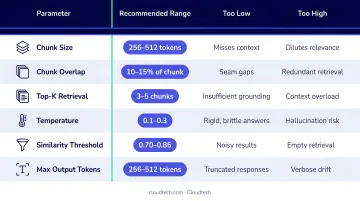
Beyond these four, embedding model selection shapes how well those four variables can do their job. The embedding model encodes both your documents and user queries into vectors — if it doesn't represent your domain well, similarity search returns irrelevant chunks regardless of other settings. Titan G1 (1,536 dimensions) works well as a default; Cohere Embed v4 on Bedrock supports configurable dimensions from 256 to 1,536. One hard constraint to plan around: switching embedding models requires re-indexing all documents from scratch.
Common Mistakes to Avoid
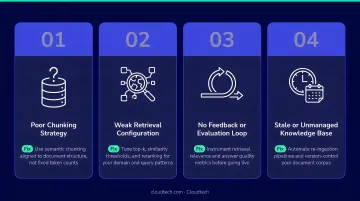
These are the mistakes that consistently break RAG chatbots in production — most are avoidable with a few deliberate design decisions upfront:
Granting full Bedrock or S3 access during prototyping and never locking it down is one of the most common security oversights. AWS Well-Architected SEC03-BP02 requires least-privilege access for production workloads. Use IAM Access Analyzer to identify and remove unused permissions.
Document quality determines retrieval quality. Scanned PDFs, image-heavy files, and off-topic content will cause retrieval to fail even when the architecture is sound. Garbage in, garbage out applies directly to RAG.
Lambda is stateless, so skipping DynamoDB for session history means the chatbot can't process follow-up questions that reference earlier context. This makes the chatbot unsuitable for most customer-facing deployments.
When answer quality is poor, the instinct is to adjust the prompt — but the actual problem is usually retrieval. Always verify the correct chunks are being returned before touching generation parameters.
When RAG Is (and Isn't) the Right Fit
RAG works best when users need answers grounded in specific, frequently updated private documents — internal knowledge bases, product manuals, compliance policies, patient FAQs — and where generating incorrect answers carries real risk.
RAG is a strong fit when:
- Your knowledge changes frequently and re-indexing is faster than retraining
- Answers must be traceable to specific source documents
- The knowledge can be well-represented in text chunks
RAG is a weaker fit when:
- The required knowledge is highly structured tabular data — research shows RAG approaches have limitations with documents combining textual and tabular data
- Queries require multi-hop reasoning across many documents simultaneously
- Real-time data feeds (stock prices, live inventory) need to be incorporated — these aren't chunk-able
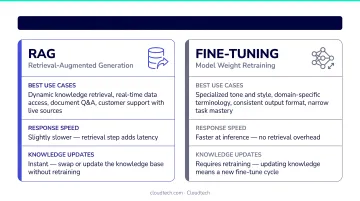
In those cases, fine-tuning or agent-based architectures are more appropriate. That said, RAG's real strength is speed of iteration: AWS Prescriptive Guidance notes that RAG can incorporate new documents in minutes without retraining, while fine-tuning is better suited for teaching the model specific task behavior, tone, or domain terminology.
For SMBs that need a RAG chatbot without dedicating an internal engineering team to it, working with an AWS-certified consulting partner like Cloudtech — which builds generative AI solutions on Bedrock — can cut weeks off the build and help avoid architectural mistakes that are easy to miss on a first attempt.
Frequently Asked Questions
What AWS services are needed to build a RAG chatbot?
The core stack is: Amazon Bedrock (LLMs and embeddings), Amazon OpenSearch Service (vector store), AWS Lambda (compute and orchestration), Amazon DynamoDB (conversation history), and Amazon S3 (document storage). LangChain is commonly used as the orchestration layer connecting these services.
How much does it cost to run a RAG chatbot on AWS?
The main cost drivers are Bedrock API token usage, OpenSearch instance hours, Lambda invocations, and DynamoDB reads/writes. For most SMBs at low-to-moderate usage, monthly costs are manageable — but check the AWS pricing pages before budgeting, as rates change regularly.
What is the difference between RAG and fine-tuning an LLM?
RAG retrieves relevant information at query time from an external knowledge base without modifying the model itself. Fine-tuning permanently updates model weights on domain-specific data. RAG is faster, cheaper, and better suited for knowledge that changes frequently — fine-tuning is better for teaching the model specific behavior, tone, or terminology.
Can I build a RAG chatbot on AWS without writing code?
Yes. Amazon Bedrock Knowledge Bases is a fully managed, low-code RAG option that handles document ingestion, embedding, vector storage, and retrieval automatically. The tradeoff is simplicity over configurability — the custom Lambda + LangChain + OpenSearch approach described in this guide gives more control over chunking, retrieval logic, and conversation memory.
How do I keep my RAG chatbot's knowledge base up to date?
Upload new or revised documents to S3, then re-chunk, re-embed, and re-insert them into the OpenSearch index. In production, automate this with S3 event triggers that invoke a Lambda indexing function whenever a file is added or modified — this keeps the knowledge base current automatically.
What security controls should I apply to a RAG chatbot on AWS?
Start with four essentials: IAM least-privilege roles, KMS encryption at rest for OpenSearch and DynamoDB, input validation to block prompt injection (per OWASP LLM01), and Amazon Bedrock Guardrails to filter harmful content, denied topics, and sensitive information — including built-in prompt-attack protection.