Introduction
Many SMBs running databases on EC2 instances — or in older AWS environments outside a VPC — are carrying more operational burden than they realize. Manual patching, fragile backup routines, open network configurations, and the engineering hours spent keeping a self-managed database alive translate directly into cost and risk. For companies in healthcare, fintech, or SaaS where uptime and compliance matter, that operational debt is a business risk — not a backlog item.
This guide covers two related migrations that often get conflated: moving a self-managed database from EC2 to Amazon RDS (an IaaS-to-PaaS shift), and moving an RDS instance into a VPC for proper network isolation. Many organizations need both.
Both decisions carry real consequences if handled carelessly. By the end of this guide, you'll understand the business case for each transition, how they work at a high level, and the specific pitfalls that derail teams who skip the planning steps.
Key Takeaways
- Migrating from EC2-hosted databases to RDS reduces manual administration — AWS handles backups, patching, and failure recovery automatically
- Placing RDS inside a VPC provides private subnet isolation, security group control, and network-level compliance coverage for HIPAA, SOC 2, and PCI-DSS
- Both migration types require planned downtime; snapshot restore or AWS DMS determines how short that window actually is
- Skipping pre-configuration steps (subnet groups, security group rules) is the most common cause of failed or delayed cutovers
- An AWS-certified partner reduces migration risk and can unlock AWS Partner Funding to cut your out-of-pocket cost
Understanding the Migration: EC2 to RDS vs. RDS Into a VPC
These are two distinct changes that often get treated as one.
| Migration Type | What Changes | What You Retain |
|---|---|---|
| EC2 → RDS | AWS takes over OS patches, disk provisioning, backups, failure detection, and recovery (per AWS's shared responsibility model) | Data ownership, IAM permissions, encryption choices, network configuration |
| RDS → VPC | How traffic reaches the instance, which security controls apply, and whether the setup meets compliance requirements | Application logic, data, and existing RDS configuration |
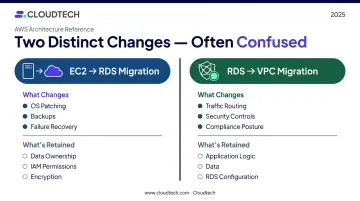
In practice, teams often need both: they migrate from EC2 to RDS first, then discover the RDS instance landed in a poorly configured network environment and needs to move. AWS now creates all new RDS instances in an account's default VPC unless another is specified — a deliberate default worth understanding before you start.
Who this affects beyond the DBA team:
- DevOps engineers managing infrastructure and pipelines
- Application developers who must update connection strings after cutover
- Security and compliance officers validating network isolation and encryption posture
Business and Technical Benefits of Migrating RDS Into a VPC
Enhanced Security and Network Isolation
A VPC gives you a logically isolated network where you define IP ranges, subnets, routing tables, and firewall rules. When RDS runs in a private subnet within that VPC, it is not publicly accessible by default — a requirement for HIPAA, SOC 2, and PCI-DSS compliance. Amazon RDS is listed as a HIPAA-eligible service, and falls within AWS's PCI DSS and SOC compliance scope, though meeting those standards requires the customer to configure the environment correctly under the shared responsibility model.
Security controls layer together here:
- Security groups act as stateful virtual firewalls; RDS network access is disabled until inbound rules explicitly authorize a source and port
- Network ACLs add stateless subnet-level filtering as a secondary control
- IAM governs who can authenticate to and administer RDS resources — separate from network reachability
- Encryption at rest uses AES-256, covering storage, logs, backups, and snapshots
- SSL/TLS encrypts traffic between your application and the database endpoint
Together, these controls satisfy what compliance frameworks call defense-in-depth — and they're what auditors look for when assessing whether your database environment meets regulatory requirements.
High Availability and Scalability
Inside a VPC, Multi-AZ deployment becomes straightforward. RDS automatically provisions a synchronous standby replica in a different Availability Zone. According to AWS documentation, failovers for Multi-AZ DB instances typically complete in 60–120 seconds — no manual intervention required. Contrast that with the effort of configuring, monitoring, and failing over an EC2-hosted database manually.
Read replicas extend this further. RDS supports asynchronous read replicas across MySQL, PostgreSQL, MariaDB, SQL Server, Oracle, and Db2. Each replica can be deployed in a different Availability Zone, using its own instance class or storage configuration — distributing read traffic and supporting reporting workloads without touching your primary instance.
Reduced Operational Overhead
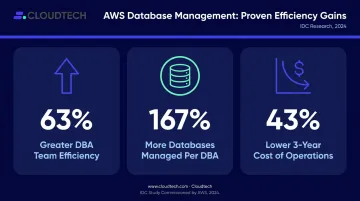
The shift from self-managed to managed database is measurable. An IDC study commissioned by AWS interviewed seven US organizations and found 63% greater DBA team efficiency, 167% more databases managed per DBA, and 43% lower three-year cost of operations after moving to Amazon RDS. The study compared managed RDS against prior on-premises or self-managed environments — not EC2 exclusively — but the operational savings still apply to teams moving off EC2-hosted databases.
The pricing model is also straightforward:
- On-Demand Instances — pay-as-you-go, no upfront fees or minimum commitments
- Reserved Instances — discounted rates for predictable, steady-state workloads
RDS isn't always cheaper per compute hour than EC2. But factor in staff time, patching risk, backup management, and unplanned downtime exposure — the total cost of ownership typically favors RDS for most SMB workloads.
How the Migration Works: Two Common Scenarios
Migrating a Self-Managed Database from EC2 to Amazon RDS
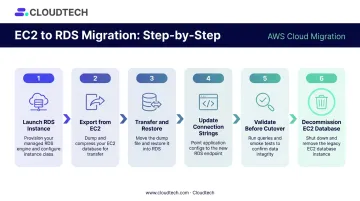
The high-level process for a homogeneous migration (same engine, same version):
- Launch the RDS instance — match the database engine version to your EC2 source; configure the VPC, subnet group, and security groups before data moves
- Export from EC2 — use
mysqldumpfor MySQL (default port 3306) orpg_dump -Fcfor PostgreSQL (default port 5432); AWS recommendspg_restore -jfor PostgreSQL databases under 100 GB; for large MySQL datasets, XtraBackup files staged to S3 are faster and more reliable - Transfer and restore — pipe directly to the RDS endpoint or use S3 as an intermediate staging location
- Update connection strings — point applications to the new RDS endpoint; this is the step developers most frequently forget to coordinate in advance
- Validate before cutover — run row count checks, schema comparison queries, and application smoke tests against the new endpoint
- Decommission the EC2 database — only after confirming the application runs correctly against RDS
Prerequisites to confirm before starting:
- Source and target engine versions are compatible
- Security group rules open the correct port from application servers
- VPC, subnet group, and DB subnet group are configured before migration begins
- Maintenance window is identified and communicated to all dependent teams
Moving an Existing RDS Instance to a New VPC
Same-account migration: Create a DB subnet group in the target VPC, then modify the RDS instance to use the new subnet group. This triggers a reboot, so plan for brief, scheduled downtime.
Before starting, confirm all of the following:
- Instance is single-AZ with no read replicas attached
- Instance is not part of a Multi-AZ cluster
- Target subnet group includes a subnet in the instance's current Availability Zone (missing this will cause the move to fail)
Cross-account migration: Take a manual snapshot of the source RDS instance, share it with the target account, then restore it into a new RDS instance in the target VPC.
One critical limitation to plan around: snapshots encrypted with the default AWS-managed RDS KMS key cannot be shared across accounts. You must copy and re-encrypt the snapshot with a customer-managed KMS key, then grant the target account access to that key before sharing.
Both scenarios above require some planned downtime. When that's not an option, AWS DMS supports continuous data replication via Change Data Capture (CDC), keeping the source operational while replication catches up, then completing the transition with a brief final cutover. Cloudtech, which holds an AWS DMS Delivery Partner certification, has used this approach for healthcare clients requiring uninterrupted data access during transitions, including a SQL Server to Amazon Aurora PostgreSQL migration completed with near-zero downtime.
Best Practices for a Successful RDS VPC Migration
Pre-configure the target environment first. The DB subnet group in the target VPC must exist — spanning at least two Availability Zones, including the source instance's current AZ — before you attempt the VPC change. Attempting the modification without this in place causes the operation to fail outright.
Validate data integrity before updating production configurations. After restoring into the new RDS instance, run row count checks, schema comparison queries, and application smoke tests against the new endpoint. Only update DNS records or application connection strings in production after the application confirms it works correctly.
Use Infrastructure as Code for environment setup. Provision the target VPC, subnets, security groups, and DB subnet groups using AWS CloudFormation (AWS::RDS::DBSubnetGroup) or Terraform before migration day. Scripted setup eliminates configuration drift at cutover — AWS Prescriptive Guidance publishes a Terraform pattern for RDS in a VPC if you need a starting point.
Schedule during low-traffic windows and communicate broadly. VPC changes require a database reboot. Developers, DevOps, and any teams with hardcoded connection strings need advance notice. For cross-account migrations via snapshot, transactions after the snapshot point are not captured — factor this data drift window into your cutover plan.
Evaluate AWS DMS for high-transaction environments. If your database handles continuous writes, a snapshot-based approach creates a growing gap between snapshot time and cutover. DMS with CDC keeps replication current, shrinking the final cutover window from hours to minutes. Manual snapshots remain a good fit for smaller databases with infrequent writes or same-account migrations.
Involve a compliance-aware partner for regulated environments. Migrations involving healthcare or financial data introduce compliance complexity that benefits from expert oversight. An AWS Advanced Tier Partner can access AWS Partner Funding for eligible engagements — which can reduce or eliminate out-of-pocket migration costs for qualifying SMBs. Cloudtech, for example, has guided SMBs through RDS migrations in HIPAA-governed healthcare environments and holds that Advanced Tier designation.
Common Pitfalls to Avoid
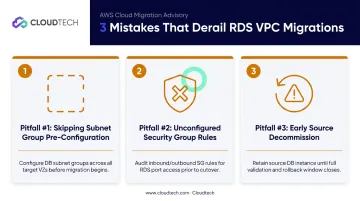
Three mistakes account for most failed or painful VPC migrations. Knowing them in advance takes each one off the table.
1. Skipping subnet group pre-configuration The target VPC's DB subnet group must exist — and include the source instance's current AZ — before you initiate the VPC change. Teams that skip this step find out only after the modification attempt fails, burning the entire maintenance window.
2. Leaving security group rules unconfigured After migration, RDS often inherits the target VPC's default security group, which blocks all inbound traffic. Application servers lose database access immediately. Add explicit inbound rule configuration to your migration runbook — not as a cutover afterthought.
3. Decommissioning the source before confirming the cutover Shutting down the EC2 database or old RDS instance before verifying the application works against the new endpoint is the leading cause of emergency rollbacks. Keep the source running in read-only or stopped state for at least 24–48 hours post-cutover. The storage cost for that window is negligible compared to rolling back under pressure.
Frequently Asked Questions
What is the difference between migrating from EC2 to RDS vs. migrating RDS to a VPC?
EC2-to-RDS is an IaaS-to-PaaS shift: AWS takes over patching, backups, and failure recovery. RDS-to-VPC changes the networking environment for better security and isolation without changing who manages the database engine. Many organizations do both, migrating to RDS first and then restructuring the network configuration.
Does migrating an RDS instance to a new VPC cause downtime?
Yes — modifying an RDS instance to use a new VPC's subnet group requires a reboot, resulting in brief, planned downtime. Schedule the change during a low-traffic window and notify dependent teams in advance. For environments where downtime must be minimal, AWS DMS with Change Data Capture keeps the source operational through most of the migration, with only a short final cutover.
Can I migrate my Amazon RDS instance to a different AWS account?
Yes, using a snapshot-share-restore workflow: take a manual snapshot, share it with the target account, then restore it into a new RDS instance in the target VPC. One constraint: snapshots encrypted with the default AWS-managed KMS key cannot be shared directly — you must re-encrypt with a customer-managed KMS key and grant the target account access first.
What AWS tools are available to help with RDS migration?
The main options are: AWS DMS for continuous replication with minimal cutover downtime; native snapshot and restore for cross-VPC or cross-account moves; and AWS Schema Conversion Tool (SCT) for heterogeneous migrations where source and target engines differ (for example, SQL Server to PostgreSQL). Homogeneous migrations between the same engine typically use native dump tools like mysqldump or pg_dump.
When should I use AWS DMS instead of a manual snapshot?
Use DMS when the database is large, handles continuous writes, or when downtime must be minimal. DMS keeps the source operational while replication catches up, then performs a brief final cutover. Manual snapshots work well for smaller databases with infrequent writes, or for same-account VPC changes where a reboot is acceptable.
How do I ensure my RDS VPC migration is compliant with HIPAA or SOC 2?
Key controls: private subnet placement, encryption at rest via a customer-managed KMS key, SSL/TLS enforcement, and strict IAM and security group policies scoped to specific application roles. RDS is a HIPAA-eligible service within AWS SOC scope, but compliance depends entirely on your configuration. A compliance-aware AWS partner can validate your architecture before and after migration to confirm no controls were missed.