That's where the AWS Glue and S3 combination earns its reputation. But serverless doesn't mean effortless. How you organize S3, configure Glue crawlers, set IAM permissions, and format your data determines whether you get a high-performing data lake or an expensive mess.
This guide covers the exact steps to build a working serverless data lake, the configuration variables that most affect performance and cost, and the mistakes that cause most implementations to fail before they reach production.
Key Takeaways
- S3 stores the data; AWS Glue handles schema discovery, ETL, and metadata management via its Data Catalog
- Think of them as complementary layers — neither alone is a data lake
- Partition S3 data by date, region, or category from day one — restructuring later is painful
- Use Parquet with Snappy compression for analytics workloads to minimize Athena query costs
- IAM role misconfiguration is the most common reason Glue crawlers fail silently
- Columnar formats and partition predicates can reduce Athena query costs from $0.36 to $0.0001 per query
How to Build a Serverless Data Lake with AWS Glue and S3
Step 1: Set Up and Organize Your S3 Bucket
Create a dedicated S3 bucket before anything else. Structure it with three prefixes that mirror AWS Prescriptive Guidance's recommended data layers:
- raw/ — original source data, preserved as-is
- stage/ — intermediate processing output
- analytics/ — curated, consumption-ready data
This zone separation matters for ETL clarity and governance. When Glue jobs read from raw/ and write to stage/, the lineage is obvious. When something breaks, you know exactly which zone to inspect.
Enable these at the bucket level before ingesting any data:
- Server-side encryption (SSE-S3 is now applied automatically to new uploads; SSE-KMS is recommended for regulated workloads)
- S3 Versioning to preserve object history
- Lifecycle policies to move infrequently accessed data to S3 Intelligent-Tiering or Glacier — note that Glacier Flexible Retrieval has a 90-day minimum storage duration, so plan transitions accordingly
The most consequential decision at this stage is your partitioning naming convention. Use a structure like year=2024/month=06/day=15/ from the start — Athena reads these as partition keys automatically.
Retroactively restructuring S3 paths after Glue tables are created means re-crawling, rebuilding tables, and fixing downstream queries. That's hours of remediation work for something that takes minutes to get right upfront.
Step 2: Configure the AWS Glue Data Catalog and Crawlers
In the AWS Glue console:
- Create a Glue Database — this is your metadata repository, not a traditional database
- Create a Crawler pointing to your
raw/S3 prefix - Assign an IAM role, set the target database, and configure a run schedule
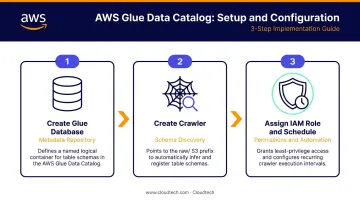
Glue's built-in classifiers detect JSON, CSV, Parquet, Avro, ORC, and several other formats automatically. The crawler infers schema and populates tables in the Data Catalog — no manual DDL required.
Incremental crawling is worth enabling once your schema stabilizes. It performs a full first crawl, then adds only newly discovered partitions on subsequent runs. One important caveat: CRAWL_NEW_FOLDERS_ONLY mode does not detect changes to or deletion of existing partitions. It's designed for stable schemas where you're appending new data, not modifying existing records.
IAM role requirements for the crawler:
AWSGlueServiceRolemanaged policy (covers Glue and basic S3/CloudWatch access)- A custom inline policy with
s3:ListBucketands3:GetObjectscoped to your specific bucket kms:Decryptif the bucket uses SSE-KMS encryption- If using Lake Formation, add
lakeformation:GetDataAccessand register the S3 location in Lake Formation
Missing any of these creates silent failures: the crawler runs but produces no tables or incomplete schemas.
Step 3: Author and Run AWS Glue ETL Jobs
In AWS Glue Studio, use the visual editor or a PySpark script to create an ETL job that:
- Reads from
raw/ - Applies transformations — type casting, deduplication, null filtering
- Writes output as Parquet with Snappy compression to
stage/oranalytics/
Snappy is the default Parquet compression codec in AWS Glue, so no additional configuration is needed to enable it.
Key job parameters to configure:
| Parameter | What It Controls |
|---|---|
| Worker type (G.1X / G.2X) | CPU and memory per worker; G.1X = 4 vCPU / 16 GB, G.2X = 8 vCPU / 32 GB |
| Number of workers | Scales parallelism; start small, monitor, then adjust |
| Job bookmarks | Tracks last-processed state; prevents reprocessing all S3 data on each run |
| Retry settings | How many times the job retries on failure before alerting |
On job bookmarks: without them, every run reprocesses all data in the source prefix. That creates duplicate records downstream and inflates DPU costs. Enable bookmarks for any job running on a recurring schedule. Glue uses the object's last-modified timestamp to determine what's new for S3 sources.
On open table formats: Glue 3.0 and later supports Apache Iceberg, Apache Hudi, and Delta Lake natively via the --datalake-formats job parameter — no connector installation needed. These are worth enabling for use cases that require ACID transactions, incremental updates, or time travel queries.
Step 4: Validate and Query with Amazon Athena
To confirm your ETL output is correctly structured, open the Athena console and set the query result location to an S3 results/ prefix. Then run a SQL query directly against your Glue Data Catalog table.
The most important optimization to verify at this stage is partition pruning. An AWS benchmark updated in February 2024 demonstrates the impact concretely:
| Query Type | Data Scanned | Cost |
|---|---|---|
| Unpartitioned (one-day filter) | 74.1 GB | $0.36 |
| Partitioned with predicate | 29.96 MB | $0.0001 |
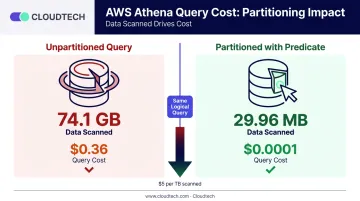
That's the same query — the only difference is a WHERE year = '2024' AND month = '06' clause. Athena charges $5 per TB scanned, so partition predicates are your most direct cost lever.
One failure mode to watch: partitioning alone doesn't reduce scans if the WHERE clause omits partition columns. The benchmark showed that a partitioned query without a partition predicate actually scanned the same 74.1 GB and ran slower than the unpartitioned version. Write partition predicates into every production query.
When Should You Build a Serverless Data Lake on AWS?
This architecture isn't universal. It works best under specific conditions.
Good fit when:
- Data sources are diverse — APIs, databases, logs, IoT streams, flat files
- Data volume is large or unpredictable and scales faster than you can provision infrastructure
- Teams need flexible, ad hoc querying without managing clusters
- Use cases include ML pipeline data prep, compliance archival, or multi-source BI
Poor fit when:
- Workloads require sub-millisecond query latency (use RDS or DynamoDB instead)
- Data comes from a single, well-structured source that a data warehouse handles cleanly
- Your team has no SQL or cloud familiarity to debug Glue jobs and crawlers
When the fit is right, the results are concrete. Healthcare is one of the strongest use cases — organizations dealing with mixed data from EHR systems, medical imaging, and clinical documents regularly benefit from the flexibility this pattern provides.
Klamath Health Partnership migrated from on-premises infrastructure to an S3-based data lake and achieved a 77% year-over-year reduction in infrastructure costs, while gaining HIPAA-compliant storage and disaster recovery. Cloudtech designed and deployed that architecture, replacing a costly managed services provider with a fully AWS-native solution the internal team could operate independently.
Key Configuration Factors That Affect Performance
Get these four configuration decisions wrong and your data lake will either break the budget, crawl at query time, or both.
Data Partitioning Strategy
Without partitioning, every Athena query scans the entire S3 prefix regardless of filters. With partitions and predicates, scans drop by orders of magnitude — as the benchmark above shows, from 74 GB to 30 MB for the same logical query.
Partition by whatever your queries filter on most often: year/month/day for time-series data, region for geographic data, event_type for log data.
File Format and Compression
Columnar formats like Parquet and ORC allow Athena to read only the columns needed rather than full rows. The scan cost difference is immediate and measurable:
- 3 TB of uncompressed text scanned = $15
- Same data in GZIP = $5
- Same data in Parquet with one column selected = $1.25
For files that arrive as many small objects — common with streaming pipelines or Lambda-written data — small file overhead degrades both Glue job and Athena performance. Glue's groupFiles='inPartition' option groups multiple input files into one in-memory partition during processing. This works for CSV, JSON, Ion, and XML inputs; it does not apply to Parquet or ORC files.
For Parquet output compaction, use a dedicated Glue ETL job that reads the small Parquet files and rewrites them as larger consolidated objects.
Glue Crawler Schedule and Incremental Crawling
AWS Glue charges $0.44 per DPU-hour for both crawlers and ETL jobs, billed by the second. Running crawlers on a full scan every hour on a large prefix adds up quickly. Enable incremental crawling to limit re-scanning to new partitions only, and schedule crawlers to match your actual data arrival frequency — hourly for near-real-time, daily for batch workloads.
IAM Role Scope and Least Privilege
Overly broad IAM roles are a security risk. Overly restrictive ones cause Glue jobs to fail silently. The pattern that works: grant Glue roles access to specific S3 prefixes and specific Glue databases — not wildcards.
For multi-team environments where different groups should see different datasets, AWS Lake Formation adds table-, row-, and column-level permissions on top of the IAM layer.
Common Mistakes When Building Serverless Data Lakes on AWS
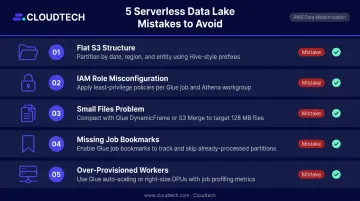
1. Skipping S3 organizational structure before ingesting data Uploading files into a flat S3 prefix without zone separation or partition-friendly naming means the crawler can't infer meaningful schema and Athena scans everything on every run. Restructuring S3 after Glue tables are created requires re-crawling, rebuilding tables, and rewriting downstream queries. Design the folder structure before the first file lands.
2. Misconfiguring the Glue IAM role
The most common reason crawlers and ETL jobs fail silently is a missing S3 bucket permission or absent Glue Data Catalog write permission. Check CloudWatch Logs for Access Denied or HTTP 403 errors, then verify the role has s3:GetObject, s3:ListBucket, and the AWSGlueServiceRole policy. Add kms:Decrypt if the bucket uses KMS encryption.
3. Ignoring the small files problem
When source data arrives as thousands of small files — typical with streaming or Lambda-generated output — ETL jobs slow dramatically. Use Glue's groupFiles for supported text formats during ingestion, and run a periodic compaction job to merge small Parquet files into larger blocks for analytics zones.
4. Not enabling Glue job bookmarks Without bookmarks, every scheduled ETL job reprocesses all data in the source prefix — producing duplicate records in processed zones and inflated DPU costs. Enable bookmarks for any recurring job. The two exceptions: initial backfill runs where full reprocessing is intentional, and targeted reruns after a failed job.
5. Over-provisioning Glue worker nodes First-time implementations often default to maximum workers without checking actual data volume. Start with G.1X workers at a low count, run the job, then check CloudWatch metrics — specifically executor memory utilization and job duration. Scale up only when metrics show a real bottleneck. Running 20 G.2X workers against a 10 GB dataset easily doubles your DPU cost with no performance gain.
Frequently Asked Questions
Does AWS support data lakes?
Yes. AWS natively supports data lake architectures with Amazon S3 as the primary storage layer. AWS Glue, AWS Lake Formation, and Amazon Athena are purpose-built to catalog, transform, govern, and query data lake content at scale — no third-party tools required.
What is the purpose of AWS Glue?
AWS Glue is a fully serverless data integration service. It automates schema discovery via crawlers, manages metadata in the Data Catalog, and runs ETL jobs to extract, transform, and load data. No ETL infrastructure to provision or maintain.
Is AWS Glue just Spark?
No. Glue ETL jobs run on Apache Spark under the hood, but the product is broader: it includes the Data Catalog, Crawlers for schema detection, Glue Studio for visual authoring, and streaming ETL support. Spark is one component, not the whole product.
What file formats work best for a serverless S3 data lake?
Columnar formats — Parquet or ORC — paired with Snappy or GZIP compression are the standard choice for analytics workloads. They reduce the data Athena scans per query and lower both storage and compute costs compared to raw JSON or CSV.
What is the difference between AWS Glue and AWS Lake Formation?
AWS Glue handles ETL and metadata cataloging. AWS Lake Formation sits on top of the Glue Data Catalog and adds fine-grained access control — including table-, row-, and column-level permissions. The two services are complementary, not competing.
How much does it cost to run a serverless data lake with AWS Glue and S3?
Costs are pay-as-you-go: S3 charges by storage volume and request count; Glue charges $0.44 per DPU-hour for crawlers and ETL jobs; Athena charges $5 per TB scanned. Proper partitioning and columnar compression are the primary cost levers — cutting per-query Athena costs by up to 99% in some cases.
Conclusion
Building a serverless data lake on AWS Glue and S3 is highly effective when the architecture is planned carefully. Success depends on a structured S3 layout established before data arrives, correctly scoped IAM permissions, optimized file formats, and Glue crawlers and ETL jobs configured for production rather than demo conditions.
Most failures trace back to shortcuts taken during setup. The most common culprits include:
- Flat S3 structures with no partitioning strategy
- Missing or overly broad IAM policies
- Disabled Glue job bookmarks causing duplicate processing
- Default worker counts that don't match actual data volumes
For SMBs and startups that want to move quickly without rebuilding from scratch, the right architecture choices up front make all the difference. Cloudtech's AWS-certified team has deployed this stack for clients in healthcare, financial services, and manufacturing, cutting typical build timelines from months to weeks through pre-packaged accelerators and a structured discovery-to-deployment process.