Introduction
Law firms lose potential clients every day—not because they lack good attorneys, but because no one answered the phone at 9 PM on a Tuesday.
Clio's 2024 secret-shopper study of 500 U.S. law firms found that only 33% responded to email inquiries and just 40% answered calls immediately. Meanwhile, FindLaw's 2024 consumer research shows that 16% of people with a legal need act within one day, and slow response is the leading reason they move to a different attorney.
The cost of that gap compounds fast. A missed personal injury inquiry, an unanswered immigration question, a criminal defense lead who hired the first firm that picked up—this happens at firms every day without a reliable intake system in place.
This guide covers what AI chatbots for legal intake and document triage can do, how they work, what compliance requirements apply, and how to choose the right solution for your firm.
Key Takeaways
- AI chatbots handle legal intake 24/7, capturing leads and qualifying cases without staff involvement
- Document triage AI goes further—analyzing submitted files to classify matter type, flag urgency, and route cases to the right attorney
- Effective deployment requires CRM integration, clear escalation rules, and guardrails against unauthorized practice of law
- Hybrid models—where AI handles first contact and humans follow up quickly—consistently outperform either approach used alone
What Are AI Chatbots for Legal Intake and Document Triage?
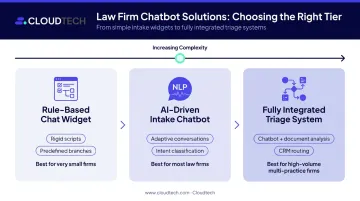
Legal AI tools fall into three distinct categories — and choosing the wrong tier is one of the most common (and costly) mistakes firms make.
Three Distinct Categories
| Type | How It Works | Best For |
|---|---|---|
| Rule-based chat widget | Follows rigid scripts and predefined branches—essentially a digital form | Very small firms with simple intake needs |
| AI-driven intake chatbot | Uses NLP to hold adaptive conversations, classify intent, and adjust questions dynamically | Most law firms with moderate inquiry volume |
| Fully integrated triage system | Chatbot + document analysis + workflow routing connected to CRM and case management | High-volume firms, multi-practice-area operations |
Legal Intake AI: What It Actually Does
An intake chatbot engages visitors on your website or SMS channel, asks qualifying questions, captures contact and case details, and routes leads directly into your CRM or scheduling system—around the clock. These tools handle triage and qualification only. They do not provide legal counsel, assess case value, or advise on strategy.
Document Triage AI: The Next Layer
After a potential client submits supporting documents—medical records, police reports, contracts, court filings—document triage AI takes over. Using OCR and NLP, it extracts key data points, classifies the document type, identifies relevant facts (incident dates, parties, liability indicators), and generates a structured case summary for attorney review.
This dramatically reduces the time attorneys and paralegals spend manually reviewing documents before the first consultation.
Practice Areas That Benefit Most
These five practice areas see the clearest workflow fit:
- Personal injury — incident details, treatment thresholds, statute of limitations flags
- Immigration — structured forms, identity data, deadline sensitivity, multilingual need
- Criminal defense — arrest status, charge type, custody, upcoming hearing dates
- Family law — residency, assets, children, sensitive personal facts
- Bankruptcy — income, debts, assets, creditor lists, filing history
Each area shares a common trait: high inquiry volume combined with time-sensitive deadlines, where missed qualification steps carry real legal risk.
How AI Legal Intake and Document Triage Works: Step-by-Step
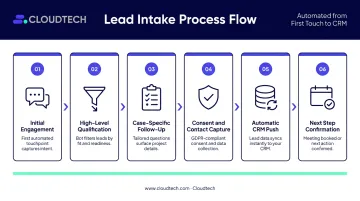
Intake Workflow
Step 1 — Initial engagement: A visitor reaches the chatbot via the firm's website, landing page, or SMS channel. The bot immediately discloses that it is an automated assistant, not a licensed attorney.
Step 2 — High-level qualification: The bot asks screening questions to determine whether the matter fits the firm's criteria—practice area, incident date, jurisdiction, injury or dispute type.
Step 3 — Case-specific follow-up: For viable inquiries, the bot asks 4–8 targeted questions that mirror the firm's actual acceptance criteria. For PI cases: Does a police report exist? Was medical treatment received? For immigration matters: What is the current immigration status? Deadline considerations?
Step 4 — Consent and contact capture: The bot collects name, contact information, and explicit consent to store data and follow up.
Step 5 — Automatic CRM push: Intake data flows directly into the firm's CRM or practice management system. No manual transfer, no inbox delay.
Step 6 — Next step confirmation: The bot either offers available consultation slots via calendar integration or confirms that an intake specialist will call within a defined window—setting clear expectations before the conversation ends.
Document Triage Workflow
Once a potential client submits supporting documents, the triage layer takes over—processing and prioritizing without waiting for staff to open an inbox.
- OCR extraction: Tools like Amazon Textract detect printed and handwritten text, pulling forms, tables, signatures, and queried fields from medical records, contracts, and other document types.
- NLP classification: The system identifies matter type, key entities (parties, dates, amounts), and urgency indicators based on extracted content.
- Case summary generation: A structured summary is created for attorney review, replacing the manual read-through that typically precedes a first consultation.
- Routing and prioritization: The system combines extracted document data with intake responses to assign a matter type, urgency score, and recommended next action.
Routing is where the time savings become concrete. Depending on what the system finds, it takes one of three paths:
- Time-sensitive matters (approaching statute of limitations deadlines, active criminal charges, pending hearings) are flagged for expedited attorney review
- Out-of-scope matters are auto-declined or queued for a courtesy response
- Conflict check flags route directly to the appropriate staff member before any consultation is scheduled
Best Practices for Implementing AI Chatbots at Your Law Firm
Mandate Disclosure From the First Message
Every chatbot interaction must open with a clear statement that the user is communicating with an automated system, not a licensed attorney. Florida Bar Opinion 24-1 specifically requires client-facing chatbots to disclose that they are AI and not a lawyer or employee. Build this into the system before anything else—not as an afterthought.
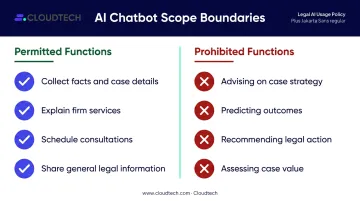
The bot's permissible functions:
- Collect facts and case details
- Explain firm services
- Schedule consultations
- Share general publicly available legal information
Prohibited functions (non-negotiable):
- Advising on case strategy
- Predicting case outcomes
- Recommending legal action
- Assessing case value
Script Questions Around Your Actual Acceptance Criteria
Work with intake staff and attorneys to build the bot's question flow around the same criteria your team uses to accept or decline matters. If your PI practice requires medical treatment above a specific threshold, that filter belongs in the bot. Generic scripts that collect data the firm can't act on waste everyone's time and create false expectations.
Define Escalation Triggers Clearly
Document the specific conditions that require immediate human handoff:
- Potential catastrophic or fatal injuries
- Active criminal charges with imminent hearings
- Explicit distress signals in the conversation
- Any direct request to speak with a person
- Time-sensitive filings within days of a deadline
When any of these triggers fire, the bot should stop collecting data and route the contact to a live person immediately—no additional questions, no delays.
Integrate With Existing Systems From Day One
Intake data trapped in a separate inbox stalls follow-up and kills conversion. The chatbot must connect to the firm's CRM, calendar, and case management software before go-live. Established platforms like Smith.ai, Lawmatics, and Clio Grow offer native integrations with tools like Clio Manage and MyCase. For custom builds, API integration should be scoped as a core requirement, not an optional add-on.
Monitor and Refine Continuously
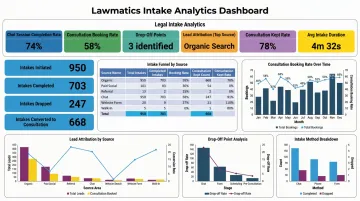
Track these metrics monthly:
- Chat session completion rate
- Consultation booking rate from bot-sourced leads
- Drop-off points in the question flow
- Signed-case attribution from chatbot leads
- Escalation rate and reasons
Review conversation transcripts regularly. A/B test opening messages. Update scripts whenever practice area focus, bar advertising rules, or state guidance on AI use changes.
Compliance, Ethics, and Data Security for Legal AI Chatbots
Attorney-Client Confidentiality and Data Security
All chat communications must be encrypted in transit and at rest. The firm remains responsible for what its chatbot collects, even when using a third-party vendor.
Key security certifications to verify before deployment:
- SOC 2 Type II — independent attestation that security controls operate as described over a defined period
- HIPAA eligibility — relevant for chatbots that collect health-related information in personal injury or medical malpractice contexts
- GDPR compliance — applicable for firms with international clients or EU data subjects
Verify vendor data storage practices, access controls, and breach notification policies. Don't assume compliance because a vendor claims it.
Informed Consent and Disclosure Obligations
Before collecting any case details, the chatbot must communicate:
- That it is an automated system
- How submitted data will be used and stored
- How long data will be retained
- That continuing constitutes consent to follow-up contact
- That an attorney-client relationship is not formed through chatbot interaction
Several state bars—including Florida—specifically warn that an overly welcoming chatbot can create a reasonable belief that legal services are being provided. ABA Model Rule 1.18 protects information from prospective clients even when no engagement follows. Place consent and disclosure controls before any free-text input or document upload.
Unauthorized Practice of Law Guardrails
Chatbots can be led outside their intended scope. Users sometimes attempt to extract legal opinions through persistent questioning. Firms should:
- Audit chatbot outputs quarterly
- Set strict response boundaries at the system level
- Implement human review for any conversation flagged as potentially crossing into legal advice
- Document these review processes for bar inquiry purposes
Jurisdictional Compliance and Record-Keeping
Consult your state bar's guidance on AI use and advertising rules before deployment. Requirements vary meaningfully by jurisdiction, so check before you build.
Maintain timestamped, auditable logs of all chatbot interactions. If a bar inquiry or client complaint arises, a complete record of what the bot said is your primary protection.
Choosing and Deploying Your AI Chatbot Solution
Vendor Selection Criteria
Evaluate any platform against this checklist:
- Legal-specific features — built-in compliance disclosures, matter type classification, conflict check support
- Security certifications — SOC 2, encryption standards, HIPAA eligibility where applicable
- Customization depth — can scripts be adapted by practice area, or are they fixed templates?
- Language support — bilingual or multilingual capability for relevant client populations
- Integration coverage — confirmed connections to your CRM, calendar, and practice management platform
Off-the-shelf SaaS options like Smith.ai, Lawmatics, and Clio Grow deploy faster and cover common intake workflows. Smith.ai combines AI and live human receptionists with Clio Grow integration. Lawmatics offers native CRM automation and AI lead scoring through its Merlin Qualify tool. Clio Grow provides custom intake forms, scheduling, and pipeline tracking that syncs to Clio Manage.
Phased Implementation Approach
- Pilot on high-traffic pages first — homepage and primary practice area pages, not site-wide
- Measure for 60–90 days before broader rollout
- Involve intake staff in script review before launch—they know your acceptance criteria better than anyone
- Assign internal ownership — marketing plus intake manager, with clear accountability for follow-up speed
Speed of human follow-up to bot-captured leads is often the single biggest factor in whether those leads convert. FindLaw's 2024 research confirms that slow response—not lack of availability—is the leading stated reason prospects switch to another attorney. The bot buys you time; your team still has to close.
When a Custom AWS Build Makes Sense
SaaS tools cover most standard intake scenarios well. For firms with complex multi-practice-area workflows, strict data security requirements, or integration demands those platforms can't accommodate, a custom solution built on AWS infrastructure is worth considering.
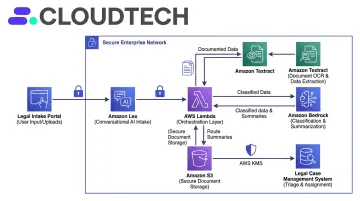
Firms can work with an AWS-certified partner like Cloudtech to build a custom intake and triage pipeline using services like Amazon Lex for conversational AI, Amazon Textract for document OCR and extraction, Amazon Bedrock for foundation-model-based classification and summarization, and AWS Lambda for event-driven orchestration and routing. Both Amazon Lex and Amazon Bedrock are HIPAA eligible and SOC-in-scope—critical for firms handling sensitive client data.
Cloudtech's team—70% former AWS employees with 100+ certifications including Machine Learning and Data Analytics specialties—has delivered HIPAA-compliant data infrastructure for regulated healthcare organizations using the same architectural patterns that apply to legal intake and document triage. A custom build integrates directly with existing systems, meets HIPAA and SOC 2 design standards, and scales with the firm's growth without the per-seat pricing that makes enterprise SaaS subscriptions expensive at volume.
Frequently Asked Questions
What is the best AI model for legal documents?
Leading models used for legal document analysis include GPT-4, Anthropic's Claude, and purpose-built legal AI tools like Harvey and CoCounsel. The right choice depends on the use case—contract review, document triage, or legal research. Legal-specific platforms built on top of these models, with proper guardrails and attorney supervision, typically outperform raw LLMs for professional legal work.
Is there a ChatGPT for legal advice?
ChatGPT can assist with general legal research and document drafting, but it is not a licensed attorney and cannot provide substantive legal advice. Purpose-built tools like Harvey and Thomson Reuters CoCounsel add accuracy controls for legal workflows, yet still require attorney oversight for all substantive judgments.
What is the difference between legal intake AI and document triage AI?
Intake AI handles the initial client interaction—qualifying leads, capturing contact and case details, and scheduling consultations. Document triage AI analyzes submitted files to extract key data, classify matter type, assess urgency, and route the case. Both deliver the most value when connected as part of a unified workflow rather than deployed separately.
Can AI chatbots replace human intake staff at a law firm?
AI chatbots handle routine screening and data capture effectively, but human staff remain essential for complex matters, distressed clients, and final conversion decisions. Hybrid models—where AI handles initial contact and humans follow up quickly—consistently outperform either approach used alone.
How do AI chatbots maintain attorney-client confidentiality?
Reputable platforms use end-to-end encryption, role-based access controls, and compliant data storage. Firms should verify vendor certifications (SOC 2, HIPAA eligibility) and disclose to prospective clients how their data is handled before any case details are shared.
What integrations should a legal AI chatbot have to work effectively?
Four integrations are non-negotiable:
- CRM or lead management to capture and track inquiries
- Practice management platform (Clio, MyCase, Filevine) for matter creation
- Calendar tool for direct consultation scheduling
- Document management system for triage handoff
Without these connections, chatbot-captured data creates a manual bottleneck that slows follow-up and reduces conversion.