This guide covers everything technical decision-makers and IT leaders at SMBs need to know about migrating a data warehouse to AWS: the three core migration strategies, the AWS tools that do the heavy lifting, a step-by-step process walkthrough, and the mistakes that derail migrations before they ever reach go-live.
Key Takeaways
- AWS data warehouse migration moves your structured data, schemas, and ETL processes to a cloud-native environment, typically Amazon Redshift
- Three migration strategies exist: one-step (small, static databases), two-step (any size requiring CDC), and wave-based (large, complex environments)
- AWS SCT converts schemas; AWS DMS moves data — distinct tools built for different jobs in the same pipeline
- Post-migration tuning of sort keys, distribution keys, and WLM settings is what separates a good migration from a great one
- Working with an AWS Advanced Tier Partner can unlock AWS Partner Funding to reduce your out-of-pocket migration costs
What Is Data Warehouse Migration to AWS?
Data warehouse migration to AWS is the process of moving structured data, schemas, ETL pipelines, and business logic from a source system — on-premises hardware or another cloud — to an AWS-managed data warehouse, primarily Amazon Redshift.
This is not the same as general data migration. Data warehouse migration specifically involves:
- OLAP-style workloads with complex, multi-table analytical queries
- Schema conversion from legacy proprietary formats to Redshift-compatible DDL
- ETL pipeline preservation — all the transformation logic your analysts depend on
- Historical data integrity — years of records that must arrive complete and queryable
The destination is Amazon Redshift, AWS's fully managed, cloud-native data warehouse service. It scales from gigabytes to petabytes and handles thousands of concurrent users through concurrency scaling. Native integrations with S3, Glue, and QuickSight mean you can build end-to-end analytics pipelines without stitching together external tools.
Why Businesses Are Migrating Their Data Warehouses to AWS
The Problem With Legacy Warehouses
On-premises data warehouses were built for predictable workloads and fixed capacity. That rigidity creates real costs:
- Hardware refresh cycles requiring large, lumpy capital expenditures
- Scaling limitations that force either overprovisioning (waste) or underprovisioning (performance degradation)
- No native path to machine learning or real-time analytics without expensive bolt-on tools
- Database administration overhead that consumes engineering time better spent elsewhere
The AWS Business Case
The numbers behind cloud data warehouse adoption are substantial. An IDC study on the business value of Amazon Redshift found that Redshift users achieved 503% three-year ROI, 43% lower data warehousing platform costs, 66% faster analytical queries, and $14.9M higher annual revenue per organization on average.
The returns extend to smaller organizations too. A Forrester Consulting report commissioned by AWS found that SMB data investments generated a 3-to-5-fold return within 3 to 12 months.
Why SMBs Benefit Most
Those financial returns are compelling — but for SMBs, the operational gains matter just as much. Enterprises have dedicated DBA teams to manage patching, capacity planning, and performance tuning. Most SMBs don't. AWS-managed infrastructure removes that burden: no hardware to provision, no patches to schedule, no emergency scaling when query volume spikes unexpectedly. For smaller teams, that operational relief is often worth as much as the performance gains.
Choosing the Right Migration Strategy for Your AWS Move
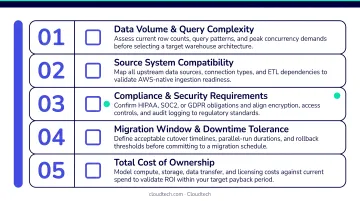
The right strategy depends on five factors. Work through this checklist before committing to an approach:
- Total data size — gigabytes, terabytes, or petabytes?
- Available network bandwidth — can you transfer over the wire, or do you need physical devices?
- Data change rate — how much data changes daily in the source system?
- Transformation complexity — custom ETL logic, stored procedures, or mostly straightforward schemas?
- Acceptable downtime window — hours, minutes, or effectively zero?
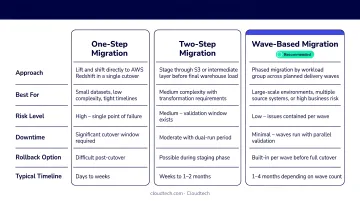
One-Step Migration
Extract source data as CSV or Parquet, move it to Amazon S3 (via network or AWS Snow Family for large volumes), load into Redshift using the COPY command, validate, and cut over.
Best for: smaller databases, lower change rates, and teams that can tolerate a cutover window measured in hours rather than seconds. The simplicity is the advantage: fewer moving parts means fewer things that can go wrong.
Two-Step Migration
Start with a full initial data load, then switch to change data capture (CDC) mode — replicating ongoing changes from the source to Redshift until you're ready to cut over. AWS DMS handles the CDC phase.
Best for: databases of any size that must remain operational during migration. It minimizes downtime while handling live data changes, making it a strong fit for business-critical workloads.
Wave-Based Migration
Divide the migration into logical waves by subject area or data domain. Run source and Redshift in parallel. Migrate incrementally, validating each wave before moving to the next.
Best for: large-scale environments with many schemas, complex dependencies, or multiple business units. A problem in one wave stays isolated — it won't stall the schemas already validated and running on Redshift.
Strategy Comparison
| Strategy | Data Size | Change Rate | Downtime Tolerance | Project Duration |
|---|---|---|---|---|
| One-step | Small | Low | Hours acceptable | Weeks |
| Two-step | Any size | Moderate–High | Minimal | Weeks to months |
| Wave-based | Large/complex | Any | Near-zero | Several months |
How to Migrate Your Data Warehouse to AWS: Step-by-Step
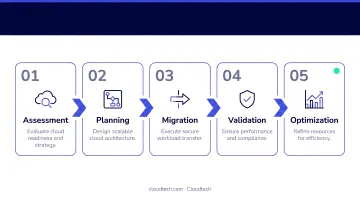
Regardless of which strategy you choose, every migration follows the same core phases. Rushing any one of them is the fastest path to costly post-migration rework.
Step 1: Pre-Migration Assessment and Planning
Audit the existing warehouse before writing a single line of migration code:
- Document schema complexity, object counts, and data quality issues
- Map all dependencies — ETL jobs, BI tools, downstream applications
- Define clear migration goals: cost reduction targets, query performance benchmarks, analytics capabilities
- Choose your target architecture: Redshift Serverless for unpredictable or intermittent workloads (billed per RPU-hour), or provisioned clusters for consistent, high-concurrency workloads requiring predictable capacity
Run AWS SCT's assessment report at this stage. It estimates conversion complexity and flags schema objects that can't be automatically converted — treat it as a scoping tool, not just a technical artifact.
Step 2: Schema Conversion
AWS Schema Conversion Tool (SCT) translates source database schemas into Redshift-compatible DDL and generates a migration assessment report itemizing objects that need manual intervention. Supported sources include Oracle, Teradata, Greenplum, Netezza, and Snowflake.
Beyond DDL translation, SCT also provides:
- Distribution key recommendations — to minimize data movement across nodes during joins
- Sort key suggestions — based on your query patterns and filter columns
- Manual conversion flags — objects SCT can't auto-convert, prioritized by complexity
These recommendations matter. A schema that loads successfully but with poor key choices will underperform from day one.
Step 3: Initial Data Extraction and Load
Extract source data using AWS SCT data extraction agents or native source tools. Stage the data in Amazon S3 — this is the central staging layer between source and Redshift.
Transfer method depends on your bandwidth constraints:
- High-volume offline transfers: AWS Snow Family devices physically ship your data to AWS, bypassing network limitations entirely
- Online transfers: AWS DataSync automates the move to S3 at up to 10 Gbps over a network link
Load into Redshift using the COPY command, which supports fixed-width, CSV, JSON, Parquet, Avro, and ORC formats. Position extraction agents close to the source system to keep transfer latency low.
Step 4: Change Data Capture and Synchronization
For two-step and wave-based migrations, this phase keeps source and target in sync after the initial load. AWS DMS captures and replicates ongoing changes until you're ready to cut over.
Prerequisites before enabling CDC:
- Enable supplemental logging at the source database level
- For Oracle: enable minimal supplemental logging, plus primary-key logging per replicated table
- For SQL Server: configure MS-CDC or MS-Replication
Define your reconciliation framework before the CDC phase begins — row counts, aggregate checks, and key attribute validation. Running these checks continuously during CDC gives you confidence the cutover will be clean.
Step 5: Validation, Cutover, and Post-Migration Optimization
Validation is not optional. Before cutting over:
- Run automated reconciliation checks for data completeness, accuracy, and consistency
- Compare aggregate results between source and Redshift for critical tables
- Confirm all downstream BI tools and ETL jobs connect to the new warehouse
Schedule the cutover during off-peak hours. Don't retire the source system immediately — keep it available in read-only mode for a defined period after go-live.
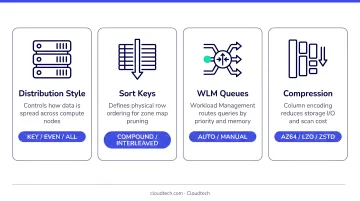
A successful data transfer doesn't mean a successful migration. Post-migration optimization is where many teams stop too early — and where performance gains are actually realized. After go-live, review:
- Distribution keys — distribute fact and dimension tables on common join columns to minimize data redistribution
- Sort keys — specify sort keys on frequently filtered columns so Redshift can skip reading unnecessary blocks
- Compression encodings — Redshift's columnar storage relies on compression to reduce disk I/O; misconfigurations waste both storage and query performance
- WLM (Workload Management) — configure queue priorities to match your actual workload patterns, not generic defaults
Key AWS Tools and Services for Data Warehouse Migration
AWS provides a dedicated toolkit for each phase of a warehouse migration — from schema conversion to physical data transport. Here's what each service does and when to use it.
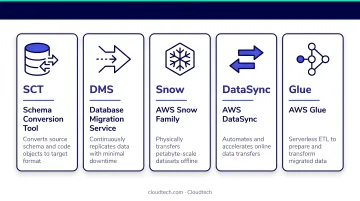
AWS Schema Conversion Tool (SCT) converts schemas and code objects from source engines (Teradata, Oracle, Greenplum, Netezza, Snowflake) into Redshift-compatible format. It generates assessment reports, recommends storage optimization settings, and hands off to DMS for the actual data movement.
AWS Database Migration Service (DMS) handles the data transfer itself — supporting homogeneous and heterogeneous migrations, managing ongoing CDC replication, and minimizing downtime. For Redshift targets, DMS stages files in S3 first, then loads them using the COPY command.
AWS Snow Family provides offline physical data transport when network bandwidth can't meet your transfer window. Note that Snowball Edge is no longer available to new customers — AWS now directs new customers to DataSync for online transfers or AWS Data Transfer Terminal for physical shipments.
AWS DataSync automates online transfer of large datasets to S3, supports connections up to 10 Gbps, and can run multiple transfer tasks in parallel.
AWS Glue is the serverless ETL option for teams that need to transform or cleanse data during migration. For SMBs without dedicated infrastructure, Glue removes the need to maintain ETL servers while still supporting ongoing pipelines into Redshift post-migration.
Common Migration Mistakes to Avoid
Most migration failures trace back to a small set of recurring errors. Knowing them in advance is the easiest way to avoid them.
- Skipping the pre-migration assessment. Teams that underestimate schema complexity or overlook data quality issues before starting consistently face costly rework mid-project. The AWS SCT assessment report is designed to surface these problems before they derail execution.
- Treating cutover as the finish line. A successful data transfer is not a successful migration. Without post-migration tuning — distribution keys, sort keys, WLM configuration, compression encodings — Redshift will underperform. This is the most common source of post-migration dissatisfaction, and it's entirely avoidable.
- Attempting a DIY migration without Redshift expertise. Amazon Redshift behaves differently from traditional RDBMS and OLAP systems. Its columnar storage model, massively parallel processing architecture, and query optimizer require configuration that doesn't translate directly from other platforms. For smaller teams without dedicated data warehouse engineers, misconfiguration can negate both the performance and cost benefits of migrating in the first place.
When to Work with an AWS Partner for Your Migration
Professional guidance adds clear value in specific situations:
- Multiple source schemas, complex ETL logic, or high data change rates
- Limited internal AWS or Redshift expertise
- Tight cutover windows for business-critical systems
- Source systems like Oracle Exadata or Teradata, where large-scale migrations can run 6 to 16 months for complex environments
- Situations where a failed migration would cost more than expert support
If any of those apply to your situation, an AWS Advanced Tier Partner brings certified solutions architects with hands-on Redshift experience, a proven migration process, and access to AWS Partner Funding programs that can offset out-of-pocket migration costs — a meaningful factor for SMBs evaluating whether migration is financially viable.
Cloudtech is an AWS Advanced Tier Partner and consulting firm focused exclusively on SMBs across the United States. The team includes former AWS professionals with hands-on experience implementing AWS-native data warehouse architectures — including migrations from legacy on-premises systems like Oracle Exadata to Amazon Redshift and Redshift Spectrum.
In one healthcare engagement, Cloudtech replaced a rigid on-premises Oracle Exadata warehouse with a centralized S3-based data lake using AWS Glue and Redshift Spectrum, eliminating storage constraints and enabling near real-time analytics. You can review the full case study at cloudtech.com/resources/healthcare-data-processing-case-study.
Frequently Asked Questions
What migration strategies are used for moving data warehouses to AWS?
Three strategies apply: one-step (extract, transfer to S3, load, cut over) for small static databases; two-step (full load plus CDC replication until cutover) for business-critical workloads; and wave-based (incremental migration by subject area) for large or complex environments. Selection depends on data size, change rate, and acceptable downtime.
Does AWS have a data warehouse service?
Yes. Amazon Redshift is AWS's fully managed, cloud-native data warehouse — scalable from gigabytes to petabytes, self-tuning, and integrated with S3, Glue, Athena, and QuickSight. It's available as provisioned clusters or as Redshift Serverless, which auto-scales capacity and bills by RPU-hour.
Why use Redshift vs. RDS for data warehousing on AWS?
Amazon RDS is built for transactional (OLTP) workloads — row-based storage, high-frequency writes, real-time updates. Amazon Redshift is built for analytical (OLAP) workloads — columnar storage, massively parallel processing, and complex multi-table queries across large datasets. Data warehousing belongs on Redshift.
How long does it take to migrate a data warehouse to AWS?
One-step migrations for smaller databases typically complete in weeks. Two-step migrations run weeks to months depending on data volume and change rate. Wave-based migrations for complex environments take several months. Large-scale mission-critical migrations from systems like Oracle or Teradata can run 6 to 16 months.
What is the difference between AWS SCT and AWS DMS?
AWS SCT converts database schemas and code objects from the source engine into Redshift-compatible format — it's a translation tool. AWS DMS handles the actual data movement and ongoing CDC replication — it's a transport tool. Both are used together: SCT runs first to handle schema conversion, then DMS manages data load and synchronization.
How do I ensure data integrity during a warehouse migration to AWS?
Run automated reconciliation checks throughout — row counts, aggregate comparisons, and key attribute validation — during both the CDC phase and immediately before cutover. Don't retire the source system until the new warehouse has run in production without issues for an agreed stabilization period.