That said, results vary significantly. The difference between a conversational AI deployment that handles thousands of interactions smoothly and one that breaks on real user inputs usually comes down to workflow selection, conversation design, integration depth, and monitoring. This guide covers exactly how to get those right.
Key Takeaways
- Conversational AI recognizes natural language and triggers predefined actions, removing humans from routine workflow steps entirely
- High-volume, repetitive, rule-based processes deliver the strongest ROI — not every workflow qualifies
- Success hinges on clean process mapping, well-designed conversation flows, and active post-launch monitoring
- Most failures trace back to skipping workflow prioritization, vague bot goals, or inadequate testing
- AWS-native tools (Amazon Lex, Lambda, Amazon Connect) give SMBs a scalable, tightly integrated stack to build on
How to Automate Workflows With Conversational AI
Step 1: Map and Prioritize the Workflows You Want to Automate
Before touching any AI tool, document what the workflow actually looks like today. Write down every input, decision point, handoff, and output. Gaps in your process map become bugs in your automation — skip this step and you'll spend weeks debugging instead of shipping.
Best candidates for conversational AI automation:
- High volume (hundreds or thousands of interactions per month)
- Repetitive inputs with predictable patterns
- Clear start trigger and defined downstream action
- Outcomes measurable as complete or incomplete
Start with one workflow that has a clear trigger and predictable user inputs — appointment booking, FAQ deflection, lead qualification, or order status lookups. Skip anything that requires nuanced judgment or has highly variable, unstructured inputs. Those come later, if at all.
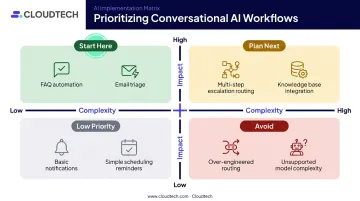
Prioritize by two variables: impact (volume × time saved per interaction) and complexity (number of decision branches, system integrations, edge cases). High impact, lower complexity is your starting point.
Step 2: Define Conversation Flows and Bot Goals
A conversation flow maps the dialogue path the AI follows: what it asks, how it handles unexpected inputs, and what action it triggers at each decision point. This design step is entirely separate from the technical build. Get it wrong here and no amount of careful configuration fixes it later.
For each conversation path, define:
- The specific trigger condition (what the user says or does that starts this flow)
- The required information the AI needs to collect (appointment type, preferred time, contact info)
- The downstream action that fires when all information is confirmed
- The fallback path when the AI cannot resolve the request
Bot goals need to be specific and measurable. "Help users with scheduling" is not a bot goal. "Trigger appointment booking workflow when user confirms preferred time slot and contact method" is. Vague goal descriptions cause the AI to trigger the wrong workflow or fail to trigger any.
Also define your escalation logic here. Define it now, not at deployment. Every path needs a clear handover to a human agent when the conversation reaches a dead end.
Step 3: Choose Your Tools and Cloud Infrastructure
Tool choice should follow use case complexity and your existing tech stack, not the other way around.
| Tool Category | Best For |
|---|---|
| Amazon Lex | AWS environments; scalable voice + text; strong NLP with slot-based intent model |
| Dialogflow | Google Cloud environments; similar intent/entity framework |
| LLM-based agents (GPT-4, Claude) | Dynamic, open-ended workflows needing flexible reasoning |
| Embedded chatbot builders | Simple FAQ deflection with no backend integration |
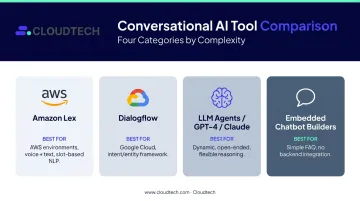
For SMBs on AWS, the Amazon Lex + AWS Lambda + Amazon Connect stack is a natural fit. Lex handles natural language understanding for both voice and text. Lambda manages workflow triggers and business logic after Lex collects required slot values. Amazon Connect enables voice-based automation — a Lex bot can be associated with a Connect instance and invoked directly from a contact flow.
Cloud infrastructure must be in place before you build: a hosted environment capable of handling API calls at volume, integration access to backend systems, and a supported communication channel. For SMBs without in-house AWS expertise, working with an AWS Advanced Tier Partner like Cloudtech can accelerate this foundation setup — particularly when MAP funding is available to offset costs.
Step 4: Build, Test, and Iterate
With infrastructure confirmed, scope the first build to a single workflow. Configure intents (what the AI recognizes), slots (information required to complete the intent), and sample utterances (example phrases users might say). Connect fulfillment logic to your backend — CRM, scheduling system, ticketing platform — through Lambda or direct API calls.
Google's Dialogflow documentation recommends at least 10–20 diverse training phrases per intent, with phrases representing varied ways users express the same request. Thin or repetitive training data degrades intent recognition accuracy before the bot ever goes live.
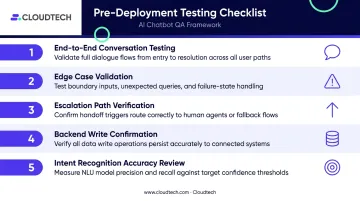
Testing checklist before any live deployment:
- Run expected conversations end-to-end and confirm workflow triggers fire correctly
- Test edge cases — misspellings, unexpected phrasing, missing information
- Verify escalation paths activate when the AI cannot resolve the request
- Confirm backend writes (CRM updates, calendar bookings) complete without errors
- Measure intent recognition accuracy and identify which intents are misclassifying
Build a feedback loop from test findings back to intent configuration before you move to deployment.
Step 5: Deploy, Monitor, and Continuously Optimize
Once testing is stable, deployment is straightforward — provided you've checked each of the following:
Deployment checklist:
- Authentication and access controls confirmed
- Integration health checks passed for all connected systems
- Escalation paths tested and verified
- Channel configuration complete (web chat, SMS, voice)
- Logging and monitoring active before first live interaction
Post-deployment monitoring is not optional. Gartner research found that only 14% of customer service issues are fully resolved in self-service, and difficulty reaching a human is consumers' leading concern with AI. Escalation design and monitoring cadence are non-negotiable as a result.
Key metrics to track weekly:
- Intent match rate (how often the AI correctly identifies what the user wants)
- Workflow completion rate (how often the triggered workflow reaches a confirmed outcome)
- Escalation rate (how often conversations hand off to a human)
- Resolution time (average time from first message to completed workflow)
Use this data to refine conversation flows, add training utterances for misclassified intents, and expand to additional workflows once the first one is stable.
When Should You Automate Workflows With Conversational AI?
McKinsey estimates that 60–70% of employee time involves activities that current technology — including generative AI — could technically automate. That number sounds promising, but technical possibility and practical fit are different things. Conversational AI works best when a workflow has a defined start trigger, a predictable set of user inputs, and a clear downstream action.
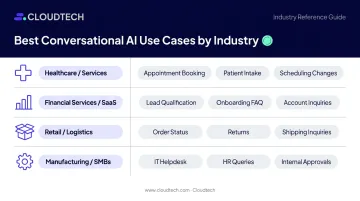
Strong use cases by industry:
| Industry | High-Fit Workflows |
|---|---|
| Healthcare / Services | Appointment booking, patient intake, scheduling changes |
| Financial Services / SaaS | Lead qualification, onboarding FAQ, account inquiries |
| Retail / Logistics | Order status, return initiation, shipping inquiries |
| Manufacturing / Large SMBs | IT helpdesk requests, HR query handling, internal approvals |
When conversational AI is the wrong fit:
- Workflows requiring complex emotional judgment or sensitive escalation
- Processes with highly variable, unstructured inputs that lack a predictable pattern
- Regulated decisions where compliance mandates a human decision-maker at every step
If your workflow clears these filters, the next step is choosing the right architecture to build on.
What You Need Before Getting Started
Preparation separates successful deployments from stalled ones. Most conversational AI projects don't fail because of the technology — they fail because of incomplete data, unclear process ownership, or insufficient integration groundwork.
System and Infrastructure Requirements
- A cloud environment capable of hosting the AI model and handling API calls at volume
- Integration access to backend systems the workflow will touch (CRM, ERP, scheduling, ticketing)
- A supported communication channel (web chat, SMS, voice, or messaging app)
- Authentication setup: role-based access controls, API key or managed identity configuration, data encryption in transit and at rest
Serverless, cloud-native architectures — such as AWS Lambda combined with Amazon Lex — significantly reduce infrastructure management burden for SMBs.
Data and Process Readiness
- Sample conversations or call transcripts representing real user inputs
- A defined list of intents and example utterances for each
- A mapped decision tree for every workflow path
- Confirmed API access to backend systems, with standardized data fields (contact records, appointment slots, order IDs)
Sparse or inconsistently labeled training data directly degrades intent recognition accuracy. Invest this time before the build starts — it's the most common cause of poor intent recognition at launch. Getting team ownership and compliance in order comes next.
Team and Compliance Readiness
Identify who owns the bot before launch. Someone must be accountable for managing conversation flow updates, reviewing escalation logs, and monitoring performance. Without a named owner, automation quality degrades quickly.
For regulated industries, confirm compliance requirements before writing a single line of configuration:
- Healthcare: HIPAA controls for patient data handling, data residency restrictions, audit logging
- Financial services: Data residency rules, consent language in conversation flows, access control policies
For healthcare SMBs, pre-configuring AWS CloudTrail, AWS Config, and KMS encryption from day one keeps HIPAA requirements embedded in the architecture rather than retrofitted after deployment.
Key Factors That Affect Your Automation Results
Even well-designed workflows underperform when these variables are not controlled.
NLP Training Data and Intent Configuration
The AI's ability to recognize what a user wants depends entirely on the intents it has been trained on and the diversity of example utterances for each. Research from COLING shows intent recognition accuracy rising from roughly 75–88% at 5 examples per intent to 79–91% at 10 examples, depending on the dataset — and that variance matters in production.
Thin or unrepresentative training data leads to misclassification, wrong workflow triggers, and user frustration. AWS recommends avoiding confusable training data and using input contexts when similar utterances could map to different intents.
Integration Depth With Existing Systems
A bot that cannot actually update a CRM record or book a calendar slot cannot complete the workflow. Shallow integrations — read-only access or single-system connections — leave manual follow-up steps in place and reduce ROI.
Full workflow completion requires read/write access to the systems that run the business. Lambda-powered backend integration is what enables an AI to take action — not just retrieve information — and is the difference between partial and full automation.
Conversation Design and Prompt Engineering
Vague or overlapping bot goal descriptions cause the AI to trigger the wrong workflow — or no workflow at all. Prescriptive, specific instructions with clear trigger conditions consistently outperform generic prompts.
Every bot should also have a fallback intent for when no intent can be matched. AWS builds this into the Amazon Lex model by default, but the fallback response and escalation path still need to be deliberately designed.
Monitoring Cadence and Feedback Loop
Conversational AI requires ongoing maintenance. User language evolves, edge cases emerge, and workflow requirements shift — meaning accuracy degrades without active oversight.
Teams that monitor consistently stay ahead of these issues. A practical cadence includes:
- Reviewing escalation logs weekly to catch misclassified intents early
- Tracking intent match rates to spot accuracy trends before they affect volume
- Auditing fallback triggers monthly to identify coverage gaps
- Updating training data whenever new user phrasing patterns appear
Common Mistakes When Automating Workflows With Conversational AI
- Skipping workflow mapping before bot configuration — results in incomplete automation that breaks on real user inputs when edge cases surface
- Overlapping trigger conditions: when multiple bot goals share similar descriptions, the AI can't reliably determine which workflow to fire — keep each condition distinct and phrased the way real users actually ask
- Over-scoping the first deployment — attempting to automate five workflows in the first release makes it nearly impossible to isolate issues; start with one high-value, clearly defined workflow
- No escalation path defined: without a clear handover route, unresolved conversations simply stop — damaging user trust before the bot has a chance to prove its value
Frequently Asked Questions
What are the key steps in a conversational AI workflow?
The core steps are: map and prioritize workflows, design conversation flows with specific bot goals, select and configure AI tools, integrate with backend systems, then deploy with active monitoring and optimization. Each step builds on the previous. Skipping process mapping makes every downstream step harder.
Which AI is best for workflow automation?
The best choice depends on your infrastructure and use case complexity. Amazon Lex suits AWS environments needing scalable voice and text automation. Dialogflow fits Google Cloud. LLM-based tools (GPT-4, Claude) work well for dynamic, open-ended workflows. Platform fit and integration support matter more than raw AI capability.
Can ChatGPT create workflows?
ChatGPT and GPT-4 via API can power workflow automation when integrated with orchestration tools — interpreting inputs, generating responses, and triggering connected actions. But ChatGPT is not a standalone workflow platform. It requires integration with systems like AWS Lambda, Zapier, or a custom backend to complete end-to-end execution.
What types of workflows can conversational AI automate?
High-fit use cases include customer support FAQ deflection, appointment scheduling, lead qualification, IT and HR helpdesk requests, order status inquiries, and internal approval routing — specifically processes that are high-volume, repetitive, and have predictable inputs and outputs.
How long does it take to set up conversational AI workflow automation?
A single, well-defined workflow on a cloud-native stack can be live in roughly four weeks. Multi-workflow deployments with deeper integrations take longer, scaling with complexity and compliance requirements. An AWS consulting partner like Cloudtech can compress timelines — their structured four-week delivery model takes a single workflow from architecture to go-live.