Introduction
Running a lean team no longer means falling behind. According to the U.S. Chamber of Commerce, 58% of small businesses now use generative AI — up from just 23% in 2023. That's a 35-point jump in two years — and the businesses driving it aren't waiting for a perfect plan.
The appeal is practical: AI assistants handle tasks that once required entire departments. Content drafting, customer support routing, meeting notes, CRM summaries, internal document search — all of it handled at a fraction of the cost of additional headcount.
But with dozens of options claiming to be the best, the real challenge is figuring out which tool actually fits your team's workflow, budget, and technical comfort level.
We evaluated 10 AI assistants specifically through the lens of small business needs — affordability, ease of setup, integration with existing tools, and measurable real-world impact.
Key Takeaways
- ChatGPT is the best all-around general-purpose AI assistant for most SMBs
- Amazon Q Business leads for SMBs already running on AWS infrastructure
- Jasper is the top pick for marketing teams needing brand-consistent content
- Zendesk AI is the strongest choice for high-volume customer support automation
- Otter.ai offers the best lightweight, budget-friendly meeting productivity
- Your best fit depends on use case, tech stack, and budget — no single tool wins for every business
Why Small Businesses Are Turning to AI Assistants
An AI assistant, in practical SMB terms, is software that uses natural language processing and machine learning to automate or accelerate everyday tasks — drafting emails, answering customer questions, summarizing meetings, searching internal documents, and analyzing data. For a five-person team, that can mean handling the workload that previously required ten.
The adoption numbers back this up. IDC predicted that 30% of SMBs would prioritize tactical AI investments in 2025, and U.S. Chamber data confirms that shift is already underway. Notably, 82% of small businesses using AI actually grew their workforce over the prior year — meaning AI is augmenting teams, not replacing them.
Three factors are driving faster adoption in 2025 specifically:
- Lower cost: Pricing has dropped across the board, with most tools now offering SMB-friendly tiers
- Simpler setup: Configuration that once took weeks now takes hours
- Embedded access: AI is shipping inside tools SMBs already use — Google Workspace bundled Gemini in January 2025, and HubSpot's Breeze AI ships with every CRM plan
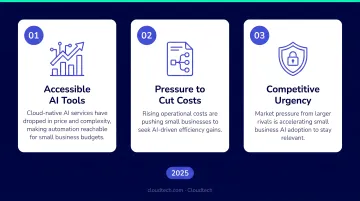
The friction of "adding another tool" is largely gone.
With that context, here are the 10 best AI assistants evaluated for small business use.
10 Best AI Assistants for Small Businesses
These tools were assessed based on real-world usability, SMB-relevant features, pricing accessibility, and integration flexibility — not just feature lists or marketing claims.
1. ChatGPT (OpenAI)
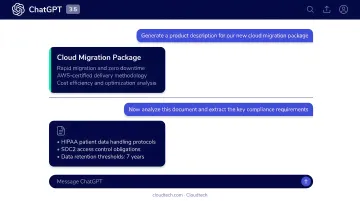
OpenAI's ChatGPT covers more ground than any other AI assistant on this list. Teams use it for drafting content, analyzing uploaded files, writing code, answering questions, and building automated workflows. It runs via web, mobile, API, and integrates into hundreds of third-party tools.
For small businesses, the appeal is practical: no specialized setup, works across every department from marketing to HR to operations, and the free tier gives bootstrapped teams genuine value.
The Business plan ($25/user/month billed monthly, or $20/user/month annually) adds team admin controls, SOC 2 Type 2 compliance, and a commitment not to train on your organization's data.
| Details | |
|---|---|
| Best For | General-purpose productivity across all departments |
| Key Features | Content generation, data analysis, code writing, document summarization, custom GPTs |
| Pricing | Free plan available; Business at $25/user/month (monthly) or $20/user/month (annually) |
2. Google Gemini
Gemini is Google's AI assistant built directly into Gmail, Docs, Sheets, Slides, Drive, and Meet. For SMBs already on Google Workspace, it's the most immediate AI upgrade available: everything works within tools your team already uses daily.
Since January 2025, Gemini features are included in Workspace Business and Enterprise plans, with Business Standard at $14/user/month — a significant drop from the prior combined cost of $32/user/month. It surfaces answers from emails and Drive files the user already has access to, making it useful from day one without any configuration.
| Details | |
|---|---|
| Best For | SMBs fully on Google Workspace |
| Key Features | Email drafting, document summarization, meeting recaps, spreadsheet analysis, Drive-grounded answers |
| Pricing | Included in Workspace Business plans from $14/user/month; AI Pro from $19.99/month |
3. Microsoft Copilot
Microsoft Copilot works the same way for Microsoft 365 users: embedded across Word, Excel, PowerPoint, Outlook, and Teams. It summarizes email threads, generates presentation decks, analyzes spreadsheet data, and catches team members up on missed Teams conversations.
Business Standard with Copilot runs $23.50/user/month annually; a standalone Copilot Business add-on is available at $18/user/month (promotional pricing through September 2026). Security is enterprise-grade by default: prompts and responses are not used to train foundation models, and data is encrypted at rest and in transit.
| Details | |
|---|---|
| Best For | SMBs operating on Microsoft 365 |
| Key Features | Email summarization, document drafting, Excel data visualization, Teams catch-up, PowerPoint generation |
| Pricing | Business Standard with Copilot at $23.50/user/month; add-on at $18/user/month |
4. Claude (Anthropic)
Claude handles what most general AI assistants struggle with: long, complex documents. Contracts, financial reports, technical specifications, compliance materials — Claude processes and reasons through them with careful, nuanced responses. It's the preferred choice for legal, finance, and operations teams.
The standout feature is persistent Projects workspaces, which maintain context across sessions using a 200K token context window. Upload style guides, policy documents, or reference files once, and Claude draws on them throughout every subsequent conversation.
Pro plan is $20/month ($17/month billed annually).
| Details | |
|---|---|
| Best For | Document-heavy workflows; legal, finance, and operations teams |
| Key Features | Long document analysis, persistent Projects workspace, Python code execution, structured Artifacts outputs |
| Pricing | Free plan available; Pro at $20/month ($17/month billed annually) |
5. Jasper
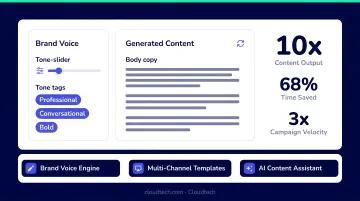
Jasper is purpose-built for marketing and content teams. It generates blog posts, social media copy, email campaigns, and ad creative while learning and maintaining a brand's specific voice across every output.
The Brand Voice feature is what separates Jasper from general writing assistants: train it on your existing content and it maintains consistent tone, terminology, and style across all generated copy. The Pro plan starts at $59/month (billed annually). Note: a Forrester TEI study commissioned by Jasper reported 342% ROI — treat that as a vendor-hosted claim, not an independent benchmark.
| Details | |
|---|---|
| Best For | Marketing and content teams needing brand-consistent copy |
| Key Features | Brand voice customization, campaign generation, AI image creation, browser extension, 50+ templates |
| Pricing | Pro at $59/month (billed annually) or $69/month; Business plans custom |
6. Notion AI
Built directly into Notion's workspace, Notion AI lets teams write, summarize, search, and manage knowledge without opening a separate tool. It's particularly valuable for distributed or async teams who already use Notion for project management, wikis, and documentation.
Key capabilities include auto-generating project briefs, summarizing long pages, answering questions from your internal knowledge base, and filling in database fields automatically. Notion AI access is primarily available on Business ($20/member/month) and Enterprise plans, with limited trial responses on lower tiers.
| Details | |
|---|---|
| Best For | SMBs using Notion for knowledge management and project tracking |
| Key Features | AI writing assist, doc summarization, Q&A from internal knowledge base, database autofill, translation |
| Pricing | Business plan at $20/member/month; Custom Agents at $10 per 1,000 credits |
7. Zendesk AI
Zendesk AI is trained on billions of real customer support interactions, making it one of the most effective tools for automating high-volume support operations. SMBs with significant customer inquiry volume get the most out of it.
Zendesk reports that its AI Agents can resolve up to 80% of customer interactions — validate that against your own ticket mix before banking on it. The AI Copilot add-on ($50/agent/month) suggests replies to human agents in real time, which meaningfully reduces handling time on complex tickets. Suite Team starts at $55/agent/month annually.
| Details | |
|---|---|
| Best For | SMBs with high customer support volume |
| Key Features | AI-powered ticketing, automated responses, agent copilot, omnichannel support, Help Center builder |
| Pricing | Suite Team at $55/agent/month; Copilot add-on at $50/agent/month |
8. Otter.ai
Otter.ai automatically joins Zoom, Google Meet, and Microsoft Teams calls to record, transcribe, and summarize conversations, generating action items without anyone taking manual notes. Setup takes minutes via calendar integration.
For small business owners wearing multiple hats, OtterPilot's auto-join feature means no meeting detail gets missed, even when attention is split. The free plan includes 300 monthly transcription minutes; Pro ($16.99/user/month, or $8.33/user/month annually) extends that to 1,200 minutes and 90 minutes per conversation.
| Details | |
|---|---|
| Best For | Meeting-heavy teams needing automated notes and action items |
| Key Features | Live transcription, meeting summaries, action item extraction, slide capture, follow-up email generation |
| Pricing | Free (limited); Pro at $16.99/user/month or $8.33/user/month annually |
9. HubSpot AI (Breeze)
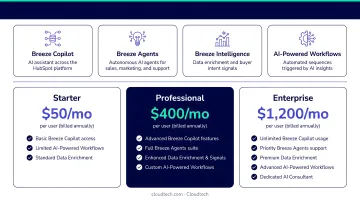
HubSpot Breeze is the AI layer across HubSpot's CRM, marketing, sales, and service hubs. For SMBs already using HubSpot as their core platform, it's the most practical AI upgrade available: everything runs inside tools and data your team already works with.
Capabilities include AI-generated email sequences, deal activity summaries, prospect research, and predictive lead scoring. Pricing is unusually accessible: Starter Customer Platform starts at $7/seat/month. Some advanced agent features (prospecting, customer agent, data agent) operate on a credit model: $1.00 per lead recommended, $0.50 per customer resolution, $0.10 per data answer.
| Details | |
|---|---|
| Best For | SMBs using HubSpot for CRM, sales, and marketing automation |
| Key Features | AI content generation, deal summaries, prospect research, email automation, predictive lead scoring |
| Pricing | Starter from $7/seat/month; Breeze AI agents billed by usage credits |
10. Amazon Q Business
Amazon Q Business lets employees ask questions and get answers from internal data sources, including documents, databases, and connected apps, all hosted securely within an AWS environment. It's the right pick for SMBs that already run workloads on AWS and need a permission-aware, compliance-ready internal knowledge assistant.
It connects to 40+ data sources including Amazon S3, Salesforce, Jira, Slack, and Microsoft 365. IAM-based permissions ensure users only see answers from content they're already authorized to access, which makes it particularly strong for regulated industries like healthcare, finance, and manufacturing.
Pricing starts at $3/user/month (Lite) or $20/user/month (Pro).
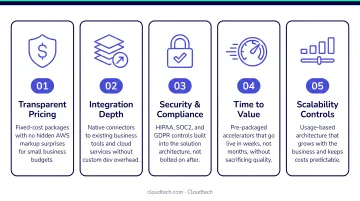
For SMBs without an in-house AWS team, an AWS partner like Cloudtech can configure the data connectors, permissions, and document processing pipeline so the deployment delivers value from day one rather than sitting idle after launch.
| Details | |
|---|---|
| Best For | SMBs on AWS infrastructure needing secure, permission-aware internal AI search |
| Key Features | Internal knowledge Q&A, 40+ data connectors, IAM-based access control, document summarization, workflow automation |
| Pricing | Lite at $3/user/month; Pro at $20/user/month |
How We Chose the Best AI Assistants for Small Businesses
Every tool on this list was assessed through the lens of resource-constrained small businesses — not feature count or model benchmarks. The five criteria that drove every recommendation:
- SMB affordability — Does it offer a meaningful free or low-cost tier? Can a team of five get real value without a $500/month commitment?
- Ease of adoption — Can a non-technical user extract value within a day? McKinsey found that gen AI projects typically take 1–4 months to reach production — tools that live inside existing platforms can cut that timeline.
- Integration flexibility — Does it connect natively with Google Workspace, Microsoft 365, Slack, HubSpot, or AWS? Or does it require custom API work to be useful?
- Use-case specificity — Does it excel at a named business function rather than trying to do everything adequately?
- Data security — Does it meet baseline compliance requirements for sensitive industries? SOC 2, encryption at rest and in transit, and explicit no-training commitments are the minimum bar.
One mistake to avoid: Gartner predicted that 30% of gen AI projects would be abandoned after proof of concept by end-2025, most commonly due to unclear business value, escalating costs, or poor data quality. The teams that succeed pick one specific workflow, measure actual outcomes, and expand from there.
A customer support team doesn't need a general-purpose writing AI. A solo founder doesn't need an enterprise ticketing system. Start with the one workflow that's costing you the most time — then find the tool built for exactly that.
Conclusion
The best AI assistant for a small business isn't the most powerful one — it's the one that addresses the team's biggest daily friction, integrates with existing tools, and delivers value quickly without a steep learning curve or an enterprise-level budget.
Start narrow. Pick one use case, evaluate two or three tools from this list, and measure actual time saved over 30 days before committing to a paid plan or broader rollout. Switching costs are low enough that a 30-day experiment is low-risk.
For SMBs already on AWS or planning a move, choosing the right AI assistant is only part of the equation. The infrastructure running beneath it determines whether that tool performs reliably as usage grows.
Cloudtech's team of AWS-certified experts helps SMBs deploy and optimize AI workloads on AWS (including tools like Amazon Q Business and custom generative AI pipelines), so the underlying infrastructure is configured correctly from the start rather than catching up after launch.
Frequently Asked Questions
What is the best free AI assistant for small businesses?
ChatGPT's free plan, Otter.ai Basic (300 minutes/month), and Notion's limited free AI responses are the strongest no-cost starting points. Each free tier has real constraints — ChatGPT free lacks team features, and Otter's basic plan caps conversation length — so they work best for early evaluation rather than full production use.
Can small businesses use AI assistants without technical expertise?
Most modern AI assistants — ChatGPT, Gemini, Jasper, Otter.ai — require no technical background to start. Tools like Amazon Q Business that connect to internal data sources and require IAM permission configuration benefit from professional setup support to avoid security gaps and wasted time.
How do AI assistants integrate with existing small business software?
Most offer native integrations with Google Workspace, Microsoft 365, HubSpot, and Slack. Where native connections don't exist, API access or third-party connectors like Zapier typically bridge the gap. Tools embedded in existing platforms — Gemini in Workspace, Copilot in Microsoft 365 — require no integration work at all.
Are AI assistants secure enough to handle sensitive business data?
Enterprise-grade plans from OpenAI (Business/Enterprise), Microsoft, Google, and AWS include AES-256 encryption, SOC 2 compliance, and explicit commitments not to train on customer data. Security standards differ across plans and vendors, so verify compliance certifications before connecting sensitive data sources.
What is the difference between an AI assistant and an AI chatbot?
AI chatbots primarily respond to questions in a conversational interface. AI assistants — and more advanced AI agents — take action across tools: updating a CRM record, scheduling a meeting, routing a support ticket, or generating a formatted report. That action-taking capability is what makes AI assistants valuable for workflow automation.
How long does it take to implement an AI assistant in a small business?
General-purpose tools like ChatGPT or Gemini can be productive within minutes. More customized deployments — like connecting Amazon Q Business to internal S3 data sources with proper IAM permissions — typically take days to a few weeks. Security configuration and data permissions are where most delays occur — getting those right upfront prevents rework later.