Introduction
Picture a typical Monday morning at a growing SMB: a sales contract sits in someone's inbox, waiting on an approval from a manager who's traveling. Meanwhile, three team members are working from different versions of the same vendor agreement saved to a shared drive. The compliance audit is next week, and no one can locate the signed policy acknowledgments from Q1.
This is the reality for many small and mid-sized businesses managing documents through email chains, shared folders, and manual handoffs. The cost isn't just frustration — it's delayed revenue cycles, compliance gaps, and staff spending hours on work that adds no real value.
This article covers what document workflow automation actually looks like in practice, with concrete examples across healthcare, financial services, manufacturing, HR, and sales. You'll also get best practices SMBs can act on today, plus a practical guide to implementing automation on AWS without enterprise-scale budgets.
Key Takeaways
- Document workflow automation replaces manual handoffs with technology-driven routing, approvals, and storage
- The highest ROI comes from targeting your single highest-volume, highest-friction process first
- Automated workflows generate timestamped audit trails, closing compliance gaps without manual effort
- AWS-native tools (Textract, Step Functions, Lambda) bring enterprise-grade automation within SMB reach
- Working with an AWS-certified partner shortens time-to-value and reduces implementation risk
What Is Document Workflow Automation?
Document workflow automation uses technology to manage, route, process, and store documents through a defined sequence of steps — from creation to final approval or archiving — without relying on manual handoffs between people.
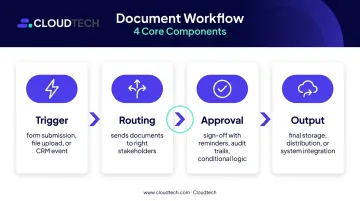
Every automated document workflow contains four core components:
| Component | What It Does |
|---|---|
| Trigger | Starts the workflow — a form submission, file upload, or CRM event |
| Routing | Sends documents to the right stakeholders in the right order |
| Approval | Structured sign-off with reminders, audit trails, and conditional logic |
| Output | Final storage, distribution, or integration into other systems |
Sequential vs. Parallel Workflows
The right structure depends on your process:
- Sequential: Steps complete in a fixed order — each approver acts only after the previous one signs off. Best for regulated chains where sequence matters, such as loan applications, contract reviews, or compliance sign-offs.
- Parallel: Documents go to multiple reviewers at the same time, cutting cycle times when approvers work independently — multi-department policy reviews or simultaneous legal and financial sign-off are common examples.
AWS Step Functions supports both models natively, including parallel branch execution and wait-for-callback human approval patterns — so teams can enforce exactly the logic their process requires.
Why Manual Document Workflows Break Down
Manual document management fails in predictable ways:
- Version conflicts — multiple people edit separate copies, creating disagreement about which version is authoritative
- Approval delays — email chains offer no visibility into who's holding up the process
- Misfiled or lost documents — shared drives become disorganized over time, creating compliance gaps during audits
- No audit trail — reconstructing who saw what, and when, is nearly impossible
Warning Signs Your Business Needs Automation
Ask yourself whether any of these apply to your team:
- Staff regularly spend time tracking document status instead of doing core work
- Frequent re-work because an outdated version reached a signatory
- Documents are difficult to locate quickly during audits or client inquiries
- Remote or hybrid teams struggle to collaborate on time-sensitive approvals
- Revenue cycles (contracts, invoices) are delayed by slow document routing
A 2021 Forrester Consulting study commissioned by M-Files modeled a 500-employee organization managing approximately 3 million documents and estimated a 40% reduction in time spent searching for information after implementing automated document management — with individual estimates ranging from 30% to 95% for complex searches.
The costs go beyond lost time. Compliance failures carry regulatory penalties. Slow contract approvals defer revenue. And employees stuck processing low-value paperwork burn out faster — often before anyone notices the bottleneck is structural, not individual.
Document Workflow Automation Examples by Industry
The best results come from targeting the highest-volume, highest-friction document processes first. What that looks like varies considerably by industry.
Healthcare
Healthcare organizations generate enormous volumes of documents that require precise routing and strict compliance. Common automation targets include:
- Prior authorization requests — routing clinical documentation to the right payer or clinician without manual data re-entry
- Patient intake forms — automatically capturing and validating patient information at the point of submission
- HIPAA-required records — maintaining complete audit logs of who accessed or modified protected health information
The regulatory momentum here is significant. CMS's 2024 interoperability rule (CMS-0057-F) projects approximately $15 billion in savings over ten years through electronic prior authorization — a regulatory projection that reflects how central document automation is becoming to healthcare operations.
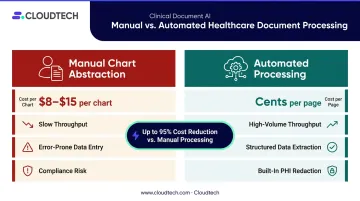
Cloudtech's Clinical Document AI service addresses this workflow for healthcare SMBs directly: Amazon Textract extracts data from PDFs, faxes, and scanned charts, while Amazon Comprehend Medical identifies clinical entities, ICD-10 codes, and flags PHI for redaction. Manual chart abstraction typically costs $8–$15 per chart; automated processing runs at cents per page.
Financial Services
Banks, lenders, and financial advisors deal with document-intensive compliance requirements that make automation both valuable and, in many cases, mandatory.
Common automation targets include:
- Loan application processing — extracting and validating borrower data across document types
- KYC verification packets — routing identity documents through review and approval queues
- Audit-ready compliance reports — generating timestamped records automatically as work is completed
The SEC's 2023 amendments to Rule 17a-4 require covered broker-dealers to maintain complete, timestamped audit trails for electronic records — including the identity of anyone who modified or deleted a document. Automated workflows generate this trail as a byproduct of normal operation, removing the compliance burden from individual employees.
Manufacturing
Manufacturers depend on documentation that crosses departments and locations. Engineering change orders (ECOs), supplier contracts, quality compliance records, and inspection reports all require controlled routing and version management.
A 2025 Quality Magazine case study on Cirtec Medical described how replacing paper Device History Records with electronic DHRs reduced review cycle times and record errors, compressed product release timelines, and enabled deviation detection in real time — compared to issues that previously surfaced after hours or days.
For manufacturers managing multi-site operations, automated workflows keep quality documentation synchronized, version-controlled, and audit-ready — without manual follow-up on regulatory certifications.
HR and Onboarding
Employee onboarding is one of the most universally relatable document workflow problems. A confirmed hire can trigger an entire document sequence automatically:
- New hire contract sent for e-signature
- Tax forms routed to payroll
- Policy acknowledgments distributed and tracked
- Benefit enrollment forms sent with a deadline
- Completion status logged for HR records
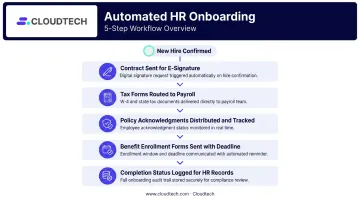
Automation ensures nothing gets missed, removes the back-and-forth, and creates a better first impression for new employees — while freeing HR staff from manually tracking who has and hasn't completed each step.
Sales and Procurement Contracts
Sales teams shorten deal cycles by automating quote generation, contract routing for legal review, and e-signature requests — often triggered directly from CRM data when a deal reaches a certain stage. Contracts stuck in manual routing queues add days to close times and delay revenue recognition.
On the procurement side, vendor onboarding documents and purchase order approvals can be automated to enforce policy compliance and eliminate processing delays that slow supply chain operations.
Key Benefits of Automating Document Workflows
Time Savings and Error Reduction
Removing manual routing and data re-entry has two compounding effects: documents move faster, and common errors disappear. Outdated versions no longer reach signatories. Data entered once flows accurately into downstream systems without re-keying.
A Forrester/M-Files composite model estimated meaningful gains from automation:
- 60% more efficient document categorization and indexing
- 50% faster template-based document creation
These figures are consistent with what Cloudtech's IDP implementations have delivered — including a 40% reduction in average document processing time in one documented case replacing a legacy OCR process with Amazon Textract.
Compliance and Auditability
Automated systems create timestamped records of every document action — who created it, who reviewed it, who approved it, and when. For regulated industries, this means compliance audits become a data retrieval exercise rather than a document reconstruction emergency.
HIPAA's 45 CFR 164.312(b) requires covered entities to implement mechanisms that record and examine activity in systems containing electronic protected health information. Automated workflows satisfy this requirement as part of normal operation rather than through separate manual logging.
Scalability Without Proportional Headcount
Compliance controls are only part of the equation. The other advantage is pure scale. A well-designed automated workflow processes 100 documents with the same overhead as 10 — so as document volumes grow with the business, staffing costs don't have to keep pace.
Best Practices for Document Workflow Automation
Map Before You Automate
Automating a broken process just makes errors happen faster. Before configuring any tool, document every step a document currently takes: who touches it, in what order, what can go wrong, and what triggers the next action. Identify bottlenecks and redundant steps, then define the ideal flow. This mapping exercise often surfaces process problems that automation alone can't fix.
Start With One High-Impact Process
Don't try to automate everything at once. Pick the single document type causing the most friction — contract approvals, invoice processing, onboarding packets — and automate that first. Proving ROI on one workflow builds internal confidence and surfaces lessons before you scale.
A phased approach consistently outperforms big-bang rollouts. Start with one process, run a pilot period, then expand once you've refined the workflow. That sequencing reduces risk and prevents early mistakes from compounding across every document type at once.
Build In Human Review Checkpoints
Automation handles routing and reminders. Decisions still belong to people. Best-practice workflows include defined approval gates where qualified people review and sign off before a document advances. This is especially important for high-stakes documents: contracts, medical records, compliance submissions.
Prioritize Security and Access Control From Day One
Document workflows often carry sensitive data. Configure these controls before go-live:
- Role-based access permissions — limit who can view, edit, or approve each document type
- Encryption at rest and in transit — standard with AWS KMS
- Multi-factor authentication for document management system access
- Audit logging via AWS CloudTrail for every document action
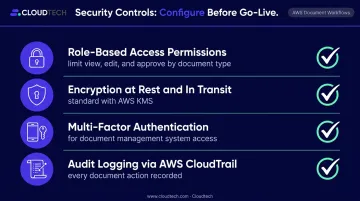
For regulated industries, these aren't optional configurations. Cloudtech builds KMS encryption, IAM-enforced access controls, and CloudTrail audit visibility into every document workflow deployment as baseline requirements, not post-launch additions.
Monitor, Measure, and Refine
Track KPIs from the start:
- Average approval cycle time
- Error rates and exception frequency
- Bottleneck location within the workflow
- Document processing volume trends
AWS's Well-Architected guidance recommends establishing KPIs that quantitatively measure workload performance against business goals and revisiting them when goals change. AWS Step Functions and CloudWatch surface this data directly, eliminating the need for manual reporting.
How to Implement Document Workflow Automation With AWS
AWS provides cloud-native services purpose-built for document automation — no on-premises infrastructure required, and no enterprise-scale budget needed to get started.
Core AWS Services for Document Automation
| AWS Service | Role |
|---|---|
| Amazon Textract | OCR — extracts text, tables, forms, and handwriting from scanned documents |
| Amazon Comprehend | NLP — classifies documents and routes them based on content understanding |
| AWS Step Functions | Orchestrates multi-step workflows with approval logic, retries, and error handling |
| Amazon S3 | Centralized, versioned document storage with event-trigger capability |
| AWS Lambda | Serverless processing triggered by document events (uploads, status changes) |
| Amazon A2I | Human review integration for low-confidence extractions |
| AWS CloudTrail / KMS | Audit logging and encryption across the pipeline |
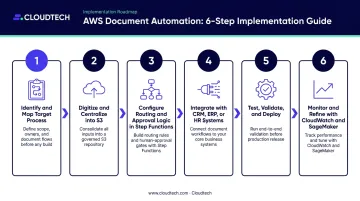
A Practical Implementation Path
- Identify and map the target process — document every step, owner, and trigger in the current workflow
- Digitize and centralize — move paper documents into cloud storage; establish S3 as the intake layer
- Configure routing and approval logic — build Step Functions state machines for your specific workflow structure
- Integrate with existing systems — connect to CRM, ERP, or HR platforms via AppFlow or custom APIs
- Test, validate, and deploy — unit testing, integration testing, and accuracy validation before go-live
- Monitor and refine — track KPIs, retrain models in SageMaker as document types evolve
The SMB Advantage With a Certified Partner
SMBs don't need to build this from scratch or maintain a large internal team. Cloudtech's AWS-certified team — comprised primarily of former AWS employees — helps businesses in healthcare, financial services, manufacturing, and other sectors design and deploy document automation pipelines at a fraction of what a traditional enterprise implementation would cost, often with AWS Partner Funding that reduces out-of-pocket investment further.
Every engagement follows a structured path from discovery to go-live:
- IDP Workflow Assessment — identifies where automation will have the highest impact
- Architecture design — builds the pipeline structure around your specific document types
- Pipeline build and system integration — connects to your CRM, ERP, or HR systems
- Testing and validation — accuracy checks before any document goes live
- Ongoing model refinement — SageMaker retraining as document types evolve
Simple deployments go live in weeks. Multi-department workflows with legacy system integrations typically take one to two months.
Because the pipeline runs in AWS, the operational benefits extend beyond automation itself. Remote and hybrid teams access documents from anywhere, the system scales as volume grows, and compliance standards — HIPAA, SOC2, or otherwise — are enforced at the infrastructure level rather than managed manually. To explore what this looks like for your specific document environment, contact Cloudtech directly.
Frequently Asked Questions
What is the difference between a document workflow and document workflow automation?
A document workflow is the defined sequence of steps a document follows through an organization. Document workflow automation uses technology to execute those steps automatically — handling routing, reminders, approvals, and storage without manual intervention between each stage.
What are the most common examples of document workflow automation?
The most frequently automated document types include employee onboarding forms, sales and procurement contracts, invoice approvals, compliance and regulatory reports, and patient intake records in healthcare settings.
How long does it take to implement document workflow automation?
Simple automations for a single document type can be live in days or weeks. More complex multi-department workflows with legacy system integrations typically take one to two months, depending on document complexity and the number of systems involved.
What AWS services support document workflow automation?
The core stack includes Amazon Textract for extraction, AWS Step Functions for orchestration, Amazon S3 for storage, and AWS Lambda for event-driven triggers. Amazon Comprehend, Amazon A2I, and AWS CloudTrail are commonly added depending on the use case.
Is document workflow automation suitable for small businesses?
Small businesses often see the biggest gains. Cloud-based solutions require no upfront infrastructure, and automated workflows let lean teams handle growing document volumes without adding headcount.
How do I know if my business needs document workflow automation?
Your business likely needs automation if staff spend significant time tracking document status manually, version conflicts cause frequent re-work, document delays are slowing revenue or compliance, or files are hard to locate during audits.