Introduction
Broadcom completed its $69 billion acquisition of VMware in November 2023, and for many organizations, the licensing bill hasn't been the same since. Customers and partners have reported price increases ranging from 2x to 5x, with some European cloud providers claiming hikes of 800% to 1,500%. Meanwhile, Broadcom raised the minimum core purchase from 16 to 72 cores, making the math increasingly painful for SMBs.
For organizations running VMware on-premises, the decision to evaluate alternatives is effectively made. The real challenge is moving efficiently without breaking production workloads in the process.
This guide covers what VMware-to-AWS migration actually involves, why the timing matters, which migration strategy fits your workloads, and how the step-by-step process works using AWS's native tooling. It also covers the most common mistakes teams make — and how to avoid them.
Key Takeaways
- Broadcom's licensing changes have made VMware significantly more expensive, especially for SMBs previously on perpetual licenses
- AWS Application Migration Service (AWS MGN) is the primary tool for VMware-to-AWS migrations, with automated replication and minimal downtime
- Three migration strategies — Redeployment, Replication, and Zero Downtime — each suit different workload types
- Pre-migration discovery and dependency mapping determine whether your migration succeeds or stalls
- AWS Partner Funding programs like MAP can offset or eliminate out-of-pocket migration costs
What Is VMware-to-AWS VM Migration?
VMware-to-AWS migration is the process of moving virtual machines running on VMware hypervisor infrastructure — vSphere, ESXi, or related platforms — to run as Amazon EC2 instances or other AWS-native services. The VMware dependency is removed entirely, and workloads run on AWS-managed infrastructure instead.
Lift-and-Shift vs. Replatform vs. Refactor
Most organizations start with lift-and-shift (rehosting), and for good reason. It means moving the VM as-is — OS, application, configuration — without code changes. The workload runs on EC2 the same way it ran on VMware. No re-architecture required.
From there, organizations can choose to:
- Replatform — make targeted optimizations during or after migration (switching to RDS, for example) without redesigning the app
- Refactor — redesign the application to use cloud-native services like Lambda, ECS, or managed databases
Lift-and-shift gets workloads off VMware quickly. Refactoring delivers long-term efficiency. Most migration projects do both — lift first, modernize after.
Not the Same as VMware Cloud on AWS
VMware Cloud on AWS (VMC) is still a VMware environment — just hosted on AWS hardware. You still pay VMware licensing fees. A true VMware-to-AWS migration moves workloads to native EC2 and removes the VMware layer entirely.
AWS officially stopped reselling VMware Cloud on AWS as of April 30, 2024, making native EC2 migration the clear path forward for SMBs.
Why Migrate from VMware to AWS Now?
The licensing cost shock is the most immediate driver, but it's not the only one.
The Licensing Math Has Changed
Broadcom's restructuring eliminated perpetual license options, moved to subscription-based per-core pricing, and consolidated the product portfolio around VMware Cloud Foundation and vSphere Foundation. For organizations previously on perpetual licenses, renewal costs have increased substantially — and the 72-core minimum purchase requirement means smaller environments now pay for capacity they don't need.
Operational Overhead That Disappears
On VMware, your team manages:
- Hardware procurement and refresh cycles
- Hypervisor patching and version upgrades
- Capacity planning tied to physical hardware
- VMware-specific tooling and licensing compliance
On AWS, that overhead shifts to managed infrastructure. You pay for what you use, scale on demand, and stop planning hardware purchases 18 months in advance.
AWS Services Unlocked Post-Migration
Moving workloads to EC2 is the entry point — not the destination. Once off VMware, organizations gain access to over 200 AWS services that are difficult or costly to replicate on-premises:
- Amazon RDS — managed relational databases with automated backups and failover
- Auto Scaling — dynamic resource adjustment based on actual demand
- AWS Backup — centralized backup policy management across services
- Amazon S3 — cost-effective object storage with lifecycle management
- Disaster recovery — cross-region replication and automated failover that would require significant infrastructure investment on VMware
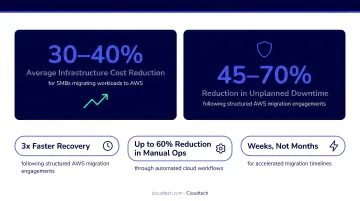
The numbers back this up. According to AWS Migration Acceleration Program data, customers migrating to AWS achieve, on average, a 31% reduction in infrastructure costs and 69% fewer unplanned downtime events.
The Cost of Waiting
Every month organizations remain on VMware subscription pricing, they're paying fees that could fund the migration itself. AWS provides migration credits and tooling to offset transition costs — and working with an AWS Advanced Tier Partner gives eligible SMBs access to AWS Partner Funding through the Migration Acceleration Program, which can reduce or eliminate out-of-pocket migration expenses entirely.
VMware-to-AWS Migration Strategies
No single strategy works for every workload. The right approach depends on each application's criticality, downtime tolerance, and complexity — pick the wrong method and you either over-engineer a simple migration or under-plan a critical one.
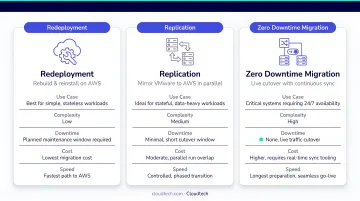
Redeployment (Redeploy and Restore)
Provision a new EC2 instance, install and configure the application fresh, then restore data from backups. This is the simplest path: no agents, no replication infrastructure.
Best for: Internal tools, dev/test environments, and non-critical workloads with a defined maintenance window
Trade-off: Requires downtime. If the application can tolerate a cutover window and rebuild effort, this is often the fastest path to completion.
AWS VM Import/Export supports this approach directly, allowing VMware OVA and VMDK images to be imported as Amazon Machine Images (AMIs).
Replication via AWS Application Migration Service (AWS MGN)
AWS MGN installs a lightweight agent on each source VM. That agent performs continuous, compressed, encrypted block-level replication to a staging area subnet in AWS — keeping the source server fully operational until you decide to cut over. When ready, a short cutover window (typically minutes to a few hours) finalizes the switch.
Best for: Most production workloads. Balances low downtime, automation, and manageable complexity.
Why it's the default recommendation: MGN is free for the first 2,160 hours (90 days) per server. Replication traffic uses LZ4 compression, which reduces transit size by 60–70%. The source server stays operational until you decide to cut over.
Zero Downtime Migration
For applications with the strictest SLAs, database-native replication tools (SQL Server Always On, distributed availability groups) keep source and target synchronized continuously. File data syncs via AWS DataSync. Application cutover happens by rerouting DNS — often within a brief maintenance window even for "zero downtime" scenarios.
Best for: Mission-critical databases and applications where even a short cutover window is unacceptable
Reality check: This approach requires the highest planning effort, application-specific expertise, and more complex validation. Most workloads don't justify it — the replication strategy with a planned maintenance window is sufficient for the vast majority of applications.
How the Migration Process Works: Step by Step
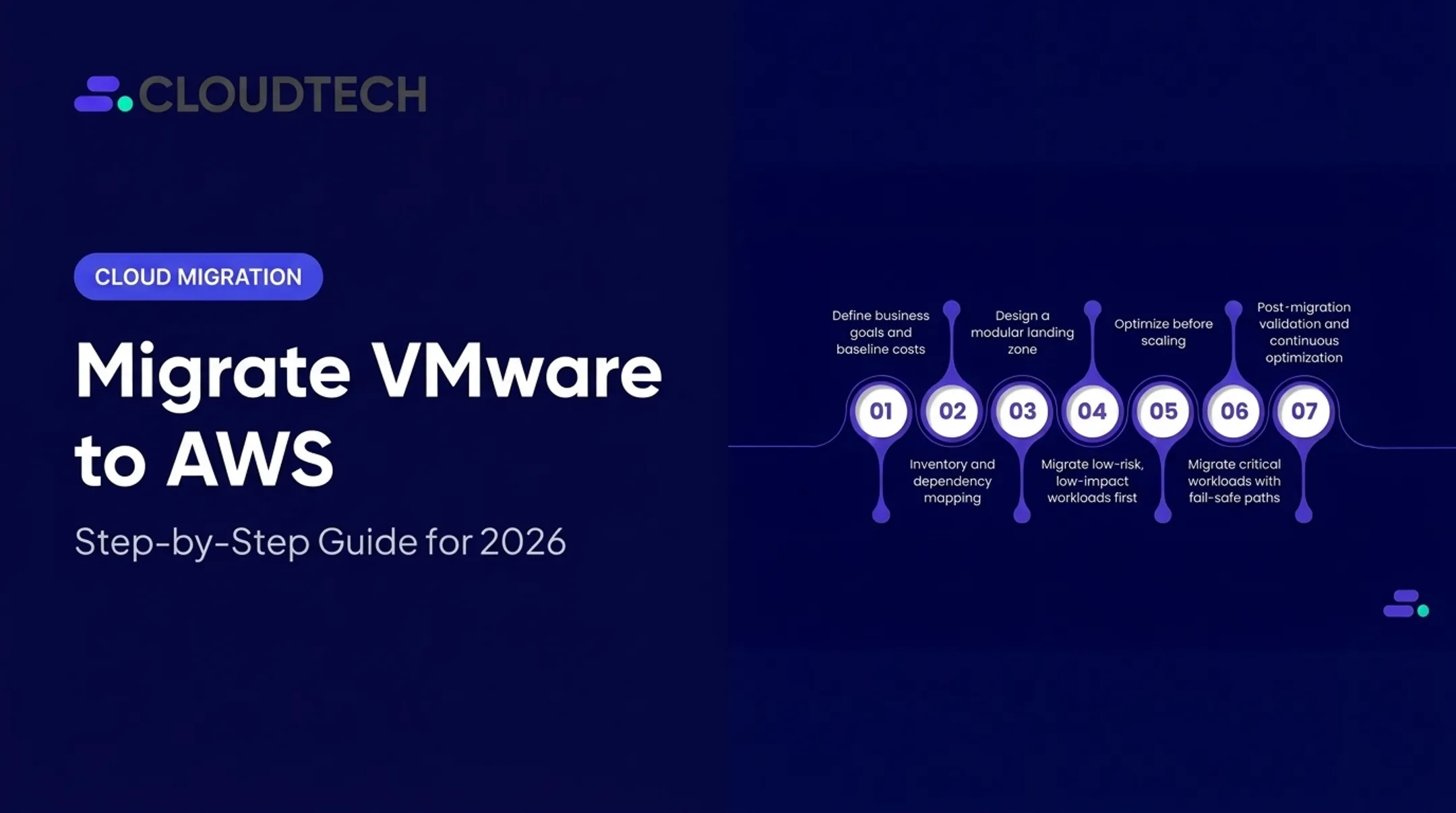
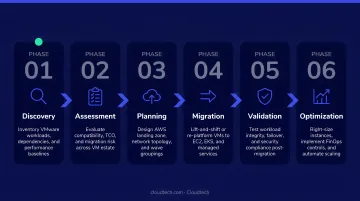
The end-to-end lifecycle follows six phases: Pre-Migration Assessment → Foundation Setup → Agent Installation & Replication → Testing → Cutover → Post-Migration Optimization. Skipping phases is the most common cause of failed or delayed migrations.
Step 1: Pre-Migration Discovery and Planning
Before a single agent is installed, you need a complete picture of what you're migrating.
Discovery involves:
- Auditing all VMs — OS versions, installed applications, disk sizes
- Mapping application dependencies — which servers talk to which, and on what ports
- Measuring performance baselines — CPU, memory, storage I/O, and network utilization to inform EC2 instance sizing
- Organizing workloads into migration waves — typically 6–10 weeks per wave, grouped by dependency and downtime tolerance
AWS Application Discovery Service and AWS Migration Hub have historically supported this phase, though note that both services are closed to new customers as of late 2025. Teams now typically use AWS Systems Manager Inventory and third-party discovery tools alongside manual dependency mapping.
Under-investment here is the most frequently cited cause of migration delays. If your dependency map is incomplete, you'll discover missing connections during testing — not before.
Step 2: Set Up the AWS Foundation
Before any VM can be migrated, the target environment must be ready. This means:
- Configure VPC subnets, routing tables, and a dedicated staging area subnet for MGN replication servers
- Open TCP port 1500 from source servers to MGN replication servers in AWS
- Attach the
AWSApplicationMigrationAgentInstallationPolicymanaged policy to the IAM user or role used for agent installation - Use AWS Control Tower to handle governance and account structure if standing up a new multi-account environment
Network and identity configuration is difficult to change once replication begins. Get it right before the first agent goes in.
Step 3: Install AWS MGN Agents and Begin Replication
With the foundation in place, install the AWS Replication Agent on each source VM:
- Linux: Requires root or sudo privileges; the installer creates an
aws-replicationuser - Windows: Run the installer as Administrator; Windows Server 2003/2008/2012 require legacy installer versions
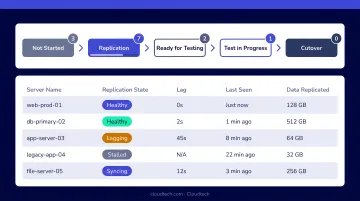
Once installed, each agent begins continuous block-level replication to the staging area. Monitor replication health in the AWS MGN console — you're looking for Data Replication Status: Healthy before proceeding. Source servers remain fully operational throughout.
Step 4: Launch Test Instances and Validate
When the MGN console shows Migration Lifecycle: Ready for Testing, launch a test EC2 instance from the replicated data. The source environment continues running normally.
Validation checklist:
- OS boots successfully
- Application services start and respond
- Authentication works (domain join, LDAP, SSO)
- Database connectivity is confirmed
- Network access to dependencies resolves correctly
Start user acceptance testing at least two weeks before the scheduled cutover. That buffer exists to resolve issues — and there will be issues.
Step 5: Cutover and Post-Migration Optimization
Mark the server Ready for Cutover in MGN, launch the cutover EC2 instance, and redirect DNS to the new instance. Once all systems check out, finalize the cutover in MGN — this stops replication, uninstalls agents, and archives the source server record.
After cutover, post-migration optimization begins:
- Right-size instances using AWS Compute Optimizer (93-day enhanced lookback) or Cost Explorer — initial sizing from discovery data is always an estimate
- Evaluate storage: gp2 → gp3 EBS upgrades and whether FSx for Windows File Server replaces a lift-and-shifted file server
- Enable Auto Scaling, configure AWS Backup policies, and assess whether EC2-hosted SQL Server should move to Amazon RDS
Leaving VMware eliminates the licensing cost. Modernizing the workloads after cutover is where you recover performance, improve resilience, and build toward a cloud-native architecture.
Key Factors, Best Practices, and Common Pitfalls
What Determines Migration Success
- Complete dependency mapping — missing one upstream API or downstream database connection causes cutover failures
- Network bandwidth — replication compresses well, but large environments with limited bandwidth extend the initial sync window
- IAM permissions — missing permissions surface mid-migration, not during setup
- Landing zone readiness — VPC architecture changes after migration begins are costly
Common Mistakes SMBs Make
- Treating EC2 like a VMware VM — over-provisioning instances to match VMware sizing without right-sizing for actual cloud workload behavior
- One strategy for all workloads — applying replication to a simple dev server that could redeploy in an hour, or trying to redeploy a complex database cluster
- Migrating without dependency validation — discovering that Application A depends on Server B only after Server B was moved in a different wave
- Assuming zero downtime is always best — the added complexity is only justified for systems with the strictest SLAs; most applications are better served by MGN replication with a planned maintenance window
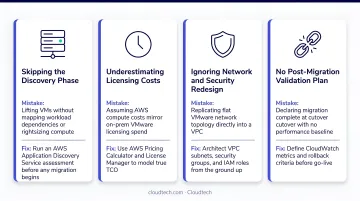
One misconception that catches SMBs off guard: migrating VMs to EC2 is not the finish line. Post-migration modernization — Auto Scaling, managed databases, serverless — is where the real economic and operational gains accumulate.
For SMBs without a dedicated migration team, partnering with an AWS Advanced Tier Partner like Cloudtech reduces that exposure. Their team — built largely from former AWS professionals — has executed migrations across healthcare, financial services, and manufacturing, and can access AWS MAP funding to offset migration costs.
Frequently Asked Questions
How long does it take to migrate VMware VMs to AWS?
Timelines depend on environment size and complexity. AWS prescriptive guidance recommends 6–10 week migration waves, and larger multi-wave environments typically take several months. Thorough discovery and planning upfront shortens actual execution time considerably.
What is AWS Application Migration Service (AWS MGN) and is it free?
AWS MGN is AWS's automated lift-and-shift migration service that uses block-level replication agents installed on source servers. It's free for the first 2,160 hours (90 days) per source server. After that, standard rates apply ($0.042/server-hour), plus ongoing EC2 and EBS costs for staging resources.
Can I migrate VMware workloads to AWS without any downtime?
True zero downtime requires database-native replication tools, AWS DataSync for file sync, and DNS-based cutover — a substantial planning investment. For most workloads, AWS MGN replication keeps the cutover window short enough to meet practical business requirements.
What happens to my VMware licenses after I migrate to AWS?
Once workloads run on native AWS EC2, you're no longer dependent on VMware licensing for those workloads. Review your Broadcom/VMware contractual obligations carefully before decommissioning — particularly around subscription term commitments.
Do my applications need to be modified to run on AWS EC2?
A lift-and-shift migration replicates the OS and application as-is — no code changes required. Post-migration modernization steps (moving to RDS, adopting Auto Scaling) may require application adjustments, but those happen after the initial migration at a pace you control.
Should I use an AWS Partner to help with VMware-to-AWS migration?
AWS Partners like Cloudtech bring pre-built migration frameworks, former AWS expertise, and access to AWS Partner Funding through MAP — which can reduce or eliminate out-of-pocket migration costs. For SMBs without a dedicated migration team, that funding alone often makes a partner engagement the more cost-effective path.