Introduction
Customer support volumes are climbing faster than most SMB teams can staff for. A single product launch, seasonal spike, or viral complaint can overwhelm a lean support operation overnight. Hiring agents to absorb every fluctuation simply doesn't scale.
Conversational AI has emerged as the practical answer. The global AI-for-customer-service market was valued at $13 billion in 2024 and is projected to reach $83.8 billion by 2033, reflecting how quickly businesses are moving to automate. But adoption alone doesn't guarantee results.
Most businesses that struggle with conversational AI chose platforms based on feature checklists rather than matching capabilities to actual support workflows. The wrong platform creates real damage: misrouted tickets, frustrated customers, and dead-ends that erode the brand the tool was supposed to protect.
This article covers the five features that separate high-performing support automation from expensive FAQ bots — and how to evaluate them before you commit to a platform.
Key Takeaways
- NLU accuracy determines whether AI resolves tickets or creates them — intent understanding beats keyword matching every time
- Omnichannel deployment requires unified customer context, not just multi-channel presence
- CRM and backend integrations are what allow AI to complete tasks, not just answer questions
- Intelligent handover with preserved context protects CSAT during complex interactions
- Analytics and gap reporting drive continuous improvement after launch — not a one-time setup concern
What Is Conversational AI for Business Support Automation?
Conversational AI is software that understands natural language, interprets customer intent, and handles support tasks automatically. Intent recognition is what separates it from traditional rule-based chatbots.
A traditional chatbot matches keywords to scripted responses. Ask "Where's my order?" in the exact phrasing the bot expects, and it works. Rephrase it as "Has my package shipped yet?" and the same bot hits a dead end. Conversational AI uses Natural Language Processing (NLP) and machine learning to understand what a customer means, regardless of how they phrase it.
For SMBs, this distinction carries real weight. Only 11.9% of small firms have adopted AI, compared to 40% of large firms, partly because the technology gap feels insurmountable without enterprise-scale resources.
AWS-native services like Amazon Lex and Amazon Connect have changed that equation, giving SMBs access to enterprise-grade conversational AI infrastructure without requiring a dedicated AI team to build and maintain it.
The features below are what to evaluate on any conversational AI platform, whether you're building on AWS or assessing a third-party solution.
Top Conversational AI Features for Business Support Automation
These five features separate platforms that genuinely reduce support load from those that just add a chat widget to your website. Evaluated by business impact, integration depth, and scalability for growing teams.
Natural Language Understanding (NLU) and Intent Recognition
NLU is the engine underneath every conversational AI interaction. It determines whether the system understands what a customer actually needs, not just the words they used.
Without strong NLU, AI systems misroute queries. A customer asking about a billing discrepancy gets routed to shipping. A refund request gets interpreted as a general account inquiry. Each misroute either generates an unnecessary escalation or leaves the customer without resolution — the opposite of what automation is supposed to achieve.
Gartner confirms that customers who experience first-contact resolution consistently report higher satisfaction and lower effort scores. NLU accuracy is the upstream driver of that metric.
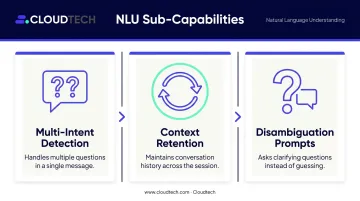
Sub-capabilities to evaluate:
- Multi-intent detection — handles queries containing more than one question in a single message
- Context retention — maintains conversation history so the AI doesn't require customers to repeat themselves within a session
- Disambiguation prompts — asks clarifying questions for ambiguous inputs rather than guessing incorrectly
| Attribute | Detail |
|---|---|
| What It Does | Parses customer input to identify intent, not just keywords, enabling accurate responses across varied phrasing and sentence structures |
| Business Benefit | Reduces misrouted tickets and escalations; increases first-contact resolution rates for Tier 1 support |
| Key Consideration | Evaluate NLU accuracy against your actual industry vocabulary — healthcare, financial services, and logistics each have domain-specific language the model must handle correctly |
Omnichannel Deployment
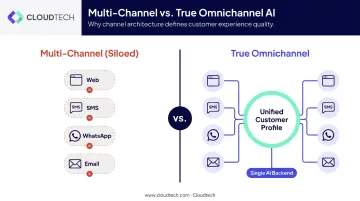
Omnichannel deployment means running a single AI support system across every customer touchpoint — web chat, SMS, WhatsApp, email, social messaging — with unified context regardless of where the conversation starts.
This is not the same as deploying separate bots on each channel. That's multi-channel, and it creates exactly the problem it's supposed to solve.
According to Salesforce research covering over 13,000 consumers, 85% of customers expect consistent interactions across departments, while 66% say they often have to repeat or re-explain information to different representatives. When a customer moves from web chat to phone and has to restart the conversation from scratch, that's a direct outcome of siloed channel architecture.
True omnichannel requires unified identity resolution — the AI must recognize the same customer across channels and maintain their conversation history throughout. Without this, each channel handoff becomes a cold start.
| Attribute | Detail |
|---|---|
| What It Does | Deploys a consistent AI support experience across web, mobile, SMS, and messaging apps from a single backend configuration |
| Business Benefit | Eliminates channel silos; customers receive consistent, context-aware support regardless of where they reach out |
| Key Consideration | Confirm whether the platform supports unified customer profiles across channels or deploys separate bots per channel — these are architecturally very different and produce very different customer experiences |
CRM and Backend System Integrations
Integrations are what separate conversational AI that answers questions from conversational AI that resolves issues.
A knowledge-base-only AI can tell a customer their estimated delivery window. An AI integrated with your order management system can tell them exactly where their specific package is, flag a delay before the customer notices, and offer a replacement — without any human involvement.
Gartner found that only 14% of customer service issues are fully resolved in self-service, with 43% of failures occurring because customers couldn't find relevant content. Connecting AI to live business data addresses both sides of that problem — accuracy and completeness.
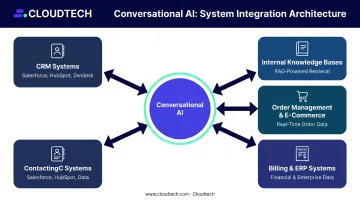
The most impactful integration categories:
- CRM systems (Salesforce, HubSpot, Zendesk) for customer history and case tracking
- Order management and e-commerce platforms for transactional data
- Internal knowledge bases for accurate, company-specific responses
- Billing and ERP systems for account management and refund processing
RAG as a must-have capability: Retrieval-Augmented Generation allows AI to pull answers from your company's own documentation rather than generating generic responses. Amazon Bedrock Knowledge Bases offers a fully managed RAG service that grounds AI responses in proprietary data sources including Amazon S3, SharePoint, and Confluence. For SMBs already on AWS, this significantly reduces the risk of AI hallucinations and improves response accuracy for domain-specific queries.
Businesses already running workloads on AWS (RDS, DynamoDB, S3) can connect conversational AI directly to those existing data stores through Amazon Lex and Lambda — avoiding the integration complexity that comes with introducing a separate vendor stack.
| Attribute | Detail |
|---|---|
| What It Does | Connects conversational AI to live business data — CRMs, databases, ticketing tools — enabling the AI to retrieve and act on real customer information |
| Business Benefit | Enables task completion (not just answers): order tracking, account updates, refund processing — without agent involvement |
| Key Consideration | Assess whether integrations are native/pre-built or require custom development; custom integrations add cost and time — prioritize platforms with pre-built connectors for your existing tools |
Intelligent Agent Handover and Escalation
Unresolved escalations are where automation most directly damages CSAT. What separates good platforms from bad ones is how the AI behaves when it reaches its limits.
Intelligent handover is not a binary pass/fail. It's a structured process triggered by configurable confidence thresholds: the AI knows when it's uncertain and escalates before the customer reaches a dead end.
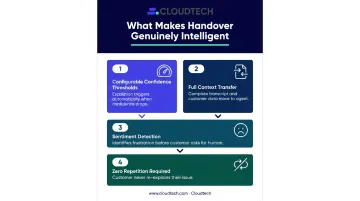
What makes handover genuinely intelligent:
- Configurable confidence thresholds — escalation triggers when the AI's confidence drops below a defined level, not just on explicit customer requests
- Full context transfer — the complete conversation transcript and customer data move to the agent automatically
- Sentiment detection — identifies frustrated customers through language cues before they ask for a human
- Zero repetition required — the customer never has to re-explain their issue
The risk of getting this wrong is real. Gartner research found that 64% of customers would prefer companies not use AI for customer service, and 53% would consider switching to a competitor if they discovered a company was using it. Difficulty reaching a human was among the leading concerns. An AI with poor escalation paths validates exactly that concern.
| Attribute | Detail |
|---|---|
| What It Does | Transfers conversations to live agents at the right moment, with full context, sentiment signals, and conversation history intact |
| Business Benefit | Protects CSAT during complex or sensitive interactions; prevents customer churn from AI dead-ends |
| Key Consideration | Test escalation flows during platform evaluation — specifically whether context transfers completely and whether confidence thresholds are configurable |
Analytics, Reporting, and Continuous Learning
Analytics are the mechanism by which conversational AI improves over time. Without them, accuracy degrades as customer needs evolve — quietly, and without warning.
Most contact centers measure what's easy to measure. ICMI's 2025 data shows 84% of contact centers track average handle time, but only 14% measure deflection and 13% measure self-service accessibility. That imbalance means most operations know how long agents spend on calls but have no reliable view of whether their AI is actually containing volume.
Metrics a support AI platform should surface:
- Containment rate — percentage of queries fully resolved without human escalation
- First-contact resolution rate — per channel and query type
- Most common unresolved query types — the most actionable data set for ongoing improvement
- Average handling time per channel
- Customer satisfaction scores tied specifically to AI interactions
The platforms worth using flag unanswered or low-confidence queries automatically and use them to prompt knowledge base updates or model retraining. This creates a feedback loop where the system identifies its own gaps and surfaces them for the right people to close.
Look specifically for gap reports: structured output showing queries the AI couldn't answer. These are the highest-leverage inputs for improving deflection rates over time.
| Attribute | Detail |
|---|---|
| What It Does | Tracks conversation outcomes, resolution rates, escalation patterns, and customer sentiment across all AI interactions |
| Business Benefit | Provides actionable data to continuously refine AI responses, close knowledge gaps, and improve deflection rates |
| Key Consideration | Prioritize platforms that surface gap reports — queries the AI couldn't answer — as this is the most actionable input for ongoing optimization |
How to Choose the Right Conversational AI Features for Your Business
The most common mistake in platform selection is optimizing for feature quantity. A platform with 30 capabilities that includes everything except strong NLU and CRM integration will underperform a simpler platform that does those two things well.
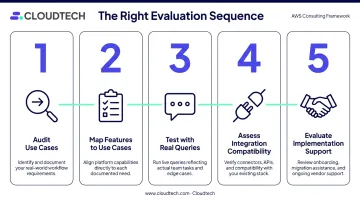
The right evaluation sequence:
- Audit your highest-volume support use cases — identify the top five query types by volume and understand their resolution paths
- Map features to those use cases — which capabilities directly address your top five? Focus there first
- Test against real queries — run actual customer questions through any platform you're evaluating, not vendor-scripted demos
- Assess integration compatibility — does it connect to your existing CRM, ticketing system, and data stores without custom development?
- Evaluate implementation support — SMBs without in-house AI teams need a vendor or partner that handles setup, not just licensing
For SMBs already on AWS, the infrastructure question is worth settling early. Building conversational AI on AWS-native services means the AI runs within your existing security perimeter, applies your existing compliance controls, and connects directly to data stores you already manage. That's one fewer vendor introducing separate data handling requirements into your environment.
Avoid buying capabilities you won't activate in the first six months. A phased approach — strong NLU, core integrations, and intelligent handover first; sentiment analysis and predictive routing later — delivers faster ROI and reduces implementation complexity.
Conclusion
Conversational AI features are not equal. NLU accuracy, integration depth, and intelligent escalation are the actual differentiators between AI that reduces support costs and AI that creates new categories of customer complaints. Breadth across many features matters less than depth in the ones that directly address your support workflows.
Before committing to any platform, run pilot scenarios with real customer queries — the ones your team currently struggles to handle at volume. The gap between a vendor demo and a live support environment is where most implementation problems originate.
For SMBs building on AWS, the underlying cloud architecture shapes how well any conversational AI layer performs. Cloudtech's AWS-certified architects help SMBs design and configure the cloud foundation — integrations, data pipelines, and security guardrails — that support automation tools depend on to function reliably. Connect with the Cloudtech team to discuss your cloud infrastructure readiness.
Frequently Asked Questions
What is conversational AI for customer support automation?
Conversational AI handles support interactions across channels — web, chat, phone, and email — pulling live data from CRM and backend systems to resolve issues without human intervention. When queries exceed the AI's scope, intelligent escalation transfers the case to a human agent with full context intact, keeping resolution rates and customer satisfaction high.
What are the features of conversational AI?
Core features include natural language understanding, omnichannel deployment, CRM integrations, intelligent agent handover, multilingual support, and analytics with continuous learning. For most support automation use cases, NLU, integrations, and escalation deliver the clearest ROI — start there before layering in advanced capabilities.
What is the difference between a chatbot and conversational AI?
Traditional chatbots follow fixed decision trees and match keywords to scripted responses — they break when customers phrase questions unexpectedly. Conversational AI uses NLU and machine learning to understand intent regardless of phrasing, handle multi-turn conversations naturally, and improve over time through interaction data.
How does conversational AI integrate with existing business systems?
Integrations are achieved through APIs, pre-built connectors to CRM and ticketing platforms, and RAG-based knowledge retrieval that grounds responses in company-specific documentation. Businesses already on AWS can connect conversational AI directly to existing data stores like RDS, DynamoDB, and S3, cutting integration complexity compared to onboarding a standalone vendor stack.
Which conversational AI features matter most for small and medium-sized businesses?
SMBs should prioritize CRM integration, strong NLU, and intelligent escalation first — these directly reduce ticket volume, improve resolution rates, and protect customer satisfaction without requiring advanced configuration. Features like sentiment analysis, predictive routing, and advanced analytics are valuable but better suited to a second phase once core automation is stable.