The scale of what's in motion is significant. AWS reports that DMS has been trusted to migrate over 1.5 million databases — and that number keeps climbing as organizations across healthcare, financial services, and manufacturing push workloads to the cloud. Yet many teams approach AWS DMS without fully understanding how it works, which leads to misconfigured tasks, undersized replication instances, and migrations that fall apart at cutover.
This guide breaks down exactly how AWS DMS works — from its core components to its migration mechanics — so your team can plan and execute with confidence.
Key Takeaways
- AWS DMS is a fully managed AWS service that migrates databases with minimal downtime by keeping the source operational throughout.
- Three components drive every migration: source/target endpoints, a replication instance, and migration tasks.
- Change Data Capture (CDC) is what makes near-zero downtime migrations possible.
- Heterogeneous migrations require AWS SCT for schema conversion before DMS handles data movement.
- Undersizing the replication instance is a common and easily preventable cause of slow migrations.
What Is AWS DMS?
AWS Database Migration Service (AWS DMS) is a cloud service that migrates relational databases, data warehouses, NoSQL databases, and other data stores to AWS — with the source database remaining fully operational during the process. That means no forced maintenance window, no data freeze, and no emergency cutover at 2 a.m.
What DMS Solves
Traditional database migrations required manual scripting, lengthy downtime windows, and deep DBA expertise just to move data between environments. AWS DMS abstracts the infrastructure layer entirely, automating data movement and synchronization so teams can focus on outcomes rather than mechanics.
DMS supports a wide range of source and target databases:
| Sources | Targets |
|---|---|
| Oracle, SQL Server, MySQL, MariaDB | Amazon RDS, Aurora, Redshift |
| PostgreSQL, MongoDB, IBM Db2, SAP ASE | DynamoDB, OpenSearch |
| Amazon Aurora, Azure SQL, Google Cloud SQL | Kinesis Data Streams, Apache Kafka |
DMS vs. AWS SCT: A Common Confusion
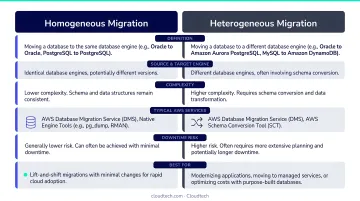
DMS is not a schema conversion tool. It moves data. For heterogeneous migrations — where the source and target use different database engines — the schema and stored objects need to be converted first. That's the job of AWS Schema Conversion Tool (SCT), a companion service that translates tables, views, stored procedures, and functions from one engine format to another.
The workflow is sequential: run SCT to convert the schema, then run DMS to move the data. Teams that skip SCT and jump straight to DMS typically discover the problem mid-migration, when data fails to load into an incompatible target schema.
Two Migration Categories
- Homogeneous migrations: Same engine on both ends (e.g., MySQL to Amazon RDS for MySQL). No schema conversion needed — DMS handles everything.
- Heterogeneous migrations: Different engines (e.g., Oracle to PostgreSQL). Requires AWS SCT for schema conversion, then DMS for data movement.
How Does AWS DMS Work?
AWS DMS operates through a defined sequence: configure endpoints, provision a replication instance, define migration tasks, synchronize via CDC, then cut over. Each stage involves specific components that work together to keep data moving and integrity intact.
Setting Up: Source and Target Endpoints
Every migration begins with two endpoint configurations:
- Source endpoint: Where the existing data lives — on-premises, another cloud provider, or within AWS.
- Target endpoint: The destination, typically an AWS-managed service like Amazon RDS, Aurora, or Redshift.
Endpoint setup requires connection credentials, database engine type, and network access settings.
This is where many teams hit early bottlenecks, particularly around VPC networking, security group rules, and IAM permissions. Database ports need to be accessible from the replication instance's subnet, and IAM roles need the right policies to interact with AWS-managed targets.
For heterogeneous migrations, AWS SCT must complete schema conversion before the DMS task begins. DMS then handles the data load against the already-converted target schema.
The Replication Instance: Core Engine
The replication instance is the compute engine of AWS DMS: a managed EC2 instance that AWS provisions on your behalf. It connects to both endpoints, reads rows from the source, applies any configured transformations, and writes data to the target.
Instance class families available:
| Family | Optimized For | Example Use Case |
|---|---|---|
| T3 | Burstable general-purpose | Dev/test, small databases |
| C5/C6i/C7i | Compute-intensive | High-throughput migrations |
| R5/R6i/R7i | Memory-intensive | Large tables, LOB columns |
Sizing matters more than most teams realize. AWS documentation is explicit: the most common cause of a slow migration task is inadequate resources on the replication instance.
Watch SwapUsage and FreeableMemory in CloudWatch. If either metric spikes, scale up the instance before assuming the migration itself is broken.
During full load, MaxFullLoadSubTasks controls how many tables load in parallel — default is 8, maximum is 49. Combined with ParallelLoadThreads, these settings directly control migration throughput.
Migration Tasks and Change Data Capture
Migration tasks are where configuration meets execution. Each task specifies:
- Source and target endpoints
- Table mappings and transformation rules
- Migration mode (Full Load, CDC Only, or Full Load + CDC)
Change Data Capture (CDC) is the mechanism that enables near-zero downtime. After the initial data load, CDC reads the source database's transaction logs (binary logs for MySQL, redo logs for Oracle) and continuously replicates every insert, update, and delete to the target. The source and target remain in sync for the entire migration window.
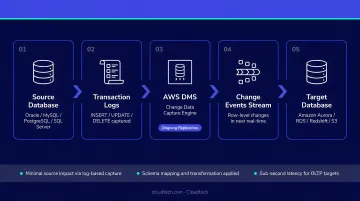
Two CloudWatch metrics track CDC health:
CDCLatencySource— delay between a change occurring at the source and DMS capturing itCDCLatencyTarget— delay between DMS capturing a change and applying it to the target
When both metrics trend toward zero, the target is fully caught up. That's the signal that cutover is safe.
Important CDC prerequisites by engine:
- MySQL: Binary logging must be enabled with row-based format; DMS cannot process binary logs larger than 4 GB
- Oracle: Requires archived redo logging and supplemental logging; CDC uses either Oracle LogMiner or AWS DMS Binary Reader
Cutover and Output
Once CDC lag approaches zero, cutover comes down to one step: redirect application connections from the source to the target. This is typically a brief, planned maintenance window, not the multi-hour outage that traditional migrations require.
Before declaring the migration complete, DMS's data validation feature automatically compares row counts and checksums between source and target, confirming nothing was dropped or corrupted. Once validation passes, downstream applications resume against the new database with full data consistency.
Types of AWS DMS Migrations
AWS DMS offers three migration modes, each suited to different scenarios:
Full Load
Copies the entire dataset from source to target in a single pass. Best for:
- One-time migrations where brief source/target desync is acceptable
- Dev/test environments
- Smaller databases with predictable cutover windows
CDC Only
Replicates ongoing changes without performing an initial data load. Used when:
- The target already has a baseline copy of the data
- The goal is ongoing replication for disaster recovery or analytics sync
- You need continuous cross-region sync without interrupting the source
Full Load + CDC
The recommended approach for production migrations. DMS performs a complete initial data load, then transitions to CDC to keep the target synchronized until cutover. This combination enables near-zero downtime for live systems.
The choice of mode affects task configuration, required replication instance size, and the overall migration window. Locking these decisions down during planning prevents costly surprises when the migration is already underway.
Where AWS DMS Is Used
AWS DMS fits several distinct operational scenarios, each with different requirements and outcomes.
Lift-and-Shift to AWS
The US Department of Veterans Affairs used DMS to migrate VACOLS — containing 20 million records — from an on-premises Oracle 11g system to Amazon RDS for Oracle in AWS GovCloud. No engine change was required; the database moved as-is, with DMS handling the transfer.
Database Modernization
Samsung used DMS to migrate 1.1 billion users and approximately 12 TB of data from on-premises Oracle to Amazon Aurora PostgreSQL with minimal downtime. For SQL Server shops, AWS Prescriptive Guidance notes that switching to Amazon RDS for PostgreSQL or MySQL can reduce licensing costs by up to 80%.
Continuous Replication
CDC-only mode lets teams sync databases across regions for disaster recovery, or stream changes to Amazon Kinesis and Redshift for real-time analytics pipelines. Both are native DMS target configurations — no additional tooling required.
Regulated Industries
Healthcare and financial services teams migrating under HIPAA or SOC 2 constraints benefit from DMS's data validation features, CloudTrail integration, and support for encrypted connections — providing the audit trail and integrity guarantees that compliance frameworks require.
Across all four scenarios, DMS configuration complexity — endpoint networking, IAM roles, replication instance sizing, CDC setup — is where most first-time migrations run into trouble.
Cloudtech's AWS-certified migration team works with SMBs across healthcare, financial services, and manufacturing to plan and execute DMS migrations correctly from the start, avoiding the misconfigurations that turn clean migrations into costly rollbacks.
Conclusion
AWS DMS is a component-driven service that moves data through a defined sequence: endpoint configuration, replication instance execution, CDC-based synchronization, and final cutover. Understanding that sequence — and where the failure points live — is what separates a smooth migration from one that requires rolling back at 2 AM.
Put that understanding to work before you touch a single setting:
- Know your migration mode before you start
- Size your replication instance based on actual workload characteristics, not defaults
- Watch CDC latency metrics throughout — not just at cutover
- For heterogeneous migrations, run AWS SCT first; DMS does not handle schema conversion on its own
If your team is planning a database migration to AWS and wants expert guidance on architecture, replication setup, and cutover strategy, Cloudtech's migration specialists can help you get it right from day one — without the trial-and-error overhead.
Frequently Asked Questions
Is the AWS Database Migration Service free?
AWS DMS is not free — you pay for replication instance hours, storage, and data transfer. Data transfer into DMS is free, and transfers between DMS and RDS within the same Availability Zone have no additional charge, but standard rates apply for cross-AZ and cross-Region traffic.
What is AWS Database Migration Service?
AWS DMS is a fully managed service that migrates databases to AWS with minimal downtime by keeping the source database operational during migration and replicating changes continuously via CDC until cutover is complete.
What is the difference between AWS SCT and DMS?
AWS SCT converts the database schema and stored objects (tables, views, stored procedures) from one engine format to another — a required prerequisite for heterogeneous migrations. AWS DMS then handles the actual movement and replication of data.
What databases does AWS DMS support?
AWS DMS supports Oracle, Microsoft SQL Server, MySQL, MariaDB, PostgreSQL, MongoDB, IBM Db2, SAP ASE, Amazon Aurora, Amazon Redshift, DynamoDB, and others — as well as cloud sources like Azure SQL Database and Google Cloud SQL for MySQL and PostgreSQL.
What is the difference between full load and CDC in AWS DMS?
Full load copies the entire existing dataset from source to target in one pass. CDC continuously replicates incremental changes (inserts, updates, deletes) after the initial load. Full Load + CDC combines both and is the standard approach for production migrations requiring near-zero downtime.
What are the main limitations of AWS DMS?
DMS does not perform schema conversion — heterogeneous migrations require AWS SCT first. CDC setup is engine-specific and requires particular log configurations at the source. Parallel table loading is capped at 49 concurrent subtasks, and LOB column tables require a primary key for CDC.