For SMB retailers, the stakes are clear. A Google/Deloitte study found that a 0.1-second improvement in mobile page speed was associated with 8.4% higher retail conversion rates and 9.2% higher average order value. Infrastructure that can't deliver that speed — or that buckles under Black Friday traffic — directly costs revenue.
This guide is written for ecommerce business owners, IT managers, and technical leads at SMBs and growing retail brands evaluating a move to AWS. You'll get a practical walkthrough of migration strategies, best practices, critical AWS services, and the mistakes that derail most migrations before they deliver results.
Key Takeaways
- AWS migration delivers elastic scalability, high availability, and lower infrastructure costs — especially during peak shopping events
- Your migration strategy — rehost, replatform, or refactor — depends on your architecture, timeline, and budget
- A phased approach — assessment, pilot, then full migration — reduces downtime risk significantly
- Security and PCI DSS compliance must be built in throughout the process, not added at the end
- Working with a certified AWS Partner helps SMBs cut timelines and avoid costly migration errors
Why Ecommerce Businesses Migrate to AWS
On-premises infrastructure has a ceiling. When traffic doubles during a flash sale or holiday campaign, a fixed server environment either holds and overdelivers on idle capacity or buckles and loses orders. The core pressures driving ecommerce teams toward AWS:
- Unpredictable traffic demand — Black Friday and promotional events create traffic spikes that fixed infrastructure can't absorb without expensive over-provisioning
- Monolithic architecture fragility — A single point of failure in a legacy storefront can take down checkout, inventory, and product browsing simultaneously
- High maintenance OPEX — On-premises hardware requires ongoing capital investment, patching, and physical management that diverts resources from growth
- Customer expectations — Shoppers expect sub-second page loads; slow stores lose conversions before customers even browse
What AWS Addresses for Retail
AWS directly addresses each of these pressures. Key capabilities for ecommerce:
- Elastic Auto Scaling — EC2 and ECS services scale up automatically when traffic surges, then scale back down when demand drops, eliminating over-provisioning costs
- Amazon CloudFront CDN — A luxury retailer case study published by AWS reports a 99.1% cache-hit rate and 20% lower p75 TTFB for product-detail pages during Black Friday, alongside an 80% reduction in static-content distribution costs
- Managed databases — Amazon Aurora provides high-availability relational databases with automatic failover across Availability Zones
- Built-in security — WAF, GuardDuty, and Cognito protect customer data and storefronts without requiring dedicated security hardware
AWS is also a PCI DSS Level 1 Service Provider (the highest certification level), which reduces the inherited infrastructure controls ecommerce teams would otherwise need to implement themselves.
AWS Migration Strategies for Ecommerce Platforms
Choosing the wrong migration strategy is one of the costliest mistakes an ecommerce team can make. Before committing to a path, you need a complete inventory of what you're moving:
- Applications and their dependencies
- Databases and data volumes
- Third-party integrations (payment gateways, ERPs, shipping APIs, loyalty platforms)
- Traffic patterns and peak load requirements
- SLA commitments and budget constraints
That discovery work determines which of the three AWS migration strategies fits your situation.
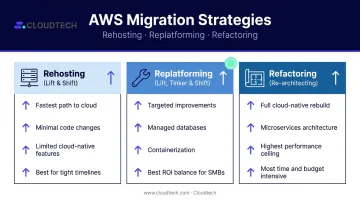
Rehosting (Lift and Shift)
Rehosting moves your ecommerce workloads to AWS with minimal changes to application code or architecture. If your priority is speed — getting off aging on-premises hardware quickly — this is the fastest path.
It works best for businesses with tight timelines, legacy systems, or limited engineering bandwidth. The trade-off is real: you gain cloud hosting, but cloud-native performance features like managed databases and auto-scaling remain out of reach until a follow-on optimization phase. It's a starting point, not a destination.
Replatforming (Lift, Tinker, and Shift)
Replatforming makes targeted improvements during migration without fully rearchitecting the application. Examples of targeted changes that fit here:
- Swapping a self-managed MySQL instance for Amazon Aurora Serverless to gain automatic scaling and high availability
- Containerizing your ecommerce app on ECS Fargate to eliminate server management overhead
- Adding ElastiCache for session caching and product catalog performance
This approach delivers meaningful cloud benefits — performance, cost efficiency, resilience — without requiring a full rebuild. For most SMB ecommerce platforms, replatforming hits the best balance between investment and return.
Refactoring (Re-architecting)
Refactoring is a complete rearchitecture of your ecommerce platform to use cloud-native capabilities. This includes decomposing a monolithic storefront into microservices, implementing serverless order processing with AWS Lambda, or adopting event-driven architectures with EventBridge.
LEGO provides a useful benchmark here. After a nearly two-hour outage during a sales event on their legacy monolithic platform, they rebuilt using a serverless, event-driven order architecture on AWS. The result: their system handled transaction spikes of up to 200x and traffic increases of 9.5x without interruption.
Refactoring delivers the highest long-term performance gains. It also demands the most — in time, budget, and technical expertise. For SMBs weighing this path, the LEGO example illustrates both the ceiling of what's possible and the complexity required to get there.
Best Practices for a Successful Ecommerce AWS Migration
1. Start With a Thorough Pre-Migration Assessment
Before any workload moves, map your entire environment. Tools like AWS Application Discovery Service identify what's running, how components connect, and which workloads are migration-ready versus those that need refactoring or retirement.
What to inventory:
- All web applications and APIs
- Database schemas, sizes, and transaction volumes
- Third-party integrations (payment processors, shipping APIs, ERPs, loyalty platforms)
- Traffic patterns and peak load scenarios
- SLA and uptime requirements
Cloudtech's assessment methodology builds a dependency matrix across databases, APIs, file shares, and integrations. This step catches issues like a customer portal losing access to a shared database after cutover — the kind of failure that's expensive to fix mid-migration but straightforward to prevent upfront.
2. Design for Near-Zero Downtime
Downtime during migration isn't just a technical problem — it's a revenue problem. The standard approach:
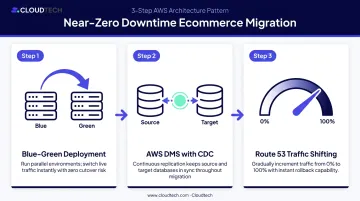
- Blue-green deployments — Run parallel environments (blue = current, green = new AWS environment). Once the green environment is validated, shift traffic gradually using an Application Load Balancer, with the ability to route back to blue instantly if issues arise
- AWS Database Migration Service (DMS) — Use continuous change data capture (CDC) to keep your source and target databases in sync during migration. DMS keeps the source database fully operational until you're ready for final cutover
- Traffic shifting via Route 53 — Route a percentage of live traffic to the new environment, monitor for errors, and increase the percentage as confidence builds
3. Build for Ecommerce-Specific Scalability
Configure your AWS environment to handle traffic spikes before they happen, not during them:
- Set up Auto Scaling Groups for EC2 instances or ECS Service Auto Scaling for containerized workloads, so capacity adjusts automatically based on demand signals
- Use CloudFront to cache static assets — product images, CSS, JS files — at edge locations closer to customers, reducing origin server load during peak events
- Implement ElastiCache for session management and product catalog caching to reduce database query load under high concurrency
4. Prioritize Security and PCI DSS Compliance Throughout
Security and compliance architecture decisions made late are expensive to undo. Build these in from the start:
- Segment your network using VPCs with public and private subnets — payment systems and cardholder data should never share a subnet with public-facing web servers
- Deploy AWS WAF with rules tuned to ecommerce attack vectors (SQL injection, credential stuffing, bot traffic)
- Enable GuardDuty for continuous threat detection across your AWS accounts
- Review AWS's PCI DSS compliance documentation to understand which controls AWS inherits and which your team must configure
AWS holds PCI DSS Level 1 certification — but that covers the infrastructure layer only. Cardholder data scoping, IAM least-privilege access, encryption configuration, and security group rules fall under your team's responsibility in the Shared Responsibility Model.
5. Establish Monitoring and Rollback Criteria Before Go-Live
Set up CloudWatch dashboards and alarms for key ecommerce metrics before the cutover, not after:
- API response times and error rates
- Database connection pool usage
- Cart abandonment signals that might indicate checkout errors
- Infrastructure-level CPU and memory utilization
Define rollback criteria before go-live, not after. If error rates exceed your threshold within the first hour post-cutover, your team needs a documented trigger and a tested revert procedure — not a conversation about what to do next.
Common Mistakes in Ecommerce AWS Migration
Underestimating Database Migration Complexity
Ecommerce databases aren't like typical application databases. High transaction volumes, complex schemas, and tight integrations with order management and inventory systems mean that a lift-and-shift approach without careful schema mapping, validation testing, and phased cutover planning will create problems.
AWS DMS documentation notes that if validation detects more than 10,000 failed or suspended records, validation stops until you resolve the underlying problem. Discovering that mid-cutover during peak season is not the right time to learn about schema incompatibilities or LOB (large object) truncation issues.
Run a representative proof of concept with your actual data before committing to a production cutover timeline.
Treating Migration as a One-Time Project
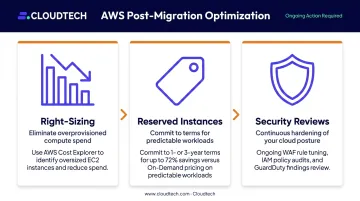
Getting your ecommerce platform onto AWS is the beginning of the optimization work, not the end. Post-migration activities that determine whether the migration delivers its expected ROI:
- Right-sizing instances — AWS Cost Explorer identifies EC2 instances that are oversized for actual usage patterns
- Reserved Instance pricing — AWS advertises savings of up to 72% versus On-Demand pricing for predictable baseline workloads on one- or three-year terms
- Security posture reviews — WAF rules, IAM policies, and GuardDuty findings require ongoing review as your platform evolves
Skipping the Pilot Migration Phase
Migrating all workloads simultaneously — rather than starting with a lower-risk environment like staging or a non-critical service — dramatically increases the risk of cascading failures. A pilot migration validates your tooling, cutover process, and rollback plan before anything customer-facing is at risk.
Teams that run pilots consistently surface issues that wouldn't have appeared in planning documents:
- Unexpected latency in cross-region database replication
- IAM permission gaps that only appear under real traffic patterns
- Third-party integrations (payment processors, shipping APIs) that behave differently behind an AWS NAT gateway
- Rollback timing that exceeds the maintenance window originally scoped
Frequently Asked Questions
How long does ecommerce migration to AWS typically take?
Timelines depend on architecture complexity, migration strategy, and team expertise. A straightforward rehost of a small ecommerce platform can take a few weeks, while a full refactor of a complex multi-service platform may take several months. A thorough assessment phase is the most reliable way to set an accurate timeline upfront.
What is the best AWS migration strategy for an ecommerce business?
Replatforming is often the best fit for SMB ecommerce businesses — it delivers meaningful cloud-native benefits like managed databases and containerized workloads without the cost and timeline of a full rearchitecture. The right choice ultimately depends on your current architecture, budget, and growth plans.
How do you avoid downtime during ecommerce migration to AWS?
Use blue-green deployments to run parallel environments, AWS DMS with change data capture to keep databases in sync until final cutover, and Route 53 traffic shifting to move live traffic to the new environment gradually. This setup preserves the ability to roll back quickly if issues arise.
Is AWS compliant with PCI DSS for ecommerce payment processing?
AWS is a PCI DSS Level 1 Service Provider, covering AWS infrastructure. Full compliance also requires your team to implement the correct controls on top of that foundation — encryption, access management, network segmentation, and logging — based on how your application is configured.
What AWS services are most important for ecommerce platform migration?
Key services include EC2 or ECS Fargate for compute, RDS Aurora or DynamoDB for databases, ElastiCache for caching, CloudFront for content delivery, WAF and GuardDuty for security, and AWS DMS for database migration. Service selection should be driven by your platform's specific performance and availability requirements.
How much does it cost to migrate an ecommerce platform to AWS?
Costs vary based on platform size, migration complexity, and strategy. The AWS Migration Evaluator provides a no-cost TCO analysis comparing your current environment against projected AWS costs. Many businesses lower total infrastructure spend post-migration by eliminating hardware maintenance and right-sizing resources. Qualifying migrations may also be eligible for AWS Migration Acceleration Program (MAP) funding to offset costs further.