Introduction
Most small business owners aren't losing leads because of bad products or weak pricing. They're losing them because no one responded fast enough.
Research from the MIT Lead Response Management Study found that the odds of qualifying a lead drop 21 times lower when you wait 30 minutes instead of 5. Yet a Workato study of 114 B2B companies found the average phone response time sits at nearly 14.5 hours — and not a single company called within 5 minutes.
For a small business with no dedicated sales development rep, that gap is almost impossible to close manually. Someone is always in a meeting, handling a client, or off the clock.
This guide covers what AI-powered lead qualification actually means, how the chatbot mechanics work, how to set one up, and what to measure — written specifically for small business owners with tight budgets and no in-house engineering team. By the end, you'll have a clear picture of whether this is worth your time and exactly how to get started.
Key Takeaways
- AI chatbots qualify leads 24/7, removing the need for a dedicated rep to handle initial screening
- An effective chatbot asks qualifying questions, scores the lead, and routes it to the right action — automatically
- Most SMBs can deploy a basic lead qualification chatbot in weeks using no-code or low-code platforms
- Track lead capture rate, qualification rate, and sales cycle length — not total chat volume
- No in-house engineers required — pre-built platforms and AWS-native tools like Amazon Lex make deployment accessible for most small businesses
What Is AI-Powered Lead Qualification (And Why It Matters for Small Businesses)
The Basics of Lead Qualification
Lead qualification is the process of determining whether an inquiry has a realistic chance of converting into a paying customer. The most common framework is BANT — Budget, Authority, Need, and Timeline:
- Budget: Does the prospect have money to spend?
- Authority: Are they the decision-maker?
- Need: Do they actually need what you offer?
- Timeline: When are they looking to buy?
Doing this manually for every inbound lead is unsustainable for a small team. You're either pulling a salesperson away from active deals, or leaving it to whoever has a spare moment — which often means it doesn't happen at all.
What "AI-Powered" Actually Adds
A traditional rule-based chatbot follows fixed scripts: click this button, get that response. It can't handle unexpected phrasing, and it breaks the moment a visitor goes off-script.
AI-powered chatbots use natural language processing (NLP), which AWS defines as technology that allows computers to "interpret, manipulate, and comprehend human language." As IBM notes, AI chatbots have learning potential for more complex interactions that rule-based systems simply can't handle.
The practical difference: an NLP chatbot understands intent, not just keywords. A visitor who types "I need help figuring out if this is right for my team" gets a relevant response, not a dead end.
The Small Business Cost Case
That NLP capability translates directly into savings. Hiring a Sales Development Representative to handle top-of-funnel screening costs real money — according to Salary.com, the average SDR salary in the US sits around $39,700 per year, before benefits, onboarding, or management time.
An AI chatbot handles the same initial screening around the clock, at a fraction of that cost. It qualifies and routes leads automatically, so your human team engages only with prospects worth their time.
The 24/7 Advantage in Plain Terms
Small businesses lose leads after hours. A prospect visits your site at 8pm on a Tuesday, fills out nothing, and moves on to a competitor by morning.
With a chatbot in place, every visit gets a response — regardless of the hour. It qualifies, scores, and routes a lead before your team shows up the next morning.
How AI Chatbots Qualify Leads: The Mechanics
Translating BANT Into Conversation
Salesforce defines BANT as a four-factor framework for identifying which leads are worth pursuing. A chatbot translates those four factors into natural questions rather than a survey form:
- "What's your approximate budget for this project?" (Budget)
- "Are you the main decision-maker, or will others be involved?" (Authority)
- "What's the primary challenge you're trying to solve?" (Need)
- "When are you looking to get started?" (Timeline)
The conversation feels natural to the visitor — the qualification logic running underneath it is entirely systematic.
Conditional Logic and Branching
What makes a chatbot accurate — not just fast — is conditional logic. If a visitor says they have a 3-person team and a $500 budget, the bot routes differently than if they describe a 50-person department evaluating enterprise software. Each answer shapes the next question, so the conversation stays relevant rather than generic.
This branching is what separates a lead qualification chatbot from a contact form — a form treats every visitor identically, while the chatbot adjusts in real time based on what each person actually says.
Lead Scoring and Automatic Routing
Once the conversation ends, the chatbot assigns a score based on weighted responses. A lead who has budget, is the decision-maker, and wants to start this quarter gets flagged as "hot." One who is researching for next year goes into a nurture sequence.
Those scores then trigger automatic actions:
- Hot lead → calendar booking link or immediate Slack notification to a rep
- Warm lead → automated follow-up email with relevant content
- Cold lead → added to a long-term nurture sequence
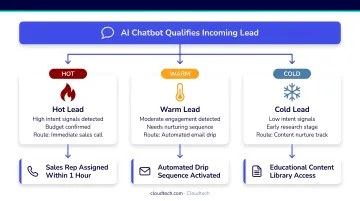
Your sales team only enters the picture once the bot has done the filtering.
The Data Capture Advantage
A chatbot captures richer data than a form. A visitor who types "we've been using spreadsheets for two years and it's becoming a nightmare" has handed your salesperson something genuinely useful for the first call. That context — the specific pain point, the urgency, the current workaround — doesn't fit in a dropdown field. It lives in a conversation log, automatically attached to the CRM record before the human ever picks up the phone.
Step-by-Step: Setting Up Your First Lead Qualification Chatbot
Step 1 – Define What "Qualified" Means for Your Business
Before opening any platform, write down your qualification criteria:
- What budget range makes a lead viable?
- What job title or role has purchasing authority?
- What problem are you solving, and does the visitor actually have it?
- What timeline indicates genuine intent?
This clarity dictates every question the chatbot will ask. Skip this step and you'll build a flow that collects information without knowing what to do with it.
Step 2 – Build a Short Qualifying Conversation Flow
Keep the flow to 3–5 questions maximum. Survey data from Survicate shows completion rates drop sharply as question count rises: 83% for 1–3 questions, 65% for 4–8, and under 57% for 9 or more. Chatbots face the same abandonment pressure.
A workable structure looks like this:
- Open with a greeting: "Hi! What brings you to [Company] today?"
- Identify intent: "Are you looking for [service A] or [service B]?"
- Ask one qualifying detail: "How large is your team?" or "What's your timeline for getting started?"
- Close with a clear action: "I'd love to connect you with our team — want to book a quick call, or would a resource be more helpful right now?"
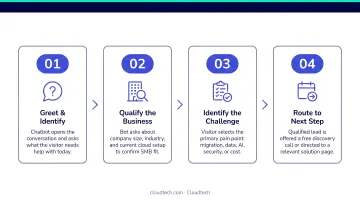
Every question earns its place. If it doesn't filter or route, cut it.
Step 3 – Connect Your CRM and Notification Tools
Without integrations, chatbot data disappears the moment the conversation ends. Prioritize these integrations:
- CRM: HubSpot, Salesforce, Pipedrive, or Zoho for automatic contact creation
- Calendar: A booking link (Calendly or native calendar tools) for hot leads
- Slack: Real-time rep notifications when a high-score lead completes the flow
- Email: Automated follow-up sequences for warm and cold leads
The right tool stack depends on your infrastructure. If you're running on AWS, Amazon Lex combined with Lambda functions and CRM API integrations gives you a customizable, scalable foundation — without the overhead of off-the-shelf platforms. Cloudtech's AWS-certified architects can configure this setup for SMBs that want the flexibility of a custom build without bringing engineers in-house.
Step 4 – Test, Launch, and Refine
Run the chatbot internally before going live. Check three things:
- Does the qualifying logic route correctly based on different answer combinations?
- Does the CRM receive clean, complete lead data?
- Does the handoff (booking, notification, or email) fire as expected?
Set a 30-day review cadence after launch. Pull conversation logs and look for questions where drop-off spikes — that's where the flow needs tightening.
How to Choose the Right AI Chatbot Platform on a Small Business Budget
Four Criteria That Actually Matter
Evaluate any platform on these factors before committing:
- Ease of setup: no-code or low-code builders are essential for non-technical teams
- CRM integration: native sync is more reliable than Zapier-based connections for real-time routing
- Pricing transparency: per-conversation billing can scale unpredictably; flat monthly fees are easier to budget
- AI vs. rule-based logic: NLP-powered platforms handle natural language; rule-based tools break on unexpected input
Platform Tiers at a Glance
With those criteria in mind, here's how current platforms stack up:
| Tier | Platforms | Starting Price | Best For |
|---|---|---|---|
| Entry-level | HubSpot Chatbot, ManyChat, Tidio | Free – $29/month | Simple flows, existing HubSpot users |
| Mid-market | Intercom | $29/seat/month | Teams wanting AI + live chat |
| Custom build | Amazon Lex + AWS | Usage-based | SMBs needing CRM control, security, or compliance |
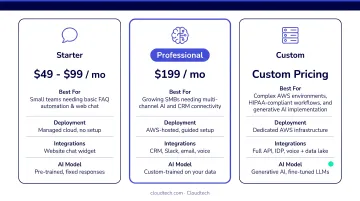
Two red flags to watch for:
- Intercom's Fin AI Agent charges $0.99 per outcome — costs can compound quickly at volume
- Tidio's pricing jumps from $49/month to $749/month with no middle tier
Only commit to an annual contract once you've confirmed the flow works and the CRM integration is clean.
Metrics That Tell You If Your Chatbot Is Actually Working
Four metrics matter for SMBs. Everything else is noise.
1. Lead Capture Rate The percentage of chatbot conversations that produce a qualified contact record. If most conversations end without an email address or booking, your flow is losing people before they commit.
2. Qualification Rate Of the leads captured, how many actually meet your criteria? A high capture rate with a low qualification rate means the bot is attracting the wrong visitors, or your qualification logic needs tightening.
3. Cost Per Qualified Lead Total monthly platform cost ÷ number of qualified leads generated. Compare this number directly against the cost of manual SDR screening to see where your ROI stands.
4. Sales Cycle Length Has the time from first contact to closed deal shortened since deployment? Intercom has documented cases where companies reduced time-to-opportunity from 21 days to 3 days after deploying conversational tools. Your results will vary, but directional improvement should appear within 60–90 days.
Evaluation window: Give the chatbot 90 days before drawing conclusions. The first 30 days are setup and adjustment. Days 31–60 reveal whether the flow is working. By days 61–90, you'll have enough volume to see real conversion patterns.
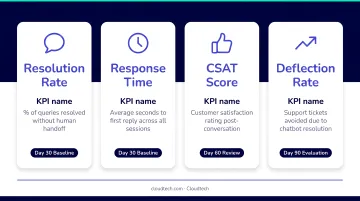
A final note: don't optimize for chat volume. A chatbot that starts hundreds of conversations but qualifies almost none of them is underperforming, even if it looks busy on the dashboard.
Common Pitfalls Small Businesses Make With Lead Qualification Chatbots
Pitfall 1: Too many questions kill the conversation. Flows with more than 5–6 questions see steep drop-off. The chatbot's job is to qualify, not conduct a full discovery call. If you're asking 10 questions, cut the 5 least essential ones and save the rest for the human conversation.
Pitfall 2: No defined handoff process after qualification. Many SMBs build a great chatbot and then have no plan for what happens next. A hot lead lands in the CRM — and sits there for two days because no one knew to act on it. Map the full handoff before launch:
- Who gets notified
- By what channel (email, Slack, CRM alert)
- Within what timeframe
- What action they're expected to take
Pitfall 3: Launching once and never revisiting it. Your qualification criteria, ideal customer profile, and team structure all shift over time — and a chatbot tuned for your business in January may be misrouting leads by July. Review conversation logs monthly and update questions or routing logic when you notice patterns shifting.
Frequently Asked Questions
What is AI-powered lead qualification, and how is it different from a contact form?
A contact form collects data passively with no context or scoring. An AI chatbot holds a dynamic conversation, adapts based on answers, scores the lead against your criteria in real time, and routes them to the right action automatically — all before a human gets involved.
How much does it cost to deploy a lead qualification chatbot for a small business?
Free-tier tools like HubSpot's chatbot builder and ManyChat require no upfront cost. Mid-tier platforms (ManyChat Pro, Tidio Growth, Intercom Essential) run $29–$150/month. Custom AWS-hosted builds via Amazon Lex are usage-based, making them a practical fit for SMBs with CRM control or compliance requirements.
Do I need technical skills to set up an AI chatbot for my business?
Most SMB-focused platforms offer no-code builders with no engineering background required. More customized deployments, such as AWS-hosted builds with CRM API integrations, typically benefit from a technical partner like Cloudtech to configure the full stack.
How do AI chatbots use the BANT framework to qualify leads?
Chatbots translate BANT criteria into 3–5 conversational questions, then weight the answers to produce a lead score. That score triggers automatic routing: hot leads book a call, warm leads receive a follow-up email, and cold leads enter a nurture sequence.
Which CRM tools do AI lead qualification chatbots integrate with?
Most platforms support native integrations with HubSpot, Salesforce, Pipedrive, and Zoho, plus Zapier-based connections for others. Native integrations are more reliable for real-time lead routing since Zapier adds a delay that can matter when following up on hot leads.
How long does it take to see results from a lead qualification chatbot?
Basic setup and first captured leads typically happen within days of launch. Reliable conversion data appears around the 30–60 day mark. Full ROI benchmarking — with enough lead volume to draw conclusions — is best assessed at the 90-day point.