2026](https://file-host.link/website/cloudtech-ff604p/assets/blog-images/05be4ab2-0057-4ee3-ad3b-597b57df8ece/1784157251604408_55a08524e7d44012ba32a8cdea1aeda2/360.webp)
Introduction
Picture this: it's 7 AM on a Monday. A remote employee can't log in — password expired over the weekend. Their first meeting is in 20 minutes. They submit a ticket. The IT team won't see it until 9 AM, and with 40 other open tickets, a response might come by noon. Meanwhile, a new hire in a different time zone is waiting on software access that HR promised would be ready on day one.
This is the daily reality for IT and HR teams at small and mid-sized businesses — buried in repetitive requests, unable to provide after-hours coverage, and watching employee frustration mount over issues that should take minutes to resolve.
Conversational AI chatbots are changing this. These virtual assistants handle employee requests at any hour: answering policy questions, resetting passwords, triggering onboarding workflows — without a human touching the ticket.
By the end of this guide, you'll know which use cases deliver the fastest ROI, what to look for in a solution, and whether your current setup is leaving efficiency on the table.
Key Takeaways
- Conversational AI chatbots use NLP and machine learning to resolve employee IT and HR queries 24/7 — resolving tickets, not just fielding them
- IBM's internal AskHR deployment achieved 94% containment and a 40% reduction in HR operating costs over four years
- Password management alone costs IT teams $15–$25 per ticket — a high-volume problem automation addresses directly
- Agentic AI will be embedded in 40% of enterprise applications by end-2026, per Gartner
- AWS services like Amazon Bedrock and Amazon Q Business give SMBs access to enterprise-grade conversational AI without enterprise infrastructure
What Is a Conversational AI Chatbot for Employee Service?
A conversational AI chatbot for employee service is an AI-powered virtual assistant that uses natural language processing (NLP) and machine learning to understand, respond to, and resolve employee queries across IT and HR channels — available 24/7, without requiring human intervention for routine requests.
How It Differs from a Basic Rule-Based Bot
Rule-based chatbots follow rigid decision trees: if the employee asks exactly the right question in exactly the right way, the bot finds the answer. Deviate slightly, and it fails. These systems can't handle intent variations, context, or anything outside their predefined script.
Conversational AI interprets what an employee means, not just what they typed. It tracks context across a conversation, handles follow-up questions, and learns from past interactions. Think of Siri or Google Assistant — that same underlying approach, applied to enterprise service desks instead of consumer queries.
In practice, that difference determines whether employees get answers in seconds or end up calling the help desk anyway.
What These Bots Actually Handle
In practice, a conversational AI chatbot serves as the intelligent front end of an employee service desk. Employees interact through Slack, Microsoft Teams, or a web portal. The bot:
- Looks up HR policies and benefits information
- Resets passwords and unlocks accounts
- Guides employees through VPN or software troubleshooting
- Submits leave requests on behalf of the employee
- Triggers onboarding and offboarding workflows
- Routes complex issues to a human agent with full context already attached
How Conversational AI Chatbots for Employees Work
The End-to-End Request Flow
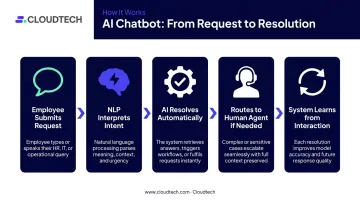
The process from employee question to resolution follows a consistent pattern:
- Employee submits a request via chat, Slack, Teams, or a service portal
- NLP interprets the intent and classifies the request type
- AI resolves it automatically using knowledge base data, or triggers a predefined workflow
- If needed, routes to a human agent with full conversation context — no re-explaining required
- System learns from the interaction to improve future response accuracy
The Integration Layer
A chatbot is only as useful as the systems it connects to. Without integrations, it can answer surface-level questions but can't take action. Effective employee service chatbots connect to:
- HRIS platforms — to pull employee data, role context, and submit requests
- ITSM ticketing systems — to create, update, and close tickets automatically
- Identity management tools (Active Directory, Okta) — to verify identity and execute credential changes
- Knowledge bases — to retrieve policy documents, FAQs, and troubleshooting guides
That connected data layer is what makes action possible — not just answers.
Self-Service Action Execution
Advanced conversational AI doesn't just retrieve information — it takes action. A well-architected bot can:
- Reset a password and send confirmation to the employee
- Provision software access after routing to the appropriate approver
- Update an employee record in the HRIS
- Submit a leave request and notify the manager
The entire request resolves without a human touching the ticket or a manager chasing an email thread.
AWS-Native Deployment for SMBs
These capabilities depend on the right infrastructure underneath them. For SMBs, that doesn't mean building from scratch — AWS provides enterprise-grade services at a scale and cost that works for smaller teams. Cloudtech, an AWS Advanced Tier Partner working exclusively with SMBs and mid-market companies, architects these solutions using:
- Amazon Bedrock — for generative AI model selection and RAG-based response generation, connecting LLMs to indexed enterprise content
- Amazon Q Business — enabling natural-language queries against internal data, with role-based access controls and source citations built in
- AWS Step Functions and Lambda — for serverless orchestration of multi-step workflows with low latency and secure data flow
- Amazon Bedrock Agents — for agentic, multi-step automation across systems
In one documented healthcare deployment, Cloudtech's Bedrock Agents implementation achieved a 45% reduction in support tickets within two months — a meaningful result for a team of any size.
Key Benefits of Conversational AI for Employee Service Automation
24/7 Availability and Instant Resolution
Human support teams work fixed hours. Employees don't limit their problems to that window — especially across distributed or remote teams spanning multiple time zones.
Ivanti's 2024 ITSM survey of more than 15,500 IT professionals found that 62% of employees who prefer self-service cited speed as the primary reason. They'd rather find the answer themselves than wait in a queue. Conversational AI matches that preference directly — resolving requests instantly, without making employees search or wait.
Significant Reduction in Support Costs
Password management alone illustrates the opportunity. A Microsoft-commissioned Forrester study found that each password-related ticket costs organizations $15–$25 in IT labor. For a 500-person company with routine reset volume, that adds up to tens of thousands of dollars annually — for one request type.
Two widely cited internal deployments show what's possible at scale:
- IBM AskHR: 94% containment of common employee questions, 75% fewer support tickets versus its 2016 baseline, and a 40% reduction in HR operating costs over four years
- ServiceNow Now Assist: 14% increase in employee self-service deflection and $10M in annualized benefit
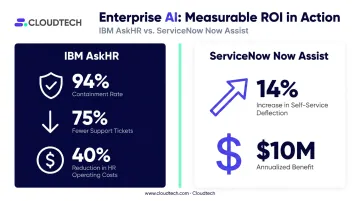
These are large-enterprise examples — but the cost drivers they address (repetitive tickets, manual resolution, agent hours on routine tasks) exist at every company size.
Improved Employee Productivity
McKinsey research found that employees spend nearly 20% of their work time searching for internal information or finding the right person to ask. That's one full day per week lost to knowledge friction. Conversational AI cuts that significantly — employees ask a question in plain language and get an accurate answer in seconds, without leaving their workflow.
Infinite Scalability Without Headcount Growth
Traditional support scales linearly. More employees mean more tickets mean more agents. Conversational AI handles any volume of simultaneous queries — which becomes especially valuable during predictable surge periods:
- Open enrollment floods HR channels with policy and benefits questions
- Tax season drives a surge in payroll and deductions inquiries
- Large onboarding cohorts multiply IT provisioning requests overnight
No overtime. No temporary staffing. No degraded service quality because the team is stretched.
Top Use Cases in IT and HR Support
Password Resets and Account Unlocks
This is the highest-ROI use case, and the math is straightforward. At $15–$25 per ticket, with password resets consistently ranking as one of the most common IT requests, automation pays for itself quickly. The bot verifies employee identity, executes the reset, and notifies the employee with no agent involvement and no ticket queue.
Software Access Provisioning
Access requests typically move through four manual steps: the employee submits a form, IT checks the HRIS for role eligibility, a manager approves, and someone provisions access by hand. A conversational AI bot handles this end-to-end: pulls role context from the HRIS, routes the approval request to the right person, and provisions access post-approval. What previously took 48 hours can happen in minutes.
VPN troubleshooting is another high-frequency IT use case where the bot walks employees through resolution steps from the knowledge base, resolving the majority of common issues without escalation.
HR Policy Lookups, Leave Requests, and Payroll Inquiries
HR teams spend significant time answering questions that are already documented. Conversational AI gives employees instant, accurate access to this information — no call to schedule, no email to wait on. For leave requests specifically, the bot can submit the request directly and notify the manager, so the employee never leaves the chat interface.
Common queries handled without agent involvement include:
- Leave balances and policy details
- Benefits enrollment windows and coverage questions
- Payroll schedules and pay stub access
- PTO request submission and manager notification
Employee Onboarding and Offboarding Automation
Onboarding involves dozens of repetitive tasks across IT and HR: account creation, software provisioning, email setup, document distribution, and policy acknowledgment. When triggered by an HRIS event (new hire record created), a conversational AI system can automate this entire sequence.
Offboarding follows the same logic in reverse — deprovisioning access, collecting equipment return instructions, triggering exit documentation — without manual coordination across departments.
SHRM notes that structured onboarding processes are associated with 50% greater new-hire productivity — and without automation, that structure breaks down as headcount grows.
Incident Detection and Pattern-Based Escalation
When multiple employees report the same issue — a shared drive is down, a SaaS tool is timing out — manual ticket review means each report gets handled separately before someone notices the pattern. Conversational AI can cluster incoming reports, identify systemic issues automatically, alert the relevant IT stakeholders, and create a single incident ticket. Detection time drops from hours to minutes.
What to Look For When Evaluating a Conversational AI Chatbot
Native Integrations With Your Existing Tech Stack
The chatbot must connect to the tools already in use — HRIS, ITSM platforms, identity management systems, and communication channels like Slack or Teams. Ask vendors specifically:
- Which integrations are pre-built versus requiring custom development?
- Can the bot take action across systems, or does it only read from them?
- How are permissions and data scoping handled across integrated systems?
A bot that requires heavy middleware to connect to your core systems is a warning sign. Once you've confirmed solid integration depth, the next question is whether the bot actually does anything with that access.
Action Execution vs. Answer Generation
This is the most important distinction when evaluating vendors. Some chatbots surface relevant knowledge base articles and stop there. Others actually complete the workflow — submitting the request, updating the system, and closing the ticket without human intervention.
Request a live demo of an end-to-end use case. A software access request processed entirely without human involvement is a useful test. If the vendor can't demo it live, the capability probably isn't production-ready.
Security, Compliance, and Enterprise-Grade Controls
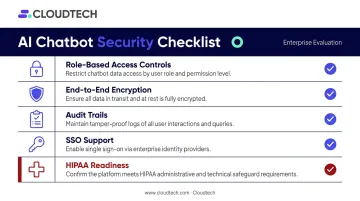
For healthcare and financial services organizations, compliance isn't optional. Evaluate:
- Role-based access controls — does the bot only surface data the employee is authorized to see?
- End-to-end encryption — are data in transit and at rest protected?
- Audit trails — are all interactions logged for compliance review?
- SSO support — can the bot authenticate through your existing identity provider?
- HIPAA readiness — for healthcare organizations, this requires specific administrative, physical, and technical safeguards; verify the platform's BAA process
Organizations deploying on AWS benefit from AWS's built-in security framework. Working with an AWS partner like Cloudtech gives SMBs access to HIPAA-aligned controls — IAM least-privilege roles, AWS KMS encryption, Amazon Macie for PHI detection, and GuardDuty for anomaly monitoring — without having to build those controls internally.
Conversational AI Trends Shaping Employee Service in 2026
From Chatbots to Agentic AI
The most significant shift underway isn't an improvement to chatbots — it's a replacement of the model. Reactive, single-turn bots are giving way to agentic AI: systems that autonomously plan and execute multi-step workflows across departments without human handoffs.
Gartner forecasts that task-specific AI agents will be integrated in 40% of enterprise applications by end-2026, up from less than 5% in 2025. However, Gartner also predicts that more than 40% of agentic AI projects will be canceled by end-2027 due to escalating costs, unclear business value, or inadequate risk controls. The technology is maturing fast — but execution quality matters enormously.
Generative AI and Contextual Personalization
Large language models are enabling a qualitative improvement in response quality. Rather than pulling from fixed scripts, LLM-powered bots generate tailored responses based on the employee's role, department, location, and support history. An employee in finance asking about expense policy gets a different, more relevant answer than a remote engineer asking the same question. ServiceNow's internal GenAI deployment achieved 80% less time writing resolution notes alongside its deflection improvements — an indication of how much manual effort contextual AI eliminates.
Proactive Service Delivery
By 2026, employee service is moving away from reactive support entirely. Rather than waiting for a ticket, AI systems detect patterns and act before problems escalate.
Real-world examples of this shift already include:
- A remote employee with recurring VPN failures receives a proactive diagnostic and fix before noticing the pattern
- Access credentials set to expire before a project deadline get flagged and renewed automatically
- Anomalous device behavior triggers remediation without an IT request ever being filed

This transition from support channel to operational intelligence is where the most significant productivity gains will materialize over the next two to three years.
Frequently Asked Questions
What are examples of conversational AI?
Consumer-facing examples include Siri, Alexa, and Google Assistant. In enterprise employee service, the same technology powers IT helpdesk bots in Slack or Teams, HR virtual assistants handling policy questions and leave requests, and AI service desks that resolve password resets without agent involvement.
What is a conversational AI chatbot for employee service?
It's an AI-powered virtual assistant that uses NLP and machine learning to handle employee IT and HR queries around the clock. Unlike a basic FAQ bot, it integrates with backend systems and executes actions — resetting passwords, provisioning access, submitting requests — rather than just providing information.
How does a conversational AI chatbot reduce IT and HR support costs?
The biggest driver is ticket deflection. Password resets alone cost $15–$25 each in IT labor, and automating them at scale adds up fast. Organizations can keep support teams lean as headcount grows, since the bot scales without proportional cost increases.
What is the difference between a conversational AI chatbot and a traditional chatbot?
Traditional rule-based chatbots follow scripted decision trees and fail when employees phrase requests differently than anticipated. Conversational AI uses NLP to interpret intent, understands context across a conversation, handles nuanced requests, and improves over time through machine learning.
How long does it take to implement a conversational AI chatbot for employee service?
It depends on complexity and integration depth. Cloud-native deployments built on platforms like AWS with pre-built connectors can be operational in weeks. Highly customized deployments with multiple system integrations and compliance requirements generally take two to four months.
Is a conversational AI chatbot secure enough for sensitive employee data?
Security depends on the platform's architecture. Look for role-based access controls, end-to-end encryption, audit trails, and SSO support. For healthcare organizations, verify the vendor's HIPAA safeguards, BAA process, and that data access is scoped strictly to each request being processed.